Shalom and greetings all my pals,
Is the following specification list good for MS2024, please?? Thank you for any comment any of you might provide. I am planning to buy powerful gaming laptop.
Tech Specs
Processor Intel® Core™ Ultra 9 185H (24 MB cache, 16 cores, 2.30 GHz to 5.10 GHz P-Core Turbo)
Operating System Windows 11 Home, English, French, Spanish
Graphics Card NVIDIA® GeForce RTX™ 4060, 8 GB GDDR6
Display 16", QHD+ 2560x1600, 240Hz, 100% sRGB, 3ms, Advanced Optimus, ComfortView Plus, NVIDIA G-SYNC
Memory 64GB, 2x32GB, DDR5, 5600 MT/s
Storage 4 TB, M.2, PCIe NVMe, SSD
Regards,
Aharon
Is This Good For MS2024??
12 posts
• Page 1 of 1
Is This Good For MS2024??
 by Aharon » Thu Feb 13, 2025 3:49 am
- Aharon
- NZFF Pro
- Topic author
- Joined: Sun Jul 23, 2017 11:39 am
- Posts: 2042
Re: Is This Good For MS2024??
by deeknow » Thu Feb 13, 2025 8:24 am
looks good .. my only suggestion as a future proofing thing seeing as your already buying a brand new rig is to look at a 4070 GPU instead, the 4060 is a bit "ordinary" these days
UPDATE: sorry just saw you looking at a laptop, 4070 most likely not an option
PS .. does this mean no more FSX screenies from you
UPDATE: sorry just saw you looking at a laptop, 4070 most likely not an option
PS .. does this mean no more FSX screenies from you
Deans repaints: http://www.deeknow.com/
X570 Mini-ITX m/b - Ryzen7 5700X3D (8c/16t) - RTX 2060-super - 32GB 3600MHz DDR4 - Win10 - P3Dv5.3
X570 Mini-ITX m/b - Ryzen7 5700X3D (8c/16t) - RTX 2060-super - 32GB 3600MHz DDR4 - Win10 - P3Dv5.3
-

deeknow - NZFF Pro
- Joined: Tue Sep 18, 2007 10:15 pm
- Posts: 4484
- Location: NZHN
Re: Is This Good For MS2024??
by Aharon » Fri Feb 14, 2025 3:14 am
deeknow wrote:PS .. does this mean no more FSX screenies from you
Deeknow,
Thanks for your input. I am not sure if 8GB video ram is ok for MS2024.
As for FSX screenies, I intend to keep using FSX for 2 more years but in event I decide to get MS2024 this year ( I say operative words "in event"), I plan to show both FSX and MS2024 scennies in same flight reports so that viewers can compare them to see which one is better. WARNING: nobody not even MS2024 can beat FSX version New Zealand ground textures of the city Christchurch by Toprob. Another good example is that MS2024 puts giant cross on the roof of stadium in Wellington which is wrong while Toprob's Wellington scenery has stadium showing correct roof. Also Toprob's FSX version Christchurch city show all SPECIFIC and CORRECT buildings while MS2024 does not.
Regards,
Aharon
- Aharon
- NZFF Pro
- Topic author
- Joined: Sun Jul 23, 2017 11:39 am
- Posts: 2042
Re: Is This Good For MS2024??
by toprob » Fri Feb 14, 2025 9:42 am
I've just looked at UserBenchmark to compare the 4060 with my own 2070S, which has just 8GB. It looks like the performance is just about the same. I can run MSFS2024 with the 2070S, but the GPU is definitely the bottleneck.
Here's the userbenchmark comparison. I had to smile at the conclusions, the 4060 just says 'this thing kinda sucks.'
MSFS2024 is still in the very early stages, and there are a lot of issues which will be dealt with this year. Yesterday I loaded up 2020 for the first time this year, just to compare a 'finished' sim with 2024, and it really makes a difference having a simulator which doesn't keep switching objects, moving them around and hanging planes in the air while they are parked. But I know that 2024 will be better in 6 months.
MSFS Christchurch uses photogrammetry, which is very different from FSX. Photogrammetry is kind of like one big 3D model of the actual city, but it does have a few limitations compared to autogen. From a few hundred metres up it looks ok, like flying over the real city, but once you get lower it all goes to mush. I don't know if that will improve much in the lifetime of 2024, but I tend to look ahead to when we have a proper scanned 3D city which works up close. I just have to live that long.
Here's the userbenchmark comparison. I had to smile at the conclusions, the 4060 just says 'this thing kinda sucks.'
MSFS2024 is still in the very early stages, and there are a lot of issues which will be dealt with this year. Yesterday I loaded up 2020 for the first time this year, just to compare a 'finished' sim with 2024, and it really makes a difference having a simulator which doesn't keep switching objects, moving them around and hanging planes in the air while they are parked. But I know that 2024 will be better in 6 months.
MSFS Christchurch uses photogrammetry, which is very different from FSX. Photogrammetry is kind of like one big 3D model of the actual city, but it does have a few limitations compared to autogen. From a few hundred metres up it looks ok, like flying over the real city, but once you get lower it all goes to mush. I don't know if that will improve much in the lifetime of 2024, but I tend to look ahead to when we have a proper scanned 3D city which works up close. I just have to live that long.
-

toprob - NZFF Pro
- Joined: Sat Apr 29, 2006 4:56 pm
- Posts: 6741
- Location: Upper Hutt
Re: Is This Good For MS2024??
by Aharon » Sat Feb 15, 2025 2:42 am
toprob wrote: From a few hundred metres up it looks ok, like flying over the real city, but once you get lower it all goes to mush. I don't know if that will improve much in the lifetime of 2024, but I tend to look ahead to when we have a proper scanned 3D city which works up close. I just have to live that long.
Toprob,
That does not sound good especially when I go for landings or take offs.
Thanks for important input.
Regards,
Aharon
- Aharon
- NZFF Pro
- Topic author
- Joined: Sun Jul 23, 2017 11:39 am
- Posts: 2042
Re: Is This Good For MS2024??
by toprob » Sat Feb 15, 2025 8:57 am
I will point out though that Splitpin's last couple of shots over Christchurch with photogrammetry just look perfect, at the ideal elevation. Airports tend to be actual models, so it's really just approaching the threshold where you need to keep your eyes on the runway so you don't see melted buildings.
-
toprob - NZFF Pro
- Joined: Sat Apr 29, 2006 4:56 pm
- Posts: 6741
- Location: Upper Hutt
Re: Is This Good For MS2024??
by Aharon » Sun Feb 16, 2025 2:57 am
toprob wrote:so it's really just approaching the threshold where you need to keep your eyes on the runway so you don't see melted buildings.
Yes but the screenshots of runway approach and landing will show what you call "melted buildings"

On the comparison, FSX version of your pure amazing NZCH scenery will show ACCURATE and REALISTIC buildings bearing real company names during a plane's runway approach and touchdown. I am so glad to get your NZCH scenery and I wish there is FSX version of NZAA scenery.
Regards,
Aharon
- Aharon
- NZFF Pro
- Topic author
- Joined: Sun Jul 23, 2017 11:39 am
- Posts: 2042
Re: Is This Good For MS2024??
by Naki » Mon Feb 17, 2025 2:04 pm
Aharon wrote:toprob wrote:so it's really just approaching the threshold where you need to keep your eyes on the runway so you don't see melted buildings.
Yes but the screenshots of runway approach and landing will show what you call "melted buildings"
On the comparison, FSX version of your pure amazing NZCH scenery will show ACCURATE and REALISTIC buildings bearing real company names during a plane's runway approach and touchdown. I am so glad to get your NZCH scenery and I wish there is FSX version of NZAA scenery.
Regards,
Aharon
This entirely depends on your internet connection speed ...I don't normally have melted photogremmetry buildings ...not in 2020 in any case. Default Towns/cities are waaaaayyy more realistic than FSX
-

Naki - NZFF Pro
- Joined: Sat Aug 05, 2006 10:03 pm
- Posts: 7175
- Location: Tauranga
Re: Is This Good For MS2024??
by Aharon » Tue Feb 18, 2025 2:16 am
Naki wrote: Default Towns/cities are waaaaayyy more realistic than FSX
Yes if you are talking about FSX default city of Christchurch BUT there is no no way MS2020/MS2024 default Christchurch is more realistic than ToProb's payware FSX version of city of Christchurch.
Here is example of ToProb Christchurch city's accuracy and realism
Passing Woolston suburb of Christchurch where you can see red building in front of right engine which is actually The Tannery Mall of shops and restaurants as well as Deluxe Cinema. Also the red building behind the right wing is National Storage which is self storage facility located at 89 Garland Road. You can see the river called Heathcote River

I never never dispute that MS2020 and MS2024 are far far far better and more superior than FSX but nobody can beat ToProb in ANYTHING especially FSX version of city of Christchurch. Smiling
Regards,
Aharon
- Aharon
- NZFF Pro
- Topic author
- Joined: Sun Jul 23, 2017 11:39 am
- Posts: 2042
Re: Is This Good For MS2024??
by toprob » Tue Feb 18, 2025 9:17 am
Ok, Aharon, I didn't want to hijack this thread but I think I need to point out some things:) Your screenshot is very interesting to me, as it shows the area where I raised my kids -- at the top of your screenshot, just forward of the stabilizer, is the house my wife and I bought in 1988. In the centre of the shot, just under the fuselage, is the house I moved to when the marriage ended, so I could be close to the kids. I know the area well:)
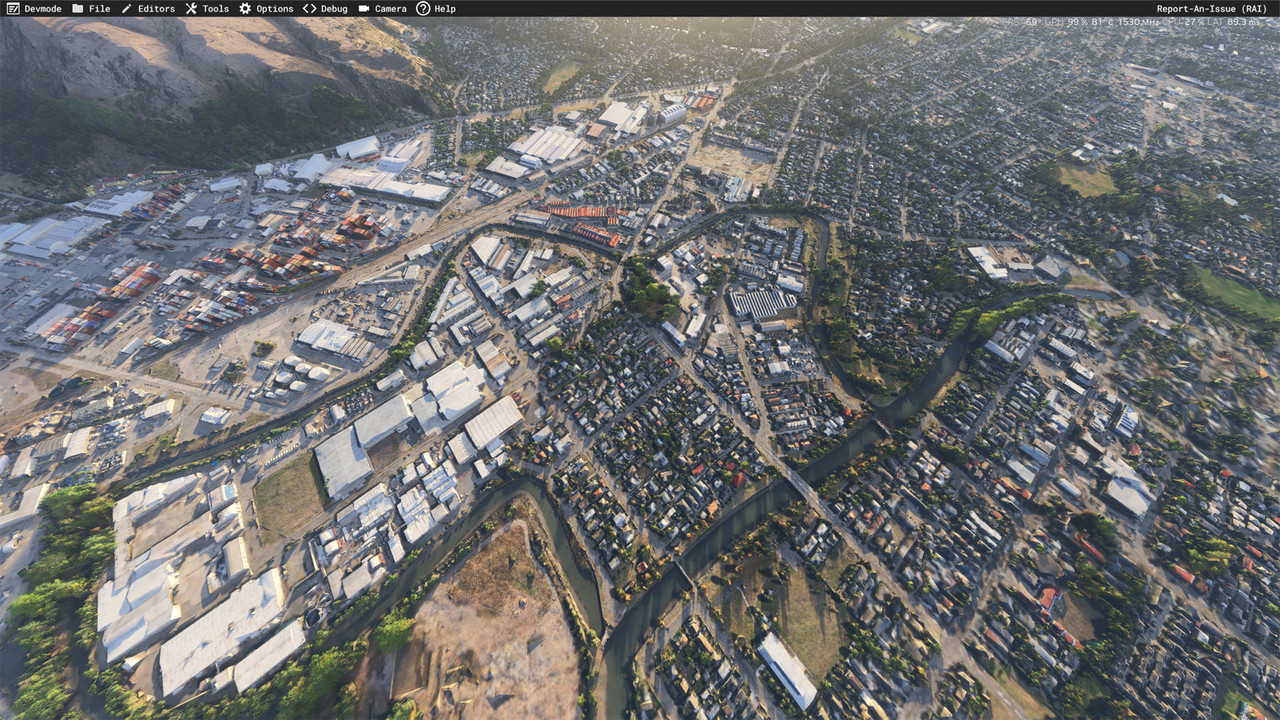
But I do think that you'll be really impressed with MSFS, so I've done some screenshots of the area to show you the difference. These are unedited, except for reducing in size from 4K.
Here's an overview of the area:
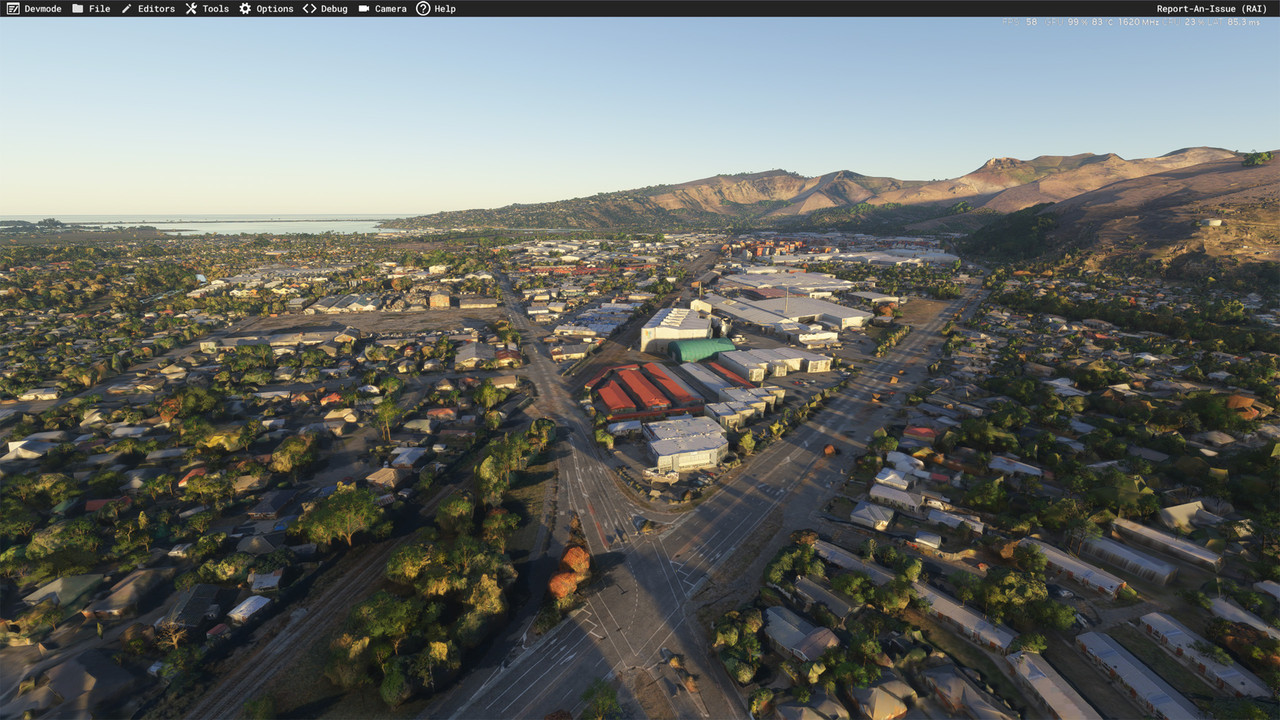
Dropping down to the intersection of Brougham St and Ferry Road, you can see all the road markings, and even the 'GIB' logo on the side of the factory.
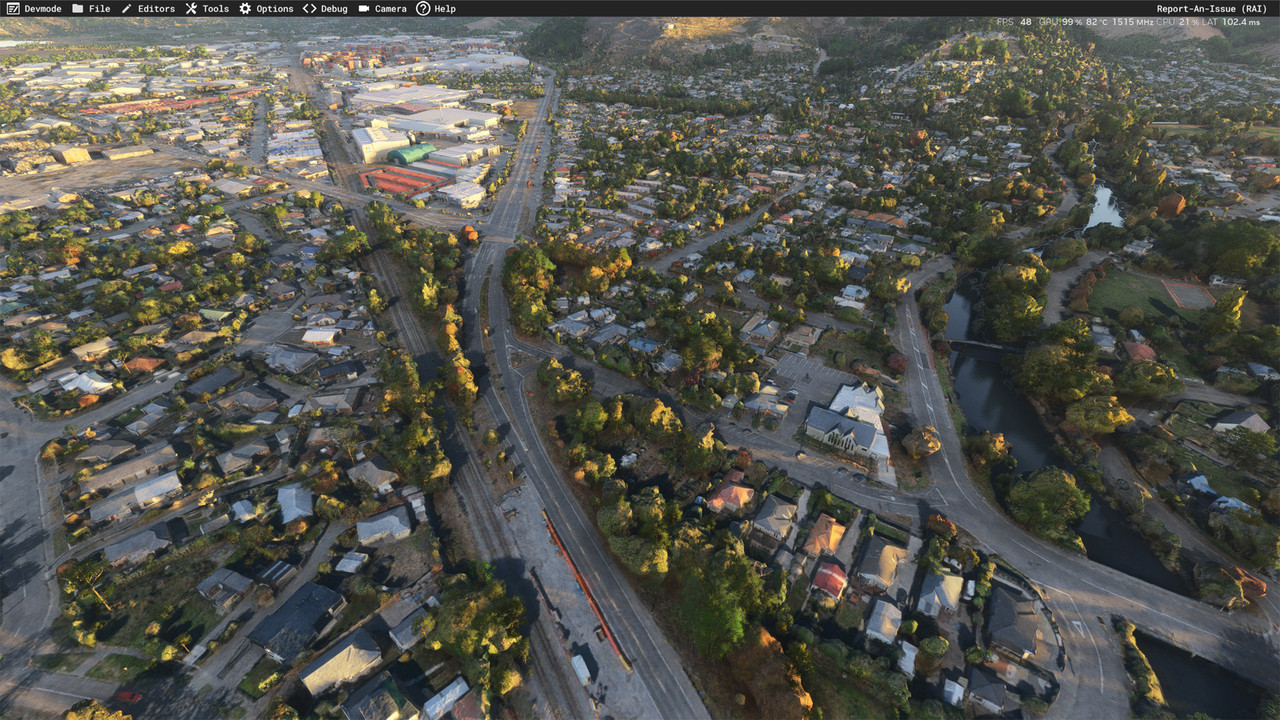
This shows the street we lived on just about in the centre, although the house was later destroyed by the earthquake and rebuilt. The local church is just along the road, it was damaged by the earthquake but repaired.
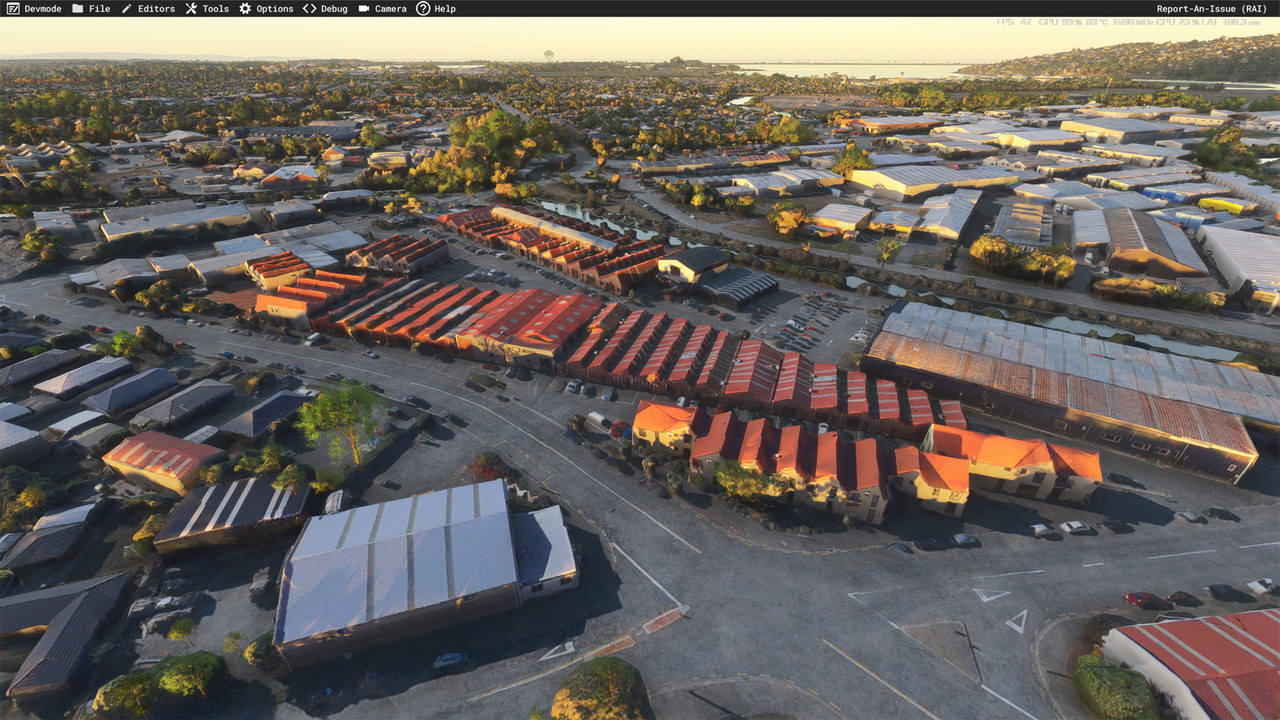
The Tannery complex.
Here's a pile of rubble, quite a common sight in Christchurch after the earthquakes.
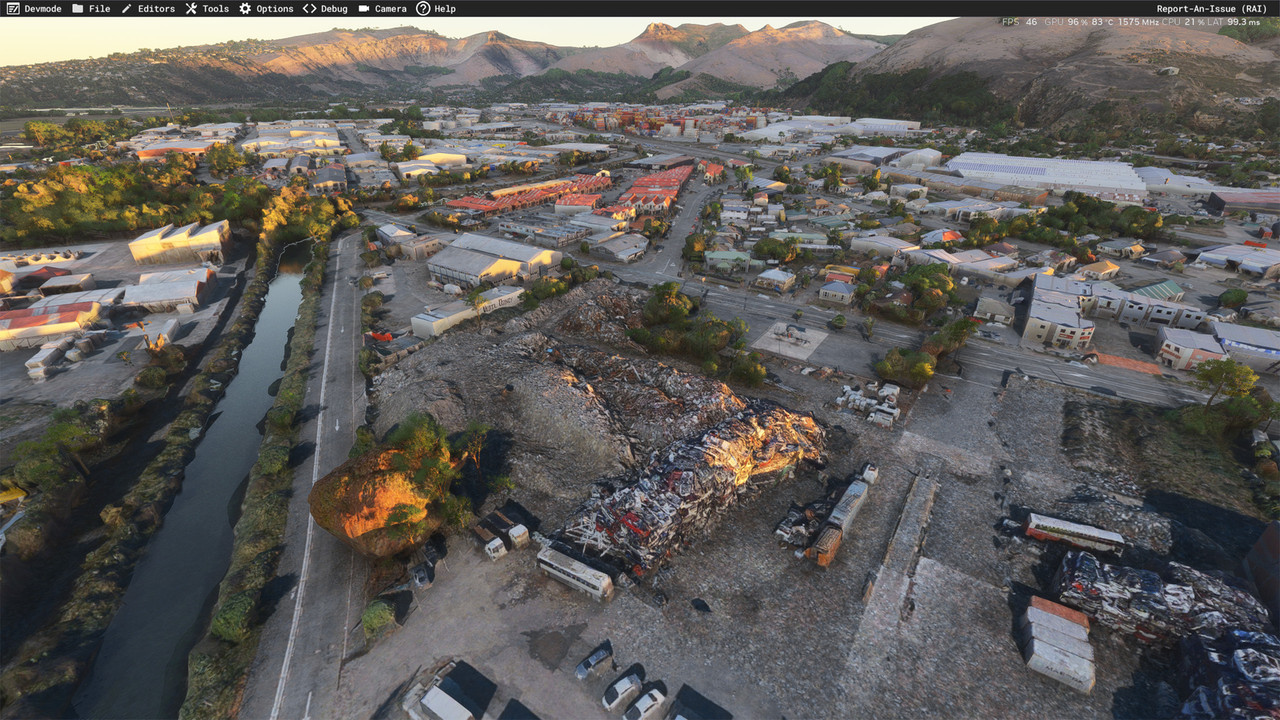
As I've said before, I am not a big fan of photogrammetry, but it is the only way to see what is really there in the simulator. In the old days, we just had aerial images to stick on the ground, and we could use the Annotator to draw a building footprint over every building on the photo, which became autogen, or later we could download a footprint data file and use one of the amazing tools from Arno at FSDeveloper.com to convert them to autogen footprints.
Now, we see an actual 3d model of every building etc, although the realism does reduce when you get close to them. But flying over at a 'normal' elevation it looks amazing.
But I do think that you'll be really impressed with MSFS, so I've done some screenshots of the area to show you the difference. These are unedited, except for reducing in size from 4K.
Here's an overview of the area:
Dropping down to the intersection of Brougham St and Ferry Road, you can see all the road markings, and even the 'GIB' logo on the side of the factory.
This shows the street we lived on just about in the centre, although the house was later destroyed by the earthquake and rebuilt. The local church is just along the road, it was damaged by the earthquake but repaired.
The Tannery complex.
Here's a pile of rubble, quite a common sight in Christchurch after the earthquakes.
As I've said before, I am not a big fan of photogrammetry, but it is the only way to see what is really there in the simulator. In the old days, we just had aerial images to stick on the ground, and we could use the Annotator to draw a building footprint over every building on the photo, which became autogen, or later we could download a footprint data file and use one of the amazing tools from Arno at FSDeveloper.com to convert them to autogen footprints.
Now, we see an actual 3d model of every building etc, although the realism does reduce when you get close to them. But flying over at a 'normal' elevation it looks amazing.
-
toprob - NZFF Pro
- Joined: Sat Apr 29, 2006 4:56 pm
- Posts: 6741
- Location: Upper Hutt
Re: Is This Good For MS2024??
by Aharon » Wed Feb 19, 2025 2:55 am
ToProb,
Thanks for AMAZING comparisons!!!!! Very impressive. Are the screenshots showing MS2020or MS2024 default ground textures of city of Christchurch or payware ground textures??
it is PURE AMAZING COINCIDENCE that I accidentally showed my screenshot of the city scene NOT knowing that my screenshot showed your two different houses!!!! Pure amazing coincidence
And that is testimony that your city ground textures for FSX are AMAZING
Regards,
Aharon
Thanks for AMAZING comparisons!!!!! Very impressive. Are the screenshots showing MS2020or MS2024 default ground textures of city of Christchurch or payware ground textures??
it is PURE AMAZING COINCIDENCE that I accidentally showed my screenshot of the city scene NOT knowing that my screenshot showed your two different houses!!!! Pure amazing coincidence
And that is testimony that your city ground textures for FSX are AMAZING
Regards,
Aharon
- Aharon
- NZFF Pro
- Topic author
- Joined: Sun Jul 23, 2017 11:39 am
- Posts: 2042
Re: Is This Good For MS2024??
by toprob » Wed Feb 19, 2025 4:40 pm
Yes, I was amazed that someone over the other side of the world can screenshot my old house:)
These are default MSFS2024, but photogrammetry works in 2020 by default as well.
These are default MSFS2024, but photogrammetry works in 2020 by default as well.
-
toprob - NZFF Pro
- Joined: Sat Apr 29, 2006 4:56 pm
- Posts: 6741
- Location: Upper Hutt
12 posts
• Page 1 of 1
Who is online
Users browsing this forum: No registered users and 59 guests