Some thoughts on NZ in Microsoft Flight Simulator

A place to converse about the general aspects of flight simulation in New Zealand

Some thoughts on NZ in Microsoft Flight Simulator

Postby toprob » Sun Feb 23, 2020 5:16 pm

The most recent Discovery Series video -- Airports -- fills in a lot of the gaps in what we knew about how airports will look in the new sim, so although this is mainly speculation, it does seem like a good time to imagine what New Zealand might look like. Normally when I get a new sim, I have a set list of flights to try -- including Christchurch, which is my where I grew up, the Central Plateau, and the Alps, mainly around Mount Cook. However with the new sim, whether I get to use the alpha, beta or have to wait for the release(!), I plan to start at one end of the country and visit each airport until I get to the other end. I suspect that this will make a lot more sense than any other sim out of the box.
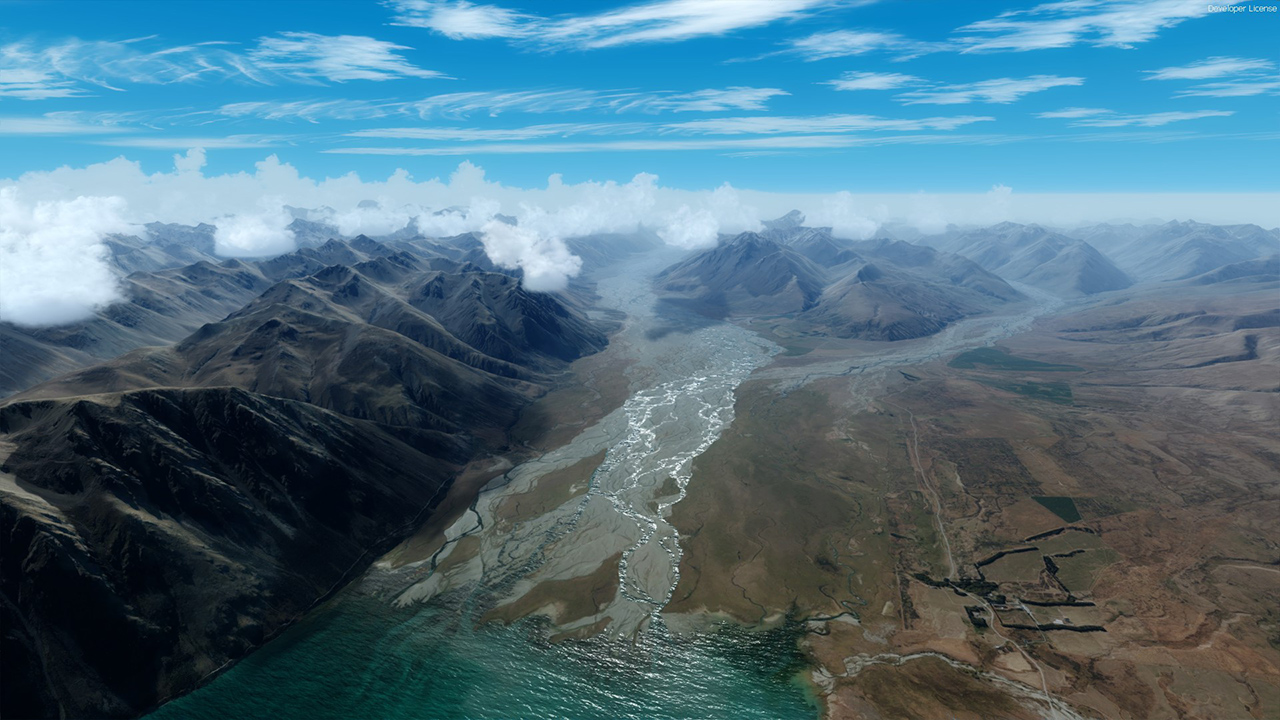
There have been three New Zealand areas showcased in Microsoft's videos -- Lake Tekapo, the Central Plateau, and now Queenstown Airport. Most of this post will centre around these, to keep things grounded, so to speak.
Image
Tekapo was the first look we had, which was very useful, as I'd previously done Tekapo scenery for all MS sims plus Prepar3d, going back to FS2002. First I have to mention the sky/atmosphere/lighting etc. For me, this is the true great leap forward. Lighting in all other sims -- including X-plane -- has always been rough, at best. Lighting always seemed to be based on a simple set of rules, whereas now we appear to be getting a lot more rules. This is tricky to explain, but I'll try. First, imagine an aircraft parked at your favourite airport, as it would appear in your sim of choice. Now if you zoomed in on the fuselage, could get describe the lighting confidently? Is it in full sunlight, or the shady side of a sunlit aircraft, or is it cloudy? How much cloud? What time of day? In my experience it has been impossible to tell, until now. The Airports video shows some remarkable lighting, the shadow side of the sunlit aircraft isn't just a darkened texture, it has a touch of blue where it is being lit by the sky only. There are a couple of poor weather shots in the video where you won't wonder what the hell you are looking at, lighting-wise, which is normally the case in Prepar3d and X-plane.

The sky in the new sim becomes a new landscape, one with as much character, detail and variation as the ground underneath. This makes so much sense when you think about it, as that's where you'll spend most of your time. The secret is 'integration', or something, where the lighting more accurately reflects the conditions/time of day, but it also lights things realistically. I compare this with some beautiful airports in Prepar3d and X-plane, where there are always a number of features, such as vegetation, which just never look like they blend in, simply because the sim is struggling to light them properly.

The first thing I noticed in the Tekapo video was the sky. A bit of mist down low, some clouds which are both ordinary, in that they are commonly seen like this, and mind-blowing, because we've never come close to clouds which are properly lit, and don't rotate/disappear at the slightest provocation. Today I was looking at NZQN in Prepar3d (Orbx's, plus my photoscenery), at a similar height to the MFS video, and I thought it looked great -- until I rose up a bit, and the mist suddenly and completely disappeared. I suspect that we won't see anything like that in the new sim. Which might help explain my ramblings a bit -- I want a sim which looks great all the time, not just when the conditions/elevation/lighting are spot-on.

The ground, however, is nothing mind-blowing. I'll state here up front that although some of what I say might appear negative, this is still better than anything else, and I just want to point out what we can expect to see, and what could be improved upon, either by Asobo down the track or by a clever developer with experience with Tekapo scenery... Yeah, funny, Rob.

Now the ground is the ground, and it relies heavily on aerial imagery, so there are always going to be limitations, many of which have been 'discussed' in depth elsewhere. A specific question regarding Tekapo might be 'what about seasons?', as this is one area which sees significant snow in the winter. I had two specific questions when I first saw this video -- what about the lake colour?, and what about the runoff? Anyone who had bought a Tekapo scenery from me would know that I make a big thing of the lake colour, which is pronounced, eye-catching, and year-round. Nobody fails to notice the colour when they first visit Tekapo. Then there's the runoff into the lake from the river, it discolours it quite a lot, and you'll almost always see this to some extent. So this is one area where I can't wait to have a crack at improving the look of the lake.
Image
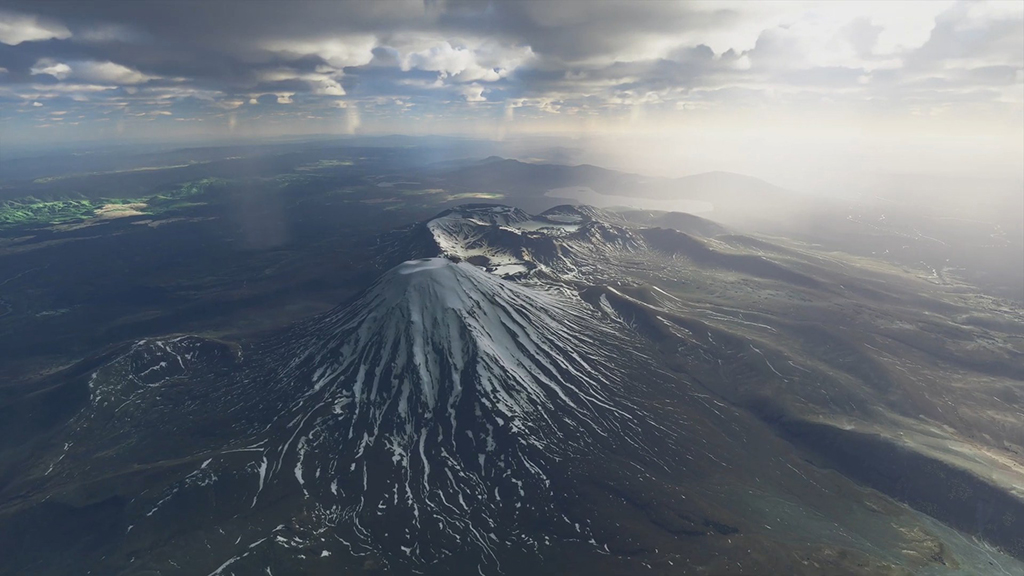
The volcanoes is another area I'm worked on in the sim, going way back. My first reaction here was Good Grief! I never suspected that we'd see a sky that good in this decade. Yes, there's one impressive landscape under there, which was always a great place to fly in previous sims, but I really, really want to fly in that sky -- even if there aren't any volcanoes to gawk at. Once again, like the Tekapo shot, we don't get to see enough detail to know how vegetation will look, for instance, but then along came....
Image
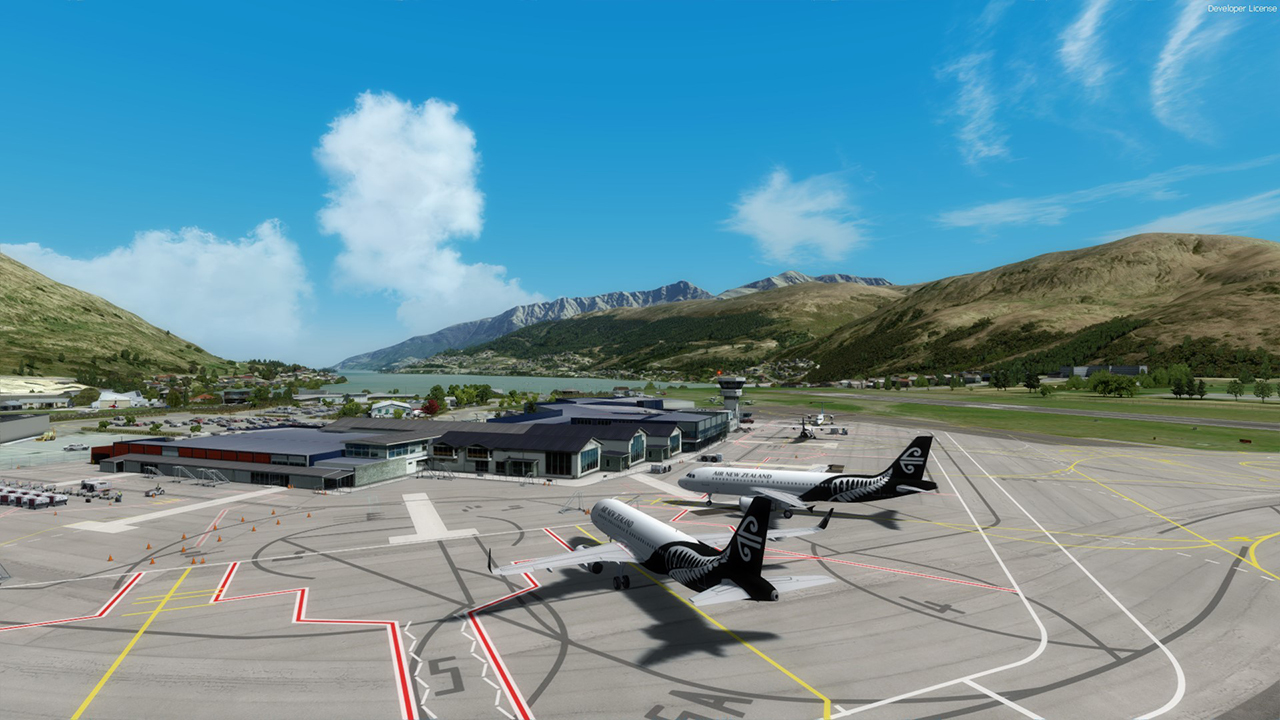
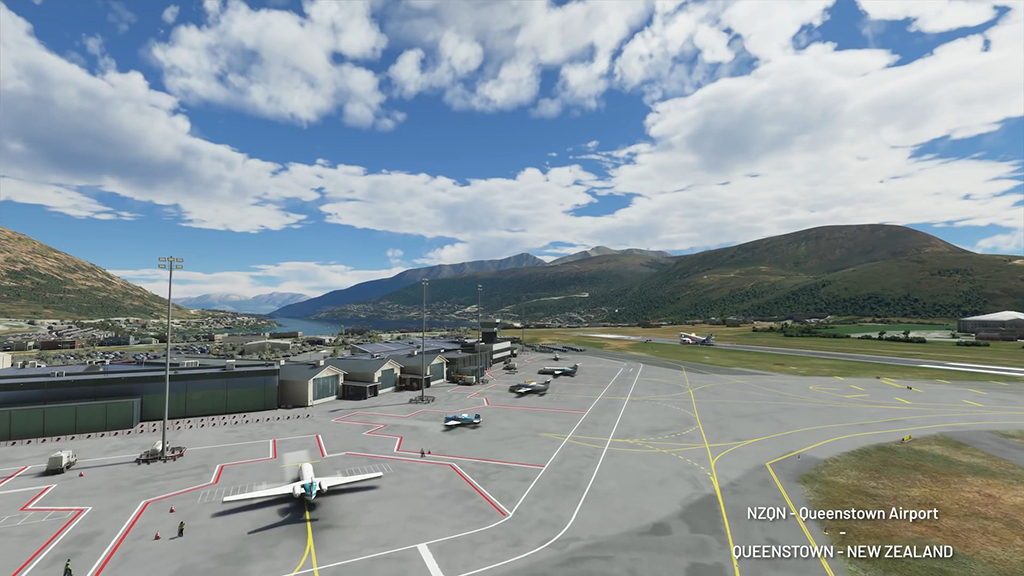
Queenstown is a popular location in the sim, rightly so. Orbx did a great version, and I've worked on the surrounding landscape of mountains and lakes more than once. Yes, this new sim is stunning, once again we get a sky which we've only ever dreamt of before, and the water colour/shade/reflection is a great contrast to what we've had before, where it can look good if you squint just right.... Now I suspect it'll look great most of the time, and certainly realistic all the time.

I suspect that this is one of the 80 special airports, which had some extra attention, but I'm not sure. Whether or not it is, this is still going to be a popular location for simmers as it is. Sure, it isn't a custom model like Orbx's, although it is a bit more up to date, but I'd probably buy a new Orbx version if it was offered, and I had some money. Here we get a vague idea of what some ground detail will look like -- there's a row of bushes in the middle ground, for instance, which look to be about halfway between Orbx quality and real life. Which are both a huge improvement over any default sim, which have tended to be close to 'noddy land' trees, so named by Ian Warren, a long time ago. He'd love the new trees.

The foreground tarmac gives a big clue to how the ground will work -- I mentioned the base aerial image forming the airport surfaces, just tidied up a lot and with a surface detail added to deal with the close-up look, plus handle the dirt/specular/wet properties. The funny looking light patch to the immediate left of the 'Queenstown' label is I think the result of the process explained in the video -- in the Bing image of Queenstown, there's an aircraft in that location, and I think that the process of manually defining areas like this for an automatic clean-up would give the result we see here -- something not quite right about it, but does the job.

Which brings me to the imagery used. I'm not sure that Bing has any New Zealand photogrammetry, so it may be a while before we see the type of scenery shown in Europe and the US. And Bing's NZ is variable at best -- for example, Lyttelton has about 40% cloud cover. All the photo scenery I produce uses LINZ imagery, which is all cleaned up and mostly cloud-free, although not colour-matched, but I'm not sure if there would be a market for custom photo scenery here. We can only hope that it is 'mostly' acceptable, and great in parts.

It will be interesting to see some big cities, but in the meantime I'm thrilled by the possibilities. At the moment, like most developers, I'm struggling to sell anything for the existing sims, but I can a lot of potential here, maybe even moving to just one sim, with some changes to the 'Real NZ' product -- a lot less photo scenery, and a lot more airports. This is where we should have been all along, and being able to have the 'base' NZ we always wanted is a gift beyond what I would have expected.

OnlineUser avatar
toprob
NZFF Pro
 
Topic author
Joined: Sat Apr 29, 2006 4:56 pm
Posts: 6711
Location: Upper Hutt

Re: Some thoughts on NZ in Microsoft Flight Simulator

Postby Charl » Sun Feb 23, 2020 7:47 pm

:hesaid: Absolutely.
Go sharpen your easel, or whatever it is...
User avatar
Charl
NZFF Pro
 
Joined: Mon May 01, 2006 8:28 am
Posts: 9691
Location: Auckland

Re: Some thoughts on NZ in Microsoft Flight Simulator

Postby Aviator 1 » Sun Feb 23, 2020 8:48 pm

It looks fantastic and finally suited for VFR flying, I guess its too early to call but flight sim addons like PMDG and Carnando and so fourth will they all work with the new Flight sim anyone know ?
Aviator 1
Sim-holic
 
Joined: Tue Mar 24, 2015 5:14 pm
Posts: 528

Re: Some thoughts on NZ in Microsoft Flight Simulator

Postby MichaelBasler » Mon Feb 24, 2020 3:37 am

While I do not belong to those seeing P3D and XP disappearing soon, I am convinced MSFS will be the goto simulator within a couple of years, if not earlier, for most of us and for sure for me. The advantages are so numerous that competitors will not be up to the standard, even more, if they continue development with the present pace; and I doubt they could stack up resources to the tenfold within a couple of years. Plus, the clever marketing (in a positive sense) done by MS will do its work as well. Compare this to the non-marketing LM does with P3D.

On one question: No, NZ indeed doesn't have any photogrammetry regions so far (while Australia got several ones :angry:). You can actually see all photogrammetry regions included using the Earth View 3D App. This can be downloaded (for free) from the MS Win10 store. It has a button (right to the plus in the menu, not obvious it's the proper one) where you can search for all Bing photogrammetry regions worldwide and display them in the App.

I wouldn't judge MSFS too closely based on those regions alone, though, as they are limited and much, much less numerous than in Google Earth. However, based on the published material, MSFS comes with a pretty good base scenery based on Azure AI for most of the world as well, even more, if you compare it to the LC-based P3D or XP bare bones scenery.

Kind regards, Michael
User avatar
MichaelBasler
Forum Addict
 
Joined: Sat Feb 20, 2010 9:52 pm
Posts: 192
Location: Jena, Germany

Re: Some thoughts on NZ in Microsoft Flight Simulator

Postby Radar88 » Mon Feb 24, 2020 2:47 pm

toprob wrote:There have been three New Zealand areas showcased in Microsoft's videos -- Lake Tekapo, the Central Plateau, and now Queenstown Airport. Most of this post will centre around these, to keep things grounded, so to speak.

Which brings me to the imagery used. I'm not sure that Bing has any New Zealand photogrammetry, so it may be a while before we see the type of scenery shown in Europe and the US. And Bing's NZ is variable at best -- for example, Lyttelton has about 40% cloud cover. All the photo scenery I produce uses LINZ imagery, which is all cleaned up and mostly cloud-free, although not colour-matched, but I'm not sure if there would be a market for custom photo scenery here. We can only hope that it is 'mostly' acceptable, and great in parts.

It will be interesting to see some big cities, but in the meantime I'm thrilled by the possibilities. At the moment, like most developers, I'm struggling to sell anything for the existing sims, but I can a lot of potential here, maybe even moving to just one sim, with some changes to the 'Real NZ' product -- a lot less photo scenery, and a lot more airports. This is where we should have been all along, and being able to have the 'base' NZ we always wanted is a gift beyond what I would have expected.


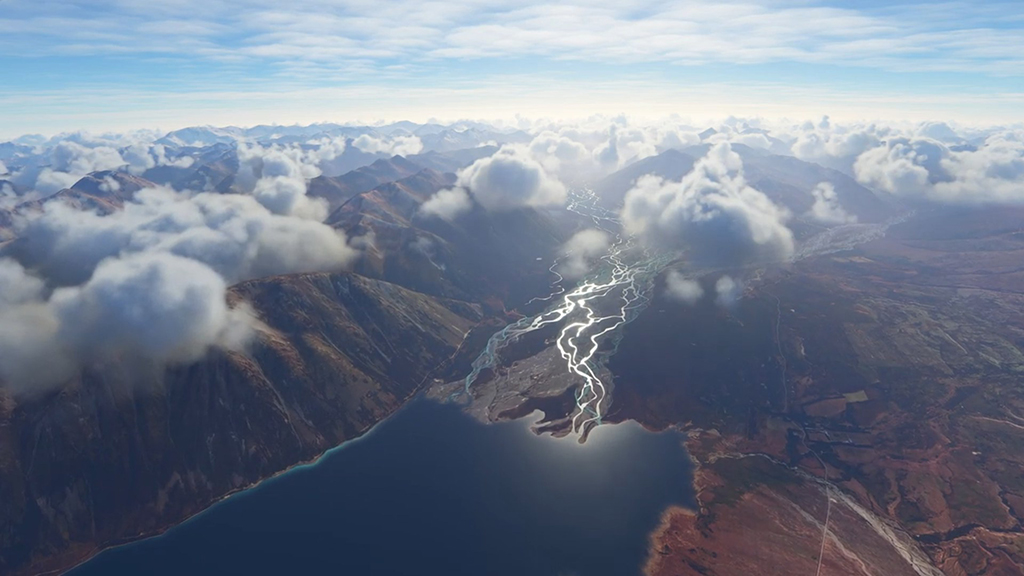
Just a different representation view point form of the above Flight Simulator images using the Bing Maps satellite imagery for comparison, using the mention Earth View 3D App.

Lake Tekapo

Image

Tongariro National Park Central Plateau

Image

Queenstown Airport

Image

Lyttelton with about 40% cloud cover.

Image

Microsoft Flight Simulator Bing Maps Hands On Demo

"Asobo Studio are tapping directly into Microsoft’s Bing Maps dataset. Flight Simulator will draw from two of the service’s three available petabytes of geographical information. That includes satellite imagery and 3D photogrammetry data, with some resolutions down to just three centimeters."

Flight Simulator Data Logarithms masking features will likely remove all the unwanted text pin points, street names etc and cloud coverage as seen in the satellite imagery over Lyttelton.

Remember that Asobo Studios have been developing Flight Simulator for the past 4 years and have only just recently entered the Alpha phase of Development through seeking input from the Flight Sim Community. It's still a working in progress, with a watch this space for what develops further during the course of the rest of the year.
Radar88
Forum Addict
 
Joined: Sun Feb 15, 2015 2:32 pm
Posts: 308

Re: Some thoughts on NZ in Microsoft Flight Simulator

Postby toprob » Mon Feb 24, 2020 3:20 pm

Nice work, Radar. It is good to point out that if anyone wants to know what sort of detail there is for their home town, you can just look at the Earth View app. Though from what I've seen, the simulator will render it a lot better:)

Here's a Tekapo comparison I posted a while ago on AVSIM:

Image
This is the Godzone subscription scenery, in Prepar3d v4.

And here's a quick compare for NZQN, using Orbx NZQN in Prepar3d v4:

Image
(The mountains beyond the lake are Godzone Sub scenery.)
OnlineUser avatar
toprob
NZFF Pro
 
Topic author
Joined: Sat Apr 29, 2006 4:56 pm
Posts: 6711
Location: Upper Hutt

Re: Some thoughts on NZ in Microsoft Flight Simulator

Postby FlyingKiwi » Mon Feb 24, 2020 7:34 pm

Funny you mention starting by doing a trip down the length of the country, I had similar thoughts for when I get my hands on this. One of my favourite things to do in FS years ago was to load up a random part of the world (preferably with improved addon terrain mesh etc.) and just go exploring. I haven't done that for years in FS but I can fully imagine doing that again a lot more in the new sim.
User avatar
FlyingKiwi
Senior Member
 
Joined: Mon May 29, 2006 4:17 pm
Posts: 1688
Location: Auckland

Re: Some thoughts on NZ in Microsoft Flight Simulator

Postby Radar88 » Sat Feb 29, 2020 4:10 pm

February 27th, 2020 – Development Update features a Screenshot from Alpha Tester User ID: Parorng

It appears to be taken at, Queenstown Airport Runway plateau near the threshold end for Runway 23. It features a ground view point of the short blades of grass at the end of the Taxiway Alpha Holding point for Runway 23, with a Cessna Skyhawk waiting for departure off Runway 23. This screenshot depicts the Queenstown Hill area hidden behind the tail and fuselage and out from the Airport plateau land overlooking the unseen Lower Shotover River beneath and towards one of the Lake Hayes Hills off on the right in the background and just further beyond to the right is the unseen Lake Hayes area and the other prominent Lake Hayes Hill towards Arrow Junction.

Image

Comparison Bing Maps over view of the same area, using the Earth View Map 3D App.

Image
Last edited by Radar88 on Sat Feb 29, 2020 11:10 pm, edited 1 time in total.
Radar88
Forum Addict
 
Joined: Sun Feb 15, 2015 2:32 pm
Posts: 308

Re: Some thoughts on NZ in Microsoft Flight Simulator

Postby toprob » Sat Feb 29, 2020 5:48 pm

Ah, brilliant find, I did think that this particular shot was the closest thing to what NZ would look like, and now I know why.
The angle puts the aircraft at A5. The vegetation is marvellous in the background, and of course there's that grass... This shot is a perfect depiction of summer down there, however I won't relax until I see winter snow on Coronet Peak:)
OnlineUser avatar
toprob
NZFF Pro
 
Topic author
Joined: Sat Apr 29, 2006 4:56 pm
Posts: 6711
Location: Upper Hutt

Re: Some thoughts on NZ in Microsoft Flight Simulator

Postby Radar88 » Fri Mar 06, 2020 10:26 am

Hot off the latest 5th March development update here's a tempting food for thought, although this is highly unlikely taken in New Zealand.

Just imagine flying a white-knuckle ride challenge in a Sounds Air Cessna 208 Caravan, while low level during a strong southerly with some white capped heavy swells, crossing the Cook Strait between the North and South Islands. In the new Microsoft Flight Simulator once it's released to market.

Such as it could potentially be depicted from, as seen in this impressive (non New Zealand) Screenshot from Alpha tester MoMedia1

Image
Radar88
Forum Addict
 
Joined: Sun Feb 15, 2015 2:32 pm
Posts: 308

Re: Some thoughts on NZ in Microsoft Flight Simulator

Postby jpreou » Mon Mar 09, 2020 9:34 am

That's pretty cool.
--
Jeff, ChCh, NZ
jpreou
Sim-holic
 
Joined: Sun Dec 09, 2012 1:21 pm
Posts: 734
Location: Redwood, Christchurch, NZ

Re: Some thoughts on NZ in Microsoft Flight Simulator

Postby Radar88 » Fri Mar 13, 2020 1:06 pm

Some good news for you Rob as a developer from the March 12th 2020 Development Update

SDK UPDATE

The SDK is now being used by over 50 companies and hundreds of programmers and artists. We have spent time listening, discussing and learning from our 3rd party developers, and we are working closely with them to keep improving the tools. The new aircraft editor is close to being finished with several improvements to the workflow. We also made lots of progress on WebAssembly support, which is the technology that will allow the porting of native code to our platform. We are excited to share what we developed with our partners within the next few weeks.

Several 3rd parties have started to share the roadmaps with us and we happy to report that dozens of planes and airports are in development and we are hopeful that quite a few of them will be ready by the time our new simulator is released.
Radar88
Forum Addict
 
Joined: Sun Feb 15, 2015 2:32 pm
Posts: 308

Re: Some thoughts on NZ in Microsoft Flight Simulator

Postby toprob » Sat Mar 14, 2020 12:53 pm

Yes, this is all coming together by the looks of it, it certainly seems that they are keen to have plenty of third party stuff available at launch. This is very encouraging for developers who are stuck in limbo at the moment. I am currently working on my own roadmap, which relies on a lot of finger-crossing and star alignment:)
OnlineUser avatar
toprob
NZFF Pro
 
Topic author
Joined: Sat Apr 29, 2006 4:56 pm
Posts: 6711
Location: Upper Hutt

Re: Some thoughts on NZ in Microsoft Flight Simulator

Postby Splitpin » Sat Mar 14, 2020 6:49 pm

Oh my goodness , I will need a bigger house to hold the computer able to run this :ph43r:
User avatar
Splitpin
NZFF Pro
 
Joined: Mon Aug 03, 2009 12:15 pm
Posts: 21332
Location: Christchurch NZ

Re: Some thoughts on NZ in Microsoft Flight Simulator

Postby toprob » Sat Apr 18, 2020 12:20 pm

The latest update includes another glimpse of NZ:

Image
Apparently Nelson Lakes area.
OnlineUser avatar
toprob
NZFF Pro
 
Topic author
Joined: Sat Apr 29, 2006 4:56 pm
Posts: 6711
Location: Upper Hutt

Re: Some thoughts on NZ in Microsoft Flight Simulator

Postby Radar88 » Fri May 15, 2020 1:03 pm

Another glimpse of NZ from the latest MSFS May 14 update in the form of a distinctive top down aerial view of Mt Taranaki

Image
Radar88
Forum Addict
 
Joined: Sun Feb 15, 2015 2:32 pm
Posts: 308

Re: Some thoughts on NZ in Microsoft Flight Simulator

Postby Adamski » Fri May 15, 2020 1:46 pm

Wow - thanks, gents, for taking the time to post such detailed information. It certainly looks like NZ may get some special treatment (and so it should!!).

This big question, of course, from us cash-strapped consumers - is whether we'll need to take out a 2nd mortgage for the hardware required to run it all. For a long time now, persuading every sim to perform as it should takes longer than actually flying/enjoying it. I can't see that changing, but we live in hope!

P3D and XP each have their good and bad points - but both are ham-strung by the quality of everything depicted *outside* the aircraft. MSFS 2020 (finally) seems to be addressing that. I'd love to be able to dump both my current (imperfect) sims and experience a more realistic environment. My main flying in RL was in gliders - where you spend 99.99% of your time studying what's outside you in great detail - either because you need to know what you're flying *through* or what you may need to land *on*. I've never looked at the world the same way since my gliding days - and those were decades ago :-(.

Adam.
Image
User avatar
Adamski
NZFF Pro
 
Joined: Thu Nov 01, 2007 2:22 am
Posts: 5029
Location: Birkenhead, Auckland

Re: Some thoughts on NZ in Microsoft Flight Simulator

Postby NZ255 » Fri May 15, 2020 3:26 pm

On a totally unrelated note, I got an email in my junk folder today :D
Very happy.
Nick
User avatar
NZ255
NZFF Pro
 
Joined: Wed Jun 20, 2007 12:57 pm
Posts: 2475

Re: Some thoughts on NZ in Microsoft Flight Simulator

Postby toprob » Fri May 15, 2020 3:43 pm

Saw your post on Avsim, Nick, good onya.
OnlineUser avatar
toprob
NZFF Pro
 
Topic author
Joined: Sat Apr 29, 2006 4:56 pm
Posts: 6711
Location: Upper Hutt

Re: Some thoughts on NZ in Microsoft Flight Simulator

Postby towerguy » Wed May 20, 2020 8:46 am

does anyone know if this still supports Opencockpits and the FSUIPC coding to run it. i.e. for physical coding of instruments etc?
cheers
CPU- i7 4790K @4.0Gb Cooler- Noctua NH-D15 M/B- Z97 ProGamer P/S- 750W RAM- 16Gb
Graphics- Nvidia GTX970 16Gb Drives- 2x 120Gb SSD Samsung 850EVO, 1x 2Tb HD, 1x DVD-RW
Sound- on M/B Logitec 5.1 surround sound system OS- Win 10 pro , all wrapped in a black Corsair case Display - Panasonic UHD 4k 50" Flatscreen TV.( 3840x2160 Res)
User avatar
towerguy
Sim-holic
 
Joined: Mon Aug 07, 2006 4:27 pm
Posts: 886

Next

Return to General

Who is online

Users browsing this forum: No registered users and 12 guests