Today I’ve been playing around with ActiveSky’s Thermal creating tool today, but don’t really have any idea what I’m really doing.
For those who don’t know, you place your aircraft in whatever position you want to see a thermal, switch to the Active Sky window and hit the create a thermal button… so I’ve set up one at the mouth of the Grey River at Greymouth with my sailplane in slew at 900ft.
It automatically updates, so I unpaused and was able to circle up to 2500 feet before I started wondering what the ceiling was, and opened the ‘thermals.txt’ file to find out. This is the code I had generated:
<Thermal>
ID = greymouth
Lat = -42.4470
Lon = 171.2172
Type = Temperature
Size = 0.9
VertComponent = 2
Decay = 10
BaseAlt = 229
UpperAlt = 1033
It says the ceiling is 1033 feet and the base is 229 feet, contrariety to the description of the Active Sky v6 read me file. Can anyone give me more detailed instructions for ‘soaring’ with FS2004, or explain the above code?
Also, what exactly does the 'Type = Temperature' line define, what are the size, VertComponent measured in? What exactly is the 'Decay' and can anyone reccomend me some decent freeware glider's to download?
Cheers!
Active Sky Thermals
22 posts
• Page 1 of 2 • 1, 2
 by Charl » Sun May 18, 2008 8:56 pm
I don't have Active Sky, but I'm watching with interest.
Meantime, why not try this
One of the best lift-to-drag craft ever made...
Meantime, why not try this
One of the best lift-to-drag craft ever made...
Last edited by Charl on Sun May 18, 2008 8:57 pm, edited 1 time in total.
-

Charl - NZFF Pro
- Joined: Mon May 01, 2006 8:28 am
- Posts: 9801
- Location: Auckland
by Alfashark » Sun May 18, 2008 9:04 pm
Havent got a clue as to how ASv6 deals with thermals, but I do know that they are scripted (eg: user placed)
As for freeware gliders, see here. I highly recommend the Duo Discus X
Thermals are taken care of using a freeware program called CCS2004, this allows completely random thermal generation wherever you are flying, with variations in strength, height and duration.
Be warned though, it takes a little thinking to get it set up right the first time.
About 6 weeks ago on the WSP servers, I took a couple of the usual suspects on a soaring flight from Pauanui to Omaka via New Plymouth in the Discus, with the other two in ASW 28's... Only took about 4.5-5hrs, with the thermals topping out at about 6-7000' up north, and closer to 8000' down in the 'Naki.
As for freeware gliders, see here. I highly recommend the Duo Discus X
Thermals are taken care of using a freeware program called CCS2004, this allows completely random thermal generation wherever you are flying, with variations in strength, height and duration.
Be warned though, it takes a little thinking to get it set up right the first time.
About 6 weeks ago on the WSP servers, I took a couple of the usual suspects on a soaring flight from Pauanui to Omaka via New Plymouth in the Discus, with the other two in ASW 28's... Only took about 4.5-5hrs, with the thermals topping out at about 6-7000' up north, and closer to 8000' down in the 'Naki.


-
Alfashark - Sim-holic
- Joined: Wed Jul 25, 2007 7:45 pm
- Posts: 549
- Location: Putaruru
by Naki » Sun May 18, 2008 9:59 pm
Alfashark wrote:QUOTE (Alfashark @ May 18 2008, 09:04 PM) <{POST_SNAPBACK}>Havent got a clue as to how ASv6 deals with thermals, but I do know that they are scripted (eg: user placed)
As for freeware gliders, see here. I highly recommend the Duo Discus X
Thermals are taken care of using a freeware program called CCS2004, this allows completely random thermal generation wherever you are flying, with variations in strength, height and duration.
Be warned though, it takes a little thinking to get it set up right the first time.
About 6 weeks ago on the WSP servers, I took a couple of the usual suspects on a soaring flight from Pauanui to Omaka via New Plymouth in the Discus, with the other two in ASW 28's... Only took about 4.5-5hrs, with the thermals topping out at about 6-7000' up north, and closer to 8000' down in the 'Naki.
Crikey you are keen flying that far in a glider!
Thanks for the link to that site - never seen it before (although I think I may have one of the gliders somewhere on my HD) - there are some nice gliders there - quite fancy the Blanik which I have had a ride in many years ago in RL ... and must try out the Discuss.
-

Naki - NZFF Pro
- Joined: Sat Aug 05, 2006 10:03 pm
- Posts: 7175
- Location: Tauranga
by Alfashark » Mon May 19, 2008 7:46 am
Naki wrote:QUOTE (Naki @ May 18 2008, 09:59 PM) <{POST_SNAPBACK}>Crikey you are keen flying that far in a glider!
Thanks for the link to that site - never seen it before (although I think I may have one of the gliders somewhere on my HD) - there are some nice gliders there - quite fancy the Blanik which I have had a ride in many years ago in RL ... and must try out the Discuss.
No worries mate!
When I was still flying in the competitions, there was an older guy from Auckland who had a Nimbus Turbo (the Germans designate almost all gliders with a fold away engine a Turbo...). He would fly from Auckland to Omarama in one hit, although usually extending the engine and climbing for some added security when crossing The Straight and when lift was scarce.
Gavin Wills, Dave Lyons and Terry Delore have taken an ASH 25 from Omarama to Gisbourne in wave conditions before, with their actual declared tracks exceeding 1000km...
What are we waiting for? We have the tech, so lets give it a go from the comfort of our keyboards

-
Alfashark - Sim-holic
- Joined: Wed Jul 25, 2007 7:45 pm
- Posts: 549
- Location: Putaruru
by ardypilot » Mon May 19, 2008 4:37 pm
Sweet thanks for the links Alphashark!
Do you use any launching systems to get the gliders airborne in FS2004, or do you just slew them straight up? What's a good starting altitude by the way?
Do you use any launching systems to get the gliders airborne in FS2004, or do you just slew them straight up? What's a good starting altitude by the way?
-

ardypilot - NZFF Pro
- Topic author
- Joined: Wed Apr 26, 2006 10:01 am
- Posts: 6802
- Location: Auckland
by Charl » Mon May 19, 2008 5:19 pm
The VET system is attached to most of Wolfgang Piper's gliders, and the Horten too.
This does a pretty good simulation of a winch launch - you can preset the height to which it launches, 1500ft is a good start.
This does a pretty good simulation of a winch launch - you can preset the height to which it launches, 1500ft is a good start.
-
Charl - NZFF Pro
- Joined: Mon May 01, 2006 8:28 am
- Posts: 9801
- Location: Auckland
by ardypilot » Mon May 19, 2008 5:29 pm
QUOTE
The VET system is attached to most of Wolfgang Piper's gliders, and the Horten too.
This does a pretty good simulation of a winch launch - you can preset the height to which it launches, 1500ft is a good start.[/quote]
How do you activate this? I tried hitting CTRL+E like the reademe says, but nothing happens. Also, how to you preset the 1500ft launch height, by setting yourself 0% fuel?
This does a pretty good simulation of a winch launch - you can preset the height to which it launches, 1500ft is a good start.[/quote]
How do you activate this? I tried hitting CTRL+E like the reademe says, but nothing happens. Also, how to you preset the 1500ft launch height, by setting yourself 0% fuel?
-
ardypilot - NZFF Pro
- Topic author
- Joined: Wed Apr 26, 2006 10:01 am
- Posts: 6802
- Location: Auckland
by Charl » Mon May 19, 2008 5:34 pm
Trolly wrote:QUOTE (Trolly @ May 19 2008, 05:29 PM) <{POST_SNAPBACK}>How do you activate this? I tried hitting CTRL+E like the reademe says, but nothing happens. Also, how to you preset the 1500ft launch height, by setting yourself 0% fuel?
You have to read the readme I'm afraid - I think you open the throttle too, but most importantly, you have to sit and wait a moment or two before the thing launches!
-
Charl - NZFF Pro
- Joined: Mon May 01, 2006 8:28 am
- Posts: 9801
- Location: Auckland
by Alfashark » Mon May 19, 2008 6:09 pm
I've never had to hit the CTRL+E or touch the throttle to get mine going... on the panel (this is for the Duo Discus X, but I usually transplant this panel into the other gliders as it's the most functional) to the left, there should be a green button/light... along with a switch. click that switch and you should hear a long beeping tone ( a bit like gear warning horn on some a/c). Then its just a case of waiting... up to 20 sec sometimes, just keep the wings level and the glider will effectively fly itself into the full climb position. Dont keep pulling back though or you'll bleed off to much speed.
As another note, I'm using an X-45 throttle and stick unit - I change the spoilers to the throttle axis and then reverse it - this is the most realistic and comfortable way to set it up by far
Also, dont change the fuel amount... If the glider has a water ballast setup, thats what the "fuel" is. Default launch height is 1500' - about 300' higher than a real world competition launch
As another note, I'm using an X-45 throttle and stick unit - I change the spoilers to the throttle axis and then reverse it - this is the most realistic and comfortable way to set it up by far
Also, dont change the fuel amount... If the glider has a water ballast setup, thats what the "fuel" is. Default launch height is 1500' - about 300' higher than a real world competition launch
-
Alfashark - Sim-holic
- Joined: Wed Jul 25, 2007 7:45 pm
- Posts: 549
- Location: Putaruru
by ardypilot » Wed May 21, 2008 7:48 pm
QUOTE
You have to read the readme I'm afraid - I think you open the throttle too, but most importantly, you have to sit and wait a moment or two before the thing launches![/quote]
Yep thanks, the throttle did the trick- very cool!
Yep thanks, the throttle did the trick- very cool!
QUOTE
Thermals are taken care of using a freeware program called CCS2004, this allows completely random thermal generation wherever you are flying, with variations in strength, height and duration.
Be warned though, it takes a little thinking to get it set up right the first time.[/quote]
Cheers- I downloaded it, had a quick peep in the readme and though 'oh I can't be bothered with this'- would you be able to give me (and for others to read here in the future) a quick start guide on how to install it properly and get gliding? At the moment I'm too tired/lazy to sit down and figure it out by myself
Be warned though, it takes a little thinking to get it set up right the first time.[/quote]
Cheers- I downloaded it, had a quick peep in the readme and though 'oh I can't be bothered with this'- would you be able to give me (and for others to read here in the future) a quick start guide on how to install it properly and get gliding? At the moment I'm too tired/lazy to sit down and figure it out by myself
-
ardypilot - NZFF Pro
- Topic author
- Joined: Wed Apr 26, 2006 10:01 am
- Posts: 6802
- Location: Auckland
by Charl » Wed May 21, 2008 7:51 pm
I'll tag along for that knowledge ride - it's been sitting in my "Downloads" folder for a loong time, and I've never managed to summon the motivation, somehow...
It has to do with the fact that I am more than satisfied with a quick shot to 1500 ft from the VET engine I suppose.
It has to do with the fact that I am more than satisfied with a quick shot to 1500 ft from the VET engine I suppose.
-
Charl - NZFF Pro
- Joined: Mon May 01, 2006 8:28 am
- Posts: 9801
- Location: Auckland
by Alfashark » Wed May 21, 2008 7:54 pm
Alrighty then gents, just a quick question first to help me help you
How do I get a screenshot of what I'm doing with the CCS interface? I'm running Vista, I know there is a key-stroke that does it but have no idea what it is... And also, where does that screenshot get saved?
How do I get a screenshot of what I'm doing with the CCS interface? I'm running Vista, I know there is a key-stroke that does it but have no idea what it is... And also, where does that screenshot get saved?
-
Alfashark - Sim-holic
- Joined: Wed Jul 25, 2007 7:45 pm
- Posts: 549
- Location: Putaruru
by Alfashark » Wed May 21, 2008 8:06 pm
Charl wrote:QUOTE (Charl @ May 21 2008, 08:03 PM) <{POST_SNAPBACK}>Sheesh, talk about the Dark SIde...next he's gonna mention it only works in FSX
LOL Hell No!
I'll probably be still happily tooling around with FS9 when FSXI hits the shelves
-
Alfashark - Sim-holic
- Joined: Wed Jul 25, 2007 7:45 pm
- Posts: 549
- Location: Putaruru
by Alfashark » Wed May 21, 2008 9:06 pm
OK, now I've got that figured out...
The user guide that comes with the program is pretty straight forward...
Forget anything about ridge-lift and wave that you read in there - thats where things get overly complicated and time consuming (I tried to get a topo scan done for some .bgl lift files of the Kaimais and kissed goodbye to 10hrs...)
Same goes for the Cumulus! folder - they are just an active cloud texture that sits over the thermals generated by CCS and they look like arse! I dont use them since they look so bad.
Now, to use CCS you're gonna have to fire up FS9 first - this is the perfect time to re-assign your throttle axis to the spoilers and reverse its movement
While you're in there, go to the weather settings and using the "user defined" and "advanced" sections, give yourself very little or no wind, and a cloudbase of about 8000' (this is just to start with while you get used to thermalling, as you get better you can bring that down to some realistic altitudes).
Pick your glider and head to your desired launch point (I use Pauanui and Waharoa a lot). Now, minimize FS9, and fire up CCS 2004 using the Control Panel shortcut on your desktop...
It should look like this:
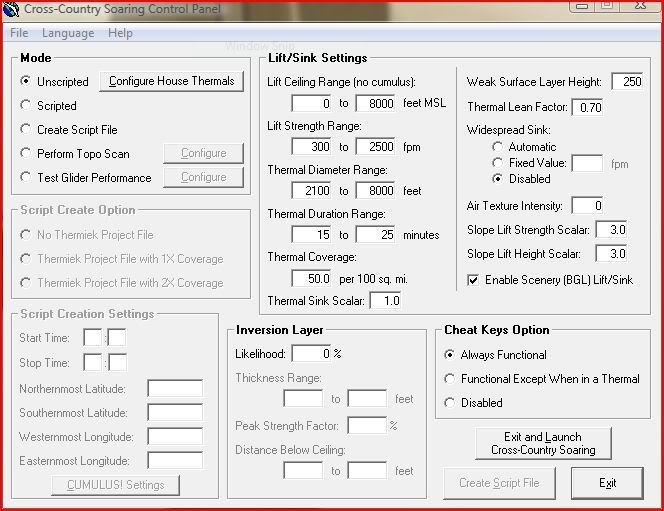
Note, this is how I set it up when I was figuring out how to soar in FS, so the figures in here are pretty generous Particularly the "widespread sink" settings on the righthand side... once you get the hang of it all, drop that back to "automatic".
Once your Control Panel looks like that, click the "exit and launch cross country soaring" button and jump back to FS9... Un-pause it and you should see a message scroll across the top of the screen.
Thats it Lads, grab a 1500' winch launch and go forth
Normal thermalling speeds should be anywhere from 40-50kts. If you're in the Duo Discus and have the Caiset gauges, the altimeter/vario/glide computer has an audio function so you can hear by the tone of the beeps as to what the air around you is doing.
If that gauge set is installed properly, any throttle inputs (keyboard or axis) should have no effect whatsoever on the glider.
The user guide that comes with the program is pretty straight forward...
Forget anything about ridge-lift and wave that you read in there - thats where things get overly complicated and time consuming (I tried to get a topo scan done for some .bgl lift files of the Kaimais and kissed goodbye to 10hrs...)
Same goes for the Cumulus! folder - they are just an active cloud texture that sits over the thermals generated by CCS and they look like arse! I dont use them since they look so bad.
Now, to use CCS you're gonna have to fire up FS9 first - this is the perfect time to re-assign your throttle axis to the spoilers and reverse its movement
While you're in there, go to the weather settings and using the "user defined" and "advanced" sections, give yourself very little or no wind, and a cloudbase of about 8000' (this is just to start with while you get used to thermalling, as you get better you can bring that down to some realistic altitudes).
Pick your glider and head to your desired launch point (I use Pauanui and Waharoa a lot). Now, minimize FS9, and fire up CCS 2004 using the Control Panel shortcut on your desktop...
It should look like this:
Note, this is how I set it up when I was figuring out how to soar in FS, so the figures in here are pretty generous
Particularly the "widespread sink" settings on the righthand side... once you get the hang of it all, drop that back to "automatic".Once your Control Panel looks like that, click the "exit and launch cross country soaring" button and jump back to FS9... Un-pause it and you should see a message scroll across the top of the screen.
Thats it Lads, grab a 1500' winch launch and go forth
Normal thermalling speeds should be anywhere from 40-50kts. If you're in the Duo Discus and have the Caiset gauges, the altimeter/vario/glide computer has an audio function so you can hear by the tone of the beeps as to what the air around you is doing.
If that gauge set is installed properly, any throttle inputs (keyboard or axis) should have no effect whatsoever on the glider.
-
Alfashark - Sim-holic
- Joined: Wed Jul 25, 2007 7:45 pm
- Posts: 549
- Location: Putaruru
by Charl » Thu May 22, 2008 5:38 pm
Well that wasn't too hard was it?
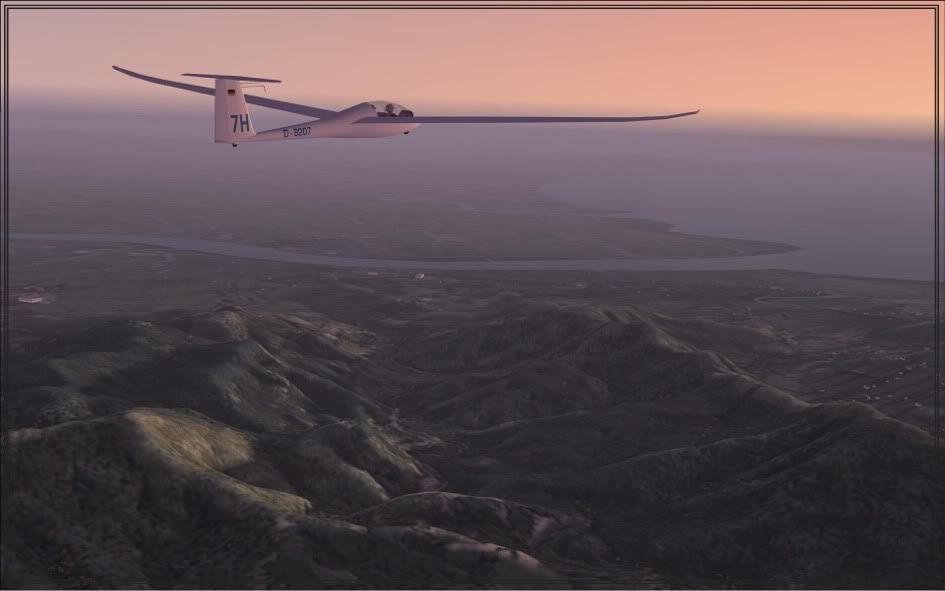
I dropped the Duo Discus at Pauanui, and winch-launched to 1500 ft.
A short while later (faster than by car!) we arrived at Thames.
Those thermals certainly have grunt; 500-700 ft a pop, I just puttered along and got there 1500ft higher than the start point!
Question: are there any indicators that you're headed into a thermal?
Which settings are best to tweak for a more realistic experience?
I dropped the Duo Discus at Pauanui, and winch-launched to 1500 ft.
A short while later (faster than by car!) we arrived at Thames.
Those thermals certainly have grunt; 500-700 ft a pop, I just puttered along and got there 1500ft higher than the start point!
Question: are there any indicators that you're headed into a thermal?
Which settings are best to tweak for a more realistic experience?
-
Charl - NZFF Pro
- Joined: Mon May 01, 2006 8:28 am
- Posts: 9801
- Location: Auckland
by Alfashark » Thu May 22, 2008 6:15 pm

Glad its worked out for you mate!
There are a couple of things that will get you going... Thermals only operate to their maximum potential between say, 11am and 3pm.
In the Control Panel pic I posted above, under the "Lift and Sink settings" you can tweak to your preference:
Lift Ceiling - Bring that down to 3500-5000', that should cover most soaring conditions in NZ (dont forget, the thermals will only lift as high as the lowest cloudbase set in FS9 - regardless of what you set in CCS)
Strength - 300-2500fpm roughly covers what you'll find in NZ (also, on the vario's in the gliders the scale is equal to fpm x 100, if its measured in knots of course)
Diameter - once you've got the hang of belting along at Vne +/- 10% then pulling up and wrapping the glider around the core of the thermal at just over stall speed, feel free to wind this down. Realistically, you'd be looking at little over 1000' at cloudbase.
Duration - Thats pretty much sorted already... Just remember they do cycle, so if one starts to decay on you, just hit the road and come back later.
Coverage - anywhere from 10-35 per 100 square miles is good, with the higher number being about right for a mid-summer competition.
Further on the righthand side of that section, the only other thing to change is the "Widespread Sink" change this to automatic (what goes up must come down... same applies to air in regards to thermals)
Theres also a section there dealing with Inversion Layers - make sure you change the "Likelihood" to 0%, or you'll get that sinking feeling... Inversions are the thermals worst enemy.
Lastly, Tab+E give you a brief text display showing the distance and bearing to the closest thermal
-
Alfashark - Sim-holic
- Joined: Wed Jul 25, 2007 7:45 pm
- Posts: 549
- Location: Putaruru
22 posts
• Page 1 of 2 • 1, 2
Who is online
Users browsing this forum: No registered users and 16 guests