When Photoreal has to Go

An effort to collaborate all freeware New Zealand scenery addons. Discuss the creation and management of the project here.

Postby Charl » Fri Apr 11, 2008 7:46 am

As we all know Lawrie "Snowman" Roache has been chugging out a string of FS9 airports for NZ.
His latest project NZNE is in my backyard so to speak, and I'm helping out with photos etc
Now here's the thing:


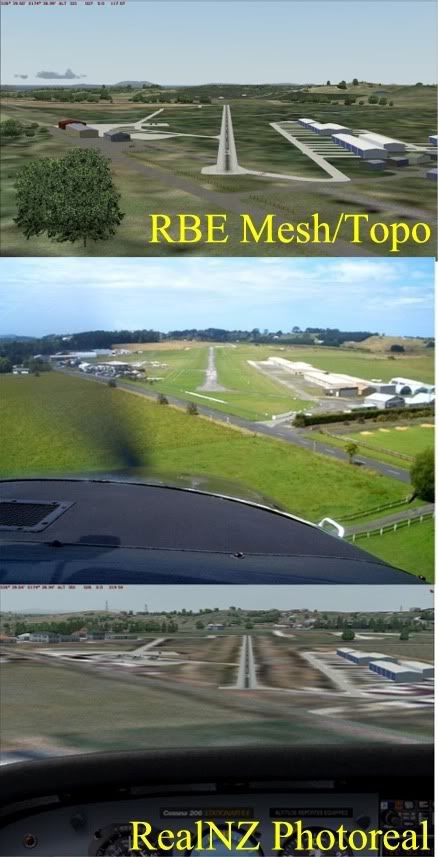
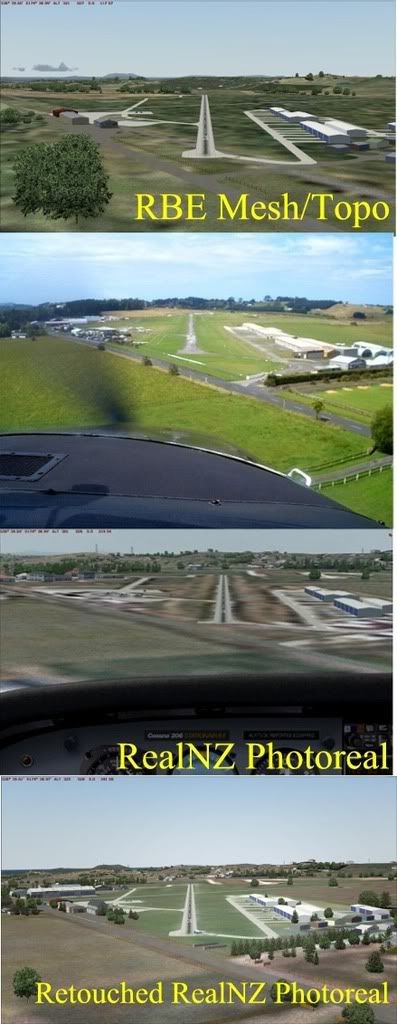
Because the photoreal resolution of Real NZ Auckland is fairly coarse, it makes smudges around this scenery, and it actually looks better with just Christian's mesh + topo!
The question is aimed at Robin, but may have application elsewhere:
Is it possible to somehow create a lighter, more uniform backdrop for the airfield as per real life, by either overlaying or removing a bit of the photoreal?
None of the ghastly AFCAD green textures will do the job.
Last edited by Charl on Fri Apr 11, 2008 5:11 pm, edited 1 time in total.
User avatar
Charl
NZFF Pro
 
Topic author
Joined: Mon May 01, 2006 8:28 am
Posts: 9687
Location: Auckland

Postby toprob » Fri Apr 11, 2008 10:48 am

The choices in FS2004 are fairly limited. Or, since I'm having a glass-half-full kind of day, I could say the choices in FS2004 are nice and simple.

You can place polygons under the airport, similar to AFCAD polygons, but as you've noticed it isn't pretty. That's why people create and distribute other textures, such as '3D grass', but these are no good for fine-tuning a particular airport, they are global changes to the default textures, and can cause issues at other airports.

And these polygons don't appear over photoreal, anyway, although those textures which can be laid down using AFCAD do -- hence your 'AFCAD green' is a common choice.

So as far as I'm concerned, there's only one way to overcome this -- building your own custom-textures ground polygons using GMAX, specifically the FS2002 gamepack.

I'm not saying that you have to reproduce the exact airport (which for me, involves flying over the top of the airport hanging out of a Cessna, usually), you could just have your own set of 'quality' textures, such as a few nice grass choices, your own tarmac, asphalt etc, and mix'n'match them.

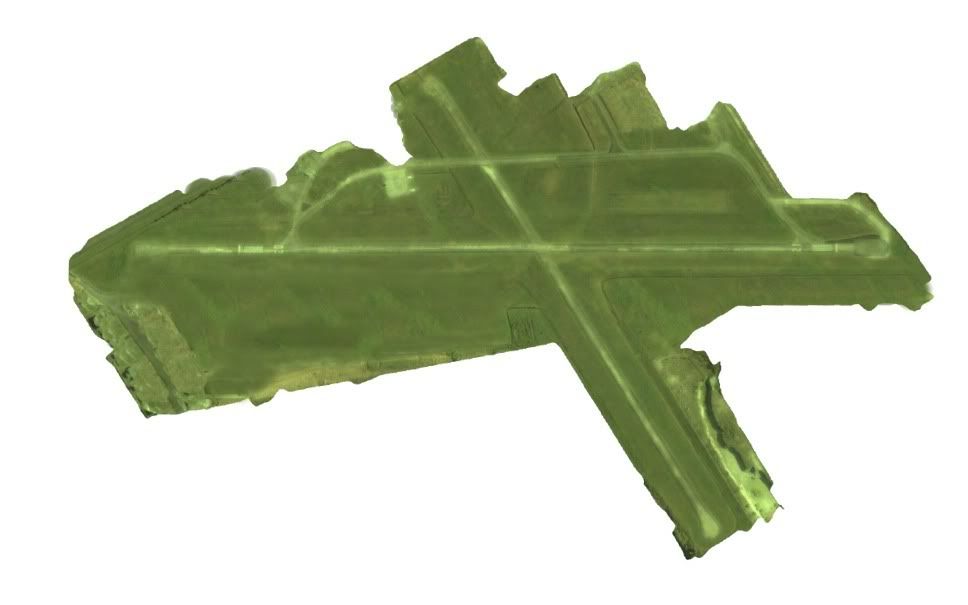
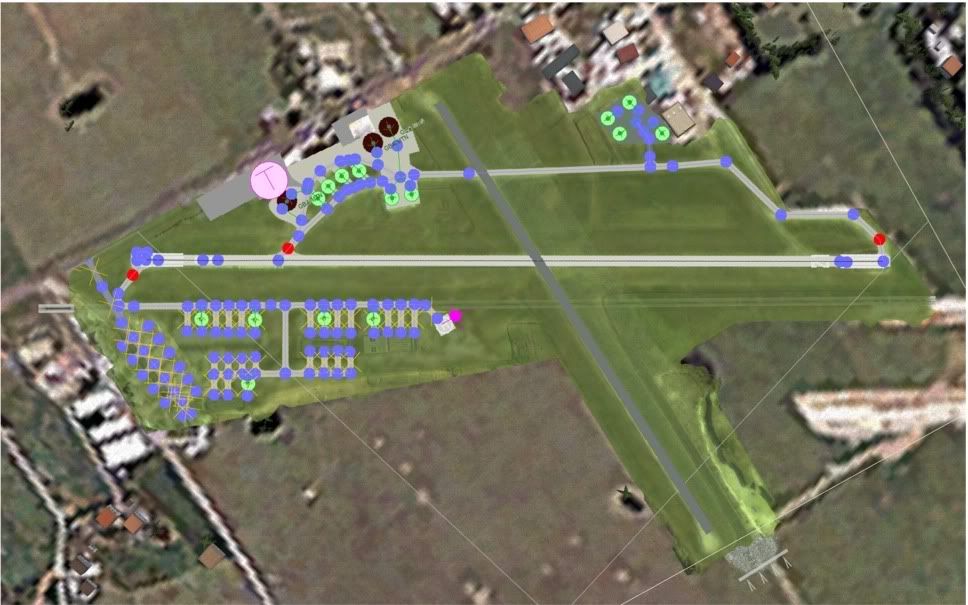
Here's a GMAX screenshot of this in its simplest form -- this is Koromiko. This airport actually stands out a lot more than I normally like in the Marlborough scenery, as the grass is very green and there's no blending. But this makes it a good example.

This screenshot shows 2 layers, but in reality this is two different GMAX files -- each layer needs to be exported separately. However GMAX can display the contents of another file for reference, which is handy.


This next image is a close-up of the middle layer only. See how it is made up of very simple textures only, mostly tiled. (There is a top layer which I haven't shown, which has the runway markings.)


And here's a more complex layout, Tauranga. If you leave out the tarmac photo texture, it is pretty similar, just repeating textures.
(I normally don't show this sort of thing, the GMAX files are kinda ugly until they are blended into the sim. You're privileged...)


There are some things which are not shown here, as GMAX won't display alpha transparency, but some of the textures can be blended using the alpha channel. However this is not really suitable for tiled textures, as the alpha is part of the texture, so you'd probably need more than one texture to blend edges effectively. However one handy trick (which I've used at Koromiko and Woodbourne) is to give the material in GMAX a degree of transparency, allowing the 'dirty' photoreal to show through slightly.
User avatar
toprob
NZFF Pro
 
Joined: Sat Apr 29, 2006 4:56 pm
Posts: 6711
Location: Upper Hutt

Postby Timmo » Fri Apr 11, 2008 1:07 pm

Yep- Not as much of a problem in FSX as source photography is at worst around 2.5m per pixel

A possibilityfor FS2004 from the top of my head: Give the runway taxi line a grass texture and make it slightly wider than the runway width? In FSX at least these blend out at the edges so you may be able to obscure the 'bleeding' from the aerial photo (i havent actually tried this so ive no idea if it works)
Timmo
NZFF Pro
 
Joined: Wed Oct 25, 2006 6:28 pm
Posts: 2056
Location: Tauranga

Postby Charl » Fri Apr 11, 2008 2:12 pm

Timmo I've tried that and this was what I was referring to as "Ghastly" - it doesn't bleed, it's just a green stripe of totally the wrong colour and no surface texturing.


The airport buldings are Library Object standard, so you'd want to be consistent with that, without getting into too much custom texturing.
What you'd want is a slightly transparent uniform (nice, grassy) layer interspersed between the photoreal and the AFCAD features.
IS this doable?
User avatar
Charl
NZFF Pro
 
Topic author
Joined: Mon May 01, 2006 8:28 am
Posts: 9687
Location: Auckland

Postby Christian » Fri Apr 11, 2008 3:38 pm

Charl wrote:
QUOTE (Charl @ Apr 16 2008, 03:12 AM) <{POST_SNAPBACK}>
Timmo I've tried that and this was what I was referring to as "Ghastly" - it doesn't bleed, it's just a green stripe of totally the wrong colour and no surface texturing.


The airport buldings are Library Object standard, so you'd want to be consistent with that, without getting into too much custom texturing.
What you'd want is a slightly transparent uniform (nice, grassy) layer interspersed between the photoreal and the AFCAD features.
IS this doable?


Hmm, could you create a grass VTP poly using Sbuilder? You need to make sure this layer has a higher priority as the photoreal and it should superimpose the photoreal. In fact, you may even be able to track down which texture is used in my landclass scenery and build a VTP poly with that texture on.

I think this should work...

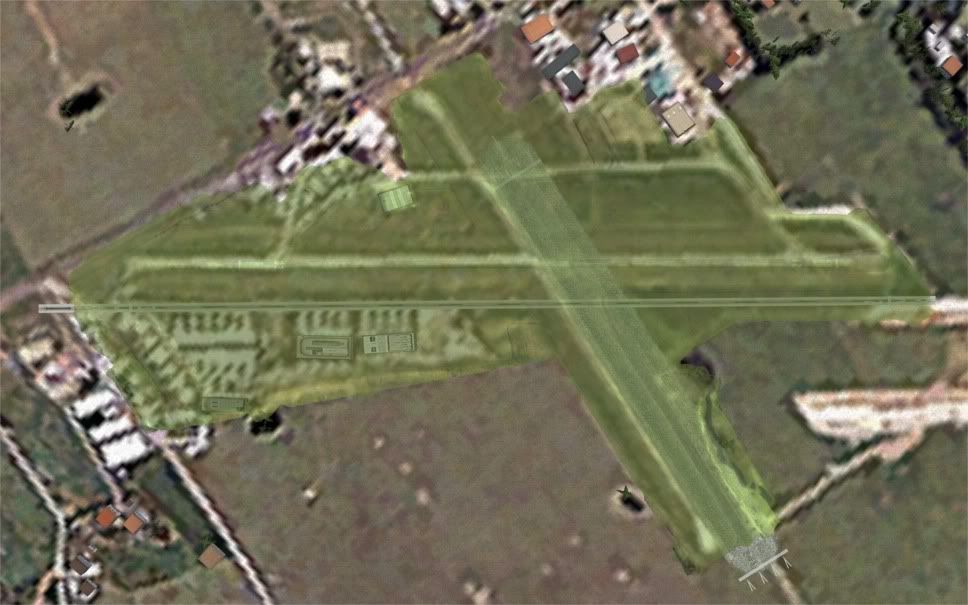
Another option would be to track down the exact image from the photoreal, convert it with image tool into a tga, edit it in photoshop (make it greener and more uniform with area select) and convert back to dxt1 in imagetool.
Breathtakingly gorgeous FS landscapes for New Zealand.
Visit Sim Pilot Experience now:
http://www.simpilotexperience.com
Follow me on twitter:
http://www.twitter.com/ChristianStock
User avatar
Christian
Forum Addict
 
Joined: Sun Apr 30, 2006 12:03 pm
Posts: 426
Location: melbourne

Postby Charl » Fri Apr 11, 2008 8:23 pm

Because I don't know the innards of FS9 I don't know if I am trying the impossible.
But instinct tells me this should be do-able.
Crudely done:
Step 1: I have a picture of sorts.

Step 2: I plop it on a higher priority than the PR with a little transparency

Step 3: AFCADs, flattens, Library Objects on top of all that


Step 3 is no problem, that's how these sceneries have been made.
Step 2 is the problem - how do you get that into FS9? How much work is involved?
It can theoretically be presented in any graphic file format.
User avatar
Charl
NZFF Pro
 
Topic author
Joined: Mon May 01, 2006 8:28 am
Posts: 9687
Location: Auckland

Postby Timmo » Fri Apr 11, 2008 9:26 pm

Charl wrote:
QUOTE (Charl @ Apr 11 2008, 02:12 PM) <{POST_SNAPBACK}>
Timmo I've tried that and this was what I was referring to as "Ghastly" - it doesn't bleed, it's just a green stripe of totally the wrong colour and no surface texturing.


Oh- not quite what I was meaning (but what I was meaning may not be possible in Fs9)

The taxiway line that goes down the length of your runway can (I think) have a texture applied- In FSX planner/FSX this grass texture blends out at the edges so you could, to get rid of the white bleeding from the aerial photo, make the runway taxi line a width a few metres thicker than the runway itself.

Alternatively you could place 2 thin grass taxiways down each side of the runway....again, not sure if this is possible in FS9 as perhaps the grass taxiways dont blend at the edges like in FSX?
Timmo
NZFF Pro
 
Joined: Wed Oct 25, 2006 6:28 pm
Posts: 2056
Location: Tauranga

Postby Christian » Mon Apr 14, 2008 2:36 pm

Step 2 can't be done Charl. Transparency in layers won't work in FS9 (as far as I know). I really think the easiest way is to find the photo tiles, run them through imagetool and then photoshop them. That'll give you exactly the effect you want.

Christian
Breathtakingly gorgeous FS landscapes for New Zealand.
Visit Sim Pilot Experience now:
http://www.simpilotexperience.com
Follow me on twitter:
http://www.twitter.com/ChristianStock
User avatar
Christian
Forum Addict
 
Joined: Sun Apr 30, 2006 12:03 pm
Posts: 426
Location: melbourne

Postby Charl » Mon Apr 14, 2008 5:56 pm

OK it's what I needed to hear...the scenery is coming along quite nicely in any event, and will stand without Lawrie (or me!) learning Gmax.
I see FSX doesn't have these issues, Scruffyduck has some good tools for exactly this sort of thing.
Maybe FSXI then... ;)
User avatar
Charl
NZFF Pro
 
Topic author
Joined: Mon May 01, 2006 8:28 am
Posts: 9687
Location: Auckland

Postby Charl » Tue Apr 15, 2008 9:31 pm

I am walking around this thing still...
OK is this simply a question of work to be done, then, rather than learning a whole set of skills?
find the photo tiles Where would one get these? In what format?
run them through imagetool What does imagetool do, simply convert the format?
and then photoshop them. Easy enough.
What then, how do you compile it back into the scenery?

I simply can't believe the whole scenery thing is as clunky as it looks from the outside - hell, Microsoft had to do it in the first place, and they were working to a budget one assumes...
Last edited by Charl on Tue Apr 15, 2008 9:37 pm, edited 1 time in total.
User avatar
Charl
NZFF Pro
 
Topic author
Joined: Mon May 01, 2006 8:28 am
Posts: 9687
Location: Auckland

Postby Christian » Wed Apr 16, 2008 10:51 am

QUOTE
find the photo tiles Where would one get these? In what format?[/quote]

Thats the hard part. The photo's are in the scenery image folder. There probably are heaps. You can see the photos with imagetool. The format is bmp, it seems, but in reality it's a DX format camouflaged as bmp. That's why you need imagetool to view/convert the images...

QUOTE
run them through imagetool What does imagetool do, simply convert the format?[/quote]

correct. It's fairly easy to use.

QUOTE
What then, how do you compile it back into the scenery?[/quote]

Run through imagetool again and save as DXT1. Simply replace the original tiles and you're done.

The hard part is finding the right images because the photoreal is going to be tiled into lots of little tiles. There maybe tools that will help you find the right tiles quickly (the name of the tiles is linked to spatial location), probably worthwhile to google it. The rest is really quite easy...
Breathtakingly gorgeous FS landscapes for New Zealand.
Visit Sim Pilot Experience now:
http://www.simpilotexperience.com
Follow me on twitter:
http://www.twitter.com/ChristianStock
User avatar
Christian
Forum Addict
 
Joined: Sun Apr 30, 2006 12:03 pm
Posts: 426
Location: melbourne

Postby Charl » Wed Apr 16, 2008 10:47 pm

Christian wrote:
QUOTE (Christian @ Apr 16 2008, 10:51 AM) <{POST_SNAPBACK}>
The hard part is finding the right images because the photoreal is going to be tiled into lots of little tiles. There maybe tools that will help you find the right tiles quickly (the name of the tiles is linked to spatial location), probably worthwhile to google it. The rest is really quite easy...

No kidding - there are 3 and a half thousand tiles for RNZ AKL.
Assuming they weren't actually numbered by an inebriated lab rat with access to a random number generator, (my first take) then there exists somewhere a key to these tiles.
Where might that reside???
User avatar
Charl
NZFF Pro
 
Topic author
Joined: Mon May 01, 2006 8:28 am
Posts: 9687
Location: Auckland

Postby toprob » Thu Apr 17, 2008 12:09 am

Charl wrote:
QUOTE (Charl @ Apr 16 2008, 10:47 PM) <{POST_SNAPBACK}>
No kidding - there are 3 and a half thousand tiles for RNZ AKL.
Assuming they weren't actually numbered by an inebriated lab rat with access to a random number generator, (my first take) then there exists somewhere a key to these tiles.
Where might that reside???


Being part-inebriated-rat myself (well, at least the inebriated part...), I may be able to help.
First, though, I'm not too sure about the viability of this, for a number of reasons, mostly to do with the quality -- or lack of it -- and the compression damage to the existing tiles.
To track down individual tiles, I use a tool called TCalc2004. I'm sure google will lead you to it. You start it up when you are running FS2004, and it gives the current tile name (and surrounding tiles) under your aircraft.
You could track down a single tile by hand if you were nerdy enough, but I've never done it:) Each of the 15 digits represents a quadrant of a LOD square divided into quarters (0 to 3). So the first digit is LOD0, which unlike the others only has two values -- 0 for the northern hemisphere, 1 for the southern. Then each subsequent digit is the next LOD quadrant. It appeals to my tiny, oops I mean tidy mind.

QUOTE
I simply can't believe the whole scenery thing is as clunky as it looks from the outside - hell, Microsoft had to do it in the first place, and they were working to a budget one assumes...[/quote]
If it appears clunky from the outside, then that's only because you are not close enough to see that it is actually hyper-mega-clunky. So to get into it, you need to take little steps, and lots of'em. I swap tools almost minute by minute, and have trouble remembering what tool to use for what job. If I don't get to use a particular technique for a while, I sometimes have to relearn it.
Which is why I encourage people to find a speciality. Only if you are silly enough to try and make a living from it do you need to do it all. If you have a desire to see something implemented, then you will probably have to end up doing it yourself, so you may as well make a start now.

EDIT: One thing which you may be vaguely aware of -- there is no official FS technique for FS2004 for applying high resolution photo textures to an airport. Any scenery which does this uses a hack which involves some massaging of the code which the official tools produce, and MS hate that we do this, which is why it is always in danger of becoming obsolete with each version. These techniques still work with FSX, but only by limiting the best FSX functionality -- you can't see a wet runway, for instance, if you use the old techniques.
You will not see a MS-built airport made with high resolution ground textures in FS2004. In FSX, they use the officially sanctioned technique which I used in NZPP for FSX -- which means using default runway textures. The reason why this is tricky is that MS never intended us to do it, and haven't supplied any support, tools or handy code to do it.
Last edited by toprob on Thu Apr 17, 2008 12:19 am, edited 1 time in total.
User avatar
toprob
NZFF Pro
 
Joined: Sat Apr 29, 2006 4:56 pm
Posts: 6711
Location: Upper Hutt

Postby Timmo » Thu Apr 17, 2008 8:35 am

toprob wrote:
QUOTE (toprob @ Apr 17 2008, 12:09 AM) <{POST_SNAPBACK}>
The reason why this is tricky is that MS never intended us to do it, and haven't supplied any support, tools or handy code to do it.


Nor a truly suitable replacement! (ie. allowing custom runway, taxi line symbology, apron textures)
Timmo
NZFF Pro
 
Joined: Wed Oct 25, 2006 6:28 pm
Posts: 2056
Location: Tauranga

Postby Charl » Thu Apr 17, 2008 9:17 am

OK...one of the benefits of using an obsolete flightsim is that all the pioneering work is over...
Nice tool, TCalc2004, certainly spares you memorising several hundred 12-digit numbers as you fight your way across the landscape.
Christian is being a little coy, also - this from the TCalc2004 readme:
"...Many, many thanks to Christian Stock, without whose pioneering efforts, we would have no understanding of current Flight Simulator Design."
Now that I am reminded by the NZ Scenery Kid (nice handle, Robin) that what we are actually doing is Hotrodding, I have no fear of treading where No Man Dares.


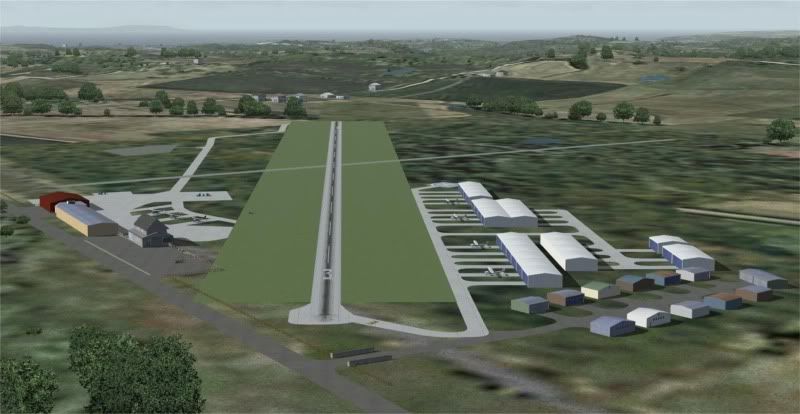
This is pretty well what I was aiming for - the scenery objects are not going to be photoreal, so just a little re-toning was necessary.
No hi-res required, although in theory that should be possible if the sim can deal with it.
Last edited by Charl on Thu Apr 17, 2008 9:18 am, edited 1 time in total.
User avatar
Charl
NZFF Pro
 
Topic author
Joined: Mon May 01, 2006 8:28 am
Posts: 9687
Location: Auckland

Postby Christian » Thu Apr 17, 2008 3:35 pm

TCalc2004 was the tools name, thanks for pointing Charl into the right direction Robin.

Well done Charl! See, wasn't that hard and looks better than any hacks would ;)
Breathtakingly gorgeous FS landscapes for New Zealand.
Visit Sim Pilot Experience now:
http://www.simpilotexperience.com
Follow me on twitter:
http://www.twitter.com/ChristianStock
User avatar
Christian
Forum Addict
 
Joined: Sun Apr 30, 2006 12:03 pm
Posts: 426
Location: melbourne

Postby ardypilot » Thu Apr 17, 2008 6:05 pm

Well done Charl- looks great. Are you going to publically release this reworked airport for the rest of us then?
User avatar
ardypilot
NZFF Pro
 
Joined: Wed Apr 26, 2006 10:01 am
Posts: 6802
Location: Auckland

Postby Charl » Thu Apr 17, 2008 6:18 pm

Trolly wrote:
QUOTE (Trolly @ Apr 17 2008, 06:05 PM) <{POST_SNAPBACK}>
Well done Charl- looks great. Are you going to publically release this reworked airport for the rest of us then?

It's up to Lawrie, really, as this is destined for his new NZNE scenery, due for release any day now.
I'm delighted with the result though, and just as delighted with the guidance and help received here!
I may turn my attention to some of the Coromandel airfields next.
User avatar
Charl
NZFF Pro
 
Topic author
Joined: Mon May 01, 2006 8:28 am
Posts: 9687
Location: Auckland

Postby Charl » Sat Apr 19, 2008 8:23 am

Charl wrote:
QUOTE (Charl @ Apr 17 2008, 06:18 PM) <{POST_SNAPBACK}>
I may turn my attention to some of the Coromandel airfields next.
...and so I did.
This creates the next 2 questions:
I fiddled with a tile which includes ocean, and got a nice black triangle where there should be water. Have I opened a can of worms, best left alone, or is there something obvious that needs doing, to reinstate the water?
Question 2 follows from this: Lawrie has for some reason decided to do Parakai airfield, which could do with a little local texturing. Wouldn't it be nice to have FS water in the river adjacent, rathr than textured PR water? How does one "carve" out the tile along the river, to let the water show?
User avatar
Charl
NZFF Pro
 
Topic author
Joined: Mon May 01, 2006 8:28 am
Posts: 9687
Location: Auckland

Postby toprob » Sat Apr 19, 2008 11:44 am

Charl wrote:
QUOTE (Charl @ Apr 19 2008, 08:23 AM) <{POST_SNAPBACK}>
I fiddled with a tile which includes ocean, and got a nice black triangle where there should be water. Have I opened a can of worms, best left alone, or is there something obvious that needs doing, to reinstate the water?
Question 2 follows from this: Lawrie has for some reason decided to do Parakai airfield, which could do with a little local texturing. Wouldn't it be nice to have FS water in the river adjacent, rathr than textured PR water? How does one "carve" out the tile along the river, to let the water show?


The water mask is a simple 1-bit alpha -- which you'd need to preserve when you convert it to something you can edit. This means converting the DXT texture to 32 bit, rather than 24 bit. You can't save it as a BMP, as a BMP can't include an alpha channel, so save as a TGA.
Now you can edit the image if you wish, and keep the alpha channel intact.
To add water, you can add an alpha channel. White=land, black=water.
User avatar
toprob
NZFF Pro
 
Joined: Sat Apr 29, 2006 4:56 pm
Posts: 6711
Location: Upper Hutt

Next

Return to NZ Scenery Project

Who is online

Users browsing this forum: No registered users and 5 guests