Active Sky

A place to converse about the general aspects of flight simulation in New Zealand

Postby ardypilot » Tue Nov 27, 2007 12:14 am

Today I bought myself Active Sky v6, as I realised it was the one addon I needed to really spruce up my enviroment and make my screenies look better :P I think I've spent so much $ in new addons this year that I could have just bought myself a new computer!

Anyway, I've spent a few hours reading through the instructions and setting it up, but am still a little confused about how it auto updates itself. Do I need to have the program running every time I start FS to get the real world weather? Do I have to enter the airport I am at's ICAO code, press fetch, then press refresh (or download?) to then get it into the sim? When inside fs2004, do I need to select Real World weather (static or update every 15 mins), or do I just leave it set as clear skys in order to recieve the AS clouds and winds? How do I know when it has been updated successfully in the sim every 10 minutes- will I get that green bar across the top of my screen giving me the updated METAR?

If someone with experience with Active Sky could help me out a bit I'd be very greatful, thanks!
User avatar
ardypilot
NZFF Pro
 
Topic author
Joined: Wed Apr 26, 2006 10:01 am
Posts: 6802
Location: Auckland

Postby AlisterC » Tue Nov 27, 2007 5:50 am

QUOTE
Anyway, I've spent a few hours reading through the instructions and setting it up, but am still a little confused about how it auto updates itself. Do I need to have the program running every time I start FS to get the real world weather?[/quote]
Yes you do. You can start it before your sim, or after, it doesn't really matter which.

QUOTE
Do I have to enter the airport I am at's ICAO code, press fetch, then press refresh (or download?) to then get it into the sim?[/quote]
No, it will recognise what airport you are at once you enter the sim, and automatically update the weather to the closest airport it has a metar for

QUOTE
When inside fs2004, do I need to select Real World weather (static or update every 15 mins), or do I just leave it set as clear skys in order to recieve the AS clouds and winds?[/quote]
My default flight has "fair weather" set, but when I have activesky running, it clears that and automatically sets the FS9 theme to "user defined". From then on it will set the weather automatically by itself.

QUOTE
How do I know when it has been updated successfully in the sim every 10 minutes- will I get that green bar across the top of my screen giving me the updated METAR?[/quote]
Yes, it will run a green bar across the top of the screen when it has set the weather, with metar information

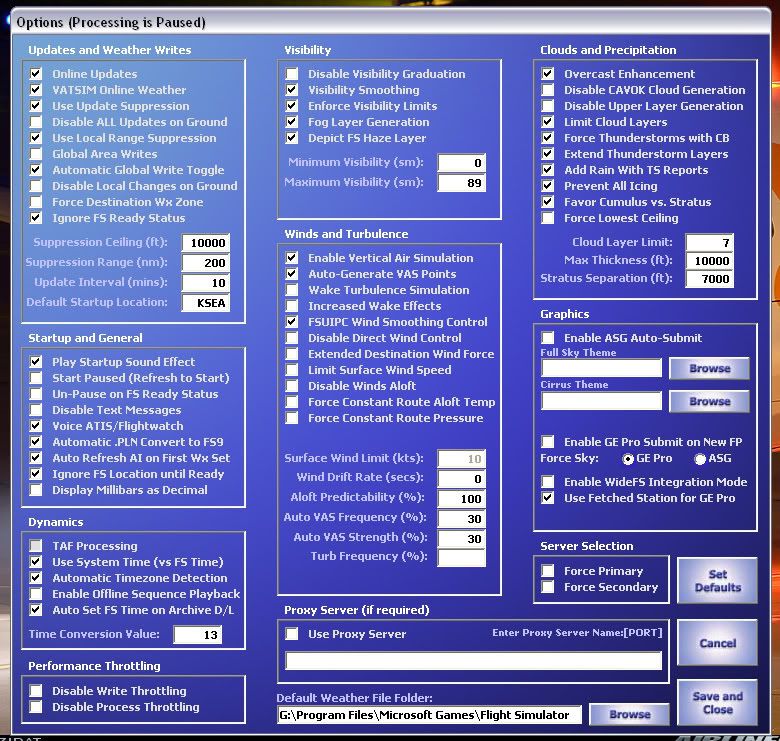
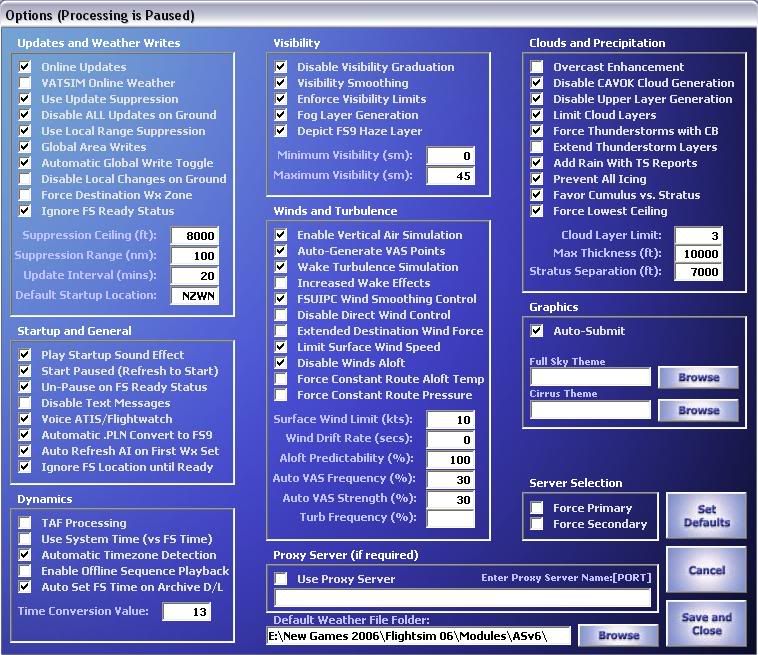
It's an invaluable program really, you'll learn to love it. Remember to check the options page, (i'll post mine for you)

Only unfortunate downside is a lack of weather stations for NZ :)

Last edited by AlisterC on Tue Nov 27, 2007 10:07 am, edited 1 time in total.
Image
User avatar
AlisterC
NZFF Pro
 
Joined: Thu Jul 20, 2006 11:13 am
Posts: 2543
Location: Nelson, NZ

Postby ardypilot » Tue Nov 27, 2007 10:07 am

Ah ok, I get it all now, thanks Alister. :D
User avatar
ardypilot
NZFF Pro
 
Topic author
Joined: Wed Apr 26, 2006 10:01 am
Posts: 6802
Location: Auckland

Postby ardypilot » Tue Nov 27, 2007 1:02 pm

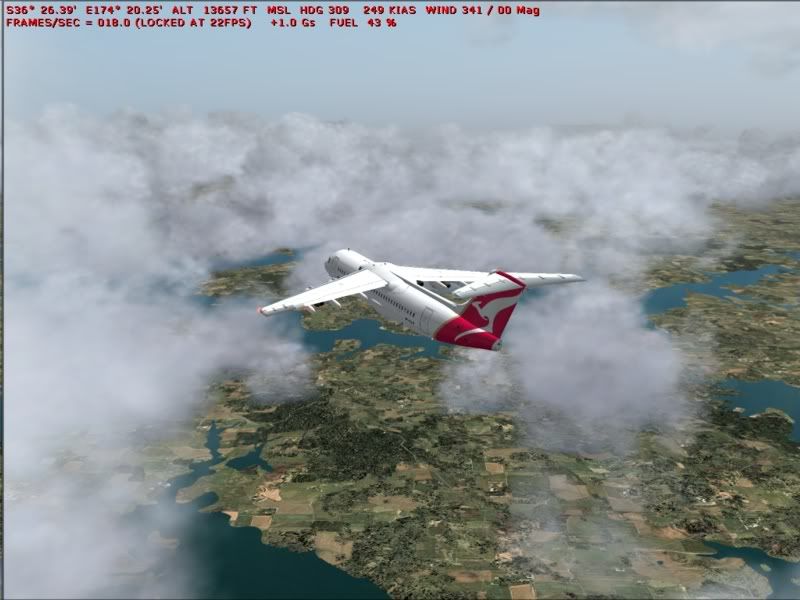
Hmmm, I thought AS was meant to take away the full brightness/contrast effect seen down below once you climb above the visabilty max altitude:

Is there a way to adjust this?

Also, looking out the window at central Auckland, there are scattered status clouds overhead, but in the sim it was a heavy thunderstorm and rain. Any idea why this was?
User avatar
ardypilot
NZFF Pro
 
Topic author
Joined: Wed Apr 26, 2006 10:01 am
Posts: 6802
Location: Auckland

Postby AlisterC » Tue Nov 27, 2007 6:02 pm

Have you adjusted the visibility settings in the options menu? (check mine (pictured) if you like but note I also use fsuipc visibilty settings..)

The weather created by activesky depends on the metar it is presently reading. It's usually out by an hour compared to real life, but sometimes it can be more. The metar is also recorded at the airport, and not central auckland. If you see "CB" in your metar, you are going to get thunderstorms. Even if CB was only over the westcoast approaches, you'll find it in your activesky rendition. It's not able to discern between CB in a part of the sky in real life, and make it happen on the sim. It is simply creating a reference to the metar. So, for example:

The raw metar is below, and the bit above is what it all actually means.


This is the current weather in Auckland Airport, New Zealand:

This is a report for Auckland Airport, New Zealand. The report was made 56 minutes ago, at 05:00 UTC. The wind was blowing at a speed of 10.3 meters per second (23.0 miles per hour) from southwest (220°). The temperature was 16 °C (61 °F), with a dew-point at 10 °C (50 °F). The atmospheric pressure was 1010 hPa (29.83 inHg). The relative humidity was 67.5%. There were a few clouds at a height of 914 meters (3000 feet).

The raw METAR is
NZAA 270500Z 22020KT 35KM FEW030 16/10 Q1010 NOSIG


Source Virtual Pilots Association weather centre ;)

So as you can see, this metar is an hour old as I type this.
Last edited by AlisterC on Tue Nov 27, 2007 6:02 pm, edited 1 time in total.
Image
User avatar
AlisterC
NZFF Pro
 
Joined: Thu Jul 20, 2006 11:13 am
Posts: 2543
Location: Nelson, NZ

Postby cowpatz » Tue Nov 27, 2007 8:47 pm

Alister I notice that you have "use VATSIM weather" checked. Does this mean that you get more weather stations (which Vatsim has) and will ActiveSky use them? If there is rain in a VATSIM metar will you get rain in the sim? You dont using Squawkbox weather. What affect, if any does the FS9 weather and dispaly options have on Active sky? ie simple clouds or % density. Like Andrew I have only just downloaded this program as well and I must say that is short on useful documentation.
Remember the 50-50-90 rule. Anytime you have a 50-50 chance of getting something right, there's a 90% probability you'll get it wrong!

Image
User avatar
cowpatz
NZFF Pro
 
Joined: Wed Mar 07, 2007 3:28 pm
Posts: 3747

Postby ardypilot » Tue Nov 27, 2007 11:19 pm

QUOTE
Have you adjusted the visibility settings in the options menu? (check mine (pictured) if you like but note I also use fsuipc visibilty settings..)[/quote]
Well I've set my maximum visability to 45sn (what does the s in sn stand for by the way, standard?) which I would have thought would have given me 45nm visability in every direction no matter what altitude I am at, however, it increases as I climb with altitude.


What about the visibility limits, graduation and smoothing? I'm sure there must be a way to achieve what I want to see somehow. I don't see any options for them in the FSUIPC screen...
User avatar
ardypilot
NZFF Pro
 
Topic author
Joined: Wed Apr 26, 2006 10:01 am
Posts: 6802
Location: Auckland

Postby AlisterC » Tue Nov 27, 2007 11:38 pm

No, unfortunately having vatsim checked doesn't mean I get more stations.. :( Apparently if you ran a "new route" through active sky, it would use the extra stations available to vatsim, but I've never got it to work. Active sky will tell FS9 what weather to make. So basically, your FS9 limitations you have enforced will still apply. So if you have simple clouds, and low density, Activesky will tell FS9 to create FEW030 (few @ 3000) and FS9 will set "few at 3000" just like you can in user defined options for any given wx station. How detailed the weather displays is still up to the settings you have in FS9.
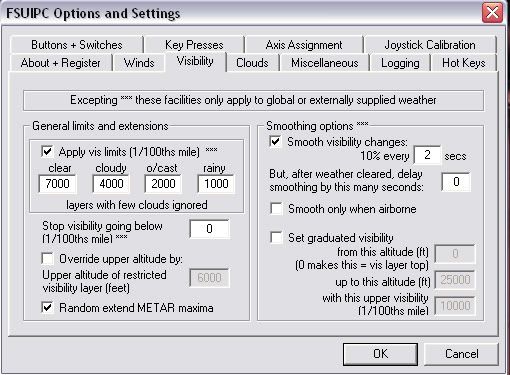
Andrew, try unchecking "Disable vis graduation" and see what happens. I'll try and post a screenshot of my FSUIPC visibility settings tomorrow. (on wrong computer at the moment)
Last edited by AlisterC on Tue Nov 27, 2007 11:39 pm, edited 1 time in total.
Image
User avatar
AlisterC
NZFF Pro
 
Joined: Thu Jul 20, 2006 11:13 am
Posts: 2543
Location: Nelson, NZ

Postby G-HEVN » Wed Nov 28, 2007 1:33 am

nm = nautical mile = 1 minute of longitude along a meridian / 6072ft / 1852m / 1.15sm

sm = statute mile = 5280ft / 1760 yds / 1609.344m

"mile" on its own always means "statute mile". It's called a statute mile because its length was decreed by a statue of parliament in 1592. The term "mile" goes back to Roman times, but until the statute, every country used a different length.
G-HEVN
 

Postby AlisterC » Wed Nov 28, 2007 5:58 am

Unfortunately SM can also mean Square Miles, I'm not sure which in the case of AS.

FSUIPC settings:


For the record if anyone didn't know, AS6 can also be used for FSX weather generation as long as you have FSUIPC4 installed. :) You don't need ActiveSky X
Image
User avatar
AlisterC
NZFF Pro
 
Joined: Thu Jul 20, 2006 11:13 am
Posts: 2543
Location: Nelson, NZ

Postby Charl » Wed Nov 28, 2007 8:17 am

G-HEVN wrote:
QUOTE (G-HEVN @ Nov 28 2007, 02:33 AM) <{POST_SNAPBACK}>
nm = nautical mile = 1 minute of longitude along a meridian / 6072ft / 1852m / 1.15sm

Ah, that would be Latitude
User avatar
Charl
NZFF Pro
 
Joined: Mon May 01, 2006 8:28 am
Posts: 9746
Location: Auckland

Postby victor_alpha_charlie » Wed Nov 28, 2007 10:17 am

Charl wrote:
QUOTE (Charl @ Nov 28 2007, 09:17 AM) <{POST_SNAPBACK}>
Ah, that would be Latitude


Good. i need to know that for my Geography exam at 2pm :P
User avatar
victor_alpha_charlie
NZFF Pro
 
Joined: Wed Jan 10, 2007 11:09 am
Posts: 2372

Postby ardypilot » Wed Nov 28, 2007 11:03 am

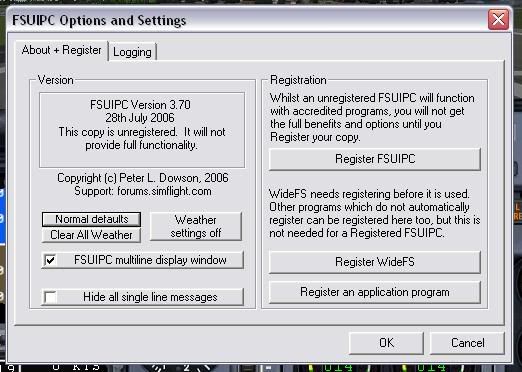
You must have a different version of FSUIPC to me, did you buy yours seperatly? Mine is just the one that comes with AS I think:


Even if I did get the same version as you, what option is it that defines max altitude for your set visability in AS?

Oh, and all the best with your exam Tom :thumbup:
User avatar
ardypilot
NZFF Pro
 
Topic author
Joined: Wed Apr 26, 2006 10:01 am
Posts: 6802
Location: Auckland

Postby ZK-MAT » Wed Nov 28, 2007 11:20 am

Trolly, your copy of FSUIPC is the free version, you have to buy it to get "full functionality" (as it says in your screenshot :P )
User avatar
ZK-MAT
Senior Member
 
Joined: Sun Apr 30, 2006 11:41 pm
Posts: 1690
Location: Papamoa

Postby ardypilot » Wed Nov 28, 2007 1:26 pm

QUOTE
Trolly, your copy of FSUIPC is the free version, you have to buy it to get "full functionality" (as it says in your screenshot :P )[/quote]
Whoops :P [note to self, think before you speak!] I seem to have fixed the problem now by clicking the 'weather settings off' button which I'm sure I had done previously as instructed in the AS manual, but it had come unchecked. I took a flight from NS via NR to HN cruising at 15,000 feet and everything looks just the way I like it, except I have a sort of brown haze over the sea in the distance (as I set up in ASG, works well on the land). What colour haze does everyone else set?
User avatar
ardypilot
NZFF Pro
 
Topic author
Joined: Wed Apr 26, 2006 10:01 am
Posts: 6802
Location: Auckland

Postby G-HEVN » Thu Nov 29, 2007 11:20 pm

Charl wrote:
QUOTE (Charl @ Nov 27 2007, 08:17 PM) <{POST_SNAPBACK}>
Ah, that would be Latitude


:whoops: Slip of the keyboard. The latitude on a meridian definition got dropped when people realised the earth wasn't spherical, and changed it to 1 minute of longitude at the equator. Then some clever dick observed that the equator isn't a perfect circle, so it's now just 1852 metres.

A metre, incidentally was originally defined as the distance along the Paris Meridian (the French never liked Greenwich!) between the Equator and the North Pole, divided by 10,000,000
G-HEVN
 

Postby LMerraine » Fri Nov 30, 2007 6:26 pm

Albatross wrote:
QUOTE (Albatross @ Nov 28 2007, 02:58 AM) <{POST_SNAPBACK}>
For the record if anyone didn't know, AS6 can also be used for FSX weather generation as long as you have FSUIPC4 installed. :) You don't need ActiveSky X

Oh really? How do you get it to run (haven't tried yet)

Other thing is - will the fs9 version be more of a resource hog than the FSX version?

I've been looking at getting the fsx version, but worried about performance.
When asked what I have contributed to on this earth my reply will be my daugther
LMerraine
Forum Addict
 
Joined: Sun Sep 23, 2007 4:19 pm
Posts: 278
Location: Northam, WA

Postby AlisterC » Fri Nov 30, 2007 7:23 pm

I would think the Active Sky X looks like more of a resource hog, it's a very intense user interface compared to the basics of v6. Simply add FSUIPC4 to your FSX, and then run AS6. It will run in FSX just the same as it would on FS9
:)
Image
User avatar
AlisterC
NZFF Pro
 
Joined: Thu Jul 20, 2006 11:13 am
Posts: 2543
Location: Nelson, NZ

Postby G-HEVN » Sun Dec 02, 2007 9:31 pm

I've used both, and can't say I've noticed a performance difference. Course, I haven't done any actual tests... With both programs, the performance killer is high levels of overcast, and that's probably more to do with the FS weather engine, since all AS is doing is feeding it parameters. To my eyes, the ASX UI is more intuitive, but I'm not sure how the UI is supposed to hog resources?

Anyhow as Albatross says AS6.5 (make sure it's the latest version) will work quite happily in FSX. Active Sky Graphics textures, however, will not. If WX-influenced textures are important to you, you'll have to use ASX/Xgraphics.
G-HEVN
 

Postby AlisterC » Mon Dec 03, 2007 5:44 am

That's good to know VN, thanks! :D I might have to look into the new version one day. Still at present not flying FSX enough to justify it :rolleyes:
Image
User avatar
AlisterC
NZFF Pro
 
Joined: Thu Jul 20, 2006 11:13 am
Posts: 2543
Location: Nelson, NZ

Next

Return to General

Who is online

Users browsing this forum: No registered users and 6 guests