Palmerston North Airport NZPM

An area to discuss scenery addons for virtual NZ

Postby Snowman » Wed Oct 10, 2007 11:34 pm

Just uploaded to Avsim,.............
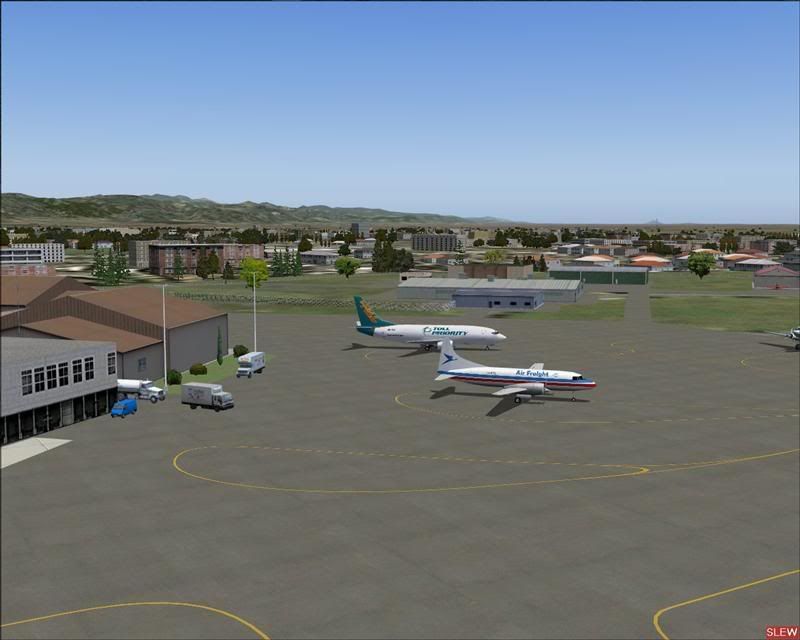
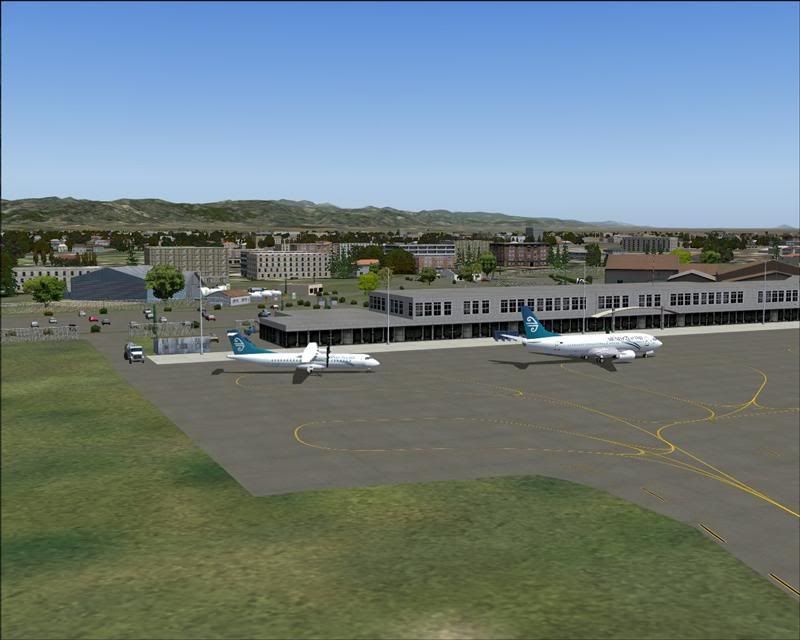
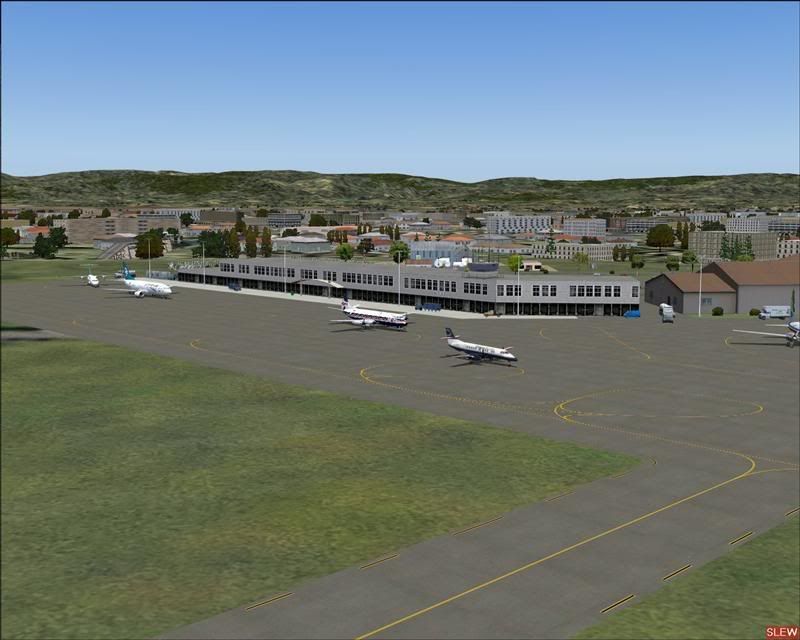
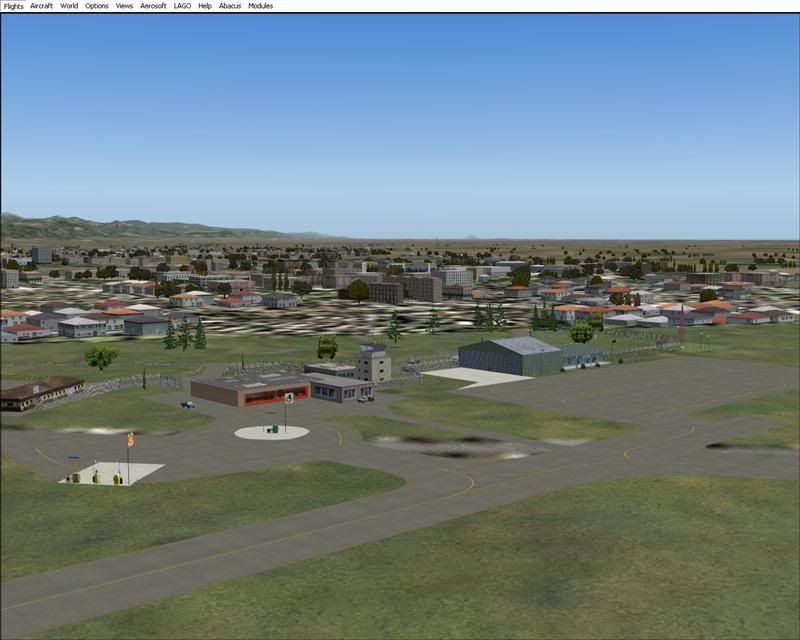
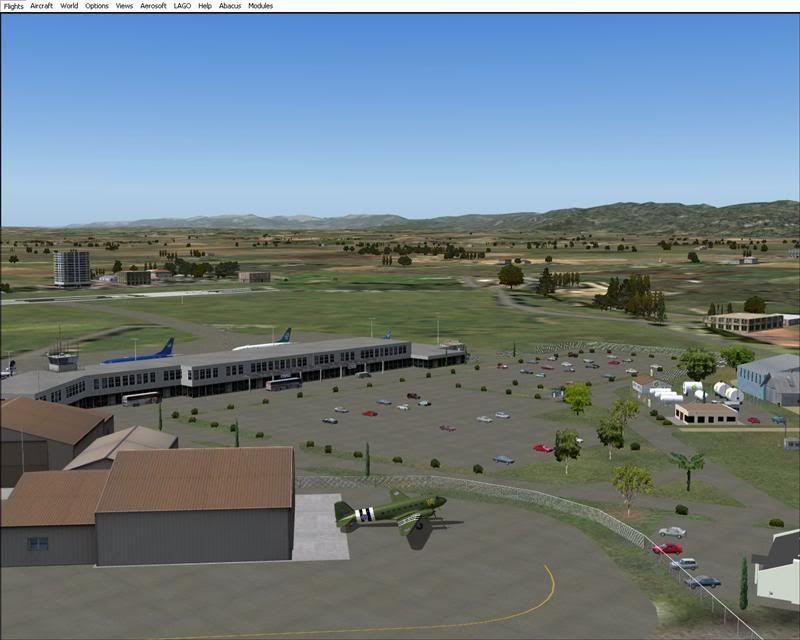
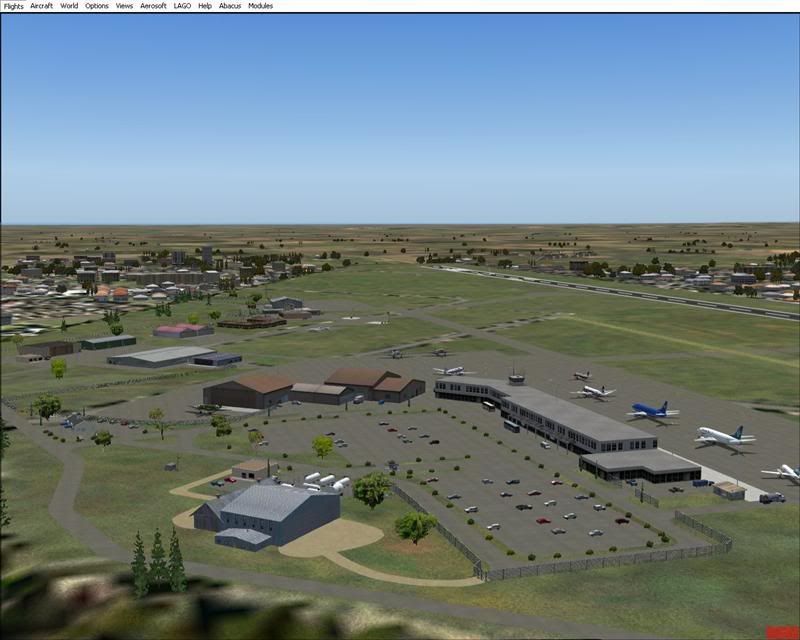
Palmerston North Airport, NZPM. This is not the photoreal building version, but one using objects from the Runway-12, EZ-Scenery, and FS9 default libraries.
filename,......... palmerston_north_nzpm_2007.zip ,.............. ID number.....223716.
Or enter my name, Lawrie Roache, in the search feild at Avsim.com.
A couple of quick pics from the building of the scenery......................


Photoreal building version to follow at a later date.

Lawrie. New_Zealand_etc.gif
Image

Image
User avatar
Snowman
NZFF Pro
 
Topic author
Joined: Wed Jul 26, 2006 3:52 pm
Posts: 2427
Location: Tauranga, NZ.

Postby creator2003 » Thu Oct 11, 2007 12:04 am

Nice work there mate ,,,yeah im still got this one on the to do list for ya lawrie its just finding time between ADHD and life to get it done laugh.gif
still working out when to stop playing and get some work done tongue.gif ,,you know same old story just different day biggrin.gif
User avatar
creator2003
NZFF Pro
 
Joined: Fri Jun 16, 2006 12:08 am
Posts: 4633
Location: Cant U C im LOCO

Postby Charl » Thu Oct 11, 2007 9:21 am

Well the nice thing is it's Done so anything that follows can add to it, all in good time.
Whew Lawrie, it's as well you are keeping a register otherwise we'll never keep up!
Well done mate, happily there's a good AFCAD too now so the AI will go where it belongs.
User avatar
Charl
NZFF Pro
 
Joined: Mon May 01, 2006 8:28 am
Posts: 9691
Location: Auckland

Postby VH-CC1 » Thu Oct 11, 2007 1:46 pm

Just downloaded it as I was curious of the afcad, it looks like a messed up one available from my site, ohh and to add there's no start locations on any of the rwys!
VH-CC1
 

Postby Snowman » Thu Oct 11, 2007 3:41 pm

VH-CC1 wrote:
QUOTE (VH-CC1 @ Oct 11 2007, 02:46 PM) <{POST_SNAPBACK}>
Just downloaded it as I was curious of the afcad, it looks like a messed up one available from my site, ohh and to add there's no start locations on any of the rwys!


Hi Craig.

Bad habit of mine, i always prefer to start at a hold short point just before the runway, rather than actually on it.
I did mean to add start points for the runway, but plain forgot. Any one that has AFCAD 2.21 can do this easily, if they prefer start points on the runway.
As for the AFCAD its one i started about 2 years or so ago, before i had the RBE Topo, so i just used what i had to hand. Probably time to build a completely new one, to make it fit into the NZ Topo a little better.
The whole scenery was only a stopgap until the photoreal building version is ready.
Im sure with your experience, you can make your own AFCAD for it if you dont like the one provided with the scenery.

Lawrie. New_Zealand_etc.gif
Last edited by Snowman on Fri Oct 12, 2007 9:56 am, edited 1 time in total.
Image

Image
User avatar
Snowman
NZFF Pro
 
Topic author
Joined: Wed Jul 26, 2006 3:52 pm
Posts: 2427
Location: Tauranga, NZ.

Postby Kelburn » Thu Oct 11, 2007 3:56 pm

lookin great as always
Image

Isn't it evident?? Boeing are my favourite aircraft.

P.S. that's is my real birthday but I wish to keep my real age secret to keep you all pondering.
Kelburn
NZFF Pro
 
Joined: Sat Oct 14, 2006 10:59 am
Posts: 2193
Location: On a reverse 'hole'

Postby Charl » Thu Oct 11, 2007 7:08 pm

Well it's no good having a nice airport and the traffic is all sitting elsewhere.
So there's a small fix for the GNZLAP traffic file available here
This brings the Massey Pipers back home.
Last edited by Charl on Thu Oct 11, 2007 7:23 pm, edited 1 time in total.
User avatar
Charl
NZFF Pro
 
Joined: Mon May 01, 2006 8:28 am
Posts: 9691
Location: Auckland

Postby ranm » Thu Oct 11, 2007 9:11 pm

Hi Lawrie, the airport sceneray is great and I am sorry to be a nuisance, but my ground textures go haywire on approach to the runway. they reload fine only few minutes after I am parked at the apron, though.

Would it be too much trouble to ask you to to briefly descibe which BGL files contain which objects so I can start removing them one by one to try and identify what might be causing the issue for me?

I appreciate your help

Ran
Image
User avatar
ranm
Forum Addict
 
Joined: Sat Dec 09, 2006 10:54 pm
Posts: 161

Postby Snowman » Thu Oct 11, 2007 11:50 pm

ranm wrote:
QUOTE (ranm @ Oct 11 2007, 10:11 PM) <{POST_SNAPBACK}>
Hi Lawrie, the airport sceneray is great and I am sorry to be a nuisance, but my ground textures go haywire on approach to the runway. they reload fine only few minutes after I am parked at the apron, though.

Would it be too much trouble to ask you to to briefly descibe which BGL files contain which objects so I can start removing them one by one to try and identify what might be causing the issue for me?

I appreciate your help

Ran


Hmmm,........... now thats different......
Send me a PM with your e-mail addy in it, and i'll make up a list and send it to you.

Lawrie.
Image

Image
User avatar
Snowman
NZFF Pro
 
Topic author
Joined: Wed Jul 26, 2006 3:52 pm
Posts: 2427
Location: Tauranga, NZ.

Postby Mattnz » Fri Oct 12, 2007 6:13 am

Brilliant work as usual, Lawrie thumbup1.gif
Image
Mattnz
Sim-holic
 
Joined: Sun Feb 25, 2007 6:13 pm
Posts: 810
Location: Dunedin

Postby ardypilot » Fri Oct 12, 2007 7:15 am

I just noticed you have a Toll 737 in your first shot. What AI package did that come with?
User avatar
ardypilot
NZFF Pro
 
Joined: Wed Apr 26, 2006 10:01 am
Posts: 6802
Location: Auckland

Postby ranm » Fri Oct 12, 2007 8:13 am

Trolly wrote:
QUOTE (Trolly @ Oct 12 2007, 08:15 AM) <{POST_SNAPBACK}>
I just noticed you have a Toll 737 in your first shot. What AI package did that come with?


Saw that too, and found the model on Avsim. just search for "Toll".... I don't recall seeing a specific AI package with flight plans though

Ran
Image
User avatar
ranm
Forum Addict
 
Joined: Sat Dec 09, 2006 10:54 pm
Posts: 161

Postby Snowman » Fri Oct 12, 2007 8:52 am

Trolly wrote:
QUOTE (Trolly @ Oct 12 2007, 08:15 AM) <{POST_SNAPBACK}>
I just noticed you have a Toll 737 in your first shot. What AI package did that come with?


Hi Andrew.
As far as i know, its not in any AI package (yet).
I came across them some time ago in one of the daily newsletters i get from Avsim.
As well as the Toll B733 in the top pic, have a look at the 5th and 6th pics, and you will see an Airwork NZ B733 (blue).
Both from Avsim, the paints, and aircraft available separately there.
Flight plans i am playing around with myself.

Lawrie. New_Zealand_etc.gif
Last edited by Snowman on Fri Oct 12, 2007 8:55 am, edited 1 time in total.
Image

Image
User avatar
Snowman
NZFF Pro
 
Topic author
Joined: Wed Jul 26, 2006 3:52 pm
Posts: 2427
Location: Tauranga, NZ.

Postby Bazza » Fri Oct 12, 2007 11:39 am

Lawrie,

Have spent most of yesterday sorting out my textures and sceneries into Addon Scenery as per your helpful instructions. I am pleased to be able to report that I have finally sorted out Kerikeri and Kaitaia so that they look like your posted shots. The problem was mainly years of fiddling without real knowledge of what I was doing. I have downloaded and deleted everything everything you suggested, however I am still not quite there....

The new Palmerston North, Main Terminal building, has a smokey, almost see thru texture, so I'm obviously still missing a texture somewhere. Can you tell me what to look for......?

I'll take the opportunity to thank you (and the others) for your work in bringing the NZ scene into some form of reality. I'm so pleased with what I have now built up over the years that I'm staying away from FSX in the short-term, at least. It's been a fair while since I've "flown" outside NZ.

Bazza.
Last edited by Bazza on Sat Oct 13, 2007 12:07 pm, edited 1 time in total.
Image
User avatar
Bazza
Sim-holic
 
Joined: Sat Jul 15, 2006 1:44 pm
Posts: 983
Location: Tauranga

Postby Snowman » Fri Oct 12, 2007 12:34 pm

Bazza wrote:
QUOTE (Bazza @ Oct 12 2007, 12:39 PM) <{POST_SNAPBACK}>
Lawrie,

Have spent most of yesterday sorting out my textures and sceneries into Addon Scenery as per your helpful instructions. I am pleased to be able to report that I have finally sorted out Kerikeri and Kaitaia so that they look like your posted shots. The problem was mainly years of fiddling without real knowledge of what I was doing. I have downloaded and deleted everything everything you suggested, however I am still not quite there....

The new Palmerston North, Main Terminal building, has a smokey, almost see thru texture, so I'm obviously still missing a texture somewhere. Can you tell me what to look for......?

I'll take the opportunity to thank you (and the others) for your work in bringing the NZ scene into some form of reality. I'm so pleased with what I have now built up over the years that I'm staying away from FSX in the short-term, at least. It's been a fair while since I've "flown" outside NZ.

Bazza.


Gudday Bazza.
The main terminal building is made up of several different objects from the following EZ Libraries.

ez default terminals ss, by Sidney Schwartz,
ez terminals ss, by Sidney Schwartz.
KBs EZ Terminals, by Kevin Burns / Sidney Schwartz.
and the tower on the roof is a default FS9 object.
If you have all the texture sets installed correctly, the terminal should show up as grey and black in colour, or if you have Airport Environment Upgrade V7 textures installed in the main FS9 Texture folder, the terminal should show up as several brown colours with reflective windows.
If you do have BOTH the Airport Environment Upgrade V7 textures installed in the main FS9 Texture folder, and the ez default terminals ss textures installed in the Static Objects Library, remove the ez textures from the Static Objects Library.
They are,..............

LargeAirport.bmp
LargeAirport_lm.bmp
MediumAirport.bmp
MediumAirport_lm.bmp

The sim may be trying to read the same named texture from 2 different locations and getting a little confused.
Actually, even if you dont have Airport Environment upgrade V7 installed, there will still be 2 versions of the same named texture in 2 places, the Main FS9 Texture folder, and the Static Objects Library. Try removing the ones from the Static Objects Library and let me knoiw what happens.

Lawrie. New_Zealand_etc.gif
Last edited by Snowman on Sat Oct 13, 2007 12:08 pm, edited 1 time in total.
Image

Image
User avatar
Snowman
NZFF Pro
 
Topic author
Joined: Wed Jul 26, 2006 3:52 pm
Posts: 2427
Location: Tauranga, NZ.

Postby dazza28 » Fri Oct 12, 2007 5:18 pm

Hey Lawrie I downloaded your PN airport.

Also i have downloaded those other files too but i don't know wear to install them could you let me know

cheers dazza.
dazza28
Member
 
Joined: Thu Apr 19, 2007 11:21 pm
Posts: 143
Location: NZPP

Postby Snowman » Sat Oct 13, 2007 12:14 am

dazza28 wrote:
QUOTE (dazza28 @ Oct 12 2007, 06:18 PM) <{POST_SNAPBACK}>
Hey Lawrie I downloaded your PN airport.

Also i have downloaded those other files too but i don't know wear to install them could you let me know

cheers dazza.


The "other" files i assume you mean the Runway-12 Objects Library, and the various EZ Scenery Object libraries ??..........

If that is what you mean, then here we go.
There needs to be a folder named "Static Objects Library" in the "Addon Scenery folder of FS.
FS9 / Addon Scenery / Static Objects Library.
Inside the Static Objects Library folder, you need a folder called "Scenery", and a folder called "Texture".
Unzip the "other" files (EZ scenery libraries) to a temporary folder of your choice somewhere.
Move all the files with .bgl and .txt (and .xml if any), extensions into the "Scenery" folder inside the Static Objects Library folder.
Move all the textures (.bmp file extensions), into the "Texture" folder inside the Static Objects Library.
Once done, start FS, go to Settings, Scenery Library, Add Area, Addon Scenery, and single left click on the Static Objects Library folder to highlight it in blue, and then click OK. It is prefferred that the Static Objects Library stay at priority 1, at the top of the list, from everything i have read about it, and from my own experience.
Once in the list, click Apply, OK, then close and restart the sim to activate it.
Hopefully i have explained this in a way easy to understand................

Lawrie. New_Zealand_etc.gif
Last edited by Snowman on Sat Oct 13, 2007 12:18 am, edited 1 time in total.
Image

Image
User avatar
Snowman
NZFF Pro
 
Topic author
Joined: Wed Jul 26, 2006 3:52 pm
Posts: 2427
Location: Tauranga, NZ.

Postby Snowman » Sat Oct 13, 2007 2:41 pm

MANY APOLOGIES guys............... sad.gif blink.gif
I forgot to add an item to the list of requirements for the Palmy North Scenery

Lens EZ Scenery Vol-1, by Len Hickman. (available at Avsim, see the NZPM Install instructions).

It contains (among other things), all the fences etc around the airport.

Lawrie. New_Zealand_etc.gif
Image

Image
User avatar
Snowman
NZFF Pro
 
Topic author
Joined: Wed Jul 26, 2006 3:52 pm
Posts: 2427
Location: Tauranga, NZ.

Postby cowpatz » Mon Oct 15, 2007 1:49 pm

Hi Lawrie,
Awesome scenery, great effort thanks.
I only have one issue and it is missing textures. I have downloaded all the suggested files. Can you steer me in the right direction here?
Not sure why it is always terminal ones that go wrong for me smile.gif
Cheers
Steve

Remember the 50-50-90 rule. Anytime you have a 50-50 chance of getting something right, there's a 90% probability you'll get it wrong!

Image
User avatar
cowpatz
NZFF Pro
 
Joined: Wed Mar 07, 2007 3:28 pm
Posts: 3739

Postby Snowman » Mon Oct 15, 2007 4:07 pm

Hi Steve.

Going only from the looks of the one pic you posted, it looks like you DO NOT have the EZ Defauult Terminals SS by Sidney Schwartz installed properly. Also, the 2 untextured buildings you see in the pic are actually underneath the main terminal building with only the terraced roof edges showing out of the main terminal building. Being untextured, i would say you also dont have the following installed properly..................
ez large hangers ss, by Sidney Schwartz.
ez terminals ss, by Sidney Schwartz.
The unhtextured hanger in the background of the pic youve shown is also from ez large hangers ss, by Sidney Schwartz.
There should also be a building beside the Fuel Tanks in the background, its from..............................

You will also need the EZ Scenery Library installed in your "Static Objects Library", which is freely available
from Abacus Publishing at the following link.............

http://www.abacuspub.com/pub/AbacusEZLibraries.exe (8mb).

Its the BASIC EZ Scenery library.

Also, the light browny coloured building at the right hand side of the pic, is the original FS9 default terminal, with the AEU-7 textures applied,. It should NOT show at all, so i am wondering if you have done the following..........................

NOTE !! Once activated, close FS again, and copy and paste the exclude line (Exclude=S40 19.30,E175 36.74,S40 19.70,E175 37.34,objects) from
the file named NZPM EXCLUDE Line.txt into Palmerston North's entry
in the main scenery.cfg file in the main FS9 folder. Open the scenery.cfg with notepad, and scroll down untill you fine the Palmerston North entry there,
( it will be that last one right at the bottom). Paste it to the bottom of the Palmerston North entry, click on "save", wait a few seconds, then close the cfg file.


[Area.068]
Title=Palmerston_North_NZPM
Local=Addon Scenery\Palmerston_North_NZPM
Remote=
Active=TRUE
Required=FALSE
Layer=315
Exclude=S40 19.30,E175 36.74,S40 19.70,E175 37.34,objects

The ONLY thing that should look any different in your entry will be the [Area.XXX] field at the top of the entry.
Yours may have a different number, depending on how many other scenery addons you have installed.

The ONLY way that the origianl terminal will show is if you have not added the exclude line to the scenery.cfg and "SAVED" it !

These are my best "guesses" at what is wrong, based on only the one pic you have posted................

Lawrie. New_Zealand_etc.gif
Image

Image
User avatar
Snowman
NZFF Pro
 
Topic author
Joined: Wed Jul 26, 2006 3:52 pm
Posts: 2427
Location: Tauranga, NZ.

Next

Return to Scenery

Who is online

Users browsing this forum: No registered users and 9 guests