Your flightdeck..

A place to converse about the general aspects of flight simulation in New Zealand

Postby Jimmy » Sun Oct 22, 2006 8:09 pm

I alwasy wounder when flying online or talking to ppl were theyr actuly sitting, a bit like the whats out your window topic that was in here a while ago.

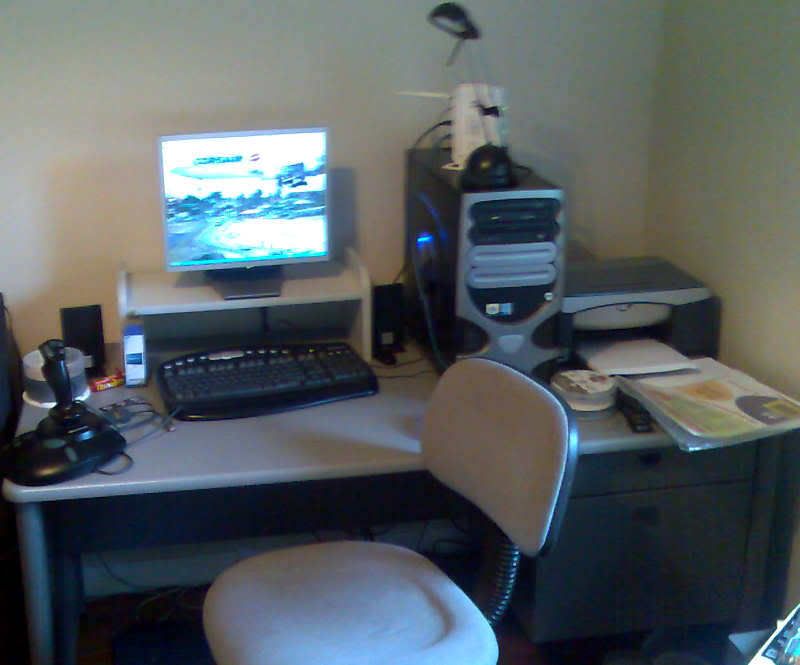
Heres my "cockpit" lol:
user posted image

no this isn't just a brag of how tidy my desk is :rolleyes: :lol: I have to do my school work at it aswell so I keep it reasonably clean (well maby... hehe)

James
Jimmy
 

Postby Alex » Sun Oct 22, 2006 8:45 pm

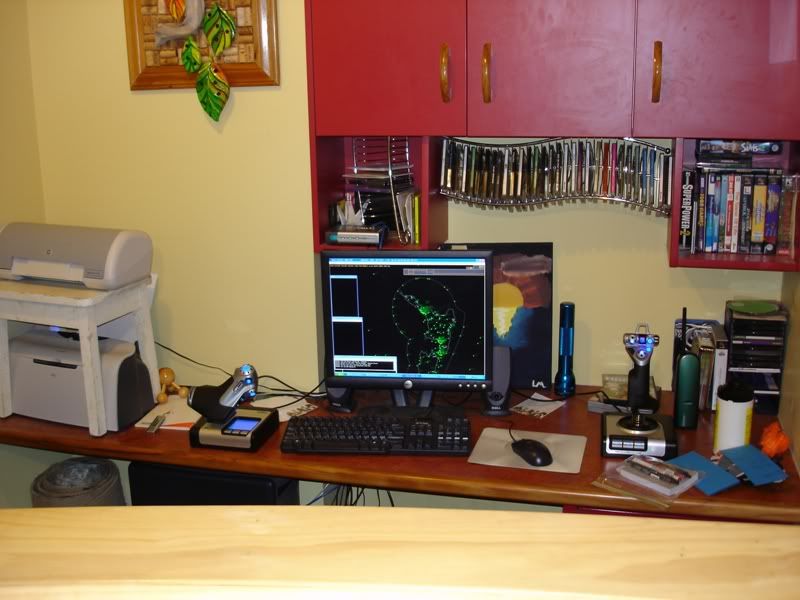
Here is an old-ish picture of mine, just instead of the 'default' ( :P ) Dell keyboard, imagine a snazzy Saitek one. B)

user posted image

Alex
Alex
NZFF Pro
 
Joined: Fri Jul 14, 2006 3:39 pm
Posts: 3620

Postby ZK-MAT » Sun Oct 22, 2006 8:46 pm

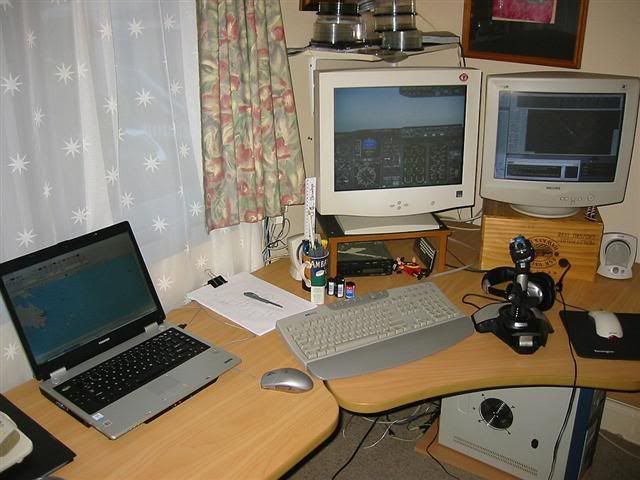
Here's mine, in my garage. Laptop to use messenger, ServeInfo, check charts, browse the net etc. Main screen for the cockpit. Second screen for FS Nav, Squawkbox/chat box, Teamspeak. Note paper to write down what ATC tells me to do, car radio hooked up to speakers to listen to the radio, pirate figure lying on its side (present from the wife lol) and messy disks on shelf full of all sorts of unorganised files.

user posted image

I was at Lawrie's yesterday. If he doesn't post a pic of his room, I will get one next time I'm there... VERY impressive collection of software and DVD's there!
User avatar
ZK-MAT
Senior Member
 
Joined: Sun Apr 30, 2006 11:41 pm
Posts: 1690
Location: Papamoa

Postby towerguy » Sun Oct 22, 2006 10:47 pm

I finally got some photos of mine but I'll have to upload them tomorrow as the wifes asleep now and if I wake her looking for the camera - wellllll.............. :o
CPU- i7 4790K @4.0Gb Cooler- Noctua NH-D15 M/B- Z97 ProGamer P/S- 750W RAM- 16Gb
Graphics- Nvidia GTX970 16Gb Drives- 2x 120Gb SSD Samsung 850EVO, 1x 2Tb HD, 1x DVD-RW
Sound- on M/B Logitec 5.1 surround sound system OS- Win 10 pro , all wrapped in a black Corsair case Display - Panasonic UHD 4k 50" Flatscreen TV.( 3840x2160 Res)
User avatar
towerguy
Sim-holic
 
Joined: Mon Aug 07, 2006 4:27 pm
Posts: 886

Postby bigdogshark62 » Mon Oct 23, 2006 4:04 am

Mine looks pretty much like Alex's, except that I fly in an Airbus Captain's configuration. That means I have the joystick in my left hand, and the throttle in my right. Ergonomically incorrect, true, but I've made it work. :thumbup:
bigdogshark62
 

Postby Zöltuger » Mon Oct 23, 2006 12:07 pm

i've always wondered how difficult it would be to fly an airbus with just your left hand, if you're a right handed captain...
Zöltuger
 

Postby bigdogshark62 » Mon Oct 23, 2006 1:43 pm

You get used to it. Years ago, I had a computer desk that was set up backward. That meant that the mouse had to be on the left instead of the right. It was odd, but I got used to it. I could have switched the buttons, but I didn't think of that at the time.

So, give it a try sometime. Use your left hand. And good luck!
bigdogshark62
 

Postby Zöltuger » Mon Oct 23, 2006 3:03 pm

i would try, but my microsoft sidewinder joystick isn't designed to be used by left handed persons at all

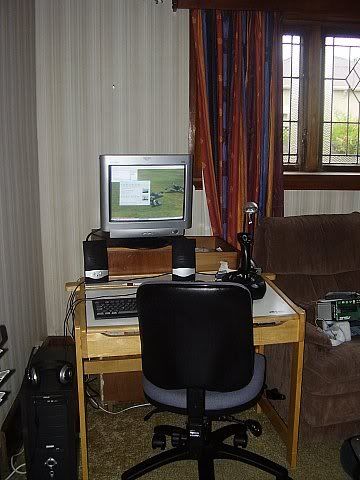
here's my desk...

user posted image
Zöltuger
 

Postby Craig » Mon Oct 23, 2006 3:16 pm

I`m still building my cockpit, once its done ( should be within the next 2 weeks ) i`ll post a pic
Craig
 

Postby brownbox » Mon Oct 23, 2006 8:45 pm

no pictures, cause i got no camera :(

anyways, its a dell inspiron laptop on the dining room table, with a mouse on the right, and a sidewinder 3D Pro on the left.

Nothing fancy for me!
Last edited by brownbox on Mon Oct 23, 2006 8:46 pm, edited 1 time in total.
Desktop:Core 2 Duo E4300 1.8@ 3.0Ghz@ 1.36v. 4Gb Supertalent DDR2-800 2.1v@ 5-5-5-15. Asus P5N-E SLI Pencil Modded. Corsair TX 650. 512MB Palit Geforce 8800GT. 2x200GB IDE+640GB SATAII. Windows Vista Ultimate X86. Samsung SH-S222A
Phone:Nokia N900 Vodafone
Car: 1993 Mitsubishi Mirage Asti Z. Steel Blue Pearl

1996 Toyota Curren 2.0L 5 Spd Manual Silver. 205/50/R16 on Enkei K-95. Lowered on Jamex Superlows. Remote locking. Remote boot release. Cruise control
1996 Mitsubishi GTO MR

Image
User avatar
brownbox
Senior Member
 
Joined: Thu Apr 27, 2006 10:55 pm
Posts: 1318

Postby ardypilot » Tue Oct 24, 2006 3:04 pm

My F'deck:
user posted image
I have no fancey joystick, just a Dick Smith Electronics one. Cost me $30 I think. It has a hat switch and throttle though- it works for me. What is the advantage of the most expensive ones?

I also shot a pick of my room wall with my new huge VNC chart poster for the central north island pinned up on it:
user posted image
Last edited by ardypilot on Tue Oct 24, 2006 3:51 pm, edited 1 time in total.
User avatar
ardypilot
NZFF Pro
 
Joined: Wed Apr 26, 2006 10:01 am
Posts: 6802
Location: Auckland

Postby HardCorePawn » Tue Oct 24, 2006 6:17 pm

Here is the 'tidy' flightdeck... I cleaned it up especially for the pic :D

I would love to upgrade to something larger than 15" LCD's, but they were free and take up lots less room on the desk than the 17" CRT sitting on my floor B)

What is the advantage of the most expensive ones?


Well I got my Sidewinder Precision 2 on trademe for like $20 2nd hand... i wanted something that had a 'twist grip' so I had rudder controls. It doesnt have force feedback but no great loss. Still waiting (after 7 1/2 weeks) for my CH Yoke/Pedals from Ebay, I think the package has got lost in the post :unsure: :( :angry:

user posted image
"Son, we are about the break the surly bonds of gravity, and punch the face of God." -- Homer Simpson

Image
User avatar
HardCorePawn
Senior Member
 
Joined: Fri Sep 01, 2006 4:18 pm
Posts: 1277
Location: 2500' above Godzone

Postby Craig » Tue Oct 24, 2006 7:02 pm

HardCorePawn wrote:Still waiting (after 7 1/2 weeks) for my CH Yoke/Pedals from Ebay, I think the package has got lost in the post  :unsure: :( :angry:

Your gunna LOVE my flightdeck CH Flight Sim Yoke, CH ProPedals, 2 GoFlight (GF-T8) Toggle Switch Modules & GoFlight (GF-166) Versatile Radio Panel, next week my CH Throttle Quadrant will be on its way B)
Craig
 

Postby brownbox » Tue Oct 24, 2006 7:35 pm

CH Flight Sim Yoke, CH ProPedals, 2 GoFlight (GF-T8) Toggle Switch Modules & GoFlight (GF-166) Versatile Radio Panel, next week my CH Throttle Quadrant will be on its way


are you sure your not flying a real plane? :lol:
Last edited by brownbox on Tue Oct 24, 2006 7:37 pm, edited 1 time in total.
Desktop:Core 2 Duo E4300 1.8@ 3.0Ghz@ 1.36v. 4Gb Supertalent DDR2-800 2.1v@ 5-5-5-15. Asus P5N-E SLI Pencil Modded. Corsair TX 650. 512MB Palit Geforce 8800GT. 2x200GB IDE+640GB SATAII. Windows Vista Ultimate X86. Samsung SH-S222A
Phone:Nokia N900 Vodafone
Car: 1993 Mitsubishi Mirage Asti Z. Steel Blue Pearl

1996 Toyota Curren 2.0L 5 Spd Manual Silver. 205/50/R16 on Enkei K-95. Lowered on Jamex Superlows. Remote locking. Remote boot release. Cruise control
1996 Mitsubishi GTO MR

Image
User avatar
brownbox
Senior Member
 
Joined: Thu Apr 27, 2006 10:55 pm
Posts: 1318

Postby Craig » Tue Oct 24, 2006 8:15 pm

brownbox wrote:
CH Flight Sim Yoke, CH ProPedals, 2 GoFlight (GF-T8) Toggle Switch Modules & GoFlight (GF-166) Versatile Radio Panel, next week my CH Throttle Quadrant will be on its way


are you sure your not flying a real plane? :lol:

LOL, i`m not finished yet :drool:
Craig
 

Postby AlisterC » Tue Oct 24, 2006 8:18 pm

When you spend as many hours on a sim as I do (or as many as I do on other admin aspects)... you might as well be comfortable!
I play the sim on the 17 inch crt as I think it looks better, and plays smoother.
Yes the yoke and pedals are great :bow: :D

user posted image
Image
User avatar
AlisterC
NZFF Pro
 
Joined: Thu Jul 20, 2006 11:13 am
Posts: 2543
Location: Nelson, NZ

Postby Jimmy » Tue Oct 24, 2006 8:33 pm

Some nice setups here. :thumbup:

I think you have the same monitor as me Alister , is it the compaq 7500? :lol:

I see quite a few of you have two monitors, I may go try and find myself a old cheap tv and plug it in to the s-vid output haha, I think ill make myself a new desk as you can see iv got quite limited space there and my monitor is like 50miles away from my face lol

Iv got some good ideas looking at all these, and Its been a good opertunity for us all to tidy up our desks :clap:

James
Jimmy
 

Postby AlisterC » Wed Oct 25, 2006 8:39 am

I think you are right, it is a Compaq 7500. It's just on loan to me at the moment unfortunately. But, when I get a new computer I'll be able to offer it back to it's owner. It's a good monitor though, I'd rather keep it than go the way of lcd screens. I've been offering to buy it off my friend for months :P
Image
User avatar
AlisterC
NZFF Pro
 
Joined: Thu Jul 20, 2006 11:13 am
Posts: 2543
Location: Nelson, NZ

Postby Zöltuger » Wed Oct 25, 2006 10:20 am

Albatross wrote: I play the sim on the 17 inch crt as I think it looks better, and plays smoother.

CRTs do have some advantages over LCDs- they reproduce colour better, they don't suffer the same motion blur problems, and they look sharp at any resolution.

but having used an LCD for the past 2 years, i would never ever go back to CRT. they're bulky, consume more power, produce crisper text and modern LCDs don't suffer from any motion blurring. in fact, i get headaches whenever i use a CRT...
Zöltuger
 

Postby Craig » Fri Oct 27, 2006 7:32 pm

Crazy`s Flight deck

The goodies: CH Flight Sim Yoke, CH ProPedals, 2 GoFlight (GF-T8) Toggle Switch Modules , GoFlight (GF-166) Versatile Radio Panel and a Logitech Wingman Extreme :D

user posted image

user posted image

:thumbup: :thumbup:

AND there`s more coming :drool: :drool:
Last edited by Craig on Sat Nov 11, 2006 5:35 pm, edited 1 time in total.
Craig
 

Next

Return to General

Who is online

Users browsing this forum: No registered users and 10 guests