Howdy,
Find out here.
Scroll down to the second to last link and benchmark your rig (Warning: link works only with the default IE browser). Was surprised to find my rig is in the 16% range (at least of those tested); I know I need to upgrade my video card to something capable of handling DirectX 9.
Will your rig run FSX?
18 posts
• Page 1 of 1

 by toprob » Tue Oct 17, 2006 9:40 am
Mine failed the test -- not enough disc space, but luckily I already have FSX installed.
Hmm, I'm in the top 12%, which confirms my suspicions that there are a lot of folk with very similar systems, or worse, who are going to struggle to enjoy their FSX.
Hmm, I'm in the top 12%, which confirms my suspicions that there are a lot of folk with very similar systems, or worse, who are going to struggle to enjoy their FSX.
-

toprob - NZFF Pro
- Joined: Sat Apr 29, 2006 4:56 pm
- Posts: 6741
- Location: Upper Hutt
by ZK-MAT » Tue Oct 17, 2006 11:25 am
After dealing with the devil and using IE ('you have to install this active x control as your system is too secure... install it so it's no longer secure and we'll add some backdoor into your system so we can see what you've got, then bring out an important security update in a few weeks to patch the hole ' .. but I digress )
I show in the top 8%
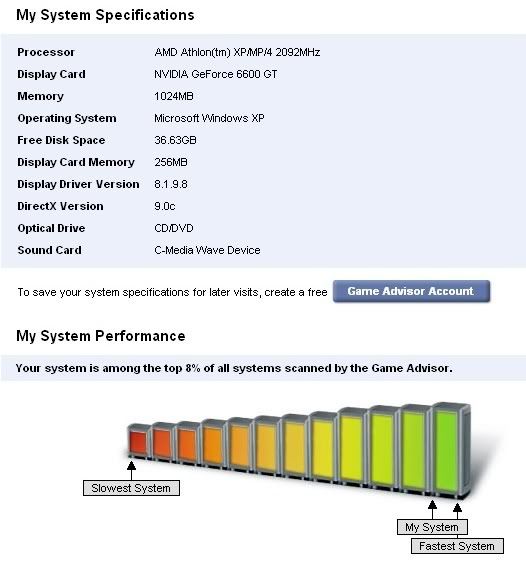
I show in the top 8%
-

ZK-MAT - Senior Member
- Joined: Sun Apr 30, 2006 11:41 pm
- Posts: 1690
- Location: Papamoa
by ZK-MAT » Tue Oct 17, 2006 3:16 pm
Just thought I would try it with the laptop, and cannot get to the page now - just a 'runtime' error page. Anyone else tried?
edit:
My laptop won't even load the web page, it's fine on the desktop, so I guess portable FSXing is out lol
edit:
My laptop won't even load the web page, it's fine on the desktop, so I guess portable FSXing is out lol
Last edited by ZK-MAT on Tue Oct 17, 2006 4:31 pm, edited 1 time in total.
-
ZK-MAT - Senior Member
- Joined: Sun Apr 30, 2006 11:41 pm
- Posts: 1690
- Location: Papamoa
by FlyingKiwi » Tue Oct 17, 2006 4:28 pm
My results for FSX are almost on top of the "fastest system" arrow so I should be all set. 
-

FlyingKiwi - Senior Member
- Joined: Mon May 29, 2006 4:17 pm
- Posts: 1690
- Location: Auckland
by Jimmy » Tue Oct 17, 2006 4:40 pm
Well heres a great example you can't trust these things:
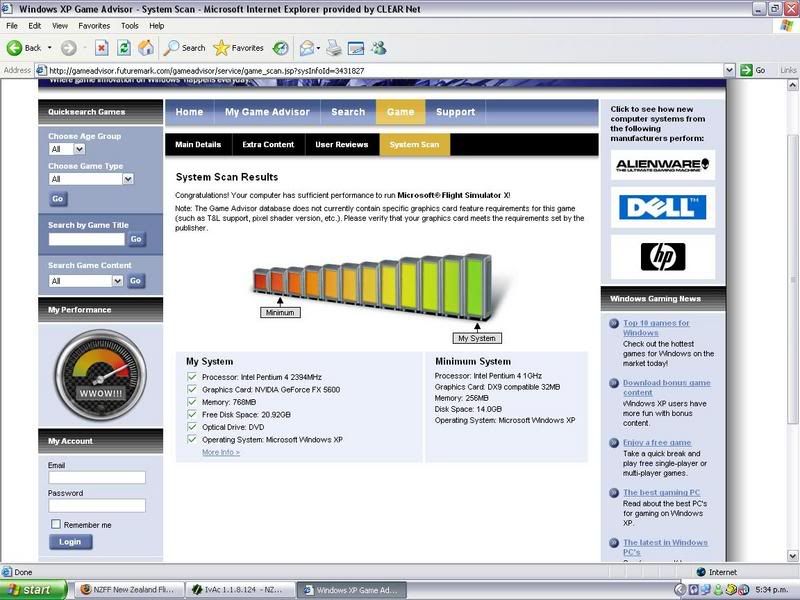
So im in the top 23% it said when I took the "more info" link.
so ill be able to run it ae? I think ill get anothor harddrive sometime in november then after that get more RAm then a better vid card Ill get there one day....
James
So im in the top 23% it said when I took the "more info" link.
so ill be able to run it ae? I think ill get anothor harddrive sometime in november then after that get more RAm then a better vid card
Ill get there one day....James
- Jimmy
by ardypilot » Tue Oct 17, 2006 5:03 pm
Pfft! I am not going to even try loading that test on my 2.4ghz celaron
My new Intel 6300 core2duo (which arrived in 5 weeks) should be sweet though, not that I will be getting FSX for a loooooong time yet. I'm still rather synical about it
My new Intel 6300 core2duo (which arrived in 5 weeks) should be sweet though, not that I will be getting FSX for a loooooong time yet. I'm still rather synical about it
-

ardypilot - NZFF Pro
- Joined: Wed Apr 26, 2006 10:01 am
- Posts: 6802
- Location: Auckland
by towerguy » Tue Oct 17, 2006 10:18 pm
I dont think I'll try the test just yet but I bought this months APC computer mag as its got the demo on the free dvd - so I'll give that a try for a few days first on all the settings.
CPU- i7 4790K @4.0Gb Cooler- Noctua NH-D15 M/B- Z97 ProGamer P/S- 750W RAM- 16Gb
Graphics- Nvidia GTX970 16Gb Drives- 2x 120Gb SSD Samsung 850EVO, 1x 2Tb HD, 1x DVD-RW
Sound- on M/B Logitec 5.1 surround sound system OS- Win 10 pro , all wrapped in a black Corsair case Display - Panasonic UHD 4k 50" Flatscreen TV.( 3840x2160 Res)
Graphics- Nvidia GTX970 16Gb Drives- 2x 120Gb SSD Samsung 850EVO, 1x 2Tb HD, 1x DVD-RW
Sound- on M/B Logitec 5.1 surround sound system OS- Win 10 pro , all wrapped in a black Corsair case Display - Panasonic UHD 4k 50" Flatscreen TV.( 3840x2160 Res)
-

towerguy - Sim-holic
- Joined: Mon Aug 07, 2006 4:27 pm
- Posts: 886
by HardCorePawn » Wed Oct 18, 2006 10:35 am
well its not completely inaccurate.... it rated my work laptop (1.3Gig Centrino with 1Gig Ram and ATI Mobility Radeon 9600) as being in the top 61%  but considering my lappy gets around 10fps on FS2004, i'm dont think this machine will see FSX anytime soon
also, this warning on that website concerns me:
considering that the GPU is going to play such a huge part in whether or not you get decent performance...
but considering my lappy gets around 10fps on FS2004, i'm dont think this machine will see FSX anytime soon also, this warning on that website concerns me:
Note: The Game Advisor database does not currently contain specific graphics card feature requirements for this game (such as T&L support, pixel shader version, etc.). Please verify that your graphics card meets the requirements set by the publisher
considering that the GPU is going to play such a huge part in whether or not you get decent performance...
"Son, we are about the break the surly bonds of gravity, and punch the face of God." -- Homer Simpson

-

HardCorePawn - Senior Member
- Joined: Fri Sep 01, 2006 4:18 pm
- Posts: 1277
- Location: 2500' above Godzone
by Zöltuger » Thu Oct 19, 2006 3:57 pm
just installed the FSX prerelease demo onto my laptop (Centrino 1.8GHz, 448MB memory, intel 64MB graphics), and in some ways its better than on my significantly faster desktop.
the 747 for instance on approach in the mission was facing the other way, there were birds on the approach, and the luggage cart didn't magically disappear when viewed from certain angles.
mind you, i did have everything on minimum, and i couldn't see out of the virtual cockpit. but it still managed 15fps...
the 747 for instance on approach in the mission was facing the other way, there were birds on the approach, and the luggage cart didn't magically disappear when viewed from certain angles.
mind you, i did have everything on minimum, and i couldn't see out of the virtual cockpit. but it still managed 15fps...
- Zöltuger

by brownbox » Fri Oct 20, 2006 7:37 am
my laptop had 62% of computers better than it. Not too bad I guess 
Desktop:Core 2 Duo E4300 1.8@ 3.0Ghz@ 1.36v. 4Gb Supertalent DDR2-800 2.1v@ 5-5-5-15. Asus P5N-E SLI Pencil Modded. Corsair TX 650. 512MB Palit Geforce 8800GT. 2x200GB IDE+640GB SATAII. Windows Vista Ultimate X86. Samsung SH-S222A
Phone:Nokia N900 Vodafone
Car:1993 Mitsubishi Mirage Asti Z. Steel Blue Pearl
1996 Toyota Curren 2.0L 5 Spd Manual Silver. 205/50/R16 on Enkei K-95. Lowered on Jamex Superlows. Remote locking. Remote boot release. Cruise control
1996 Mitsubishi GTO MR

Phone:Nokia N900 Vodafone
Car:
1996 Mitsubishi GTO MR
-

brownbox - Senior Member
- Joined: Thu Apr 27, 2006 10:55 pm
- Posts: 1318
by TyphoonNZ » Mon Oct 23, 2006 10:40 pm
We imported FSX direct from the US over a week ago, our stock sold out straight away, like in 3 hours, so many of our NZ customers have been playing it for over a week.
I've finally got around to bench testing it on 2 Machines:
Intel Dual Core 2.8GHz
1GB Corsair XMS2 DDR2 667
Nvidia 7600GT PCI-E 256MB
Ran like crap, to get a descent framerate it looked like FS9, but still very enjoyable.
Really struggled on loading times.
2nd PC:
Intel Core2Duo E6600 4mb Cache
2GB Corsair XMS2 DDR2 667
Nvidia 7900GT PCI-E 256MB
2 x 74GB 10,000rpm WD Raptors running a Raid-0
Now this was good, running 1920x1200 in a Dell 24" LCD, GFX cranked rather high, 30cm Textures and a 20meter Mesh, this was extremely playable, and overall I give it the big thumbs up, I'll never load FS9 again, seriously, I was very impressed.
Network/Internet Code is extremly good, and collisions detecion is exceptional.
Addional features I thought were rather well done and unexpected:
Wings flexing under load, especially the Glider.
General Interface is very clean and easy to manage.
Flight Planning is very simple, and great for multiplayer.
General Feel was very good, already clocked up near 30 hours over long weekend.
Now, I have a m8 running the exact same system as above, but with a AMD X2 4200+, and he is most disappointed, I'll repeat, MOST DISAPPOINTED. Regardless what he does, he just can't get the frames, or the GFX. My personal recommendation to get great benifit is:
Recommended CPU: Intel Core2Duo E6600, that 4mb L2 cache makes an HUGE difference in crunching the vectors for that scenary.
Recommended Ram: 2GB (667 does have better latencys then 800, and the C2D only needs 533)
MINIMUM GFX: Nvidia 7900GT - Recommended 7900GTX if you can afford it.
If your specs are any lower than these, you will get better performance from FS9 until Vista's DX10, or XP's DX9L equipment is released.
I've finally got around to bench testing it on 2 Machines:
Intel Dual Core 2.8GHz
1GB Corsair XMS2 DDR2 667
Nvidia 7600GT PCI-E 256MB
Ran like crap, to get a descent framerate it looked like FS9, but still very enjoyable.
Really struggled on loading times.
2nd PC:
Intel Core2Duo E6600 4mb Cache
2GB Corsair XMS2 DDR2 667
Nvidia 7900GT PCI-E 256MB
2 x 74GB 10,000rpm WD Raptors running a Raid-0
Now this was good, running 1920x1200 in a Dell 24" LCD, GFX cranked rather high, 30cm Textures and a 20meter Mesh, this was extremely playable, and overall I give it the big thumbs up, I'll never load FS9 again, seriously, I was very impressed.
Network/Internet Code is extremly good, and collisions detecion is exceptional.
Addional features I thought were rather well done and unexpected:
Wings flexing under load, especially the Glider.
General Interface is very clean and easy to manage.
Flight Planning is very simple, and great for multiplayer.
General Feel was very good, already clocked up near 30 hours over long weekend.
Now, I have a m8 running the exact same system as above, but with a AMD X2 4200+, and he is most disappointed, I'll repeat, MOST DISAPPOINTED. Regardless what he does, he just can't get the frames, or the GFX. My personal recommendation to get great benifit is:
Recommended CPU: Intel Core2Duo E6600, that 4mb L2 cache makes an HUGE difference in crunching the vectors for that scenary.
Recommended Ram: 2GB (667 does have better latencys then 800, and the C2D only needs 533)
MINIMUM GFX: Nvidia 7900GT - Recommended 7900GTX if you can afford it.
If your specs are any lower than these, you will get better performance from FS9 until Vista's DX10, or XP's DX9L equipment is released.
Last edited by TyphoonNZ on Mon Oct 23, 2006 10:42 pm, edited 1 time in total.
- TyphoonNZ
by toprob » Tue Oct 24, 2006 9:44 am
TyphoonNZ wrote:
Recommended CPU: Intel Core2Duo E6600, that 4mb L2 cache makes an HUGE difference in crunching the vectors for that scenary.
Recommended Ram: 2GB (667 does have better latencys then 800, and the C2D only needs 533)
MINIMUM GFX: Nvidia 7900GT - Recommended 7900GTX if you can afford it.
That's exactly the specifications which beta testers were reporting good performance -- nothing else even came close.
Now if I keep my old monitor and DVD writer, I could just about get this system for under $3,000. However, I do think that I might be happier, budget-wise, to wait six months at least.
Last edited by toprob on Tue Oct 24, 2006 9:45 am, edited 1 time in total.
-
toprob - NZFF Pro
- Joined: Sat Apr 29, 2006 4:56 pm
- Posts: 6741
- Location: Upper Hutt
by Jimmy » Tue Oct 24, 2006 2:04 pm
So my p4 2.40ghz and fx5600 (witch doesnt seem to be working very wel) is gana strugle a wee bit with fsx then
I stll can't figure out why I managed to get like 17fps on my old 1ghz pc with same vid card ,Maby that video card really liked my old pc..... I dont even get that in fs9much anymore.....
I stll can't figure out why I managed to get like 17fps on my old 1ghz pc with same vid card ,Maby that video card really liked my old pc..... I dont even get that in fs9much anymore.....
Last edited by Jimmy on Tue Oct 24, 2006 2:05 pm, edited 1 time in total.
- Jimmy
by Zöltuger » Tue Oct 24, 2006 3:23 pm
if you can run the demo, you can run the full version. sure you'll have to comprimise on graphics once you load it up with add-ons, but that's what new software is about- pushing the limits of hardware.
especially when vista comes along and bumps the system requirements up another notch.
keep enjoying FS9, but start saving now for a new PC now.
especially when vista comes along and bumps the system requirements up another notch.
keep enjoying FS9, but start saving now for a new PC now.
Last edited by Zöltuger on Tue Oct 24, 2006 3:26 pm, edited 1 time in total.
- Zöltuger
by Zöltuger » Wed Oct 25, 2006 12:40 pm
here's a blog entry by the FSX technical art lead, responding to criticism about how people can't set their sliders to full:
====================================================
So I got this comment from my FSX FAQ about why you can't turn all the sliders up:
"It really bothers me to see MS design a game for hardware two years out. I want to play the game today (when I bought and PAID for it), not two years from now.
Do users complain that with their latest hardware that FS2004 runs too smoothly, frame rates are too fast and and it just looks too good?
You don't see console game designers selling games for the next generation of consoles and when the performance stinks telling the users "Just wait for the next console and it will look great"."
And this is something that's currently all over the Amazon.com reviews of the product and I think it's going to be something that is all over PC games in general over the next few years. And here's my response:
YOU CAN PLAY THE GAME TODAY ON YOUR CURRENT HARDWARE! IN FACT, YOU CAN PLAY THE GAME ON YOUR CURRENT FIXED FUNCTION PIPELINE 32 MEG GRAPHICS CARD HARDWARE! Sorry to yell, but this just drives me crazy. Your hardware determines what kind of experience you have, but the game will play smoothly on a variety of machines all the way from the low end to the high end. We do tons of performance testing to ensure that is the case. Heck, I couldn't turn up all the sliders on Half-Life 2, but I still got an amazingly fun and beautiful experience.
Okay, so you can't turn up all the settings on everything and expect to get perfect performance. But we do that for a reason, because 2 years after every game released this year is in the trash, Flight Simulator X will still be on many, many people's hard drives and will be used often. Additionally, Flight Simulator is a huge product with a huge number of possible settings (just wade through our dialogs for a while and you'll see). If you like weather and water, you can make those look amazing. If you like lots of trees and buildings, you can turn up the autogen. If you like a dynamic living world, you can turn on all the road, water and airport traffic. Or you can do what I do, turn on a little bit of everything. On my dual core Athlon x64 4200, Geforce 6800, 2 gig of ram machine, I can get an amazingly beautiful flying experience. I can turn up the autogen about halfway, turn up all the effects settings and bloom and glint, have a small amount of moving traffic and still get smooth flying. And I also know that when I get Vista with a new DX10 card, I will likely be able to turn things up even higher and still get great performance (provided all the promises are true).
Part of the success of our franchise is because we don't cap everything at exactly what the current top of the line hardware can handle. As hardware gets better and better, so does our product. Because we have such a long shelf-life, there would be nothing discoverable for users if we capped everything to current hardware standards.
So my question to you:
Would you rather we capped the experience just so you can turn up all the sliders on current hardware?
I guess if we did that, then we could just release a new version every time there's a hardware upgrade and we wouldn't even have to do any work. We could just make the sliders go higher each time...
Yeah, but these go to 11.
====================================================
So I got this comment from my FSX FAQ about why you can't turn all the sliders up:
"It really bothers me to see MS design a game for hardware two years out. I want to play the game today (when I bought and PAID for it), not two years from now.
Do users complain that with their latest hardware that FS2004 runs too smoothly, frame rates are too fast and and it just looks too good?
You don't see console game designers selling games for the next generation of consoles and when the performance stinks telling the users "Just wait for the next console and it will look great"."
And this is something that's currently all over the Amazon.com reviews of the product and I think it's going to be something that is all over PC games in general over the next few years. And here's my response:
YOU CAN PLAY THE GAME TODAY ON YOUR CURRENT HARDWARE! IN FACT, YOU CAN PLAY THE GAME ON YOUR CURRENT FIXED FUNCTION PIPELINE 32 MEG GRAPHICS CARD HARDWARE! Sorry to yell, but this just drives me crazy. Your hardware determines what kind of experience you have, but the game will play smoothly on a variety of machines all the way from the low end to the high end. We do tons of performance testing to ensure that is the case. Heck, I couldn't turn up all the sliders on Half-Life 2, but I still got an amazingly fun and beautiful experience.
Okay, so you can't turn up all the settings on everything and expect to get perfect performance. But we do that for a reason, because 2 years after every game released this year is in the trash, Flight Simulator X will still be on many, many people's hard drives and will be used often. Additionally, Flight Simulator is a huge product with a huge number of possible settings (just wade through our dialogs for a while and you'll see). If you like weather and water, you can make those look amazing. If you like lots of trees and buildings, you can turn up the autogen. If you like a dynamic living world, you can turn on all the road, water and airport traffic. Or you can do what I do, turn on a little bit of everything. On my dual core Athlon x64 4200, Geforce 6800, 2 gig of ram machine, I can get an amazingly beautiful flying experience. I can turn up the autogen about halfway, turn up all the effects settings and bloom and glint, have a small amount of moving traffic and still get smooth flying. And I also know that when I get Vista with a new DX10 card, I will likely be able to turn things up even higher and still get great performance (provided all the promises are true).
Part of the success of our franchise is because we don't cap everything at exactly what the current top of the line hardware can handle. As hardware gets better and better, so does our product. Because we have such a long shelf-life, there would be nothing discoverable for users if we capped everything to current hardware standards.
So my question to you:
Would you rather we capped the experience just so you can turn up all the sliders on current hardware?
I guess if we did that, then we could just release a new version every time there's a hardware upgrade and we wouldn't even have to do any work. We could just make the sliders go higher each time...
Yeah, but these go to 11.
Last edited by Zöltuger on Wed Oct 25, 2006 1:00 pm, edited 1 time in total.
- Zöltuger
18 posts
• Page 1 of 1
Return to All Flight Simulators
Who is online
Users browsing this forum: No registered users and 13 guests