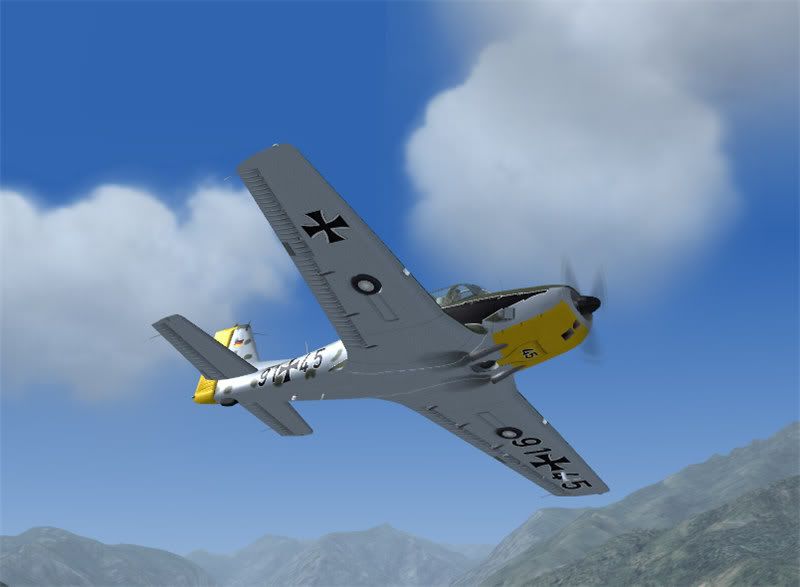
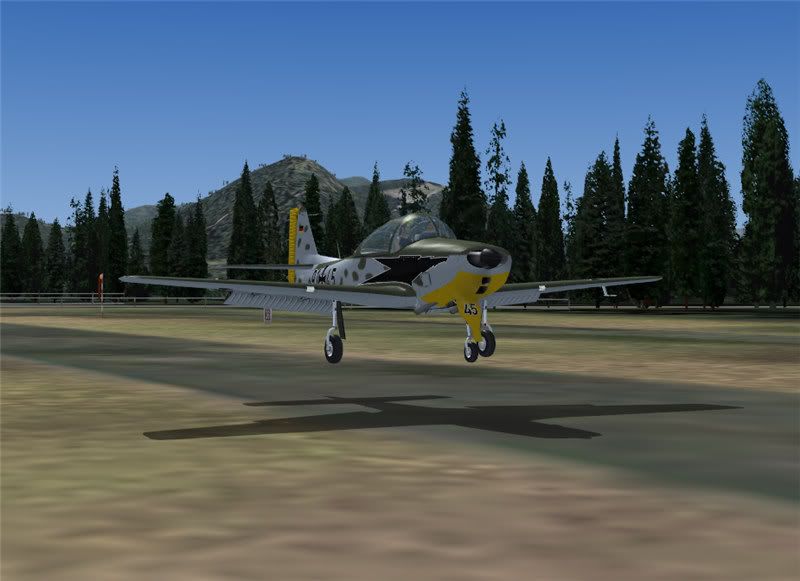
Another day, another paint

Post and comment on screen captures from the beautiful game here. Home of the monthly screenshot competition

Postby Cbris » Mon Sep 18, 2006 7:05 am

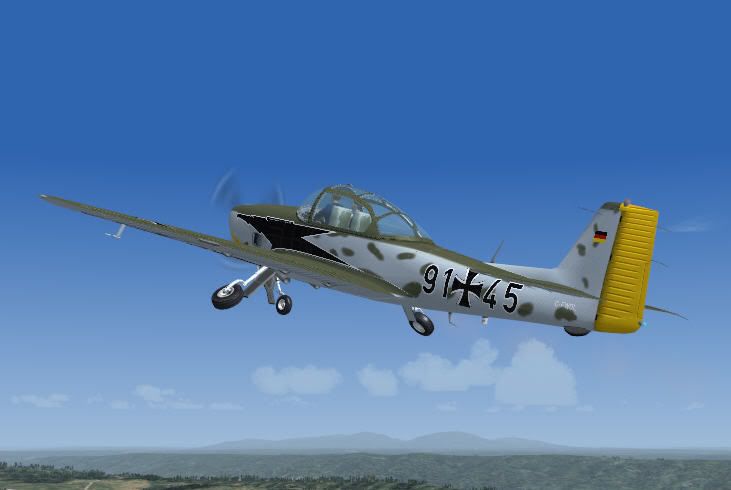
I've been having a bit of fun today - with the freeware Piaggio P149D by Mario Noriega. For a freeware plane, it's quite fun. A good fly, but a bit strange in loops - it goes haywire. Maybe the real plane wasn't intended to loop, or the air file is a wee bit messed up. But either way, she's a grand wee plane and very enjoyable to fly in a gentle manner.

Avsim: get it here

There's also a first bugfix:

Avsim: get it here

My paint: texture.cfwol.zip (once it goes live in a few hours)

user posted image

user posted image

user posted image
Chris Brisland a.k.a. 'EagleSkinner' or 'Dances with Paintbrushes'

Visit my site below (Click the pic) for all my latest FSX paints and much more

Image

Drop by my blog sometime

[url=http://www.facebook.com/christopher.brisland?ref=name#!/pages/Eagleskinner/119483578109942]Follow me on Facebook too[/url]
User avatar
Cbris
Forum Addict
 
Topic author
Joined: Sat Aug 12, 2006 9:43 pm
Posts: 399
Location: EGNE - well, 7 1/2 miles from threshhold of 03

Postby Jimmy » Sat Sep 23, 2006 3:18 pm

You did that in a single day!
What do you use for your repainting? I'm considering buying abascus repaint as my last repaint took over 4weeks and I still didn't have the strips lined up properly :wacko:
Jimmy
 

Postby Cbris » Sat Sep 23, 2006 6:45 pm

Jimmy wrote: You did that in a single day!
What do you use for your repainting? I'm considering buying abascus repaint as my last repaint took over 4weeks and I still didn't have the strips lined up properly :wacko:

Hi Jimmy,

What do I use? Ideas ;) some paints take me longer (look for the Piper Cheyenne "Hawke's Bay" and the "HB-LNL" both shown here - they took together seven weeks for lack of ideas)

But in general you can do paints in relatively short order once you have familiarised yourself with the paintkit - and you have done about fifty... you practice, you get better, you know the shortcuts and methods.

Nothing against the Abacus aircraft repaint software, but it is limited - with practice you can do almost as good in Windows paint and using a freebie software called DXTbmp from mnwright (in fact you should have this anyway - it's great for looking at other paints in your aircraft directory to see things like the alpha channels or how the original maker ordered his images - and of course for converting your paint jobs to the required DXT format for Flightsim)

But what do I use? Corel Photopaint and Corel Draw and I have been using these for ten years. I can open a paintkit here and work on it to my heart's content. It is a question of money though. The pros use Adobe Photoshop - and that is expensive. you can also get older versions of Corel Draw relatively cheap - I think Corel Draw 10 can be had for about 60 dollars US. For that price, it is worth having and a thousand times more versatile than the Abacus painter.

Here's a thought for you and all who are thinking of painting. There's a freeware "Photoshop" quality software called GIMP. It is freeware because it is open source. From what I can judge, it does everything you can do in Photoshop and more. The snag is, it's modular - you have to more or less put it together yourself.

Find out more here

A sort of "Linux" for graphic artists.

BTW - how to line up the paintstripes? Difficult, but once you have a method, it's a piece of cake. One of my methods is to copy the relevant aircraft sections (fuselage) to a new image and line these up first. Paint the stripe along "both" sections and cut it along the join. Then copy paste the fuselage sections back to the originals.

Any fine tuning is then done by having FS9 open with that plane, taking a close look and going back to the paint and moving the misaligned bit, saving, copying to FS9 and rebuilding the aircraft using the FS9 "refresh". You can do it on the fly that way.
Chris Brisland a.k.a. 'EagleSkinner' or 'Dances with Paintbrushes'

Visit my site below (Click the pic) for all my latest FSX paints and much more

Image

Drop by my blog sometime

[url=http://www.facebook.com/christopher.brisland?ref=name#!/pages/Eagleskinner/119483578109942]Follow me on Facebook too[/url]
User avatar
Cbris
Forum Addict
 
Topic author
Joined: Sat Aug 12, 2006 9:43 pm
Posts: 399
Location: EGNE - well, 7 1/2 miles from threshhold of 03

Postby Jimmy » Sat Sep 23, 2006 7:52 pm

Hi there Cbris
thanks for the tips :D

Yes I use dxt and photoshop, I downloaded GIMp once but gave up on it for all its confusing windows for everything, I think I need a bigger monitor to use GIMP :lol:

Yea I do the same with the texture palet, like with IFDG's a320 fuse textures cos there divided into four. With the partenaiva I did it had the fuse divided in to just two, one for each ac side, getting the stripes lined up at front and back was a bit beyond me, I measured the number of pixels from the top of the fuse to the first pixel of red in the strip on the texturepalet and got it perfectly the same height yet they still had a noticable unalignment (is that a word?) in fs :blink:

Oh and how do you refresh fs9? I tried "refresh ac" but that didn't work ,I actuly exit it and restart! A little frustrating when it takes 10mins to start up lol I like to do heaps of little adjustments and look at them all at once, kind of like a end of day check :P

Thanks
James
Jimmy
 

Postby Cbris » Sat Sep 23, 2006 8:46 pm

Refresh:

(I am afraid I use a German language version so I am not sure of the English names for things) go to the FS9 optins menu where you set the joystick commands and so on. Search through the list and look for the refresh aircraft command - there's one for refresh scenery too by the way.

Allocate a new keyboard command for this (it's empty by default)

I guess you know that from what you say though.

It doesn't work all the time for me - there seem to be limitations as to when and where or what you are doing. Perhaps you have to be unpaused while refreshing. So if that doesn't work, I simply select a new aircraft, unpause for a microsecond and return to the one I am painting. Saves killing and restarting.

Another bugbear is that some makers make different parts of the plane to different scales - the pax door on the Cheyenne is one such.

Yet another bugbear is antialiasing in a photoeditor - bend a shape and it blurs. I try to create stripes and shapes in Corel Draw - that way they are scaleable graphics. Then I copy them to paint.

The whole painting issue is really fraught with pitfalls - it would be better if the makers gave us their 3D models and we painted directly on these. But no maker is going to release his code for free...

On some paintkits you have "identical" images for left and right - that way you can copy and paste from one to the other and place the copied bits pixel perfect using the position tool. Or they are "flipped" in whichcase you do some mental maths and subtract from 1024...

Yep - GIMP is confusing to a first timer - and yep - two monitors helps. Two PCs is better with four monitors - I fly on one and paint on the other, sending repainted bits from paint to FS9 and back. OK, I only have two PCs because I built a new one for Visty / FSX and didn't want to throw the old one (still pretty capable) away.

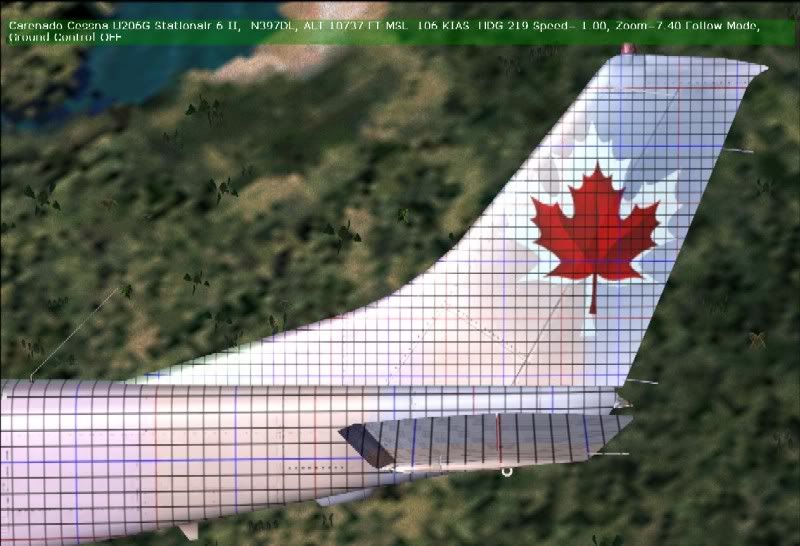
Another trick to keep in the back of your mind for the more complex paintkits: Sometimes I take the "white" model and place a one pixel black lined (10 pixel separation) grid over the whole plane. Every tenth line is red, every fifth blue. That gives you a "gridded" plane to make screenshots from. Erm... let me see, I think I have one on photobucket.... Ah! here's one:
user posted image

As you can see, I also added faint colour swatches here too. Gives extra reference points. As you can see, there's a lot more than even I know, but what I know already would fill a boring book.
Chris Brisland a.k.a. 'EagleSkinner' or 'Dances with Paintbrushes'

Visit my site below (Click the pic) for all my latest FSX paints and much more

Image

Drop by my blog sometime

[url=http://www.facebook.com/christopher.brisland?ref=name#!/pages/Eagleskinner/119483578109942]Follow me on Facebook too[/url]
User avatar
Cbris
Forum Addict
 
Topic author
Joined: Sat Aug 12, 2006 9:43 pm
Posts: 399
Location: EGNE - well, 7 1/2 miles from threshhold of 03


Return to Screenshots

Who is online

Users browsing this forum: Google Adsense [Bot] and 22 guests