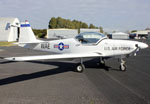
This is the NZ One ( skydive roto`s ) pac high over the field
100% ad-free
 by Craig » Sat Aug 19, 2006 12:53 pm
Charl wrote: Wow I've been looking for PAC stuff!
What's the model?
 .
.by ardypilot » Sat Aug 19, 2006 11:19 pm

by Craig » Sat Aug 19, 2006 11:21 pm
Trolly wrote: Nice work Craig, if only Mike Stone's models had those 'dynamic reflections'
BTW, does anyone know how to make repaints "shiny", do you just have to add an alpha layer or something...?
Plus, where can we grad your PAC750 repaints?

by Craig » Sun Aug 20, 2006 12:52 pm
by Postalvote » Wed Sep 06, 2006 5:28 am

 .
.by Cbris » Wed Sep 06, 2006 5:58 pm
Trolly wrote: Nice work Craig, if only Mike Stone's models had those 'dynamic reflections'
BTW, does anyone know how to make repaints "shiny", do you just have to add an alpha layer or something...?
Plus, where can we grad your PAC750 repaints?


Users browsing this forum: No registered users and 56 guests