Where has this weird file come from?

The place to ask for help or solve each others technical issues and discuss hardware

Postby Eagleeye » Thu Jun 26, 2014 9:11 am

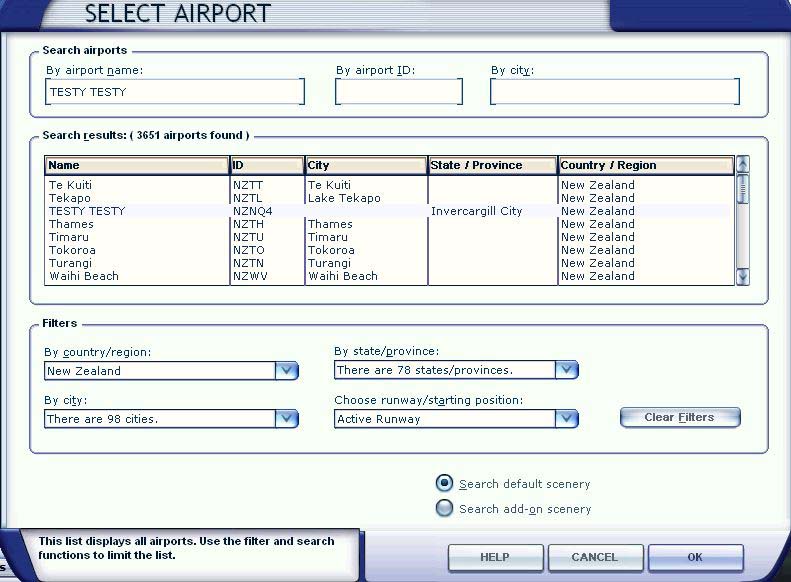
Well guys I have a bit of a head scratcher for you. Over the past couple of weeks I have been adding AVSim and VLC scenery & airports around New Zealand to my scenery library. The other day I notice a strange entry 'TESTY TESTY' in my FSX 'Select Airport' page.
If I go to it, it places the aircraft amongst trees on sloping ground. The really strange thing is I can't see this entry either in my FSX 'Scenery Library' or in my FSX directory on my SSD. It says 'Invercargill City' in the State/Provence field I cant recognise that either.
I don't know where it came from or how to get rid of it. How do you edit the 'Select Airport' lists??
User avatar
Eagleeye
Member
 
Topic author
Joined: Thu Apr 17, 2014 3:45 pm
Posts: 33
Location: Auckland.

Postby Ian Warren » Thu Jun 26, 2014 9:21 am

For a start I would look at what you have D/loaded for a start , find NZNQ4 in the FSX scenery root file and delete it .
Image
User avatar
Ian Warren
NZFF Pro
 
Joined: Fri May 05, 2006 5:23 pm
Posts: 41187
Location: AREA 51

Postby toprob » Thu Jun 26, 2014 9:40 am

NZNQ4 is one of the Vector Landclass strips, the ones which are normally named 'z-agstrip' or similar. I suspect that this one ended up with a special name as part of the testing process.

I think it's actually pronounced 'a pair of testy's', as only those with balls can land there...
User avatar
toprob
NZFF Pro
 
Joined: Sat Apr 29, 2006 4:56 pm
Posts: 6711
Location: Upper Hutt

Postby Eagleeye » Thu Jun 26, 2014 9:42 am

Ian Warren wrote:
QUOTE (Ian Warren @ Jun 26 2014,9:21 AM) <{POST_SNAPBACK}>
For a start I would look at what you have D/loaded for a start , find NZNQ4 in the FSX scenery root file and delete it .


Thanks for the quick reply. I did as you suggested and searched my FSX folder which is stored on my exclusive SSD F:\FSX drive. No luck!
User avatar
Eagleeye
Member
 
Topic author
Joined: Thu Apr 17, 2014 3:45 pm
Posts: 33
Location: Auckland.

Postby Ian Warren » Thu Jun 26, 2014 10:03 am

toprob wrote:
QUOTE (toprob @ Jun 26 2014,10:40 AM) <{POST_SNAPBACK}>
I think it's actually pronounced 'a pair of testy's', as only those with balls can land there...

Me Balls are so big I intend to check this out , new fresh clean PC , I wanted to have a look at VLC with only installing ORBX Global textures , since introduced in the Latter .... but now in search for me Balls ..
Image
User avatar
Ian Warren
NZFF Pro
 
Joined: Fri May 05, 2006 5:23 pm
Posts: 41187
Location: AREA 51

Postby Fozzer » Thu Jun 26, 2014 8:18 pm

Problem cured over at Simviation?

http://forums.simviation.com/phpBB3/viewto...21&t=170318

Paul.
Paul Fosbery.

Windows 11. HP Vitus 15L Ryzen Desktop Gaming Computer + BenQ 24-inch Gaming Monitor. Thrustmaster T Flight Stick X.

A few tasty Motorbikes!
OnlineUser avatar
Fozzer
NZFF Pro
 
Joined: Tue Aug 17, 2010 10:29 pm
Posts: 2428
Location: Hereford, Herefordshire, England

Postby toprob » Thu Jun 26, 2014 9:10 pm

Just to elaborate on my earlier post, which seems to have been overlooked:

This is a Vector Landclass airstrip, and was installed by Vector Landclass. These airstrips all appear in the airport list, and they all start with 'z agstrip'. However NZNQ4 was obviously part of Tim's original development test for these airstrips, and he didn't get around to fixing the name. However it isn't a 'rogue' file causing it.

The airstrips are all together in 11 regional scenery files starting with 'cvx_Airstrips' in VectorLandClass\Scenery.

If you have no use for the added airstrips, you can disable them using the VLC config tool. That'll remove all the airstrips.

Other things you can try:

1) email Tim, and he might fix it in a future update;
2) create your own facilities file for NZNQ4, and call it 'z Airstrip NQ4' which will place it with the rest of the airstrips in the Scenery Library list;
3) just leave it, it isn't doing any harm;
4) visit all the airstrips from here, and work your way north, you'll visit some interesting places!
Last edited by toprob on Thu Jun 26, 2014 9:28 pm, edited 1 time in total.
User avatar
toprob
NZFF Pro
 
Joined: Sat Apr 29, 2006 4:56 pm
Posts: 6711
Location: Upper Hutt

Postby Eagleeye » Fri Jun 27, 2014 11:10 am

Thanks to all who responded, especially TOP ROB whom has explained it all. Sorry I couldn't get to reply earlier rather busy. Cheers.
User avatar
Eagleeye
Member
 
Topic author
Joined: Thu Apr 17, 2014 3:45 pm
Posts: 33
Location: Auckland.


Return to Technical Issues

Who is online

Users browsing this forum: No registered users and 5 guests