Wondered if anyone is using big screen TV for monitor?
The way the price is dropping on these I wonder if it may be an alternative for the SimPit.
Anyone with any experience or feedback?
cheers
Big screen TV
7 posts
• Page 1 of 1
 by towerguy » Tue Dec 31, 2013 5:22 am
CPU- i7 4790K @4.0Gb Cooler- Noctua NH-D15 M/B- Z97 ProGamer P/S- 750W RAM- 16Gb
Graphics- Nvidia GTX970 16Gb Drives- 2x 120Gb SSD Samsung 850EVO, 1x 2Tb HD, 1x DVD-RW
Sound- on M/B Logitec 5.1 surround sound system OS- Win 10 pro , all wrapped in a black Corsair case Display - Panasonic UHD 4k 50" Flatscreen TV.( 3840x2160 Res)
Graphics- Nvidia GTX970 16Gb Drives- 2x 120Gb SSD Samsung 850EVO, 1x 2Tb HD, 1x DVD-RW
Sound- on M/B Logitec 5.1 surround sound system OS- Win 10 pro , all wrapped in a black Corsair case Display - Panasonic UHD 4k 50" Flatscreen TV.( 3840x2160 Res)
-

towerguy - Sim-holic
- Topic author
- Joined: Mon Aug 07, 2006 4:27 pm
- Posts: 886
by rocky289 » Tue Dec 31, 2013 8:57 am
Not sure what the resolution is on the latest tv monitors but usually not high enough for the graphics quality you would want.
Thats why pc monitors are more expensive.
Thats why pc monitors are more expensive.
Last edited by rocky289 on Tue Dec 31, 2013 8:58 am, edited 1 time in total.
- rocky289
- Forum Addict
- Joined: Tue Feb 05, 2008 9:20 am
- Posts: 283
- Location: Central Otago
by AlisterC » Tue Dec 31, 2013 9:08 am
As Rocky said, I was using a 32 inch LCD tv for a while, but despite the huge size, the supported PC resolution was low, around 1380(?) pixels wide from memory. I've gone back to a normal PC LCD monitor now. That resolution also wasn't a 'native' size for panels etc, so 2D panels were stretched and out of shape. Virtual cockpit worked fine though. I found most of my other PC games on Steam ran really well though. With my Xbox controller the PC became like an Xbox. Very cool in that regard.
Last edited by AlisterC on Tue Dec 31, 2013 9:09 am, edited 1 time in total.

-

AlisterC - NZFF Pro
- Joined: Thu Jul 20, 2006 11:13 am
- Posts: 2543
- Location: Nelson, NZ
by Kelvinr » Tue Dec 31, 2013 10:04 am
Ok,
I just recently purchased a Sony Bravia KDL42W670A 42" LED HD TV.
This TV runs at at 1920x1080 using HDMI and I run Prepar3d and other games on it with absolutely no issues at all.
The main things to look out for on using TV's as PC monitors are:
1) Input Lag
2) Response Time
However, manufacturers do not include these details in the specs.
So, I researched far and wide and came up with this TV being the most suitable. I also run Battlefield 4 and Arma 3 and both run crisp and with great frames (but that's also taking into account my GTX 780.
This is a model I can guarantee provides an awesome experience even if you have it a couple of feet away from you, no issues with distortion or pixelated icons etc...
I've never been happier with this and have always wanted to have a larger screen for my gaming/simming but not had the space for a projector.
Feel free to ask me any questions.
Cheers,
Kelvin
I just recently purchased a Sony Bravia KDL42W670A 42" LED HD TV.
This TV runs at at 1920x1080 using HDMI and I run Prepar3d and other games on it with absolutely no issues at all.
The main things to look out for on using TV's as PC monitors are:
1) Input Lag
2) Response Time
However, manufacturers do not include these details in the specs.
So, I researched far and wide and came up with this TV being the most suitable. I also run Battlefield 4 and Arma 3 and both run crisp and with great frames (but that's also taking into account my GTX 780.
This is a model I can guarantee provides an awesome experience even if you have it a couple of feet away from you, no issues with distortion or pixelated icons etc...
I've never been happier with this and have always wanted to have a larger screen for my gaming/simming but not had the space for a projector.
Feel free to ask me any questions.
Cheers,
Kelvin
--------------------------------------
-

Kelvinr - Sim-holic
- Joined: Sat May 03, 2008 1:06 pm
- Posts: 904
by Chairman » Tue Dec 31, 2013 12:30 pm
I have a full HD samsung 42" that my notebook plugs into via HDMI and it's absolutely brilliant except for (1) the usual dramas making the sound come out of the right speakers after connecting an HDMI display after the computer has started, and (2) the TV doesn't quite display a full HD picture at full HD.
This is fairly standard apparently, because different people have different ideas about what constitutes 1920x1080 TV's only display the middle ~97% of a full HD signal which takes care of any issues with the very edges of the picture. Fine and you don't even know it's happening for movies and TV but not so fine for games with title bars and menus (world of tanks doesn't care for such frippery). There's a TV setting that lets you switch between seeing the full size picture without the edges (that's the default), which gives you proper full HD quality, or to show everything at a very slightly reduced size, which gives you back the title bars but slightly resizes everything just enough to make it look a bit fuzzy. All the different brand tv's we've connected via HDMI have this issue. On the "full size" setting, my win8 notebook showing a maximised window loses the title bar of the window, the bottom 2/3 of the taskbar and tray, and a corresponding amount at the edges.
I should explore the back of the tv and see if there's a VGA input, that plus plugging some speakers into the notebook should solve the whole thing in one easy step.
This is fairly standard apparently, because different people have different ideas about what constitutes 1920x1080 TV's only display the middle ~97% of a full HD signal which takes care of any issues with the very edges of the picture. Fine and you don't even know it's happening for movies and TV but not so fine for games with title bars and menus (world of tanks doesn't care for such frippery). There's a TV setting that lets you switch between seeing the full size picture without the edges (that's the default), which gives you proper full HD quality, or to show everything at a very slightly reduced size, which gives you back the title bars but slightly resizes everything just enough to make it look a bit fuzzy. All the different brand tv's we've connected via HDMI have this issue. On the "full size" setting, my win8 notebook showing a maximised window loses the title bar of the window, the bottom 2/3 of the taskbar and tray, and a corresponding amount at the edges.
I should explore the back of the tv and see if there's a VGA input, that plus plugging some speakers into the notebook should solve the whole thing in one easy step.
Last edited by Chairman on Tue Dec 31, 2013 12:31 pm, edited 1 time in total.
The above post is in the public domain and is guaranteed by the manufacturer to contain no references to anything illegal or discussion of piracy, although this signature may contain traces of nuts.
- Chairman
- Sim-holic
- Joined: Wed Feb 13, 2008 8:07 pm
- Posts: 912
by Charl » Tue Dec 31, 2013 12:43 pm
Adding to Kelvin's experience:
I've had a 40" Sony Bravia LCD TV for some years, which can show FS pretty handily.
Connectivity is best via HDMI/DVI and any later model should be fine, especially the ones with Motion Flow.
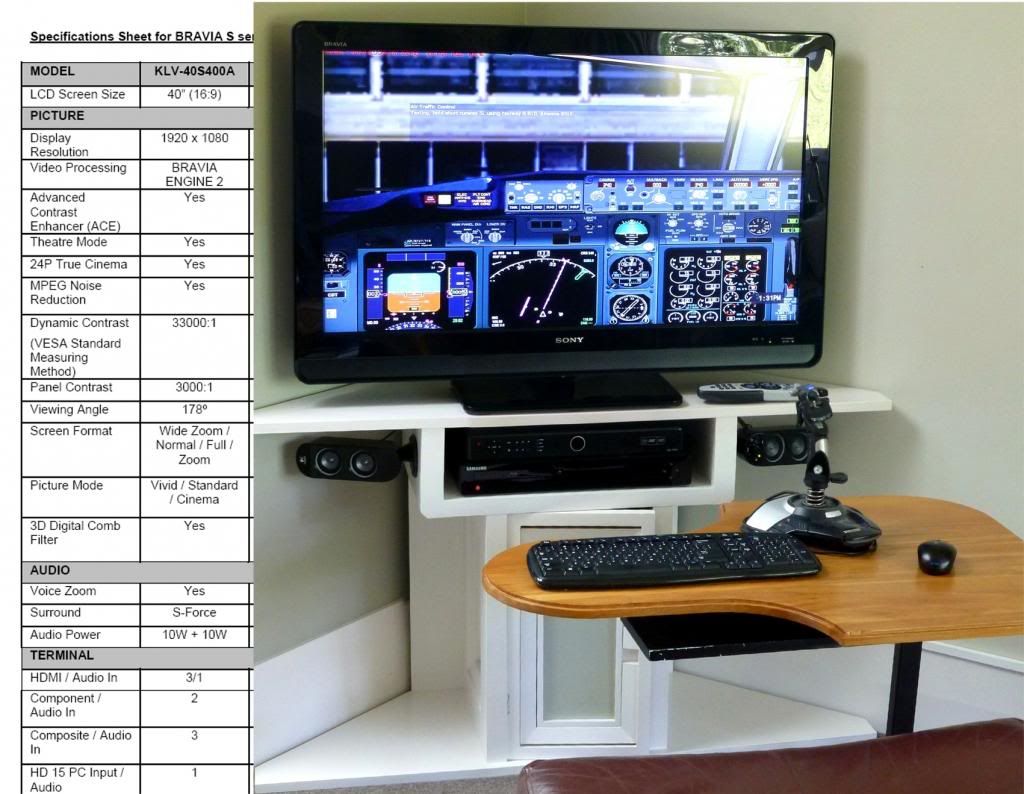
What I found surprising, is how close you tend to sit, to get the Big Effect!
There's an HD 3D projector project waiting to be hooked up... perhaps the way to go?
I've had a 40" Sony Bravia LCD TV for some years, which can show FS pretty handily.
Connectivity is best via HDMI/DVI and any later model should be fine, especially the ones with Motion Flow.
What I found surprising, is how close you tend to sit, to get the Big Effect!
There's an HD 3D projector project waiting to be hooked up... perhaps the way to go?
Last edited by Charl on Tue Dec 31, 2013 12:49 pm, edited 1 time in total.
-

Charl - NZFF Pro
- Joined: Mon May 01, 2006 8:28 am
- Posts: 9801
- Location: Auckland
by towerguy » Wed Jan 01, 2014 4:44 pm
thanks for the input guys
gives me something to think about, although most hope of doing anything about it is just about gone,
I'm in the middle of major renovations but the builder has gone through the estimated labour budget already and the whole downstairs is gutted with no Gib on the walls and no kitchen laundry or bathroom - the wife tells me not to worry it'll all work out - the bank is as helpful as the CAA - and everything is closed down for the holidays ---- I feel like I'm going assymetric in a single engined aeroplane! aaahhhhhhhhhhhh......................
gives me something to think about, although most hope of doing anything about it is just about gone,
I'm in the middle of major renovations but the builder has gone through the estimated labour budget already
and the whole downstairs is gutted with no Gib on the walls and no kitchen laundry or bathroom - the wife tells me not to worry it'll all work out - the bank is as helpful as the CAA - and everything is closed down for the holidays ---- I feel like I'm going assymetric in a single engined aeroplane! aaahhhhhhhhhhhh......................CPU- i7 4790K @4.0Gb Cooler- Noctua NH-D15 M/B- Z97 ProGamer P/S- 750W RAM- 16Gb
Graphics- Nvidia GTX970 16Gb Drives- 2x 120Gb SSD Samsung 850EVO, 1x 2Tb HD, 1x DVD-RW
Sound- on M/B Logitec 5.1 surround sound system OS- Win 10 pro , all wrapped in a black Corsair case Display - Panasonic UHD 4k 50" Flatscreen TV.( 3840x2160 Res)
Graphics- Nvidia GTX970 16Gb Drives- 2x 120Gb SSD Samsung 850EVO, 1x 2Tb HD, 1x DVD-RW
Sound- on M/B Logitec 5.1 surround sound system OS- Win 10 pro , all wrapped in a black Corsair case Display - Panasonic UHD 4k 50" Flatscreen TV.( 3840x2160 Res)
-
towerguy - Sim-holic
- Topic author
- Joined: Mon Aug 07, 2006 4:27 pm
- Posts: 886
7 posts
• Page 1 of 1
Who is online
Users browsing this forum: No registered users and 8 guests