How do you uninstall ORBX NZSI & NZNI
10 posts
• Page 1 of 1
 by raddragon » Sun Jun 09, 2013 6:47 pm
Really stupid question, but how do you uninstall ORBX NZSI & NZNI???
i7 3770, ASUS P8Z77-V DELUXE, 8GB Ram Corsair Dominator DDR3-1600, GTX660 Ti, 1TB WD Black, Coolermaster HAF-XM, Coolermaster 750W PSU
PMDG 777 NGX 737-600/700/800, 747-400X, J4100, MD11, Level D 763 , VLC, Real NZ FSX, ORBX NZNI & NZSI, F1 ATR72-500, Capt Sim C130, 727, 737, 757, 767, 777, 707, FS Labs Concorde X, CLS A330 & A340, iFly 738, Wilco Airbus Series 1 & 2, Aerosoft Airbus X Extended, VRS F18, F1 Cessna 172, Quality Wings 146 & 752, Fly Tampa Kai Tak, Princess Juliana, Mega Airport Paris, Carenado 208B
PMDG 777 NGX 737-600/700/800, 747-400X, J4100, MD11, Level D 763 , VLC, Real NZ FSX, ORBX NZNI & NZSI, F1 ATR72-500, Capt Sim C130, 727, 737, 757, 767, 777, 707, FS Labs Concorde X, CLS A330 & A340, iFly 738, Wilco Airbus Series 1 & 2, Aerosoft Airbus X Extended, VRS F18, F1 Cessna 172, Quality Wings 146 & 752, Fly Tampa Kai Tak, Princess Juliana, Mega Airport Paris, Carenado 208B
- raddragon
- Forum Addict
- Topic author
- Joined: Sun Aug 02, 2009 12:34 pm
- Posts: 201
- Location: Auckland
by dbcunnz » Sun Jun 09, 2013 7:16 pm
raddragon wrote:QUOTE (raddragon @ Jun 9 2013,6:47 PM) <{POST_SNAPBACK}>Really stupid question, but how do you uninstall ORBX NZSI & NZNI???
Remove and reinstall ORBX
1 - Set FTXcentral to [Default FSX]
2 - Browse to FSX/ORBX and delete the FTX_NZ folder
3 - Browse to FSX/Scenery/World/Scenery and delete all 26 x NZNI and 57 x NZSI tagged elevation adjustment files
4 - Browse to FSX/ORBX/Scripts and delete scenerylib_NZNI.cfg and scenerylib_NZSI.cfg then while in that same folder ... double-click FTXconfigurator.exe (silent operation)
5 - Load up somewhere in New Zealand to confirm its stock/default FSX
If you suspect your default NZ/FSX install is not quite right somehow.. now is the time to do an FSX-repair using your FSX DVD, otherwise continue the installation steps below
Then when you reinstall:
- Run the NZSI installer,
- Set FTXcentral to [Oceania],
- Run the NZSI.001 servicepack,
- Run NZNI installer,
- Set FTXcentral to [Oceania],
- Run the latest ORBXlibs

-

dbcunnz - NZFF Pro
- Joined: Thu Feb 21, 2008 12:56 pm
- Posts: 4016
- Location: Blenheim New Zealand
by raddragon » Wed Jun 12, 2013 6:58 pm
Just completed a full reinstall of both, still no NZQN airport in NZSI. Any ideas?
i7 3770, ASUS P8Z77-V DELUXE, 8GB Ram Corsair Dominator DDR3-1600, GTX660 Ti, 1TB WD Black, Coolermaster HAF-XM, Coolermaster 750W PSU
PMDG 777 NGX 737-600/700/800, 747-400X, J4100, MD11, Level D 763 , VLC, Real NZ FSX, ORBX NZNI & NZSI, F1 ATR72-500, Capt Sim C130, 727, 737, 757, 767, 777, 707, FS Labs Concorde X, CLS A330 & A340, iFly 738, Wilco Airbus Series 1 & 2, Aerosoft Airbus X Extended, VRS F18, F1 Cessna 172, Quality Wings 146 & 752, Fly Tampa Kai Tak, Princess Juliana, Mega Airport Paris, Carenado 208B
PMDG 777 NGX 737-600/700/800, 747-400X, J4100, MD11, Level D 763 , VLC, Real NZ FSX, ORBX NZNI & NZSI, F1 ATR72-500, Capt Sim C130, 727, 737, 757, 767, 777, 707, FS Labs Concorde X, CLS A330 & A340, iFly 738, Wilco Airbus Series 1 & 2, Aerosoft Airbus X Extended, VRS F18, F1 Cessna 172, Quality Wings 146 & 752, Fly Tampa Kai Tak, Princess Juliana, Mega Airport Paris, Carenado 208B
- raddragon
- Forum Addict
- Topic author
- Joined: Sun Aug 02, 2009 12:34 pm
- Posts: 201
- Location: Auckland
by Ian Warren » Thu Jun 13, 2013 8:53 am
raddragon wrote:QUOTE (raddragon @ Jun 12 2013,7:58 PM) <{POST_SNAPBACK}>Just completed a full reinstall of both, still no NZQN airport in NZSI. Any ideas?
Any chance of a screen , .. same thing with other people with this problem - one fix again mention is re-install just over the top and may require it done a couple of times .. sounds silly but it worksLast edited by Ian Warren on Thu Jun 13, 2013 9:52 am, edited 1 time in total.
-

Ian Warren - NZFF Pro
- Joined: Fri May 05, 2006 5:23 pm
- Posts: 41187
- Location: AREA 51
by raddragon » Thu Jun 13, 2013 6:33 pm
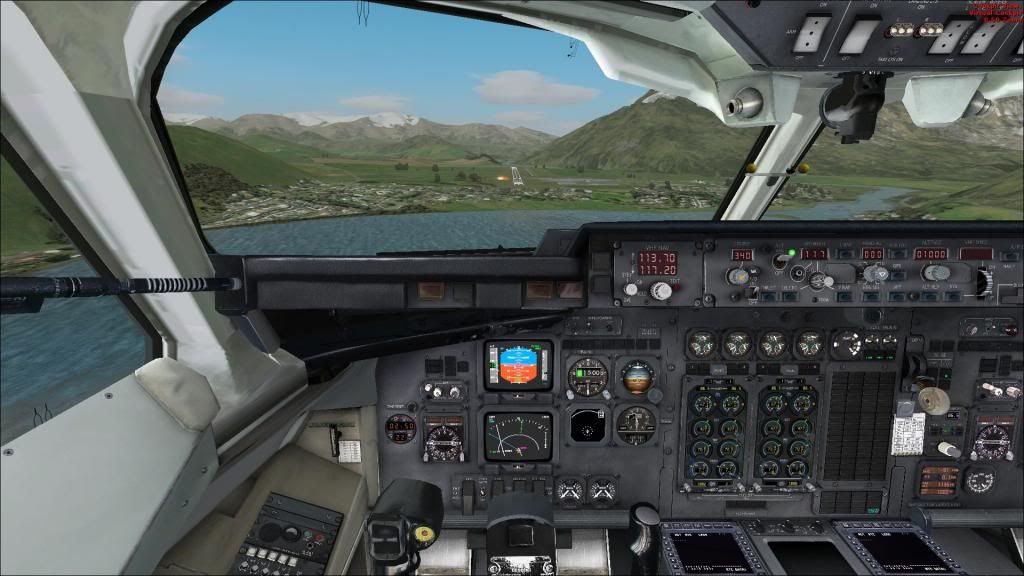
Have a look at this screen. No Airport
i7 3770, ASUS P8Z77-V DELUXE, 8GB Ram Corsair Dominator DDR3-1600, GTX660 Ti, 1TB WD Black, Coolermaster HAF-XM, Coolermaster 750W PSU
PMDG 777 NGX 737-600/700/800, 747-400X, J4100, MD11, Level D 763 , VLC, Real NZ FSX, ORBX NZNI & NZSI, F1 ATR72-500, Capt Sim C130, 727, 737, 757, 767, 777, 707, FS Labs Concorde X, CLS A330 & A340, iFly 738, Wilco Airbus Series 1 & 2, Aerosoft Airbus X Extended, VRS F18, F1 Cessna 172, Quality Wings 146 & 752, Fly Tampa Kai Tak, Princess Juliana, Mega Airport Paris, Carenado 208B
PMDG 777 NGX 737-600/700/800, 747-400X, J4100, MD11, Level D 763 , VLC, Real NZ FSX, ORBX NZNI & NZSI, F1 ATR72-500, Capt Sim C130, 727, 737, 757, 767, 777, 707, FS Labs Concorde X, CLS A330 & A340, iFly 738, Wilco Airbus Series 1 & 2, Aerosoft Airbus X Extended, VRS F18, F1 Cessna 172, Quality Wings 146 & 752, Fly Tampa Kai Tak, Princess Juliana, Mega Airport Paris, Carenado 208B
- raddragon
- Forum Addict
- Topic author
- Joined: Sun Aug 02, 2009 12:34 pm
- Posts: 201
- Location: Auckland

by Ian Warren » Thu Jun 13, 2013 7:18 pm
See the airport , no building s YES .. reinstall again , the ORBX will install a Queenstown .. typical ORBX issue

-
Ian Warren - NZFF Pro
- Joined: Fri May 05, 2006 5:23 pm
- Posts: 41187
- Location: AREA 51
by raddragon » Sat Jun 15, 2013 7:05 pm
Absolutely no luck, very annoyed. Reinstalling FSX from scratch 
i7 3770, ASUS P8Z77-V DELUXE, 8GB Ram Corsair Dominator DDR3-1600, GTX660 Ti, 1TB WD Black, Coolermaster HAF-XM, Coolermaster 750W PSU
PMDG 777 NGX 737-600/700/800, 747-400X, J4100, MD11, Level D 763 , VLC, Real NZ FSX, ORBX NZNI & NZSI, F1 ATR72-500, Capt Sim C130, 727, 737, 757, 767, 777, 707, FS Labs Concorde X, CLS A330 & A340, iFly 738, Wilco Airbus Series 1 & 2, Aerosoft Airbus X Extended, VRS F18, F1 Cessna 172, Quality Wings 146 & 752, Fly Tampa Kai Tak, Princess Juliana, Mega Airport Paris, Carenado 208B
PMDG 777 NGX 737-600/700/800, 747-400X, J4100, MD11, Level D 763 , VLC, Real NZ FSX, ORBX NZNI & NZSI, F1 ATR72-500, Capt Sim C130, 727, 737, 757, 767, 777, 707, FS Labs Concorde X, CLS A330 & A340, iFly 738, Wilco Airbus Series 1 & 2, Aerosoft Airbus X Extended, VRS F18, F1 Cessna 172, Quality Wings 146 & 752, Fly Tampa Kai Tak, Princess Juliana, Mega Airport Paris, Carenado 208B
- raddragon
- Forum Addict
- Topic author
- Joined: Sun Aug 02, 2009 12:34 pm
- Posts: 201
- Location: Auckland
by Ian Warren » Sun Jun 16, 2013 10:18 am
Before a complete uninstall You could try making a scenery file call Queenstown with scenery/texture folders inside and copy the four ADE_FTX_NZSI_NZQN files they only small and that should kick-start it , just simply do a add scenery .
-
Ian Warren - NZFF Pro
- Joined: Fri May 05, 2006 5:23 pm
- Posts: 41187
- Location: AREA 51
10 posts
• Page 1 of 1
Who is online
Users browsing this forum: No registered users and 10 guests