This is offered here first as a 'test' version. If you have both Real NZ Nelson and FTX NZSI installed, please download this patch and install it after reading the included manual.
I've now moved the patch to my site, it has had a minor change so anyone who has installed it from here should get the updated version from the Godzone site -- no need to uninstall, just run it over the top of the the previous install.
Click my banner to go to the Godzone Store.
Real NZ Nelson FTX NZSI compatibility patch
31 posts
• Page 1 of 2 • 1, 2
 by Ian Warren » Mon Jan 23, 2012 1:28 pm
Well that worked well  and not a GABLED ROOF Building in site , not a lumpa dirt on the end off Rwy20
  Yaaaaaa , Good on ya Rob
and not a GABLED ROOF Building in site , not a lumpa dirt on the end off Rwy20 Yaaaaaa , Good on ya RobLast edited by Ian Warren on Mon Jan 23, 2012 1:29 pm, edited 1 time in total.

-

Ian Warren - NZFF Pro
- Joined: Fri May 05, 2006 5:23 pm
- Posts: 41187
- Location: AREA 51
by GlennAV8R » Mon Jan 23, 2012 8:19 pm
Ok I have installed the patch and seem to have everything working fine. The only issue I had was that an extra airfield texture was bleeding through the main airport texture. This would disappear gradually as I flew along the airport about 500 metres in front of me. I solved this by putting the Nelson Aerial Scenery above the Nelson Scenery in the scenery library. This had never been a problem before.
Thanks for the patch.
Glenn
Thanks for the patch.
Glenn
- GlennAV8R
- Forum Addict
- Joined: Tue Mar 04, 2008 3:19 pm
- Posts: 154
- Location: Wellington
by toprob » Mon Jan 23, 2012 8:32 pm
GlennAV8R wrote:QUOTE (GlennAV8R @ Jan 23 2012,9:19 PM) <{POST_SNAPBACK}>Ok I have installed the patch and seem to have everything working fine. The only issue I had was that an extra airfield texture was bleeding through the main airport texture. This would disappear gradually as I flew along the airport about 500 metres in front of me. I solved this by putting the Nelson Aerial Scenery above the Nelson Scenery in the scenery library. This had never been a problem before.
Thanks for the patch.
Glenn
Thanks for that. The Nelson/Nelson_Aerial folders are separate so that they can be properly prioritized -- it looks like you've discovered that here.
-

toprob - NZFF Pro
- Topic author
- Joined: Sat Apr 29, 2006 4:56 pm
- Posts: 6741
- Location: Upper Hutt
by MurrayH » Thu Jan 26, 2012 4:54 pm
Hi Robin
Many thanks for the Patch which I most appreciate.
I do have one "small" issue though. The houses on the hills next to the airport sit several feet in the air.
I have know idea why this is. Do you have any ideas?
Thanks,
Murray Hall
Many thanks for the Patch which I most appreciate.
I do have one "small" issue though. The houses on the hills next to the airport sit several feet in the air.
I have know idea why this is. Do you have any ideas?
Thanks,
Murray Hall
- MurrayH
- Member
- Joined: Tue Jan 23, 2007 8:54 am
- Posts: 50
by toprob » Thu Jan 26, 2012 4:57 pm
MurrayH wrote:QUOTE (MurrayH @ Jan 26 2012,5:54 PM) <{POST_SNAPBACK}>Hi Robin
Many thanks for the Patch which I most appreciate.
I do have one "small" issue though. The houses on the hills next to the airport sit several feet in the air.
I have know idea why this is. Do you have any ideas?
Thanks,
Murray Hall
All the time, or just now and then?
-
toprob - NZFF Pro
- Topic author
- Joined: Sat Apr 29, 2006 4:56 pm
- Posts: 6741
- Location: Upper Hutt
by MurrayH » Fri Jan 27, 2012 4:27 pm
toprob wrote:QUOTE (toprob @ Jan 31 2012,5:57 AM) <{POST_SNAPBACK}>All the time, or just now and then?
Hi Robin
All the time, but I found the problem.
My Mesh resolution was too high. It was set to 1 meter. Turning it down to 10 meters fixed it.
Now I can go back to enjoying your wonderful Nelson scenery.
Many thanks,
MurrayLast edited by MurrayH on Fri Jan 27, 2012 4:28 pm, edited 1 time in total.
- MurrayH
- Member
- Joined: Tue Jan 23, 2007 8:54 am
- Posts: 50
by matthw » Wed Apr 25, 2012 6:29 pm
Hi Robin,
I have been having a small issue with your Nelson scenery since I installed FTX South Island and the Nelson Patch. I have default textures still bleeding through at the runway ends and on the main tarmac (i've shown these in the pics). These are only bleeding through when I am on (or very close to) the ground.
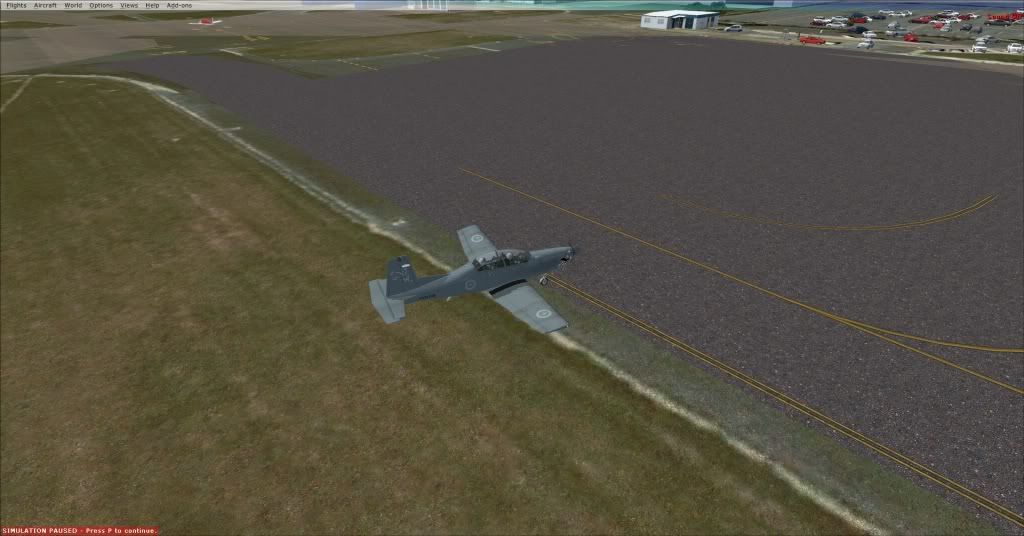
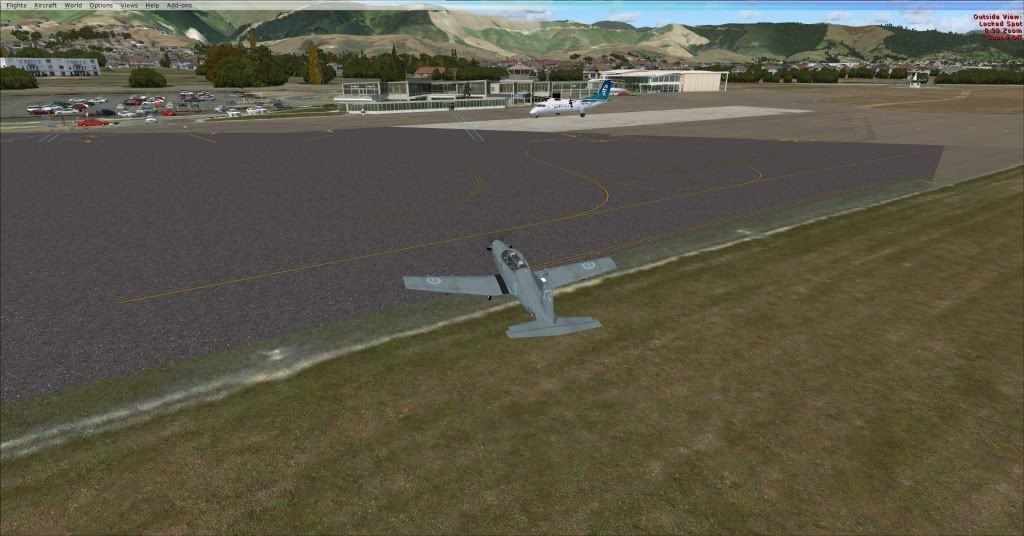
I have tried moving the scenery categories in the Scenery Library, to no avail. Any other ideas?
Matt
I have been having a small issue with your Nelson scenery since I installed FTX South Island and the Nelson Patch. I have default textures still bleeding through at the runway ends and on the main tarmac (i've shown these in the pics). These are only bleeding through when I am on (or very close to) the ground.
I have tried moving the scenery categories in the Scenery Library, to no avail. Any other ideas?
Matt
- matthw
- Member
- Joined: Mon Sep 27, 2010 8:40 pm
- Posts: 58
by toprob » Wed Apr 25, 2012 6:46 pm
matthw wrote:QUOTE (matthw @ Apr 25 2012,6:29 PM) <{POST_SNAPBACK}>Hi Robin,
I have been having a small issue with your Nelson scenery since I installed FTX South Island and the Nelson Patch. I have default textures still bleeding through at the runway ends and on the main tarmac (i've shown these in the pics). These are only bleeding through when I am on (or very close to) the ground.
I have tried moving the scenery categories in the Scenery Library, to no avail. Any other ideas?
Matt
Hi Matt
Just a couple of ideas. First, you can't 'fix' the Orbx scenery priority in the Scenery Library, you need to do it using FTX Central. See the Nelson patch manual for details.
If you are sure that you have followed all the instructions when you installed the patch, you could try resetting both FTX and Nelson. To do this:
Run FTX Central, set to default, then change it back to Oceania.
Run the Nelson Switcher, and change to default, then change it back to FTX compatibility.
That can sometimes fix things which have gotten out if sync.
-
toprob - NZFF Pro
- Topic author
- Joined: Sat Apr 29, 2006 4:56 pm
- Posts: 6741
- Location: Upper Hutt
by toprob » Wed Apr 25, 2012 8:35 pm
matthw wrote:QUOTE (matthw @ Apr 25 2012,7:55 PM) <{POST_SNAPBACK}>No luck I'm afraid. I've tried everything, I've uninstalled and reinstalled again making sure i did everything in the manual and I've reset both FTX and the switcher again since.
Ok, thanks for that. I'll give some thought to what could be going wrong here. I just need to clarify how you have this installed.
I assume you have changed the priority of FTX using the instructions in the Nelson patch manual?
Do you have all FSX SPs installed?
What mesh resolution setting do you have?
I wonder what would happen if you set both FTX Central and the Nelson switcher to default?
-
toprob - NZFF Pro
- Topic author
- Joined: Sat Apr 29, 2006 4:56 pm
- Posts: 6741
- Location: Upper Hutt
by matthw » Wed Apr 25, 2012 9:52 pm
I did everything in the manual when I installed the patch. I'm using a 10m resolution but I've tried it at 5 as well with no better result. I've got all FSX Service Packs installed.
When I set both to default, the Nelson scenery works perfectly, but I lose my FTX South Island, which is obviously less than ideal...
When I set both to default, the Nelson scenery works perfectly, but I lose my FTX South Island, which is obviously less than ideal...
- matthw
- Member
- Joined: Mon Sep 27, 2010 8:40 pm
- Posts: 58
by toprob » Fri Apr 27, 2012 4:36 pm
matthw wrote:QUOTE (matthw @ Apr 25 2012,9:52 PM) <{POST_SNAPBACK}>I did everything in the manual when I installed the patch. I'm using a 10m resolution but I've tried it at 5 as well with no better result. I've got all FSX Service Packs installed.
When I set both to default, the Nelson scenery works perfectly, but I lose my FTX South Island, which is obviously less than ideal...
Yes, turning off NZSI was just a way to make sure that there was no other Nelson scenery interfering.
Sorry about the delay, I wanted to see if I could reproduce this first. Did I ask if you have the Orbx FTX NZSI patch installed?
I guess that now is the time to actually make sure that all the elevation files are present and correct. The simplest way to do this is in Windows Explorer. There are a number of different files which affect elevation.
First, there's the Orbx files themselves, which should all be deactivated. if you open the Orbx folder in Explorer, and type 'nzns' into the search box at the top, you should get a list of Nelson files -- they should all have .bak extensions except one.
If that's fine, go to the FSX Scenery folder -- this is the Scenery folder located directed in your FSX folder. Type 'nzns' into the search box.
You should get two files. One should be called NZNS_ADEX_ALT.bgl, and one should be called ADE_FTX_NZSI_NZNS_elevation_adjustment.bak.
If correct, open the RealNZnelson folder, and type 'adex' into the search box. You should get two files, one has 'GVF' in the filename, and should be deactivated with a .off extension, and the other should have 'ALT' in the filename, and have a .bgl extension.
Let me know the results.
-RobinLast edited by toprob on Fri Apr 27, 2012 4:36 pm, edited 1 time in total.
-
toprob - NZFF Pro
- Topic author
- Joined: Sat Apr 29, 2006 4:56 pm
- Posts: 6741
- Location: Upper Hutt
by matthw » Sun Apr 29, 2012 5:25 pm
I have installed the NZSI Update. When I look in the Orbx folder I get 13 items pop up, with a mixture of .bak and .bgl extensions. Many of the files appear to be duplicated, except for the fact they have the different extension. In the scenery folder I get 3 files, again one being a .BGL duplicate of the .bak file you said should be there. I'm not quite sure why all these extras are there.
- matthw
- Member
- Joined: Mon Sep 27, 2010 8:40 pm
- Posts: 58
by toprob » Sun Apr 29, 2012 7:15 pm
That would happen if you reinstalled NZSI without completely removing the folders when you uninstalled it. The Nelson patcher renames the files from .bgl to .bak, but a NZSI reinstall wouldn't rename them back, it would just reinstall the .bgl files. And then when you ran the Nelson patcher, it wouldn't be able to rename the .bgl files as the .bak versions already existed. Simple, huh?
The simplest way to fix this would be to delete the .bgl version of any file which has a corresponding .bak (and by deleting it, I mean move it somewhere safe where FSX can't find it, even the Recycle Bin would do), then run the Nelson Switcher to toggle Orbx compatibility off then on again.
The simplest way to fix this would be to delete the .bgl version of any file which has a corresponding .bak (and by deleting it, I mean move it somewhere safe where FSX can't find it, even the Recycle Bin would do), then run the Nelson Switcher to toggle Orbx compatibility off then on again.
-
toprob - NZFF Pro
- Topic author
- Joined: Sat Apr 29, 2006 4:56 pm
- Posts: 6741
- Location: Upper Hutt
by matthw » Sun Apr 29, 2012 8:09 pm
This is really starting to confuse me now. I have everything like you said in the post above, except for the bit where you said
"You should get two files. One should be called NZNS_ADEX_ALT.bgl, and one should be called ADE_FTX_NZSI_NZNS_elevation_adjustment.bak."
I have an NZNS_ADEX_GVF_ALT.bgl. I tried copying the filename above from godzone nelson folder into the scenery folder with no success either.
"You should get two files. One should be called NZNS_ADEX_ALT.bgl, and one should be called ADE_FTX_NZSI_NZNS_elevation_adjustment.bak."
I have an NZNS_ADEX_GVF_ALT.bgl. I tried copying the filename above from godzone nelson folder into the scenery folder with no success either.
- matthw
- Member
- Joined: Mon Sep 27, 2010 8:40 pm
- Posts: 58
by toprob » Sun Apr 29, 2012 10:02 pm
matthw wrote:QUOTE (matthw @ Apr 29 2012,9:36 PM) <{POST_SNAPBACK}>Right well I'm stumped then. I've uninstalled and reinstalled, all the files appear to be where they should be, but no success.
Just to prevent any confusion, you took the steps in this post?QUOTEThe simplest way to fix this would be to delete the .bgl version of any file which has a corresponding .bak (and by deleting it, I mean move it somewhere safe where FSX can't find it, even the Recycle Bin would do), then run the Nelson Switcher to toggle Orbx compatibility off then on again.[/quote]
There should only be 7 NZNS files in the Orbx folders -- is that what you see?
toprob- NZFF Pro
- Topic author
- Joined: Sat Apr 29, 2006 4:56 pm
- Posts: 6741
- Location: Upper Hutt
31 posts
• Page 1 of 2 • 1, 2
Return to Godzone 'Real New Zealand' Scenery Support
Who is online
Users browsing this forum: No registered users and 14 guests