Ohakea Scenery V2



 by Adamski » Mon Jul 18, 2011 7:01 pm
Hi Gavin ...
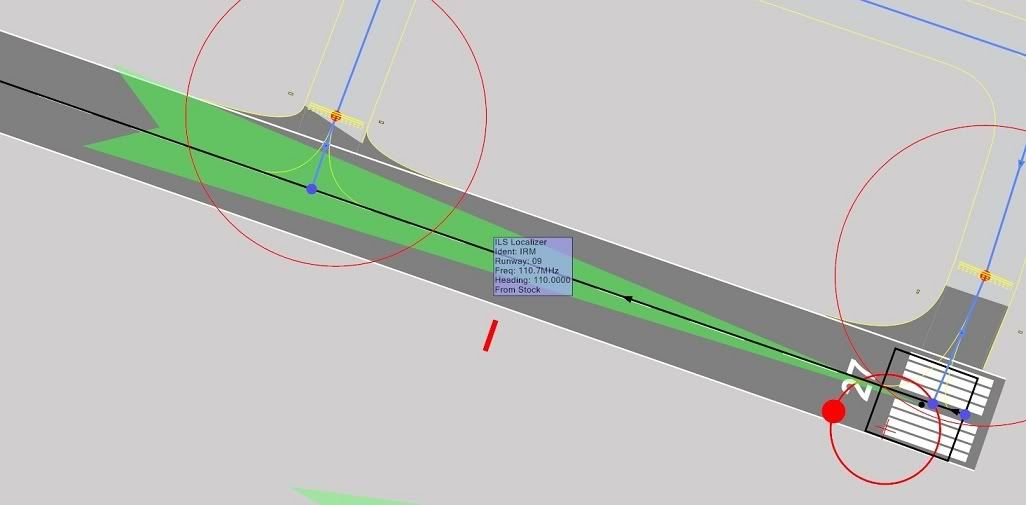
I have a small problem with the ILS approach to RW09 at NZOH. R27 is fine, but the localiser/glideslope for RW09 places you about 100m to the left of the runway. Is this a fault in the FSX data somewhere? If so, can it be got at (easily)?
As far as I can make out - checking with online charts - your co-ordinates are accurate.
I have a small problem with the ILS approach to RW09 at NZOH. R27 is fine, but the localiser/glideslope for RW09 places you about 100m to the left of the runway. Is this a fault in the FSX data somewhere? If so, can it be got at (easily)?
As far as I can make out - checking with online charts - your co-ordinates are accurate.
Last edited by Adamski on Tue Jul 19, 2011 12:40 pm, edited 1 time in total.

-

Adamski - NZFF Pro
- Joined: Thu Nov 01, 2007 2:22 am
- Posts: 5072
- Location: Birkenhead, Auckland
by Kahu » Mon Jul 18, 2011 8:14 pm
I'll check out the AFCAD file
EDIT: Checked AFCAD and ILS seems fine, can you run another test on RW09 for me?
EDIT: Checked AFCAD and ILS seems fine, can you run another test on RW09 for me?
Last edited by Kahu on Mon Jul 18, 2011 8:26 pm, edited 1 time in total.

-
Kahu - Sim-holic
- Topic author
- Joined: Sat May 05, 2007 3:59 pm
- Posts: 578
- Location: Tauranga
by Adamski » Tue Jul 19, 2011 2:59 am
Kahu wrote:QUOTE (Kahu @ Jul 18 2011,8:14 PM) <{POST_SNAPBACK}>I'll check out the AFCAD file
EDIT: Checked AFCAD and ILS seems fine, can you run another test on RW09 for me?
Sure thing - will post a series of shots showing the deviation as soon as I've finished playing with my new JF Comet
Meanwhile - by way of a "thank you" here's a *night time* pic of NZOH ... which may not have come out too well ... in in FSX it looked *awesome*. It just looked exactly how I'd imagine it ought to be - whereas some sceneries just look like Disneyland at night. You're a clever lot, you scenery designers!
Toggling my a/c lights on and off also toggled the parking floodlights ... what a hoot!!!

-
Adamski - NZFF Pro
- Joined: Thu Nov 01, 2007 2:22 am
- Posts: 5072
- Location: Birkenhead, Auckland
by Adamski » Tue Jul 19, 2011 10:55 am
OK ... here we go ... I've kept the SLEW info in there so you can try recreate positioning ...
Just sat on the runway - more or less as FSX places you when you "go to" NZOH, RW09

Slewed to the left till the localiser needle lined up ...

Slewed forward till the glideslope needle flipped. This appears correct.

As per (2) ... on a dummy approach ... slewed left and on glideslope

As per (1) ... on a dummy approach ... on rwy centre-line and lined up on glideslope

I've tried this with other aircraft and get the same offset. RW27 is fine. It's a pretty new install with only VLC plus all the RealNZ sceneries. Other than your NZOH and NZWP, I don't have any other sceneries installed - and I certainly haven't messed with any global elevations or airfield data.
Hope this helps!!!
Just sat on the runway - more or less as FSX places you when you "go to" NZOH, RW09
Slewed to the left till the localiser needle lined up ...
Slewed forward till the glideslope needle flipped. This appears correct.
As per (2) ... on a dummy approach ... slewed left and on glideslope
As per (1) ... on a dummy approach ... on rwy centre-line and lined up on glideslope
I've tried this with other aircraft and get the same offset. RW27 is fine. It's a pretty new install with only VLC plus all the RealNZ sceneries. Other than your NZOH and NZWP, I don't have any other sceneries installed - and I certainly haven't messed with any global elevations or airfield data.
Hope this helps!!!
-
Adamski - NZFF Pro
- Joined: Thu Nov 01, 2007 2:22 am
- Posts: 5072
- Location: Birkenhead, Auckland

by Ian Warren » Tue Jul 19, 2011 12:20 pm
Eddy .. that,s for cross wind landings  , Quit kidding around , easy adjusted
, Quit kidding around , easy adjusted
-

Ian Warren - NZFF Pro
- Joined: Fri May 05, 2006 5:23 pm
- Posts: 41187
- Location: AREA 51
by Adamski » Tue Jul 19, 2011 12:36 pm
Nzeddy wrote:QUOTE (Nzeddy @ Jul 19 2011,11:13 AM) <{POST_SNAPBACK}>The ILS for runway 09 is not in the center and is on a angle. I've checked with ADEX.
I checked with AFX and it shows pretty well as you have it (except I don't see the red circle). However - when you actually jump in to a plane, it seems way off. I'm wondering whether FSX is reading some generic AFCAD data instead of Gavin's NZOH one.
The opposite end looks pretty well the same to me (in AFX) yet that doesn't have this weird offset.Last edited by Adamski on Tue Jul 19, 2011 1:08 pm, edited 1 time in total.
-
Adamski - NZFF Pro
- Joined: Thu Nov 01, 2007 2:22 am
- Posts: 5072
- Location: Birkenhead, Auckland
by Kahu » Tue Jul 19, 2011 7:50 pm
Woops missed that. Fixed now and added ILs to the other runways. Sill working on your orginal problem though.
Do you have any of the AFCADs installed that come with the RNZAF AI pack?
EDIT:I see your problem, your flying into a Air Force base in a horrible GA Aircraft, jump into military jet mate
Try this reworked AFCAD
Do you have any of the AFCADs installed that come with the RNZAF AI pack?
EDIT:I see your problem, your flying into a Air Force base in a horrible GA Aircraft, jump into military jet mate
Try this reworked AFCAD
Last edited by Kahu on Tue Jul 19, 2011 8:27 pm, edited 1 time in total.
-
Kahu - Sim-holic
- Topic author
- Joined: Sat May 05, 2007 3:59 pm
- Posts: 578
- Location: Tauranga
by Adamski » Wed Jul 20, 2011 12:06 am
Kahu wrote:QUOTE (Kahu @ Jul 19 2011,7:50 PM) <{POST_SNAPBACK}>EDIT:I see your problem, your flying into a Air Force base in a horrible GA Aircraft, jump into military jet mate
Hehehe
After Eddy's post I thought I'd look at it in AFX. I hadn't realised that the ILS end point is set at the far end of the runway, so a fraction out on the ILS bearing gets magnified quite a lot by the time you get down to the other end.
Anyway ... that particular ILS wasn't set to *exactly* the same as the runway bearing (it was out a couple of decimal points, I think) - whereas the working one is bang-on. I did a quick temporary edit to a copy of your bgl and it cured it.
I'll try your replacement AFCAD, but it sounds to me that that's probably what you've just corrected <??>.
Apart from the two extra library sets, I'm not sure what I else I tried (short term memory problem). I maybe did have a go at trying to get the AI traffic to work (it didn't for me). However - looks that that may be a red herring (hopefully!!).
I'll install your fix now and report back!
EDIT: Yay ... nailed it! 109.12 from the old 109.00 was it? Works a treat now Last edited by Adamski on Wed Jul 20, 2011 6:07 am, edited 1 time in total.

-
Adamski - NZFF Pro
- Joined: Thu Nov 01, 2007 2:22 am
- Posts: 5072
- Location: Birkenhead, Auckland
by lowglow » Tue Jan 17, 2012 8:45 pm
I added this scenery tonight and I appear to have a problem with weird ground textures between the runways
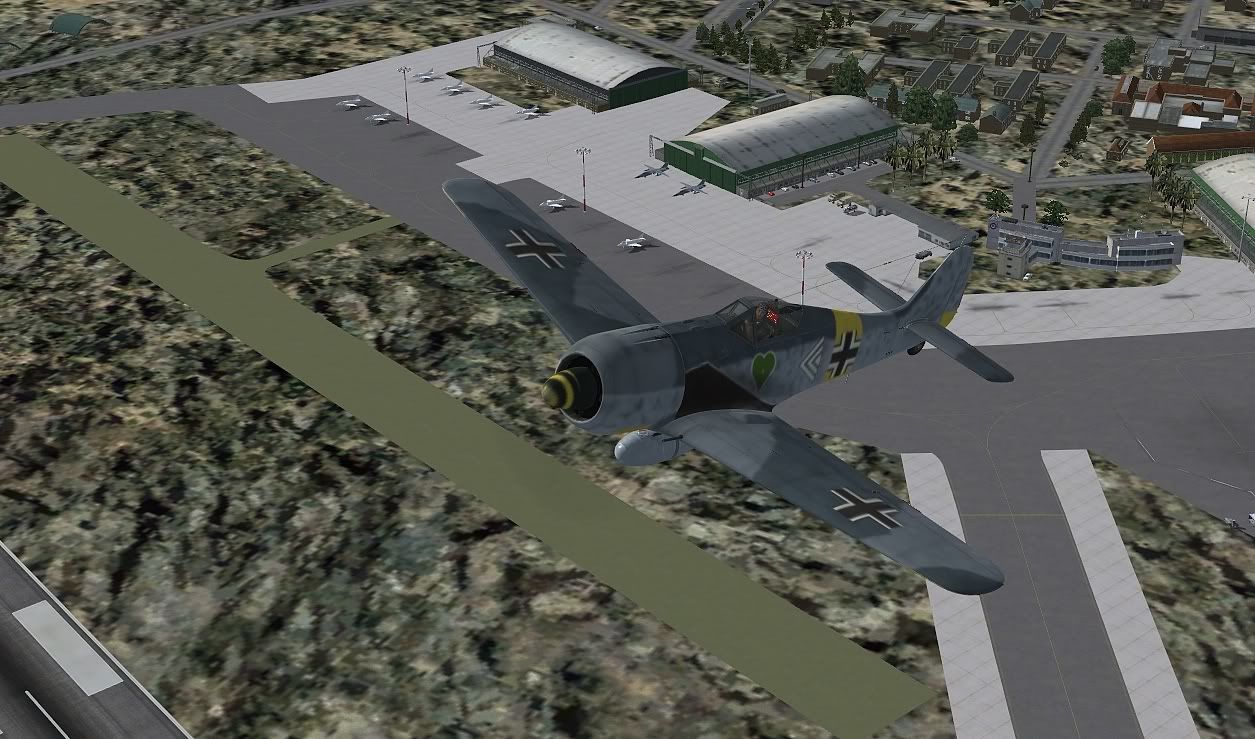
any ideas on how to fix this? I downloaded the scenery and the update originaly from Snowmans website, when I saw this I removed the scenery from FSX and redownloaded it from the above link and reenstalled it with the same effect
any ideas on how to fix this? I downloaded the scenery and the update originaly from Snowmans website, when I saw this I removed the scenery from FSX and redownloaded it from the above link and reenstalled it with the same effect




-

lowglow - Sim-holic
- Joined: Mon Jul 06, 2009 9:42 pm
- Posts: 538
- Location: Blenheim New Zealand
by Ian Warren » Wed Jan 18, 2012 9:21 am
CRIPES CHRIS !  ... looks like you attacked the field with those Jerry mini anti personal cluster bombs
... looks like you attacked the field with those Jerry mini anti personal cluster bombs -
Ian Warren - NZFF Pro
- Joined: Fri May 05, 2006 5:23 pm
- Posts: 41187
- Location: AREA 51
by lowglow » Wed Jan 18, 2012 11:39 am
Ian Warren wrote:QUOTE (Ian Warren @ Jan 18 2012,10:21 AM) <{POST_SNAPBACK}>CRIPES CHRIS !
LOL yep, it's not too attractive, makes you feel a bit queasy if you fly around above it for too long

-
lowglow - Sim-holic
- Joined: Mon Jul 06, 2009 9:42 pm
- Posts: 538
- Location: Blenheim New Zealand
by Adamski » Wed Jan 18, 2012 1:31 pm
lowglow wrote:QUOTE (lowglow @ Jan 18 2012,12:39 PM) <{POST_SNAPBACK}>LOL yep, it's not too attractive, makes you feel a bit queasy if you fly around above it for too long
I haven't re-installed NZOH (yet) after adding NZSI. I'll report back when I do.
-
Adamski - NZFF Pro
- Joined: Thu Nov 01, 2007 2:22 am
- Posts: 5072
- Location: Birkenhead, Auckland
by lowglow » Wed Jan 18, 2012 9:41 pm
Kahu wrote:QUOTE (Kahu @ Jan 18 2012,6:57 PM) <{POST_SNAPBACK}>This scenery was made on top of VLC. This looks like a Landclass problem.
So when I get around to buying VLC then this problem should go away?
-
lowglow - Sim-holic
- Joined: Mon Jul 06, 2009 9:42 pm
- Posts: 538
- Location: Blenheim New Zealand
by Adamski » Wed Jan 18, 2012 11:09 pm
lowglow wrote:QUOTE (lowglow @ Jan 18 2012,10:41 PM) <{POST_SNAPBACK}>So when I get around to buying VLC then this problem should go away?
Quite possibly ... I'll have to try a screenshot with it disabled to see what it looks like... in the meantime, here are some pics of my fresh re-install. NZSI/Oceania on, VLC on:
Some static aircraft plus UT2 generated (parked) RNZAF 757 and C-130 ... Orion must OTW!
So much to enjoy with this add-on (thanks, Snowman!)
UPDATE: @lowglow ... I disabled VLC and all that happened was the area outside the airfield went to default FSX (desert!). No show-through like you're getting. How high (priority-wise) did you put NZOH?
Looks like the base grass texture is missing somehow. FYI, I didn't place any of Snowman's files anywhere "shared" (eg. the default FSX Addon Scenery directory). I created a new directory in FSX root called "Addon_Scenery_Snowman" and placed NZOH (and Army Ojects, libraries etc.) in there.Last edited by Adamski on Wed Jan 18, 2012 11:36 pm, edited 1 time in total.


-
Adamski - NZFF Pro
- Joined: Thu Nov 01, 2007 2:22 am
- Posts: 5072
- Location: Birkenhead, Auckland
by Ian Warren » Wed Jan 18, 2012 11:16 pm
That still looks Smart , Captain Sims Flagship and NZ scenery at its best 
-
Ian Warren - NZFF Pro
- Joined: Fri May 05, 2006 5:23 pm
- Posts: 41187
- Location: AREA 51
by Adamski » Wed Jan 18, 2012 11:45 pm
Ian Warren wrote:QUOTE (Ian Warren @ Jan 19 2012,12:16 AM) <{POST_SNAPBACK}>That still looks Smart , Captain Sims Flagship and NZ scenery at its best
Yep! I ought to mention that this is a new RNZAF C-130 repaint I found on Avsim - from Daniel Furnkas: Cheese-Repaints.
-
Adamski - NZFF Pro
- Joined: Thu Nov 01, 2007 2:22 am
- Posts: 5072
- Location: Birkenhead, Auckland
Who is online
Users browsing this forum: No registered users and 36 guests