
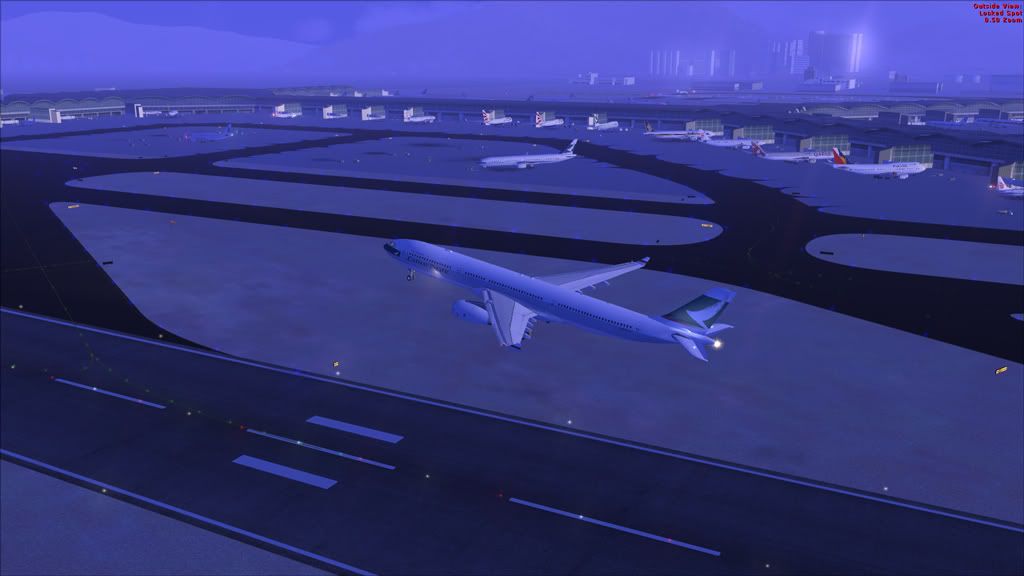
Does anybody here know what might be going on? I'm NOT running DX-10 either, I am running REX.
100% ad-free
 by connor » Sun Dec 25, 2011 8:29 pm
by connor » Sun Dec 25, 2011 9:04 pm
Nzeddy wrote:QUOTE (Nzeddy @ Dec 25 2011,9:58 PM) <{POST_SNAPBACK}>Looks normal to me. Just change the taxiway texture in the REX theme creation menu.
Yeah, I've tried this, But I can't tell any different. To remove all doubt tommorrow I'll install the lightest shade asphalt texture REX has and see if i can tell any difference. Something is definitely up with the Taxiway textures, I'm just not sure what yet.Last edited by connor on Sun Dec 25, 2011 9:04 pm, edited 1 time in total.
by Ian Warren » Mon Dec 26, 2011 7:56 am


by connor » Mon Dec 26, 2011 9:40 am
Ian Warren wrote:QUOTE (Ian Warren @ Dec 26 2011,8:56 AM) <{POST_SNAPBACK}>Are you running 'Shade' , this has cause a lot of unwanted texture changes for the worst , i have currently removed them because of the strange effects it caused .
No, I'm not. I almost bought it the other day though.
by Ian Warren » Mon Dec 26, 2011 10:18 am
by connor » Tue Dec 27, 2011 8:41 am
Ian Warren wrote:QUOTE (Ian Warren @ Dec 26 2011,11:18 AM) <{POST_SNAPBACK}>After that i wonder the size and the amount installed .. your FSX is still limited and could be the cause .
What do you mean?
by Ian Warren » Tue Dec 27, 2011 9:07 am
by Rotordude » Tue Dec 27, 2011 9:59 am
connor wrote:QUOTE (connor @ Dec 25 2011,10:04 PM) <{POST_SNAPBACK}>Yeah, I've tried this, But I can't tell any different. To remove all doubt tommorrow I'll install the lightest shade asphalt texture REX has and see if i can tell any difference. Something is definitely up with the Taxiway textures, I'm just not sure what yet.
When you make your theme is REX do you have the the set option in the settings ticked to actually update the taxiways. REX will only update what is ticked. Also try it without that heavy blue cast over the land.Ian Warren wrote:QUOTE (Ian Warren @ Dec 27 2011,10:07 AM) <{POST_SNAPBACK}>Running FSX , it will do some funny things when you get up around the 70/80 GB installed , loading times , textures and many other issues .
mmmmmm I must be ready for the big crash then, 183gig install so far.Last edited by Rotordude on Tue Dec 27, 2011 10:00 am, edited 1 time in total.Regards always
Pete
- Rotordude
- Sim-holic
- Joined: Wed Mar 25, 2009 3:50 pm
- Posts: 508
- Location: Huntly, NZ
by Ian Warren » Tue Dec 27, 2011 10:25 am
Rotordude wrote:QUOTE (Rotordude @ Dec 27 2011,10:59 AM) <{POST_SNAPBACK}>mmmmmm I must be ready for the big crash then, 183gig install so far.
I don't use a program manger but if you have one to recommend , if i list the paywares installed and then start playing around , i be interested to here your load times , i can list a file size but these dont run or sit in the background , they are on ice till required , love to see your the list off scenery and aircraft installed .Last edited by Ian Warren on Tue Dec 27, 2011 10:26 am, edited 1 time in total.
by connor » Tue Dec 27, 2011 12:07 pm
Ian Warren wrote:QUOTE (Ian Warren @ Dec 27 2011,10:07 AM) <{POST_SNAPBACK}>Running FSX , it will do some funny things when you get up around the 70/80 GB installed , loading times , textures and many other issues .
I've just checked and my fsx has about 65 gig installed. Would this cause the issues seen here?
Return to All Flight Simulators
Users browsing this forum: No registered users and 25 guests


