How to get the best out of the default textures used in VLC

Information and support relating to this forthcoming New Zealand Vector Land Class addon.

Postby robmw » Mon Jun 06, 2011 2:14 am

I raised a question in another thread regarding the look of VLC as designed using the FSX default textures. Basically I wanted to get as close as possible to the appearance in some of the promotional videos and screenshots which were really impressive. I don't seem to be able to reproduce this myself despite using tweaks like the ENB bloom mod and being almost certain that I am using the correct default texture set. I have used alternative texture sets such as GEX and OrbX in other areas and get results very close to what is shown in their promotional material which is I why I raised this question in relation to VLC in the first place as I'm sure it is installed correctly.

Here are some screenshots showing what I mean.

Eastern side of Southern Alps in autumn:


Near Picton:


Here are some screenshots above Ashburton which lead me to think I am using the correct textures.

Winter:


Summer:


Nearer the mountains in summer (slewing from location of previous shot):


And finally a satellite view of the whole area above in summer:


So to sum up I don't think there is anything actually wrong with my install of VLC and maybe it is just the use of tweaks like the ENB mod etc. which make the difference? Unfortunately I have always had mixed results with the ENB mod on Win7 64 which I use now, whereas it always used to work perfectly with XP 64.

Any suggestions welcome!

Rob

robmw
Member
 
Topic author
Joined: Wed May 25, 2011 8:28 pm
Posts: 12

Postby Ian Warren » Mon Jun 06, 2011 11:40 am

Robin is working on a new set off textures and possibly the wind breaks which are accurately placed , one thing you may want to try is reduce the distance to soften the texture .
Last edited by Ian Warren on Mon Jun 06, 2011 11:40 am, edited 1 time in total.
Image
User avatar
Ian Warren
NZFF Pro
 
Joined: Fri May 05, 2006 5:23 pm
Posts: 41187
Location: AREA 51

Postby Timmo » Mon Jun 06, 2011 1:05 pm

Firstly, your installation looks correct with the correct textures being used- Given that VLC mostly uses default texture sets at the moment, there are some instances where the default texture isn't quite right for NZ in all seasons- When developing VLC I spent a lot of time choosing landclasses that were associated with the most 'New Zealand looking' textures and for the most part default textures work OK in absence of specific New Zealand sourced texture sets. There are a few that don't work in all seasons, especially in Autumn.
One of these is the 'scrub' texture which looks OK in winter, summer and spring, but gets too orange in autumn....

As mentioned, we are looking to continually grow VLC to get around these limitations by developing and releasing more custom textures- This has always been the intention but it is a daunting task.
Timmo
NZFF Pro
 
Joined: Wed Oct 25, 2006 6:28 pm
Posts: 2056
Location: Tauranga

Postby robmw » Mon Jun 06, 2011 8:25 pm

Timmo wrote:
QUOTE (Timmo @ Jun 6 2011,1:05 AM) <{POST_SNAPBACK}>
Firstly, your installation looks correct with the correct textures being used- Given that VLC mostly uses default texture sets at the moment, there are some instances where the default texture isn't quite right for NZ in all seasons- When developing VLC I spent a lot of time choosing landclasses that were associated with the most 'New Zealand looking' textures and for the most part default textures work OK in absence of specific New Zealand sourced texture sets. There are a few that don't work in all seasons, especially in Autumn.
One of these is the 'scrub' texture which looks OK in winter, summer and spring, but gets too orange in autumn....

As mentioned, we are looking to continually grow VLC to get around these limitations by developing and releasing more custom textures- This has always been the intention but it is a daunting task.


Thanks for that Timmo. The shots above are a bit harsh as they use unlimited distance just to demonstrate what I meant (as Ian noted). Normally I fly with visibility limited by ASE, usually at best 20-30 miles at lower elevations but if anything some of the default textures look worse to my eye then! The texture I have the most problem with is the orange scrub texture which just doesn't look right as you note. At least I know now that I have VLC working properly.

I look forward to future updates of NZ specific textures. The scrub texture seems like a prime candidate as they appear to cover a lot of the mountain areas outside of winter.
robmw
Member
 
Topic author
Joined: Wed May 25, 2011 8:28 pm
Posts: 12

Postby Olderndirt » Fri Jul 22, 2011 3:44 am

Much as I'd like to say it was my idea, when I installed VLC my GEX NA was still in place. Apparently this software has a tendency to migrate and, rather than default, became my VLC textures. Not a whole lot of difference but, to me, quite pleasing. Turning off 'minor streams' in the VLC config gets rid of a lot of those lines running down mountainsides. Looking at your shots of the Canterbuy Plains and those crooked windbreaks reminds me of how much I dislike that part of VLC.
Last edited by Olderndirt on Fri Jul 22, 2011 1:17 pm, edited 1 time in total.
Image
User avatar
Olderndirt
Senior Member
 
Joined: Wed Jan 05, 2011 2:36 pm
Posts: 1774
Location: Rochester, Washington USA

Postby AndrewJamez » Fri Jul 22, 2011 6:32 pm

I wonder if it would be possible to force dense autogen to be placed on the wind break lines. That would fix the problem. Then they would be as they are in real life.
AndrewJamez
Sim-holic
 
Joined: Sun Feb 14, 2010 5:04 pm
Posts: 766
Location: Hamilton

Postby Ian Warren » Fri Jul 22, 2011 9:47 pm

AndrewJamez wrote:
QUOTE (AndrewJamez @ Jul 22 2011,7:32 PM) <{POST_SNAPBACK}>
I wonder if it would be possible to force dense autogen to be placed on the wind break lines. That would fix the problem. Then they would be as they are in real life.

Canterbury is covered in very corrected wind breaks , this is one question i put forward pre-release , breaking down the coding and doing XML files is a task in its self , i put forward this idea as well making models in and around following a compass bearing , placing these would be a huge job as well .
Last edited by Ian Warren on Fri Jul 22, 2011 9:49 pm, edited 1 time in total.
Image
User avatar
Ian Warren
NZFF Pro
 
Joined: Fri May 05, 2006 5:23 pm
Posts: 41187
Location: AREA 51

Postby Olderndirt » Sat Jul 23, 2011 1:25 pm

AndrewJamez wrote:
QUOTE (AndrewJamez @ Jul 21 2011,11:32 PM) <{POST_SNAPBACK}>
I wonder if it would be possible to force dense autogen to be placed on the wind break lines. That would fix the problem. Then they would be as they are in real life.
It's not so much the lack of autogen as the misalignment with the field (paddock - not a Kiwi) boundaries.
Image
User avatar
Olderndirt
Senior Member
 
Joined: Wed Jan 05, 2011 2:36 pm
Posts: 1774
Location: Rochester, Washington USA

Postby Timmo » Sat Jul 23, 2011 1:33 pm

Originally I tried having the windbreak lines as 'utility' lines with spaced autogen trees on top of a texture (this is how the powerlines are coded in FSX...but with pylons instead of trees and a mask instead of a texture)- Unfortunately, even with one type of tree and at fairly low density, the performance hit was very large. This coupled with the fact that we would have had to have released and managed a separate terrain.cfg file to handle the shelter belt line definition meant that it was a no-go.

The misalignment with the underlying ground textures is an issue with the way that the FSX engine is coded....there is no way around this unfortunately.
Timmo
NZFF Pro
 
Joined: Wed Oct 25, 2006 6:28 pm
Posts: 2056
Location: Tauranga

Postby kcgb » Sat Jul 23, 2011 1:49 pm

Mike and I thought off a way to do it by using the windbreak models used in the VLC airfeilds and puttng them on the texture, the same way autogen houses are done. That would mean only 6 polys per windbreak instead of 80 for 40 trees. But I was unsure how you would make them be aligned with the strips of texture.
kcgb
Sim-holic
 
Joined: Sun Aug 30, 2009 7:44 pm
Posts: 679
Location: NZLX

Postby toprob » Sat Jul 23, 2011 3:22 pm

kcgb wrote:
QUOTE (kcgb @ Jul 23 2011,1:49 PM) <{POST_SNAPBACK}>
Mike and I thought off a way to do it by using the windbreak models used in the VLC airfeilds and puttng them on the texture, the same way autogen houses are done. That would mean only 6 polys per windbreak instead of 80 for 40 trees. But I was unsure how you would make them be aligned with the strips of texture.


This was one of the original ideas for the windbreaks, but there are some problems which rule it out. For instance, a large percentage of windbreaks are on a slope, so these tend to stick out of the ground.
User avatar
toprob
NZFF Pro
 
Joined: Sat Apr 29, 2006 4:56 pm
Posts: 6711
Location: Upper Hutt

Postby kcgb » Sat Jul 23, 2011 3:44 pm

To Fix the bottom of the windbreaks being off the ground you could make it so a bit of the model goes underground then on the slopes it would come out, but for the tops not following the terrain the only way I could think of doing it is the FS2002 ground poly method and have it as an object but then that would take a very long time to place all the wind breaks and they wouldn't follow the autogen slider, they would follow the scenery complexity slider.
kcgb
Sim-holic
 
Joined: Sun Aug 30, 2009 7:44 pm
Posts: 679
Location: NZLX

Postby Olderndirt » Mon Jul 25, 2011 2:54 am

A nice option, probably not feasible, would be to offer a configurator choice - Windbreaks or Not.
Last edited by Olderndirt on Mon Jul 25, 2011 2:55 am, edited 1 time in total.
Image
User avatar
Olderndirt
Senior Member
 
Joined: Wed Jan 05, 2011 2:36 pm
Posts: 1774
Location: Rochester, Washington USA

Postby Olderndirt » Thu Jul 28, 2011 6:09 am

Robmw
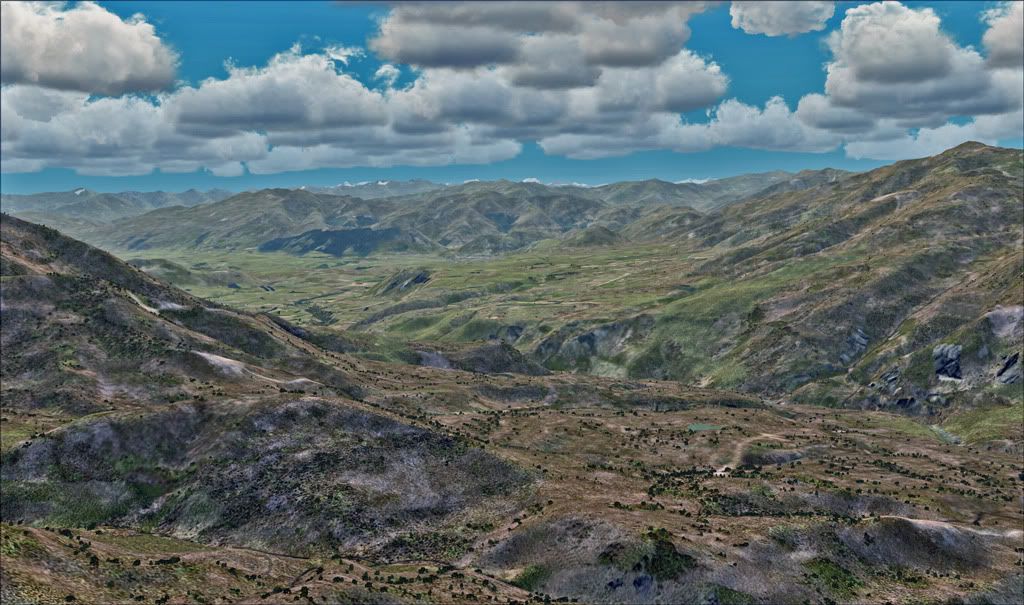
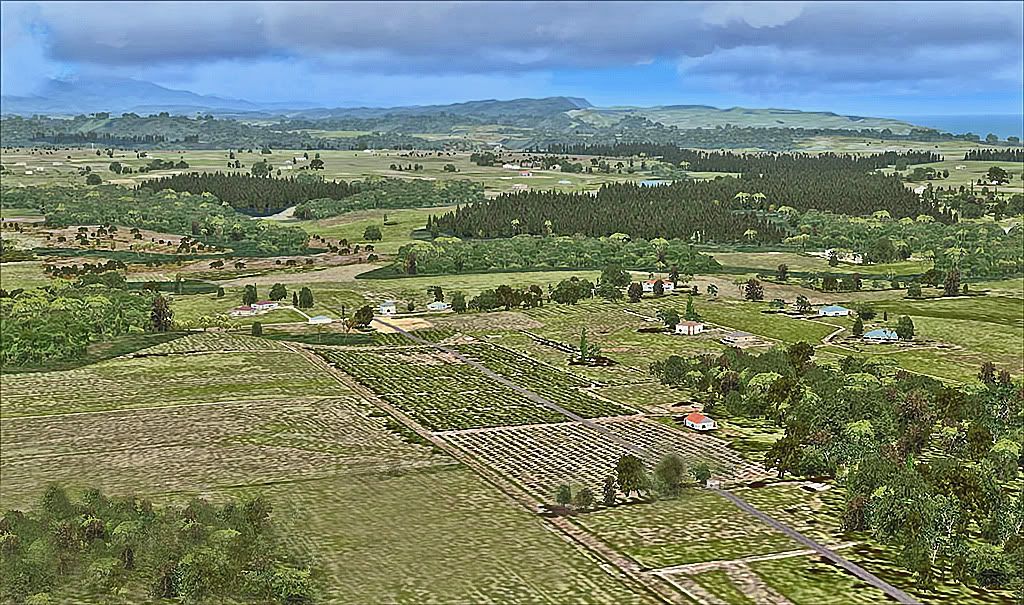
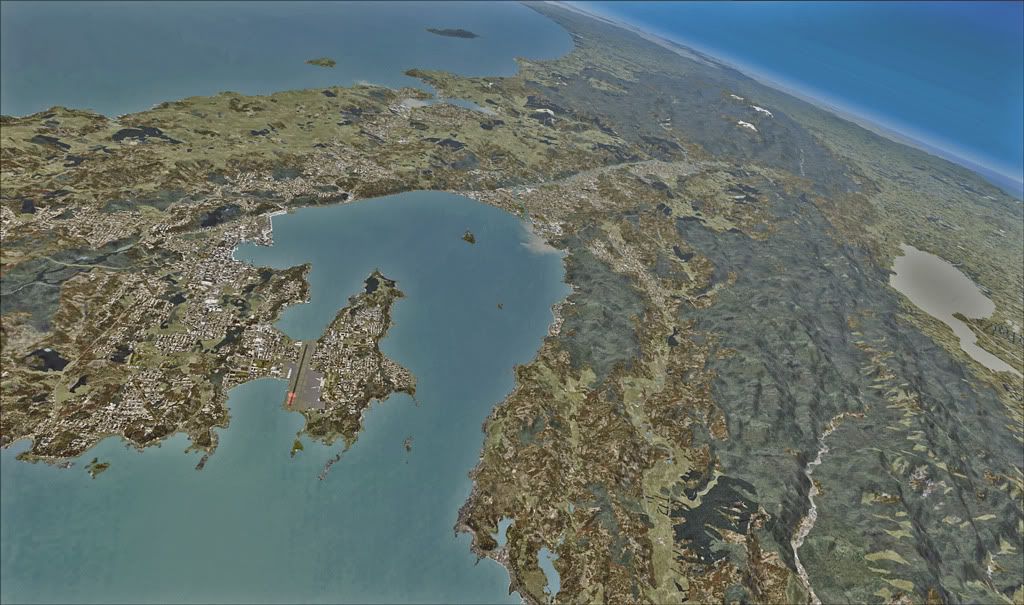
Here are a couple of examples of my VLC with the GEX textures.

The first is an area about thirty southeast of Queenstown.


Ten south of Westport.


This is Wellington and surrounding area from FL400.

Last edited by Olderndirt on Fri Jul 29, 2011 12:47 pm, edited 1 time in total.
Image
User avatar
Olderndirt
Senior Member
 
Joined: Wed Jan 05, 2011 2:36 pm
Posts: 1774
Location: Rochester, Washington USA

Postby robmw » Sat Jul 30, 2011 4:56 am

Olderndirt wrote:
QUOTE (Olderndirt @ Jul 27 2011,6:09 PM) <{POST_SNAPBACK}>
Robmw
Here are a couple of examples of my VLC with the GEX textures...

Hi Olderndirt,
Yes, I've got GEX too and had a play with that but it didn't look as good as your shots. I read in some other posts here that at the moment VLC probably works best overall with default textures which aren't good once you get used to the enhanced stuff!

You said you were using GEX NA and I've used this when flying Ultimate Alaska where the upland textures in the first shot appear the same. On the Ultimate Terrain forums there was info that the new GEX Africa & Middle East contains some textures which map to New Zealand by virtue of the same landclass assignments but I haven't tried these out.

I've been spending the time since my original post on a big tour of NZ in my Super Cub and I've found a lot depends on season and time of day. I've had some spectacular flights in spring and at dawn and dusk (quite often the best times to fly scenically in FSX IMO) and after a while I found I was accepting the default textures for the most part. One thing I would say is that improved upland, glacier and snow/rock textures might have a big impact, alongside the existing enhanced forest textures as a possible VLC update. I can understand much work goes into creating good texture sets so a few 'targeted' enhancements would seem a good way to proceed. A lot of the south island seems to be made up of this type of terrain so perhaps Timmo or Robin could comment as I know that work is in progress in this area?

I've found the best way to fly for me is adjusting use of streams and roads etc. for the type of flying I want to do but unfortunately you can't do that mid-flight depending on the terrain you want to see. It really is a compromise a lot of the time.
Last edited by robmw on Sat Jul 30, 2011 5:03 am, edited 1 time in total.
robmw
Member
 
Topic author
Joined: Wed May 25, 2011 8:28 pm
Posts: 12

Postby Olderndirt » Sat Jul 30, 2011 1:53 pm

robmw wrote:
QUOTE (robmw @ Jul 29 2011,9:56 AM) <{POST_SNAPBACK}>
Hi Olderndirt,
Yes, I've got GEX too and had a play with that but it didn't look as good as your shots. I read in some other posts here that at the moment VLC probably works best overall with default textures which aren't good once you get used to the enhanced stuff!

You said you were using GEX NA and I've used this when flying Ultimate Alaska where the upland textures in the first shot appear the same. On the Ultimate Terrain forums there was info that the new GEX Africa & Middle East contains some textures which map to New Zealand by virtue of the same landclass assignments but I haven't tried these out.

I've been spending the time since my original post on a big tour of NZ in my Super Cub and I've found a lot depends on season and time of day. I've had some spectacular flights in spring and at dawn and dusk (quite often the best times to fly scenically in FSX IMO) and after a while I found I was accepting the default textures for the most part. One thing I would say is that improved upland, glacier and snow/rock textures might have a big impact, alongside the existing enhanced forest textures as a possible VLC update. I can understand much work goes into creating good texture sets so a few 'targeted' enhancements would seem a good way to proceed. A lot of the south island seems to be made up of this type of terrain so perhaps Timmo or Robin could comment as I know that work is in progress in this area?

I've found the best way to fly for me is adjusting use of streams and roads etc. for the type of flying I want to do but unfortunately you can't do that mid-flight depending on the terrain you want to see. It really is a compromise a lot of the time.
One thing I must admit to - if I don't like the colors and shading of my original screenshot, I dive right into my editing program to put things right, at least as I see them.
Image
User avatar
Olderndirt
Senior Member
 
Joined: Wed Jan 05, 2011 2:36 pm
Posts: 1774
Location: Rochester, Washington USA

Postby robmw » Sun Jul 31, 2011 4:19 am

Olderndirt wrote:
QUOTE (Olderndirt @ Jul 30 2011,1:53 AM) <{POST_SNAPBACK}>
One thing I must admit to - if I don't like the colors and shading of my original screenshot, I dive right into my editing program to put things right, at least as I see them.

hehe - I did wonder about the colour of the sky on that first shot smile.gif
robmw
Member
 
Topic author
Joined: Wed May 25, 2011 8:28 pm
Posts: 12

Postby Olderndirt » Mon Aug 01, 2011 1:13 pm

robmw wrote:
QUOTE (robmw @ Jul 30 2011,9:19 AM) <{POST_SNAPBACK}>
hehe - I did wonder about the colour of the sky on that first shot smile.gif
This red/green/blue setup seems to lean towards the blue. Sometimes, in toning down the sky, you almost lose all other color.
Image
User avatar
Olderndirt
Senior Member
 
Joined: Wed Jan 05, 2011 2:36 pm
Posts: 1774
Location: Rochester, Washington USA


Return to Vector Land Class

Who is online

Users browsing this forum: No registered users and 11 guests