Lake Wakatipu Wall

An area to discuss scenery addons for virtual NZ

Postby connor » Mon Jun 20, 2011 8:11 pm

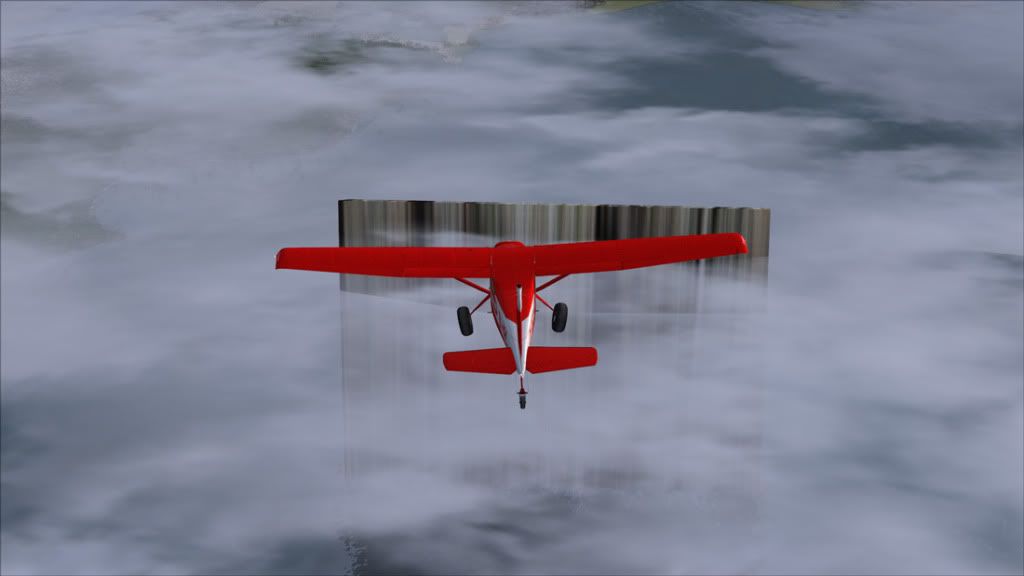
I was flying from Q-town to Glenorchy when I noticed this:

It seems there is an airport on top of it - there is a difficult landing - and it juts up from the lake about 1500-2000ft. The ICAO code for the airport is NZ61, something about a waypoint in the name.

I don't know why it is there, or how to get rid of it. unsure.gif
connor
Senior Member
 
Topic author
Joined: Sat Nov 27, 2010 11:01 am
Posts: 1616
Location: Christchurch

Postby Ian Warren » Mon Jun 20, 2011 8:17 pm

There is a VCL patch you may not be using other than that a rouge AFCAD in the scenery folder .
Image
User avatar
Ian Warren
NZFF Pro
 
Joined: Fri May 05, 2006 5:23 pm
Posts: 41187
Location: AREA 51

Postby Redda03 » Mon Jun 20, 2011 8:35 pm

[quote name='Ian Warren' date='Jun 25 2011,9:17 AM' post='8286607']
There is a VCL patch you may not be using other than that a rouge AFCAD in the scenery folder
/quote]

Must be my fault......the Redda "rogue" in the system!!!

Cheers,

Bob R
url="http://www.VectorLandclass.co.nz/"]
Image[/url]
Redda03
Forum Addict
 
Joined: Tue Aug 08, 2006 12:31 pm
Posts: 205
Location: Waikanae Beach

Postby toprob » Mon Jun 20, 2011 8:42 pm

Just a suggestion -- is this part of GNZLAP or one of the related projects? I think that to get these working in FSX meant leaving out the supplied AFCADs. Sorry, I haven't done my usual research, just delving into my decidedly suspect memory...
User avatar
toprob
NZFF Pro
 
Joined: Sat Apr 29, 2006 4:56 pm
Posts: 6711
Location: Upper Hutt

Postby Snowman » Mon Jun 20, 2011 9:30 pm

toprob wrote:
QUOTE (toprob @ Jun 20 2011,8:42 PM) <{POST_SNAPBACK}>
Just a suggestion -- is this part of GNZLAP or one of the related projects? I think that to get these working in FSX meant leaving out the supplied AFCADs. Sorry, I haven't done my usual research, just delving into my decidedly suspect memory...


Your memory is indeed correct Rob.
It is a waypoint from GNZLAP REDUX ( the final version for FS9).
They will not work in FSX in their original AF2 format, but will work if converted to FSX format using AFX (Airport Facilitator X , by Flight1 Software).

Lawrie. New_Zealand_etc.gif
Image

Image
User avatar
Snowman
NZFF Pro
 
Joined: Wed Jul 26, 2006 3:52 pm
Posts: 2427
Location: Tauranga, NZ.

Postby connor » Tue Jun 21, 2011 7:51 am

I must of slipped the afcads in, I definitely made a point of leaving them out. How do I get rid of them?
connor
Senior Member
 
Topic author
Joined: Sat Nov 27, 2010 11:01 am
Posts: 1616
Location: Christchurch

Postby morrisman1 » Tue Jun 21, 2011 12:17 pm

theres only one thing to do there... Land on the damn thing
Cameron Morison
CAA CPL(A), MEIR

FSX Acceleration on windows 7 64bit, Gigabyte P55a-UD3R i5-750, 4GB DDR3, HD5850 1GB (and still sucky frames - thanks fsx!)
User avatar
morrisman1
Member
 
Joined: Wed Jan 27, 2010 6:24 pm
Posts: 87

Postby Snowman » Tue Jun 21, 2011 2:57 pm

connor wrote:
QUOTE (connor @ Jun 21 2011,7:51 AM) <{POST_SNAPBACK}>
I must of slipped the afcads in, I definitely made a point of leaving them out. How do I get rid of them?


Depending on whether you placed them in same name folders in FSX as in the FS9 install instructions with the GNZLAP package, they could be in one of 2 places.

FSX / Addon Scenery / Scenery , or in

FSX / Scenery / World / Scenery.

If you find it in either of those places, simply remove the file named "AF2_NZ61.bgl" by deleting it or moving it to a folder of your choice (outside of FSX) for storage.

Lawrie. New_Zealand_etc.gif
Image

Image
User avatar
Snowman
NZFF Pro
 
Joined: Wed Jul 26, 2006 3:52 pm
Posts: 2427
Location: Tauranga, NZ.


Return to Scenery

Who is online

Users browsing this forum: No registered users and 8 guests