100% ad-free
 by Olderndirt » Sun Apr 03, 2011 5:46 am


by Rotordude » Sun Apr 03, 2011 6:33 am
Olderndirt wrote:QUOTE (Olderndirt @ Apr 3 2011,6:46 AM) <{POST_SNAPBACK}>I'm at 10,000 ft, about twenty west of Ashburton (see coordinates). What's the story on all the geometric strips and slabs of autogen - am I doing something wrong, I hope.
Hedge rows and pine blocks, all normal. I do find the autogen a bit too sparse in a lot of places (especially the hedge rows) for my liking in such a "Green Country"Last edited by Rotordude on Sun Apr 03, 2011 6:37 am, edited 1 time in total.Regards always
Pete
by Olderndirt » Sun Apr 03, 2011 9:18 am
Rotordude wrote:QUOTE (Rotordude @ Apr 2 2011,11:33 AM) <{POST_SNAPBACK}>Hedge rows and pine blocks, all normal. I do find the autogen a bit too sparse in a lot of places (especially the hedge rows) for my liking in such a "Green Country"Even if it is, it doesn't look right. By the way, your second entry in the DOS command series 'xcopy /E......' didn't take. Something about a bad dll in windows32 so I never got to implement your fix.l
by toprob » Sun Apr 03, 2011 12:42 pm
Olderndirt wrote:QUOTE (Olderndirt @ Apr 3 2011,9:18 AM) <{POST_SNAPBACK}>Even if it is, it doesn't look right.
I'm glad someone brought that up -- I grew up on the Canterbury Plains, and it certainly looks right. I've had this discussion with lots of people before, while VLC was in development -- the question was always how far could we go to balance realism with 'what looks right.' Thankfully Tim could not be bought off, and realism has been the main goal. This is what makes me a big fan of VLC, I could have got involved with a project which gave a kind of hollywood interpretation of New Zealand, and there are some of those in development, and maybe they'll get a lot of world-wide sales, but I wanted something which the locals could recognise. Incidentally there are lots of local pilots use the windbreaks and pine blocks to orientate themselves.
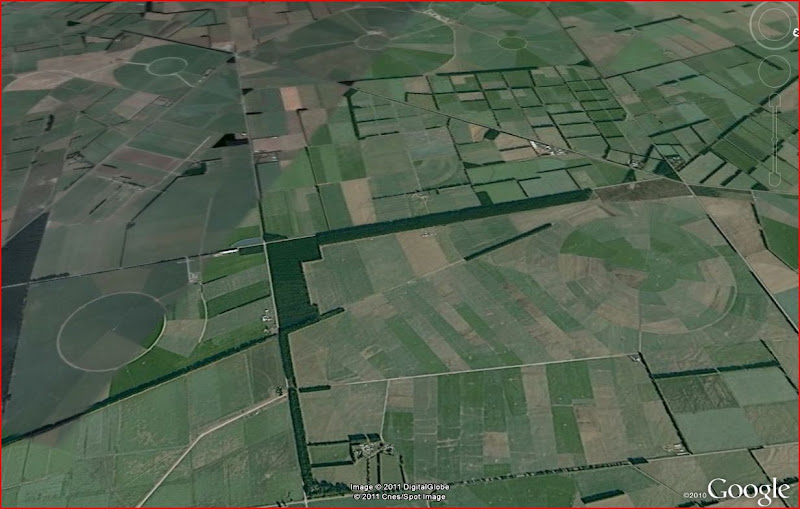
Google Earth:
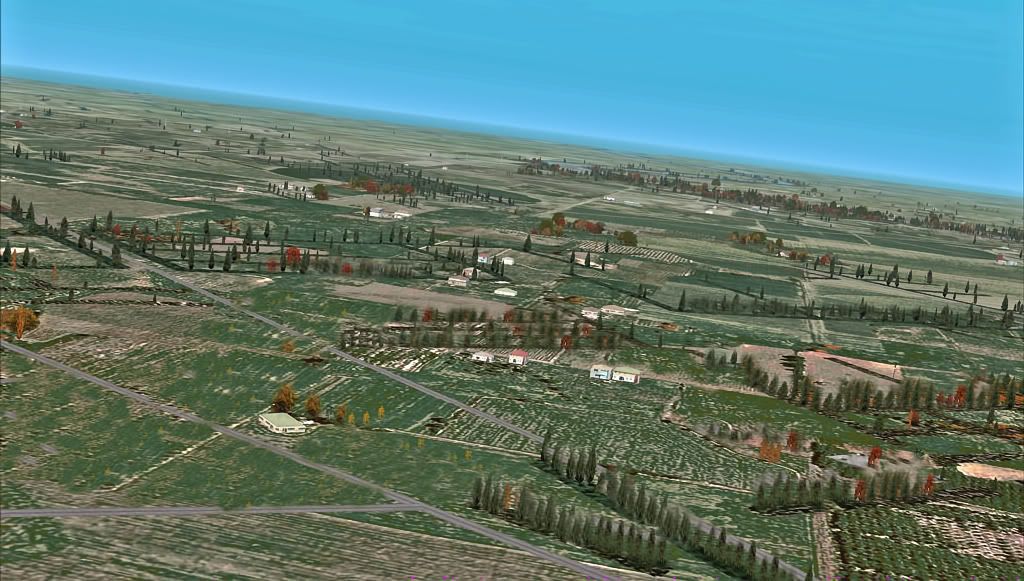
Vector Land Class:
Rotordude -- the autogen density is a problem, and we have been looking at a few ways of improving it. This has to do with the way in which FSX lays autogen on the vectors -- it likes a bit of a buffer zone at the edges, which means that on narrower vectors it thins out too quickly. FSX has no native provision for shelter belts, and most developers leave them out, but they are such a huge feature here that I'd rather have them than not have them.
As local airfields have been released I've included object-placed trees around the airfield to fill these out a bit, but you can't do the whole country this way.

by Olderndirt » Sun Apr 03, 2011 1:34 pm
 . In the screenshots thread is a post made about the Westport area. Believe it's slipped to page two but one of the shots is of local autogen and, as I remarked, it's amazing.
by Rotordude » Sun Apr 03, 2011 1:55 pm
Olderndirt wrote:QUOTE (Olderndirt @ Apr 3 2011,9:18 AM) <{POST_SNAPBACK}>By the way, your second entry in the DOS command series 'xcopy /E......' didn't take. Something about a bad dll in windows32 so I never got to implement your fix.l
ok sounds like you have a xcopy issue (I only used xcopy so you could do a full recursive backup). Try this with the copy command. Xcopy will copy over folder and any recursive folder beneath. copy will just do files.
- Code: Select all
copy /Y "C:\Program Files\Microsoft Games\Microsoft Flight Simulator X\VectorLandClass\*.*" "C:\Program Files\Microsoft Games\Microsoft Flight Simulator X\VectorLandClass-BU"Last edited by Rotordude on Sun Apr 03, 2011 1:57 pm, edited 1 time in total.Regards always
Pete
by Olderndirt » Mon Apr 04, 2011 4:31 am
Rotordude wrote:QUOTE (Rotordude @ Apr 2 2011,6:55 PM) <{POST_SNAPBACK}>ok sounds like you have a xcopy issue (I only used xcopy so you could do a full recursive backup). Try this with the copy command. Xcopy will copy over folder and any recursive folder beneath. copy will just do files.Got as far as #4 and it's telling me the 'system cannot find file specified' - "D:\Program Files\Microsoft Games\Microsoft Flight Simulator X\VectorLandClass-BU\*b2*.bmp" I tried it without the '-BU' and it said 'You can't copy a file into itself'.
- Code: Select all
copy /Y "C:\Program Files\Microsoft Games\Microsoft Flight Simulator X\VectorLandClass\*.*" "C:\Program Files\Microsoft Games\Microsoft Flight Simulator X\VectorLandClass-BU"
by Rotordude » Mon Apr 04, 2011 5:59 am
by Olderndirt » Mon Apr 04, 2011 6:44 am
Rotordude wrote:QUOTE (Rotordude @ Apr 3 2011,10:59 AM) <{POST_SNAPBACK}>Ok, using windows can you navigate to "Microsoft Games\Microsoft Flight Simulator X\VectorLandClass-BU" and verify that folder and its contents exist.Vector Land Class-BU is there and it contains - EULA/Log4net.dll/PDF Readme/vlc config XML/VLC config.exe/vlc config.log. In the Vector Land Class original folder are now 2986 .bgl files, copied in step three so they should be in use in 'scenery library' - right. Since step four appears to be a transfer from '-BU' to original , is it still necessary or am I all screwed up?Last edited by Olderndirt on Mon Apr 04, 2011 8:07 am, edited 1 time in total.
by husker » Mon Apr 04, 2011 10:38 am
toprob wrote:QUOTE (toprob @ Apr 3 2011,12:42 PM) <{POST_SNAPBACK}>I'm glad someone brought that up -- I grew up on the Canterbury Plains, and it certainly looks right. I've had this discussion with lots of people before, while VLC was in development -- the question was always how far could we go to balance realism with 'what looks right.' Thankfully Tim could not be bought off, and realism has been the main goal. This is what makes me a big fan of VLC, I could have got involved with a project which gave a kind of hollywood interpretation of New Zealand, and there are some of those in development, and maybe they'll get a lot of world-wide sales, but I wanted something which the locals could recognise. Incidentally there are lots of local pilots use the windbreaks and pine blocks to orientate themselves.
For me, the fact that the hedgerows don't line up with the underlying patchwork of textures totally kills any extra realism that they might impart - I understand this can't be avoided without full photoreal underneath. I avoid flying in the Canterbury Plains because it hurts my eyes so much :-)
by toprob » Mon Apr 04, 2011 12:28 pm
husker wrote:QUOTE (husker @ Apr 4 2011,10:38 AM) <{POST_SNAPBACK}>For me, the fact that the hedgerows don't line up with the underlying patchwork of textures totally kills any extra realism that they might impart - I understand this can't be avoided without full photoreal underneath. I avoid flying in the Canterbury Plains because it hurts my eyes so much :-)
A fair point. I have the same issue with roads -- the way in which the texture define the landclass can't take into account the road system, so the normal way in which rural areas are defined within 'blocks' delineated by roads can't really be simulated. Some scenery systems actually leave out 'real' roads for this reason, and only include pictures of roads. Others define whole cities with half a dozen main highways and nothing else except masses of autogen trees and houses to give the impression that roads must be there somewhere...
Since we (arguably) need to have roads, I like the fact that the vector windbreaks and pine blocks help define and strengthen the effect of the roads, as they align with them in a lot of places. So in the Vector Land Class pic I included earlier, common sense tells you that there will be a road running parallel to the big rectangular block, towards the stream. In the Google version, you don't see the road at all, but you KNOW it's there. Maybe not important at all to a lot of people, who might have no interest in what is actually there in that one spot, but to me as important as an accurate coast-line.
by Olderndirt » Mon Apr 04, 2011 1:06 pm
toprob wrote:QUOTE (toprob @ Apr 3 2011,5:28 PM) <{POST_SNAPBACK}>A fair point. I have the same issue with roads -- the way in which the texture define the landclass can't take into account the road system, so the normal way in which rural areas are defined within 'blocks' delineated by roads can't really be simulated. Some scenery systems actually leave out 'real' roads for this reason, and only include pictures of roads. Others define whole cities with half a dozen main highways and nothing else except masses of autogen trees and houses to give the impression that roads must be there somewhere...As I mentioned somewhere above, my textures aren't a very representative shade of green especially compared to the Google Sat shots. Been playing around with PS and, with a little work 'planting' trees, the windbreak strips look a lot more like they belong. By applying some 'underwater' filter the overall color got closer to Google. Don't suppose there's a way to lay in a little more 'Google' like color in a future patch?
Since we (arguably) need to have roads, I like the fact that the vector windbreaks and pine blocks help define and strengthen the effect of the roads, as they align with them in a lot of places. So in the Vector Land Class pic I included earlier, common sense tells you that there will be a road running parallel to the big rectangular block, towards the stream. In the Google version, you don't see the road at all, but you KNOW it's there. Maybe not important at all to a lot of people, who might have no interest in what is actually there in that one spot, but to me as important as an accurate coast-line.
by AndrewJamez » Mon Apr 04, 2011 3:43 pm
by Olderndirt » Tue Apr 05, 2011 3:19 am
by Timmo » Tue Apr 05, 2011 11:02 am
husker wrote:QUOTE (husker @ Apr 4 2011,11:38 AM) <{POST_SNAPBACK}>For me, the fact that the hedgerows don't line up with the underlying patchwork of textures totally kills any extra realism that they might impart - I understand this can't be avoided without full photoreal underneath. I avoid flying in the Canterbury Plains because it hurts my eyes so much :-)
It is one of the draw backs of this type of terrain rendering- I read a X-plane development blog which outlines the different approaches well so I'll paste it here:QUOTEOne of the problems with comparing scenery system approaches is that a real productized approach to scenery rarely fits into a perfect bucket or matches a single theoretical techniques. So here are some approximate terms, designed to generally describe an approach. They're not going to be perfect fits, and even the definitions will fluctuate in different contexts and forums.
We can say scenery is plausible when it looks like it might exist somewhere in the world. Plausible means that roads don't go straight up over a cliff, trees don't grow in the ocean, etc. In other words, plausible scenery is scenery where absurd things don't happen. Plausible scenery is great when you don't know what an area should look like. A lack of plausibility is often a bug.
We can say scenery is realistic when it correlates closely with what is really present at a given location on the Earth. So if there really is a lake behind my house, realistic scenery has that lake. Plausible scenery might have a lake, a forest, or something else believable for where I live (the Northeastern United States). A giant sandy desert would not be plausible for my location.
We can say scenery is procedural if the detail in the scenery comes from some kind of algorithm that produces results. For example, a fractal coastline is procedural.
We can say scenery is data driven when the detail comes from some source of external input data. Our mountains are currently data driven - that is, the mountain shape basically comes directly from the DEMs we use.
We can say scenery is artist driven if the look of the scenery comes from art assets created by an art team.
We can say scenery is algorithm driven if part of its look comes from the transformational process that converts data from one form to another.
(I'm sort of drawing a line in the sand here with procedural vs. algorithmic, but what I'm trying to contrast is a program that generates 'information' out of thin air vs. a program that creates information out of other information. For example, in X-Plane 9, European capillary roads were procedural. We had no real data, so I wrote an algorithm that made them up in a manner that was consistent with underlying terrain. In version 10, these roads will be algorithmic; we take OSM data and then do some processing to make it suitable for X-plane. This is definitely a line in the sand kind of definition.)[/quote]
(Source: http://xplanescenery.blogspot.com/search/l...obal%20scenery)
Scenery design of a real world location is always a balance between realism and plausibility
From VLC's perspective, we focus a lot on the realistic which, with the way that FSX renders terrain means that there can be a corresponding drop in plausibility in regards to the relationship with the underlying ground textures. As mentioned, there is no way around this without either using photoreal coverage over the whole country or reducing the realism.
In other words, simply removing a heap of data from the vector layer (such as shelter belts) could increase the plausibility of VLC ("Hey those shelter belts don't look like they are supposed to be there because they don't line up with the ground texture! Remove them.") but with a subsequent reduction in realism ("hey there are shelter belts there in real life! where are they?!")- FTX perhaps moves closer towards the 'plausibility' end of the scale, and if you have never flow over a particular area in real life it looks good.....but it mightn't be realistic: Someone with knowledge of the area would have a high level of disconnect between reality and the sim. I wanted to make a package that real life pilots (or budding real life pilots) could use and, with a high degree of confidence, rely on what they were seeing out the window would be close to what they would see in real life: A ground simulation for a flight simulator package
I've thought long and hard about trying to overcome some of the limitations of the FSX rendering system.....but this either requires total photoreal coverage of New Zealand or a less realistic experience. In saying that, if there is enough demand for it, it shouldn't be too hard to remove the shelterbelts and release a alternate VLC layerLast edited by Timmo on Tue Apr 05, 2011 11:07 am, edited 1 time in total.
- Timmo
- NZFF Pro
- Joined: Wed Oct 25, 2006 6:28 pm
- Posts: 2056
- Location: Tauranga
by Ian Warren » Tue Apr 05, 2011 11:49 am
Timmo wrote:QUOTE (Timmo @ Apr 5 2011,12:02 PM) <{POST_SNAPBACK}>I've thought long and hard about trying to overcome some of the limitations of the FSX rendering system.....but this either requires total photoreal coverage of New Zealand or a less realistic experience. In saying that, if there is enough demand for it, it shouldn't be too hard to remove the shelterbelts and release a alternate VLC layer
Tim , I would have you save your time , the shelterbelts are what define many and most areas off the NZ , I guess its just time to figure an enhancement increasing the autogen density and later the ground texture , REMOVAL off anything would not be real and that is what you strove to get and i like it .

by Olderndirt » Tue Apr 05, 2011 1:14 pm
by toprob » Tue Apr 05, 2011 2:19 pm
Users browsing this forum: No registered users and 13 guests