Hi..........I have been following your excellent tutorial "Building in GMAX - Texturing". Do you have any tutorials on how to create a texture sheet like your "sample texture" or any links on how to do this.
Thanks
Gary
Texture Sheet
7 posts
• Page 1 of 1
 by toprob » Fri Sep 24, 2010 1:58 pm
Hi Gary
The reason why I don't cover this much is that it is very dependent on what graphics software you have. The tool I use -- Micrografx Picture Publisher -- is very obsolete, in that it was released last century. Since there is no 'standard' graphics software, in the same way as GMAX is the standard modelling tool, then it's trickier to track down tutorials.
However I could probably run through some general tips, but it is up to you to pick a graphics software solution and learn how to use it.
The reason why I don't cover this much is that it is very dependent on what graphics software you have. The tool I use -- Micrografx Picture Publisher -- is very obsolete, in that it was released last century. Since there is no 'standard' graphics software, in the same way as GMAX is the standard modelling tool, then it's trickier to track down tutorials.
However I could probably run through some general tips, but it is up to you to pick a graphics software solution and learn how to use it.
-

toprob - NZFF Pro
- Joined: Sat Apr 29, 2006 4:56 pm
- Posts: 6716
- Location: Upper Hutt
by creator2003 » Fri Sep 24, 2010 2:33 pm
I use photoshop ,
I start with a 1024x1024 transparent texture then add my cropped building images as layers ,i normally have the raw photo of my building side by side with the map in PShop and work it with transform skew stretch cut paste clone tools ,what ever it takes to get good straight images to map to my walls /roofs etc ,making sure ive mapped all parts i can think of onto the map .
After ive finished the main texture i save a copy of the map for a night texture "texture01_LM" , "_LM "part is just to find it easy in a group of many textures ,i then add one final solid black layer over my buildings texture , and then change its opacity to 80% 90% or what ever looks good and shows the buildings a little underneath ,then i use the eraser tool to brush /draw out the lights for the windows .
This map is a old one of mine and shows how much you can put on a map ,i try to put all buildings that are close to each other on the one map etc ,ive refined the way i do maps since i made this one, so will you as you learn more ,it just gets better as you work out the tools
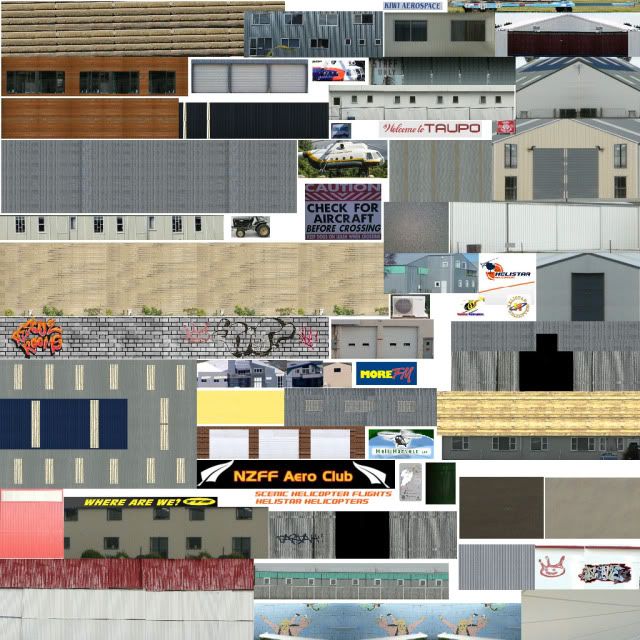
after the objects are mapped to a model and you are happy with it you put a copy of the texture through the image tool and export them at the format you would like ,my maps are normally saved out as MipMap / format dx1 and saved as a .dds texture for use in FSX ,fences and see through stuff is normally dx3 or dx5 format which holds more info and larger file sizes for transparent
PS:the texture sizes have to be even 64x64 / 256x256 / 512x512 /1024x1024 /2048x2048 they can have 1024x256 , but i don't normally do that myself and stick with 1024x1024
hope this explains a little of the process
mike
I start with a 1024x1024 transparent texture then add my cropped building images as layers ,i normally have the raw photo of my building side by side with the map in PShop and work it with transform skew stretch cut paste clone tools ,what ever it takes to get good straight images to map to my walls /roofs etc ,making sure ive mapped all parts i can think of onto the map .
After ive finished the main texture i save a copy of the map for a night texture "texture01_LM" , "_LM "part is just to find it easy in a group of many textures ,i then add one final solid black layer over my buildings texture , and then change its opacity to 80% 90% or what ever looks good and shows the buildings a little underneath ,then i use the eraser tool to brush /draw out the lights for the windows .
This map is a old one of mine and shows how much you can put on a map ,i try to put all buildings that are close to each other on the one map etc ,ive refined the way i do maps since i made this one, so will you as you learn more ,it just gets better as you work out the tools
after the objects are mapped to a model and you are happy with it you put a copy of the texture through the image tool and export them at the format you would like ,my maps are normally saved out as MipMap / format dx1 and saved as a .dds texture for use in FSX ,fences and see through stuff is normally dx3 or dx5 format which holds more info and larger file sizes for transparent
PS:the texture sizes have to be even 64x64 / 256x256 / 512x512 /1024x1024 /2048x2048 they can have 1024x256 , but i don't normally do that myself and stick with 1024x1024
hope this explains a little of the process
mike
Last edited by creator2003 on Fri Sep 24, 2010 5:30 pm, edited 1 time in total.
-

creator2003 - NZFF Pro
- Joined: Fri Jun 16, 2006 12:08 am
- Posts: 4633
- Location: Cant U C im LOCO
by dbcunnz » Fri Sep 24, 2010 4:40 pm
toprob wrote:QUOTE (toprob @ Sep 24 2010, 01:58 PM) <{POST_SNAPBACK}>Hi Gary
The reason why I don't cover this much is that it is very dependent on what graphics software you have. The tool I use -- Micrografx Picture Publisher -- is very obsolete, in that it was released last century. Since there is no 'standard' graphics software, in the same way as GMAX is the standard modelling tool, then it's trickier to track down tutorials.
However I could probably run through some general tips, but it is up to you to pick a graphics software solution and learn how to use it.
Hi Rob the Micrografx Picture Publisher is a real great program I still use it but I had to install the virtual winXP pro (available free from Microsoft) in my windows 7 so I can still run it I started with version 8 and updated to version 10.
Micrografx was taken over by Coral many years ago and they didn't continue with Picture Published which is a real pity as it was such a good program I have other graphics programs but still go back to Picture publisher as I find some of the features are much easier to use than in the latter graphic programs.
doug

-

dbcunnz - NZFF Pro
- Joined: Thu Feb 21, 2008 12:56 pm
- Posts: 4011
- Location: Blenheim New Zealand
by garypow » Fri Sep 24, 2010 9:34 pm
Hi Rob.........Thanks everyone for the reply & help. I have "Coral Paintshop Photo Pro" as well as "Coral Painter 11" installed, but have not used them much. I have now installed -- Micrografx Picture Publisher 10 -- and had a play around with it, so would like your help. I did the following and it seemed to work: -
1) File>new>new image> then set Width = 1024 pixels Height = 1024 pixels & Resolution to 300 which then created a blank sheet.
2) I then converted 5 separate jpeg images to .bmp format all at 512 X 512 X 300 dpi and using the import tool placed all 5 onto the blank sheet, by resizing them.
3) I then saved as "texture sheet .jpg"
So is this the correct way to do it??. I noticed that Mike has loads of textures on his sheet, so I assume that it does not matter what size you shrink them down to, so that more can fit on the sheet.
The other thing is, in the tutorial, you explain about textures being to the power of 2, which I understand why, but if for example I create a "club house" for my local airport in 3ds Max for FSX, and the dimensions of the building are 60 feet wide X 40 feet deep X 15 feet high, and my texture sheet containing my 5 textures are all at 512 X 512, does that mean I have to make them all 1024 X 1024?? as I don't understand yet the difference between 512 & 1024 in terms of quality.
Thanks again
Gary
1) File>new>new image> then set Width = 1024 pixels Height = 1024 pixels & Resolution to 300 which then created a blank sheet.
2) I then converted 5 separate jpeg images to .bmp format all at 512 X 512 X 300 dpi and using the import tool placed all 5 onto the blank sheet, by resizing them.
3) I then saved as "texture sheet .jpg"
So is this the correct way to do it??. I noticed that Mike has loads of textures on his sheet, so I assume that it does not matter what size you shrink them down to, so that more can fit on the sheet.
The other thing is, in the tutorial, you explain about textures being to the power of 2, which I understand why, but if for example I create a "club house" for my local airport in 3ds Max for FSX, and the dimensions of the building are 60 feet wide X 40 feet deep X 15 feet high, and my texture sheet containing my 5 textures are all at 512 X 512, does that mean I have to make them all 1024 X 1024?? as I don't understand yet the difference between 512 & 1024 in terms of quality.
Thanks again
Gary
- garypow
by IslandBoy77 » Fri Sep 24, 2010 9:49 pm
Another excellent - and free - image creator / editor is Paint.NET. If you haven't got Photoshop, I have found Paint.NET to be an excellent product. Oh, and did I mention it was free? I use Photoshop, but install Paint.NET on all my customer's PCs.
-

IslandBoy77 - Senior Member
- Joined: Tue Feb 03, 2009 2:23 pm
- Posts: 1020
- Location: Napier, New Zealand
7 posts
• Page 1 of 1
Who is online
Users browsing this forum: No registered users and 10 guests