Scenery editing question

An area to discuss scenery addons for virtual NZ

Postby IslandBoy77 » Sun Sep 19, 2010 9:36 pm

Well, after thinking about it for quite a while, I took the plunge today to see how hard it is to do scenery. Far out! I think algebra was easier - and I suck at that! I don't think I've come across a murkier, less clearly-documented, more difficult to get into hobby in my life. I don't consider myself a dunce, but I sure feel like one after wasting most of today with no result.

It would appear that scenery editing is more akin to art that science, where one has to absorb "basic principles" with no idea as to what they are or how to bring them together in a cohesive manner that one might expect a normal human being to be able to interpret.

So, anyway, gripe finished.

Now the question. Napier is not well defined in FSX, especially the "finer" points - like my friend (or is it nemesis?) Park Island. So I decided to have a lash at creating the left hand larger feature. Following the somewhat garbled and esoteric instructions for FSX_XML, I drew a polygon shape in Google Earth, named it, gave it LANDCLASS_Grass, and saved it as an XML file. I then ran FSX_XML (after having to manually edit the config file so that it found all the tools it needed) and it dutifully spat out a 14MB BGL file. However, FSX won't let me "add" the BGL. If I plonk the BGL into the add-on scenery folder, FSX seems to go through the motions of adding it, but it doesn't show up in the sim. Is that because VLC might be over-riding it?

The other thing is that I noticed that the preview of the BGL file looks nothing like the lovely, complex 3D (height of 20m) polygon I created (and can still see) in GE - it looks like a pink wedge on it's side!

So, for those who have plumbed the depths of this black mystical art of scenery creation, where am I going wrong? Timmo intimated that it was possible to alter the underlying mesh, but 8 hours of bashing my head against cryptic gobbledygook and barely coherent scribblings on the 'net gave me ZERO information on how to achieve this.

Not a pleasant waste of ones day... angry.gif
Last edited by IslandBoy77 on Sun Sep 19, 2010 9:37 pm, edited 1 time in total.
User avatar
IslandBoy77
Senior Member
 
Topic author
Joined: Tue Feb 03, 2009 2:23 pm
Posts: 1020
Location: Napier, New Zealand

Postby creator2003 » Sun Sep 19, 2010 10:46 pm

Well you,d be please to hear im doing the images /ie laying them down in your area as i type this message ,my day was spent trying to work out the best way to lay down the 3500 sq miles and recolour it to blend with old and newer images ,mission nearly complete .
Even after your bad day there will still be a good out come , i think there needs to be video tutorials in Gmax specifically for fsx scenery/aircraft design ,there are some but not all in one place which would be better ..
User avatar
creator2003
NZFF Pro
 
Joined: Fri Jun 16, 2006 12:08 am
Posts: 4633
Location: Cant U C im LOCO

Postby Ian Warren » Mon Sep 20, 2010 2:47 am

Pete , Wonder if i should dig up that song again smile.gif following many , you may want pick one airport /airfield a small one close to home
Image
User avatar
Ian Warren
NZFF Pro
 
Joined: Fri May 05, 2006 5:23 pm
Posts: 41187
Location: AREA 51

Postby IslandBoy77 » Mon Sep 20, 2010 8:50 am

Ian Warren wrote:
QUOTE (Ian Warren @ Sep 20 2010, 02:47 AM) <{POST_SNAPBACK}>
Pete , Wonder if i should dig up that song again smile.gif following many , you may want pick one airport /airfield a small one close to home

Hi Ian - sure, what song might that be? Napier is my closest airport - I live almost under the southern flight approach, about 10km as the crow flies from the threshold. There is a feature about 1km short of the runway on the southern approach called "Park Island" (before the great earthquake, it was an island - now 2 large & 1 small hills covered in trees, mostly Australian gums & eucalyptus, with cemeteries atop, surround by hockey / soccer playing fields) that has a mean height of 20m (you can see it's height profile in GE by switching that feature on, but the very coarse mesh in GE means that 3D view shows it as flat). VLC shows it a little, but only in terms of a very basic landclass & a few trees. I was keen - and still am - to either "add" the 3 hills and then populate them with trees, or to alter the mesh underneath to the correct height.

I don't fly much, and don't have my license. However, not only is Park Island VERY visible from the ground winkyy.gif but it stands out quite nicely on approach by air also. It is certainly "missing". The other thing I want to correct in that area is the large, wide drain that runs along Prebensen Drive - one has to fly over it just before landing, about 700m or so short of the runway.

It sounds like Mike is doing photo real (oooooooooo drool.gif ), so that will vastly improve the area (to say the least). VLC is a good jump up from default, but knowing my area well and being fussy, I want the best! cool.gif The other things that need tending to to make Napier "proper" are the Norfolk Pines along the foreshore north & south of the Hill, Napier Port (a huge job by itself), Pan Pac out at Whirinaki (another huge job), the Ahuriri Port and surrounds (huge), a decent Awatoto fertiliser works (almost a not-huge job), and various landmark buildings (A&B, Rothmans, Napier City Council, Taradale shopping centre). Given how incredibly difficuly it appears that editing FSX is (I mean, this is the 21st century, right?), I doubt I'll ever get to recreating Napier in all it's "glory". But it would be nice to be able to do some minor tinkering without having to learning rocket science (BTW, I see TM has a Rocket Scientist position available at the moment - I might be better trying my hand there... tongue.gif )
Last edited by IslandBoy77 on Mon Sep 20, 2010 8:53 am, edited 1 time in total.
User avatar
IslandBoy77
Senior Member
 
Topic author
Joined: Tue Feb 03, 2009 2:23 pm
Posts: 1020
Location: Napier, New Zealand

Postby dart15 » Mon Sep 20, 2010 8:51 am

IslandBoy77 wrote:
QUOTE (IslandBoy77 @ Sep 19 2010, 09:36 PM) <{POST_SNAPBACK}>
Well, after thinking about it for quite a while, I took the plunge today to see how hard it is to do scenery. Far out! I think algebra was easier - and I suck at that! I don't think I've come across a murkier, less clearly-documented, more difficult to get into hobby in my life. I don't consider myself a dunce, but I sure feel like one after wasting most of today with no result.

It would appear that scenery editing is more akin to art that science, where one has to absorb "basic principles" with no idea as to what they are or how to bring them together in a cohesive manner that one might expect a normal human being to be able to interpret.

So, anyway, gripe finished.


This is something that I am interested in too but have zero knowledge/developed skills/applications so its going to be a pretty steep learning curve blink.gif . Like you I have struggled to find anything out there in the ether which is suitable for a person like myself - and I wondered whether you or anyone here might be able to provide some pointers to suitable reference material or even........ a tutorial. Yes, i know I can google for billy-o but most of it is going to be over my head!

I would like to be able to do something quite basic (I imagine) such as the CGC's airfield at Hororata as a learning project but I am very much aware that what I perceive as "basic" is probably a series of highly complex steps - and your post has only served to emphasise that!!! Good on you for taking the plunge - it would be good if you could share the knowledge (frustrations) along the way....


Cheers
Dart 15

Image

Image

Asus P6X58D Premium | i7 930 @2.8 OC 4.2 Ghz | Radeon 5850 | 3x2 GB Corsair Dominator DDR3 1600 7-8-7-7-20 |
OCZ Vertex3 120GB SSD | Corsair H50 | Corsair HX650W | Cooler Master Gladiator 600 | Win7 x64 | FSX Acceleration
dart15
Forum Addict
 
Joined: Mon Jul 26, 2010 11:54 am
Posts: 181
Location: Christchurch

Postby IslandBoy77 » Mon Sep 20, 2010 9:00 am

creator2003 wrote:
QUOTE (creator2003 @ Sep 19 2010, 10:46 PM) <{POST_SNAPBACK}>
Well you,d be please to hear im doing the images /ie laying them down in your area as i type this message ,my day was spent trying to work out the best way to lay down the 3500 sq miles and recolour it to blend with old and newer images ,mission nearly complete .
Even after your bad day there will still be a good out come , i think there needs to be video tutorials in Gmax specifically for fsx scenery/aircraft design ,there are some but not all in one place which would be better ..

Hey Mike. Oh yes, I most certainly am pleased! Did you try contacting any of the local councils to see if they were prepared to help you at all with imagery? What program / method are you using for the laying down of the images? Are the images all geo-tagged, or are you manually aligning them somehow?

I had always hoped that it would be possible to manually lay down imagery. I have fair abilities in Photoshop, and have an accurate eye for aligning and blending stuff. So I figured if there were some way to get a wireframe representation of how FSX sees New Zealand, and if I could zoom in on that and then place images & just move them about so that the main features lined up with the wireframe, that would be fairly easy, if a little tedious. And for the mesh, I envisaged a similar thing, being able to have "layers" of data one could switch on or off - wireframe, photo, elevation, landclass - and then have tools that can tweak / create elevations. Indeed, I've seen tools like that before, just not specifically for FSX. Where would my best place be to start where there is well-written, explanatory tutorials that include lay-mans explanations of terms and concepts, with pointer / links to tools (whether payware or freeware)? I have spent probably 20+ hours trolling various websites trying to get a firm handle on all this, but it seems the more I research the muddier it gets and the more frustrated I become! Grrrrr.
Last edited by IslandBoy77 on Mon Sep 20, 2010 9:02 am, edited 1 time in total.
User avatar
IslandBoy77
Senior Member
 
Topic author
Joined: Tue Feb 03, 2009 2:23 pm
Posts: 1020
Location: Napier, New Zealand

Postby IslandBoy77 » Mon Sep 20, 2010 9:11 am

dart15 wrote:
QUOTE (dart15 @ Sep 20 2010, 08:51 AM) <{POST_SNAPBACK}>
This is something that I am interested in too but have zero knowledge/developed skills/applications so its going to be a pretty steep learning curve blink.gif . Like you I have struggled to find anything out there in the ether which is suitable for a person like myself - and I wondered whether you or anyone here might be able to provide some pointers to suitable reference material or even........ a tutorial. Yes, i know I can google for billy-o but most of it is going to be over my head!

I would like to be able to do something quite basic (I imagine) such as the CGC's airfield at Hororata as a learning project but I am very much aware that what I perceive as "basic" is probably a series of highly complex steps - and your post has only served to emphasise that!!! Good on you for taking the plunge - it would be good if you could share the knowledge (frustrations) along the way....


Cheers

My initial idea was to do Hastings (Bridge Pa) Aerodrome. I know a couple of the pilots out there, so can probably swing access for photos and such. However, my experience to date has been, as you can see, like pulling teeth! I had envisaged being able to have access to straight-forward placement and manipulation tools that were intuitive and "made sense", rather than the wash of extremely technical, often not-written for FSX - FS9 ports (and certainly not Windows 7 64-bit friendly) - programs that are awkward and require what appears to be quite a depth of "pre-knowledge" (understanding various technical aspects / inner workings of FSX). The GMax program is a prime example of this. I started working through Robins tutorial on the windowlight (godzone) website, but discovered by step 3 that his knowledge of GMax does bestow certain "operational assumptions" needed to complete the exercise - "pre-knowledge" that he has gained over the years and now just intuitively knows (and indeed, he notes that an understanding of GMax is pretty much needed to complete the tutorial - he's right!).

But I say, why can't there be user-friendly tools? Is this the 21st century or not? If this was FS98 and this was 1997, I could understand it. But 2010 and still using clunky, pseudo-rocket science geek programs for editing? Not good enough.

If I manage to gain any traction in this area and start to make some headway, be assured that I will post it here. But to date, even "following the instructions", I couldn't achieve the very simple task of adding a single, basic hill... blink.gif
User avatar
IslandBoy77
Senior Member
 
Topic author
Joined: Tue Feb 03, 2009 2:23 pm
Posts: 1020
Location: Napier, New Zealand

Postby toprob » Mon Sep 20, 2010 11:02 am

IslandBoy77 wrote:
QUOTE (IslandBoy77 @ Sep 19 2010, 09:36 PM) <{POST_SNAPBACK}>
Not a pleasant waste of ones day... :angry:


I learnt a long time ago not to fight the process -- otherwise I would have had a lot of bad days. You are right, in that most processes are based on some rather cryptic info and tools. That's the way that ACEs always worked, so we're stuck with it. Unfortunately there is just no real market to justify building a one-stop-shop graphical wizz-tool that could do everything.

However the tools have improved a lot -- the release of AFCAD was a huge improvement over coding airports by hand, and today's replacement tools such as Airport Design Editor are amazing. But no, they don't do everything.

For me, the secret is to break it down into tiny little steps. I did nothing but 'play' with GMAX for 3 months before I got to the stage where I could place a model into FS. Things are a lot easier now, as there's a lot more information and help available, but you still need to treat it as a rather technical field.

I went about 3 weeks over budget getting one animated person into a mission when I was putting 'Southern Lakes' together. If I was sensible, I would've given up.

Unfortunately things like building a hill are especially complex, although you might see it as one job, in FS terms you need to do a number of different things, which may involved a number of different tools. Trying to do them all at once can be an exercise in frustration, as you won't really know where the problem lies if it doesn't work as expected. So first you need to make sure that the tools you use are all working, and to do this requires doing lots of simple little experiments, if you are lucky these will be supplied with the tools in the form of tutorials.

The methods I like to use are probably the complete opposite of how the system is set up -- anything complex stumps me completely, so I have to break it down into a 'design' model. I simplify it a lot until I get to an understanding of the underlying processes. This actually makes me a tough teacher, ask my flatmate -- I've been helping her learn to use a computer, and she writes down lists of steps to do each job -- I refuse to teach her that way, forcing her to understand the concepts so she can figure out the steps herself. She hates that, she'd rather just list steps, but she won't actually learn anything that way.

For your project, I suspect that if you got the first phase working you'd be a bit more relaxed about it all. Maybe you could send me your KML file and I'll have a look at it.
User avatar
toprob
NZFF Pro
 
Joined: Sat Apr 29, 2006 4:56 pm
Posts: 6711
Location: Upper Hutt

Postby creator2003 » Mon Sep 20, 2010 11:32 am

If there is anyway you can get on the simple Teamspeak channel ,i can then help you alot more as im not one for typing much ,download TS3 press connect and put this "atl01.bargainvoice.com 7890" in the address and port number ,anyway ill be there all day this week mostly to run anyone through the process if they want to learn as i feel this is the best way i can explain it ..
mike

Edit :
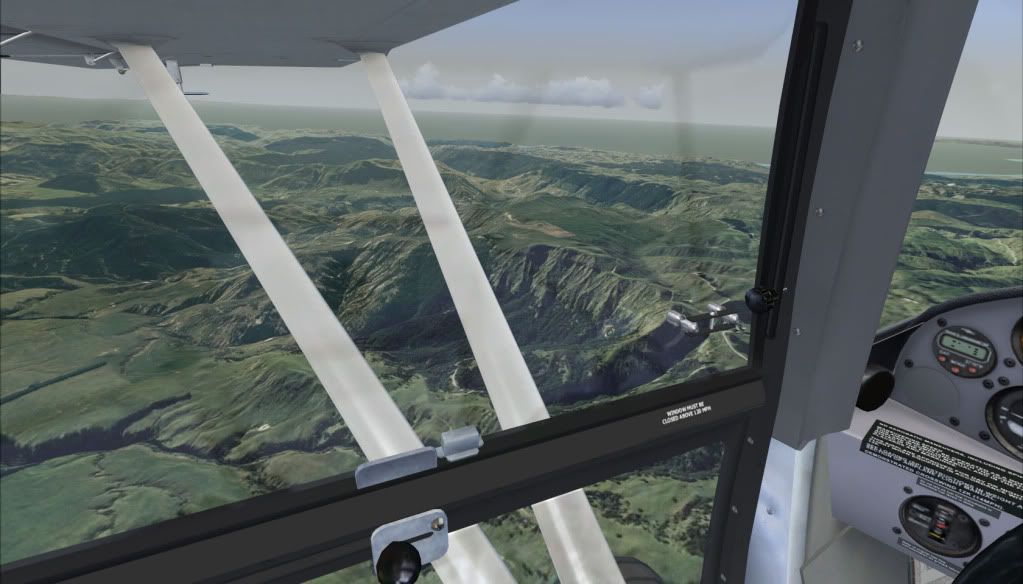
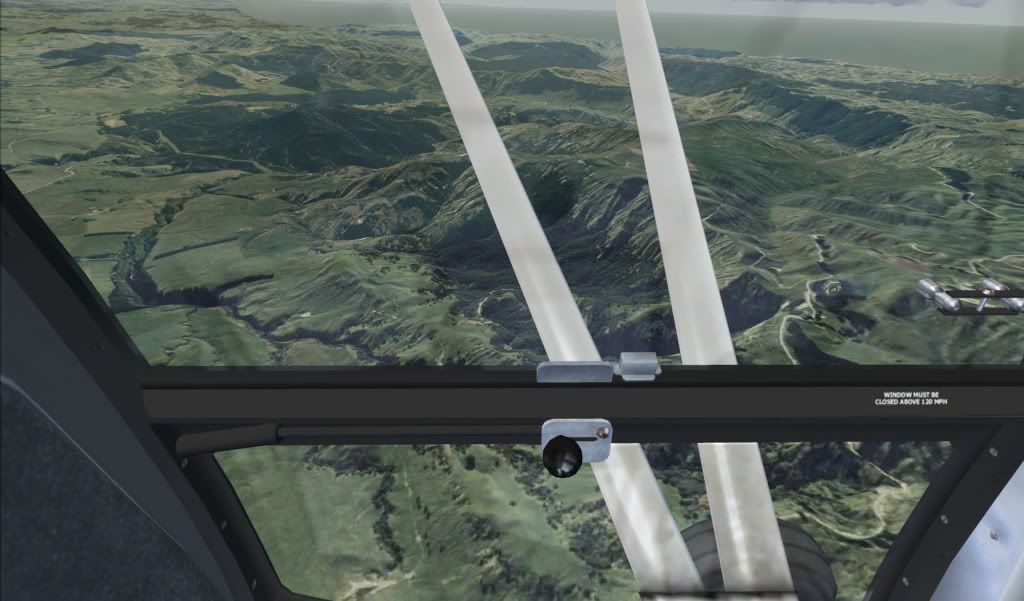
pic out the back of Napier


Last edited by creator2003 on Tue Sep 21, 2010 12:34 am, edited 1 time in total.
User avatar
creator2003
NZFF Pro
 
Joined: Fri Jun 16, 2006 12:08 am
Posts: 4633
Location: Cant U C im LOCO

Postby Syncop8r » Tue Sep 21, 2010 8:00 pm

Yes someone needs to post a FLOW CHART showing the basic processes involved to make scenery...
Syncop8r
Forum Addict
 
Joined: Sun Nov 11, 2007 11:28 pm
Posts: 206

Postby IslandBoy77 » Tue Sep 21, 2010 8:19 pm

creator2003 wrote:
QUOTE (creator2003 @ Sep 20 2010, 11:32 AM) <{POST_SNAPBACK}>
If there is anyway you can get on the simple Teamspeak channel ,i can then help you alot more as im not one for typing much ,download TS3 press connect and put this "atl01.bargainvoice.com 7890" in the address and port number ,anyway ill be there all day this week mostly to run anyone through the process if they want to learn as i feel this is the best way i can explain it ..
mike

Edit :
pic out the back of Napier

Thanks for the offer Mike - I really appreciate that, especially since I know how busy you are. No, I've never used Teamspeak. I'm just getting over a serious bout of RSI in my right arm which has put me back in my work, so I'm gonna have to shelve FSX stuff for a week, maybe longer.

As for those pics, I've only got one thing to say to those - drool.gif notworthy.gif clapping.gif (ok, so that's 3 things... tongue.gif )

toprob wrote:
QUOTE (toprob @ Sep 20 2010, 11:02 AM) <{POST_SNAPBACK}>
I learnt a long time ago not to fight the process -- otherwise I would have had a lot of bad days.

For your project, I suspect that if you got the first phase working you'd be a bit more relaxed about it all. Maybe you could send me your KML file and I'll have a look at it.

Hey Robin - had to laugh at "I learnt a long time ago not to fight the process": gotcha - I will endeavour to try to "go with it". cool.gif

And thanks for the email info on the KML file - I'm gonna have a lash at that tonight... ninja.gif
User avatar
IslandBoy77
Senior Member
 
Topic author
Joined: Tue Feb 03, 2009 2:23 pm
Posts: 1020
Location: Napier, New Zealand

Postby Naki » Tue Sep 21, 2010 10:11 pm

creator2003 wrote:
QUOTE (creator2003 @ Sep 20 2010, 11:32 AM) <{POST_SNAPBACK}>
pic out the back of Napier


Wow..they look great!
User avatar
Naki
NZFF Pro
 
Joined: Sat Aug 05, 2006 10:03 pm
Posts: 7170
Location: Tauranga


Return to Scenery

Who is online

Users browsing this forum: No registered users and 5 guests