Bugs, Issues And Annoyances
 by creator2003 » Fri Sep 10, 2010 11:11 am
-

creator2003 - NZFF Pro
- Joined: Fri Jun 16, 2006 12:08 am
- Posts: 4633
- Location: Cant U C im LOCO
by toprob » Fri Sep 10, 2010 12:32 pm
MurrayH wrote:QUOTE (MurrayH @ Sep 10 2010, 07:31 AM) <{POST_SNAPBACK}>Hi Robin
I have to disagree. The elevation issue I can deal with, but not the duplication.
The duplicate airfields are making VLC unusable for me. All my favourite airfields, West Melton, Forest Field, Ashburton etc. are all duplicated and offset, so flying circuits is all but impossible.
Is there a temporary fix I can apply to remove the FSX default airfields? Or can the VLC airfields be disabled?
MurrayH
I think that West Melton and Forest Field must be addon airfields? Do you know who built them?
The original plan was to release batches of relocated and re-elevated airfields soon after the release of VLC, but since there is a patch coming which will change some elevations, this will need to wait until then. However I would think that a concerted effort should see this taking a week or two after the patch is released.
The issue isn't duplicate airfields, but the default runways not being correctly placed on top of the VLC airfield definitions. Ashburton is a typical example, it would not make sense to leave it in the default location, because the default runway cuts through the roads. However I see your point, it does confuse things visually in the meantime. To fix this would require a new AFCAD-type file, the sort created by ADE. However initially we'll only be tweaking default airports, so any addon airports may be best handled by the original developer.creator2003 wrote:QUOTE (creator2003 @ Sep 10 2010, 11:11 AM) <{POST_SNAPBACK}>I know Ian just installed Orbx again with VLC active and from what i heard as he flew around was they both work together ,just need my Oceania AGN textures to get rid of orbx yellow buildings here in NZ, but work side by side with the orbx ones ,they show there side mine show our side no deactivation needed as far as i can see .. more info on this would be found with one of your beta testers ..
Yes, in reality there should not be much overlap between VLC and Orbx, as both keep most landclass elements localised. However autogen tends to be global, so this is where you might see small discrepancies if you run them both activated. Personally I'd prefer not to bother too much with deactivate/activate different areas to simply fly across the Tasman. Once a VLC autogen is released, things may get a bit trickier, but the plan is to minimise this as much as we can by creating new autogen classes when we can, rather than altering existing autogen.
toprob- NZFF Pro
- Joined: Sat Apr 29, 2006 4:56 pm
- Posts: 6741
- Location: Upper Hutt
by madkudu » Sat Sep 18, 2010 2:30 pm
Quite strange because here you can see that VLC should include Chatams...
Anyone else having this issue?
Cheers, Jimmy
-

madkudu - Member
- Joined: Sun Jul 05, 2009 10:43 am
- Posts: 127
- Location: Leigh
by dbcunnz » Sun Sep 19, 2010 4:16 am
I have had this problem with the VLC config since I loaded the VLC this is all that opens and I can't get any buttons on the bottom of it or the full width of it.
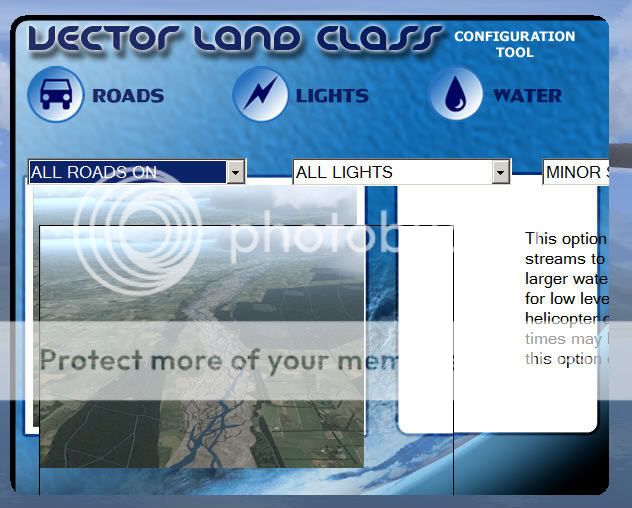
Doug

-

dbcunnz - NZFF Pro
- Joined: Thu Feb 21, 2008 12:56 pm
- Posts: 4016
- Location: Blenheim New Zealand
by sprowse » Thu Sep 23, 2010 8:42 pm
Many thanks for the quick reply, excellent service. I've put the new file in the folder as instructed, and the config tool seems to be fine now. I will let you know if I find any problems with it. Once again cheers.
All the best
Steve
- sprowse
- Newbie
- Joined: Sun Sep 05, 2010 3:54 pm
- Posts: 1
by chavins » Thu Dec 09, 2010 1:21 pm
i have flown to quite a few of the smaller airports on south island and msot of them appear ok. however, milford sound runway and taxiway appear to be displaced from the grass pad (which i presume to be a default image). the runway textures appear to come and go when viewed from a low approach or from the runway itself. i know that i installed the milford sound fix when i installed vlc, and in addition, i have installed the version 3 of milford sound which is specifically designed to match vlc. the default mesh anomalies appear to have been fixed, so the current version of the airport is a vast improvement. nonetheless, it would be nice to see a faultless milford sound.
the other airport which appears to be simply misaligned is nzmc, mount cook. is this one which has been identified and awiting correction in the upcoming patch?
thanks again for the wonderful scenery. looking forward to further refinements.
steve chavin
- chavins
- Member
- Joined: Fri Dec 15, 2006 12:23 pm
- Posts: 45
by Timmo » Thu Dec 09, 2010 5:22 pm
The VLC Milford was for those users that didn't have Mikes Milford V3 installed (or any other milford scenery for that matter) so it's likely the issues you are seeing are due to duplicate files.
My advice would be to remove the VLC milford if you have mikes already as the VLC version was just to correct errors rather than a proper upgrade like mikes.
Some of the other airports will be released soon. These will be separate from VLC itself....but obviously made to work with it- releasing it separate just makes it easier to manage updates etc.
Robin is currently working behind the scenes getting the patch compiled and the distribution side of it organised. I've started uploading some of the basic airport upgrades to the VLC website too but there will be a more formal announcement for both soon.
Cheers
- Timmo
- NZFF Pro
- Topic author
- Joined: Wed Oct 25, 2006 6:28 pm
- Posts: 2056
- Location: Tauranga
by ASHLEE » Sun Dec 12, 2010 6:38 pm
Your help would be appreciated.
ASHLEE
(Bob)
- ASHLEE
- Member
- Joined: Fri Mar 26, 2010 9:37 am
- Posts: 37
by toprob » Sun Dec 12, 2010 7:09 pm
Timmo wrote:QUOTE (Timmo @ Dec 9 2010, 06:22 PM) <{POST_SNAPBACK}>Robin is currently working behind the scenes getting the patch compiled and the distribution side of it organised. I've started uploading some of the basic airport upgrades to the VLC website too but there will be a more formal announcement for both soon.
Cheers
Yes, one last check of the patch, and it'll be ready to go.
By the way, to give some idea of what will be included in the airfield/airport update, here's a quick shot of an airfield enhanced with VLC library objects.
Welcome to Gore...
I waited for a while to get a shot of a truck going by, so sorry about the info bar!
Initial libraries will include airfield and rural objects, such as the buildings and fences here. Oh, and a few local trees. However the libraries will be an ongoing project, with any updates released with each batch of enhanced airfields. Eventually I'd like to convert the library to autogen, but this will come when we start on replacement landclass textures.

-

toprob - NZFF Pro
- Joined: Sat Apr 29, 2006 4:56 pm
- Posts: 6741
- Location: Upper Hutt
by Timmo » Sun Dec 12, 2010 8:25 pm
ASHLEE wrote:QUOTE (ASHLEE @ Dec 12 2010, 07:38 PM) <{POST_SNAPBACK}>Hi Timmo, many thanks for your input into VLC. I fly mainly around Central Otago but have just spotted that the Manuherikia River coming off the Clutha at Alexandra shows as being Dry. Is this an error in the VLC or has my system download failed to color this river.
Your help would be appreciated.
ASHLEE
(Bob)
Hi Bob- That isn't an error in VLC nor in your copy, it is simply a function of the approach to topographic mapping that LINZ took when they set up the digital topographic database on which VLC is based- Because every geospatial dataset has a use scale dependent on its purpose and 'foot print', choices have to be made about whether to a) capture a certain feature (i.e. if a river/stream is but a trickle, is it useful to include it) and b) how to capture it (should I take the time to digitise this river as a polygon or a polyline?). In the case of this river, because it is quite narrow (and presumably fairly ephemeral), it looks like the choice was made to capture most of it as a line feature- You can see the river represented as a line (if you have streams turned on of course!)
Given that the dataset covers the whole of the country and was developed in order to create printed 1:50 000 topoo maps, it just isn't realistic to capture every little water body, patch of bush and house

- Timmo
- NZFF Pro
- Topic author
- Joined: Wed Oct 25, 2006 6:28 pm
- Posts: 2056
- Location: Tauranga
by ASHLEE » Mon Dec 13, 2010 8:08 am
Timmo wrote:QUOTE (Timmo @ Dec 12 2010, 09:25 PM) <{POST_SNAPBACK}>Hi Bob- That isn't an error in VLC nor in your copy, it is simply a function of the approach to topographic mapping that LINZ took when they set up the digital topographic database on which VLC is based- Because every geospatial dataset has a use scale dependent on its purpose and 'foot print', choices have to be made about whether to a) capture a certain feature (i.e. if a river/stream is but a trickle, is it useful to include it) and b) how to capture it (should I take the time to digitise this river as a polygon or a polyline?). In the case of this river, because it is quite narrow (and presumably fairly ephemeral), it looks like the choice was made to capture most of it as a line feature- You can see the river represented as a line (if you have streams turned on of course!)
Given that the dataset covers the whole of the country and was developed in order to create printed 1:50 000 topoo maps, it just isn't realistic to capture every little water body, patch of bush and house
Thanks Timmo for your prompt reply and answer. As i used to farm close to that river i am very aware of its seasonal characteristics. it can have a flow from 8 cumecs(trout with there backs out of the water) to a roaring flood of 350 cumecs and be the major influence to flooding Alexandra. Very surprised that Linz took the dry river mapping approach as its not the norm. Anyway keep up the great VLC work it is so much appreciated to see NZ as it really is.
regards
Bob

- ASHLEE
- Member
- Joined: Fri Mar 26, 2010 9:37 am
- Posts: 37
by chavins » Fri Dec 17, 2010 12:43 pm
Timmo wrote:QUOTE (Timmo @ Dec 14 2010, 05:22 AM) <{POST_SNAPBACK}>Hi Steve- Glad that VLC is working out for you.
The VLC Milford was for those users that didn't have Mikes Milford V3 installed (or any other milford scenery for that matter) so it's likely the issues you are seeing are due to duplicate files.
My advice would be to remove the VLC milford if you have mikes already as the VLC version was just to correct errors rather than a proper upgrade like mikes.
Some of the other airports will be released soon. These will be separate from VLC itself....but obviously made to work with it- releasing it separate just makes it easier to manage updates etc.
Robin is currently working behind the scenes getting the patch compiled and the distribution side of it organised. I've started uploading some of the basic airport upgrades to the VLC website too but there will be a more formal announcement for both soon.
Cheers
timmo:
i have just got around to carrying out your suggestion. unfortunately, in my setup, your suggestion does not work. i uninstalled vlc and then reinstalled it with the 'milford sound fix' option unchecked; milford sound version 3 remained installed as before. when i opened the sim at milford sound, i was rewarded with the big, jagged cliffs surrounding the airport. i then uninstalled the vlc scenery again and reinstalled it a third time, this time rechecking the 'milford sound fix' option, and again leaving milford sound v3 activated. the elevation anomalies were once again fully corrected. on the runway, the surface was intact and without flashing textures and discontinuities. a quick round trip showed everything looking good from the air, including the alignment of the airport and runway with the grass pad.
my conclusion is that the 'milford fix' is required, as well as the milford v3 scenery, and that the original problems i saw are no longer present and were caused by unknown factors.
i thought you might appreciate the followup.
steve chavin
- chavins
- Member
- Joined: Fri Dec 15, 2006 12:23 pm
- Posts: 45
by Rotordude » Fri Dec 17, 2010 8:50 pm
ASHLEE wrote:QUOTE (ASHLEE @ Dec 13 2010, 09:08 AM) <{POST_SNAPBACK}>Thanks Timmo for your prompt reply and answer. As i used to farm close to that river i am very aware of its seasonal characteristics. it can have a flow from 8 cumecs(trout with there backs out of the water) to a roaring flood of 350 cumecs and be the major influence to flooding Alexandra. Very surprised that Linz took the dry river mapping approach as its not the norm. Anyway keep up the great VLC work it is so much appreciated to see NZ as it really is.
regards
Bob
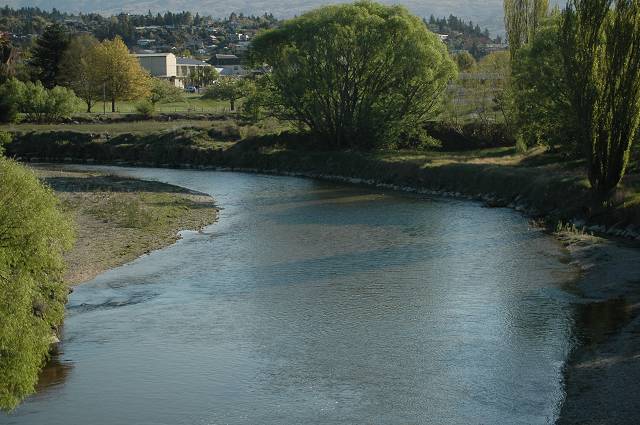
I spent many a day of my childhood swimming in the Manuherikia just below the Shaky Bridge and bailing off said bridge, I was stunned as well not to see that river mapped out when the red baron topo had it. One day hopefullyRegards always
Pete
- Rotordude
- Sim-holic
- Joined: Wed Mar 25, 2009 3:50 pm
- Posts: 508
- Location: Huntly, NZ
by jordNZ » Tue Dec 28, 2010 11:41 am
Every time I change any options in the VLC Config Tool, I hit 'Apply' and then exit the tool, but as soon as I reopen the application ALL of the settings I changed revert back to the defaults. Therefore these settings will not save any of the changes I make within the VLC Config Tool.

- jordNZ
- Member
- Joined: Mon Dec 27, 2010 10:35 pm
- Posts: 17
- Location: Wellington, NZ
by AlisterC » Fri Jan 28, 2011 10:30 pm
Hi Timmo, perhaps just a little something for the next patch (not that I have the first patch yet)...
Could you alter the landclass for the Port Nelson? It's right under the approach path for NZNS, and doesn't look right. Comparison pictures below
VLC

Google Earth

If it could be classed as industrial/ commercial rather than grass it would certainly fit better. Nice touch with the Talley's wharf included though! I'm happy about that

Cheers!

-

AlisterC - NZFF Pro
- Joined: Thu Jul 20, 2006 11:13 am
- Posts: 2543
- Location: Nelson, NZ
by AdrianPetford » Mon Feb 14, 2011 12:09 am
Firstly, congratulations on VLC. It's amazing and the experience gets better and better all the time. So good in fact that when I was flying over New Plymouth recently I was able to pinpoint the road where my hotel was when I stayed there six years ago! I've lost count of all the familiar things I've been able to revisit... very good when you're this far away and can only get over to NZ once a year. Now the airports are starting to come through and all the old favourites are returning I can well see a time when I may go FSX only, something which would have been unthinkable only a year ago. Well done!
Anyway, I've noticed something a bit strange. Not sure if it's my set up or a general thing, but when I tick and untick the VLC Autogen Textures Active box in the Config tool, only two of the three textures swap over. veg_tropical1.dds and veg_tropical2.dds change dependent on the setting, but veg_palm1.dds remains as it is. It's only a small thing as I have backups of both the VLC and default texture which are easy to swap but I thought I'd flag it up in case anyone else has had the problem.
VLC boxed CD 1.0
VLC download patch 1.01
VLC Libraries + South Island Airfield Pack 1.0
VLC/Godzone Ashburton
VLC/Godzone Kaikoura
FSX SP2/Acceleration
Windows XP SP3 32 bit
Another quick question - are you going to reissue your older airports for VLC? They're brilliant but I currently have half of Kaipara Flats hovering in mid-air!

Many thanks for all your hard work,
Ade
West Midlands, UK
I spend eleven months of the year in the UK and one in NZ. I'm hoping to improve that... ;-)
-

AdrianPetford - Sim-holic
- Joined: Wed Apr 02, 2008 1:28 pm
- Posts: 510
- Location: West Midlands, UK
by Adamski » Mon Feb 14, 2011 2:16 am
Any ideas as to what may be causing the suburbia to levitate?

That's Marty's Spit, BTW - he doesn't want it any more


-

Adamski - NZFF Pro
- Joined: Thu Nov 01, 2007 2:22 am
- Posts: 5072
- Location: Birkenhead, Auckland
by Timmo » Mon Feb 14, 2011 12:23 pm
AdrianPetford wrote:QUOTE (AdrianPetford @ Feb 14 2011, 12:09 AM) <{POST_SNAPBACK}>Hi Timmo,
Anyway, I've noticed something a bit strange. Not sure if it's my set up or a general thing, but when I tick and untick the VLC Autogen Textures Active box in the Config tool, only two of the three textures swap over. veg_tropical1.dds and veg_tropical2.dds change dependent on the setting, but veg_palm1.dds remains as it is. It's only a small thing as I have backups of both the VLC and default texture which are easy to swap but I thought I'd flag it up in case anyone else has had the problem.
Hi Ade- Thanks for bringing this to my attention. This is a 'general' thing and is caused by a missing definition in the config.xml file which the config tool uses- It's a fairly simple fix luckily- I've made the fix and have uploaded it to the VectorLandClass site (access it via the Resources>Downloads>Misc menu....apologies for the ugly layout here I need to fix this).
If you could let me know how you get on etc that would be goodAdrianPetford wrote:QUOTE (AdrianPetford @ Feb 14 2011, 12:09 AM) <{POST_SNAPBACK}>Another quick question - are you going to reissue your older airports for VLC? They're brilliant but I currently have half of Kaipara Flats hovering in mid-air!
Yes- These are on the to do list- I was hoping I get an aerial image to accompany my Kaipara flats airport but I may just release a basic fixed versionLast edited by Timmo on Mon Feb 14, 2011 1:04 pm, edited 1 time in total.
- Timmo
- NZFF Pro
- Topic author
- Joined: Wed Oct 25, 2006 6:28 pm
- Posts: 2056
- Location: Tauranga
by toprob » Mon Feb 14, 2011 2:24 pm
Adamski wrote:QUOTE (Adamski @ Feb 14 2011, 03:16 AM) <{POST_SNAPBACK}>Maybe this one's specifically for Rob ... this one's the REALNZ Wellington - with VLC (but I think I had the problem before).
Any ideas as to what may be causing the suburbia to levitate?
Does a reboot fix this, or is it like that all the time?
-
toprob - NZFF Pro
- Joined: Sat Apr 29, 2006 4:56 pm
- Posts: 6741
- Location: Upper Hutt
Who is online
Users browsing this forum: No registered users and 24 guests