Dark/blue textures in Real NZ Wellington

The official REAL NZ support forum

Postby deeknow » Fri Sep 03, 2010 6:40 pm

Hey Guys. First up so you dont think I'm (JAW) just another whinger biggrin.gif am very impressed with the product, its turned lots of previously uninteresting NZ areas into real eye candy, and reignited the GA fire within, am SO looking forward to another 150kt tour of NZ below 2000', bloody well done Timmo and all others who helped with development and testing clapping.gif

Right, back to business, have noticed the following dark-blue almost black areas with bright irredescent/green spots in them around the Mt Crawford area to the north of Wellington airport, kinda looks like there's been a scrub-fire go through there...
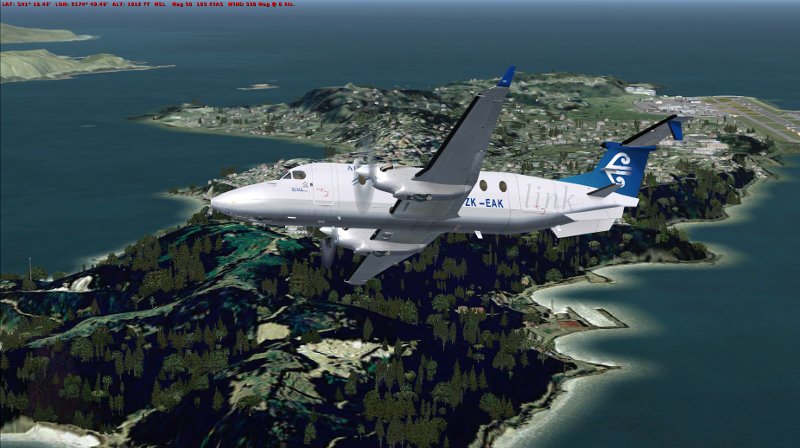

They look quite out of place and distinct from the other surrounding colours. I have a brand new install of FSX with the only addons being the RealNZ stuff (have the NZ collection installed, including Wellington). I did have Christians roads-n-rivers and 20mesh installed but these have been removed so shouldnt be affecting things? Any ideas?
Last edited by deeknow on Fri Sep 03, 2010 6:41 pm, edited 1 time in total.
Deans repaints: http://www.deeknow.com/
X570 Mini-ITX m/b - Ryzen7 5700X3D (8c/16t) - RTX 2060-super - 32GB 3600MHz DDR4 - Win10 - P3Dv5.3
User avatar
deeknow
NZFF Pro
 
Topic author
Joined: Tue Sep 18, 2007 10:15 pm
Posts: 4448
Location: NZHN

Postby Timmo » Fri Sep 03, 2010 6:52 pm

That is an issue with the plantation pine on the source aerial photo used in Real NZ wellington (which is showing there- no VLC is present in that shot since its covered in aerial photo).
Timmo
NZFF Pro
 
Joined: Wed Oct 25, 2006 6:28 pm
Posts: 2056
Location: Tauranga

Postby toprob » Fri Sep 03, 2010 7:10 pm

I've separated this post to the 'Real NZ' subforum, as this is not related to VLC.
Yes, as Tim pointed out, this is dependent on the aerial image, which is damaged a little.
This is mentioned here. I'd love to get hold of a better image for this area, but I would imagine that it would be part of a high resolution airport update.
User avatar
toprob
NZFF Pro
 
Joined: Sat Apr 29, 2006 4:56 pm
Posts: 6711
Location: Upper Hutt

Postby deeknow » Fri Sep 03, 2010 7:34 pm

OK, thanx for the response guys. Rob then this one may also be for you, although I never noticed it before. When flying by the city waterfront a long and wide shadow all of a sudden charges out from about where the ferry terminal is. Looks like its a motorway road sign or something, it covers the aircraft as it stretches out, and the shadow is always aiming at you in the direction you approach from. Pic attached
Deans repaints: http://www.deeknow.com/
X570 Mini-ITX m/b - Ryzen7 5700X3D (8c/16t) - RTX 2060-super - 32GB 3600MHz DDR4 - Win10 - P3Dv5.3
User avatar
deeknow
NZFF Pro
 
Topic author
Joined: Tue Sep 18, 2007 10:15 pm
Posts: 4448
Location: NZHN

Postby toprob » Fri Sep 03, 2010 8:21 pm

A shadow which joins your aircraft shadow is caused by an object with a broken 'volume shadow'. I have had a look at this, and I can't figure out what this object is -- I can't see it on my system.

EDIT: do you have FSX SP2 installed?
Last edited by toprob on Fri Sep 03, 2010 8:22 pm, edited 1 time in total.
User avatar
toprob
NZFF Pro
 
Joined: Sat Apr 29, 2006 4:56 pm
Posts: 6711
Location: Upper Hutt


Return to Godzone 'Real New Zealand' Scenery Support

Who is online

Users browsing this forum: No registered users and 5 guests
