Photoreal Vs VLC....an unfair fight?

Information and support relating to this forthcoming New Zealand Vector Land Class addon.

Postby Timmo » Sun Jun 20, 2010 8:21 pm

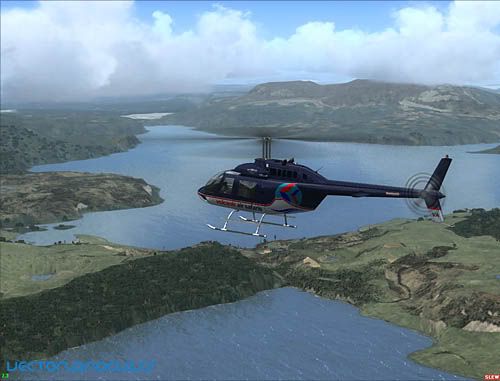
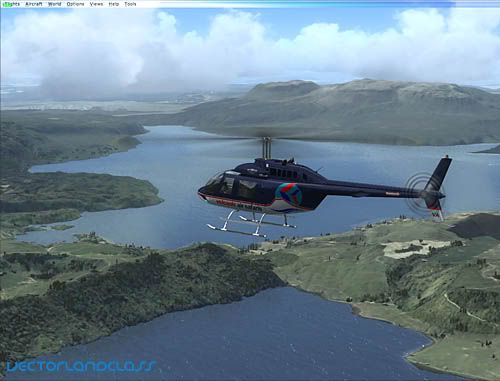
I was just finding some nice images of the VLC to populate the new website (more on that soon!) and thought I'd compare a scene from FSX using VLC with one where I have photoreal coverage for- Mount Tarawera

The results are below (although note that the photoreal image is draped over a 5m mesh so that 'shape' doesn't compare as well)

Timmo
NZFF Pro
 
Topic author
Joined: Wed Oct 25, 2006 6:28 pm
Posts: 2056
Location: Tauranga

Postby ShaneG » Sun Jun 20, 2010 8:26 pm

OK, I hate sound like the newbie around (even though I am. Bucktooth.gif ) but what is this VLC I keep hearing so much about?

Is this a NZ only scenery?

Going by the pics, it sure looks amazing! drool.gif
ShaneG
Member
 
Joined: Fri Jun 18, 2010 5:01 am
Posts: 49
Location: 39IN

Postby Timmo » Sun Jun 20, 2010 9:07 pm

Gidday Shane- VLC (Vector Land Class) is a Scenery addon for New Zealand which updates the landclass/roads/water etc etc to make NZ actually look like NZ rather than the desert you get in default FSX

It hasn't been released yet- We are in the final (hopefully) stages of development
Timmo
NZFF Pro
 
Topic author
Joined: Wed Oct 25, 2006 6:28 pm
Posts: 2056
Location: Tauranga

Postby Ian Warren » Sun Jun 20, 2010 9:50 pm

Tim , Absolutely impressive ! .. I have been looking comparing the very same , i damn good example
Last edited by Ian Warren on Sun Jun 20, 2010 10:00 pm, edited 1 time in total.
Image
User avatar
Ian Warren
NZFF Pro
 
Joined: Fri May 05, 2006 5:23 pm
Posts: 41187
Location: AREA 51

Postby Venge » Sun Jun 20, 2010 10:40 pm

Timmo wrote:
QUOTE (Timmo @ Jun 20 2010, 09:07 PM) <{POST_SNAPBACK}>
It hasn't been released yet- We are in the final (hopefully) stages of development


So looking forward to this. As far as flight simming goes, there is nothing more I wanted to to give my money away for then VLC smile.gif
So, can we pre order yet? wub.gif
Image

Chris
Near Whangarei


Image
User avatar
Venge
Forum Addict
 
Joined: Fri Apr 23, 2010 10:36 am
Posts: 257
Location: Whangarei, New Zealand

Postby ZK-MAT » Mon Jun 21, 2010 5:17 pm

Which one is VLC and which one is photoreal?

I like the background of the first one and the foreground of the second:)
User avatar
ZK-MAT
Senior Member
 
Joined: Sun Apr 30, 2006 11:41 pm
Posts: 1690
Location: Papamoa

Postby Splitpin » Mon Jun 21, 2010 5:28 pm

ZK-MAT wrote:
QUOTE (ZK-MAT @ Jun 21 2010, 05:17 PM) <{POST_SNAPBACK}>
Which one is VLC and which one is photoreal?

I like the background of the first one and the foreground of the second:)

I agree ZK....Aspects of both....but still, both are far better than anything my system can generate at the moment... sad.gif ..clever dude's thumbup1.gif
User avatar
Splitpin
NZFF Pro
 
Joined: Mon Aug 03, 2009 12:15 pm
Posts: 21330
Location: Christchurch NZ

Postby markll » Mon Jun 21, 2010 7:19 pm

ZK-MAT wrote:
QUOTE (ZK-MAT @ Jun 21 2010, 05:17 PM) <{POST_SNAPBACK}>
Which one is VLC and which one is photoreal?

I like the background of the first one and the foreground of the second:)


Second one looks like the photoreal, making the first one the VLC shot. Check the profile of Tarawera in the background too to "confirm" it (Timmo said that the photoreal one had a 5m mesh, so that one would be more detailed than the VLC one)

Image Image
User avatar
markll
Forum Addict
 
Joined: Wed Jun 04, 2008 6:19 am
Posts: 345
Location: Whitby

Postby AndrewJamez » Fri Jun 25, 2010 5:19 pm

Damn Timmo thats awsome. I will take the VLC over blurrie photoreal any day. In fact i wish i could cut all the awsome NZ payware airports out and have just them on top of VLC with out all of LINZ's lousey 2meter/pixel imagery.
AndrewJamez
Sim-holic
 
Joined: Sun Feb 14, 2010 5:04 pm
Posts: 766
Location: Hamilton

Postby NZ255 » Fri Jun 25, 2010 5:55 pm

You can remove that photoreal...just look in the addon airport scenery folder. It'll be the biggest file/s and probably have aerial in the name or a code like F40 or AU23. Just edit the file extension from .bgl to .bak
Last edited by NZ255 on Fri Jun 25, 2010 5:55 pm, edited 1 time in total.
Nick
User avatar
NZ255
NZFF Pro
 
Joined: Wed Jun 20, 2007 12:57 pm
Posts: 2475

Postby Ian Warren » Fri Jun 25, 2010 6:41 pm

AndrewJamez wrote:
QUOTE (AndrewJamez @ Jun 25 2010, 06:19 PM) <{POST_SNAPBACK}>
I will take the VLC over blurrie photoreal

Andrew , Its the secret .. Blurrie Photoreal . in flightsim .. its part and parcel ... . is how you use it and how your PC handles it , VLC is GOG BLOB WOW !

Many find 'blurrie photoreal' simply due to the turning off the AGN to get frames , a low end PC , graphic card ... With VCL heading our direction not for the photo - we also need to look at photo , this will become part and parcel for your own install l , applications and what you want depends on what you want to see .

The entire NZ is getting ..... PIMP MY COUNTRY!
Last edited by Ian Warren on Fri Jun 25, 2010 6:43 pm, edited 1 time in total.
Image
User avatar
Ian Warren
NZFF Pro
 
Joined: Fri May 05, 2006 5:23 pm
Posts: 41187
Location: AREA 51

Postby Ian Warren » Fri Jun 25, 2010 8:31 pm
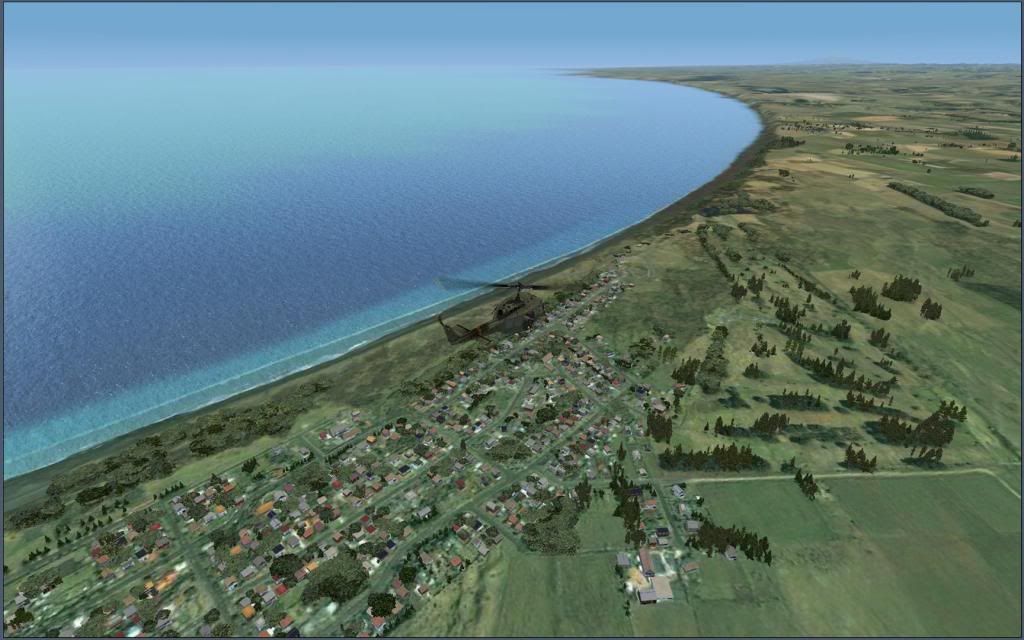
VLC working with its freeware photoreal companion Wanganul

Low res screen ... but No Blurries here

Lets ... PIMP MY COUNTRY!
Image
User avatar
Ian Warren
NZFF Pro
 
Joined: Fri May 05, 2006 5:23 pm
Posts: 41187
Location: AREA 51

Postby ZK-MAT » Fri Jun 25, 2010 11:45 pm

Ian Warren wrote:
QUOTE (Ian Warren @ Jun 25 2010, 06:41 PM) <{POST_SNAPBACK}>
Andrew , Its the secret .. Blurrie Photoreal . in flightsim .. its part and parcel ... . is how you use it and how your PC handles it , VLC is GOG BLOB WOW !

Many find 'blurrie photoreal' simply due to the turning off the AGN to get frames , a low end PC , graphic card ... With VCL heading our direction not for the photo - we also need to look at photo , this will become part and parcel for your own install l , applications and what you want depends on what you want to see .

The entire NZ is getting ..... PIMP MY COUNTRY!

Some days we need a guidebook, sliderule and readyreckoner to understand your posts Ian!!
User avatar
ZK-MAT
Senior Member
 
Joined: Sun Apr 30, 2006 11:41 pm
Posts: 1690
Location: Papamoa

Postby Ian Warren » Sat Jun 26, 2010 7:27 am

biggrin.gif Matt .. Arr the Kids today , 'text message and hyphens' readyreckoner its time to make up a new flightsim language rolleyes.gif come to think ....... what the ells a 'readyreckoner'
Image
User avatar
Ian Warren
NZFF Pro
 
Joined: Fri May 05, 2006 5:23 pm
Posts: 41187
Location: AREA 51

Postby toprob » Sat Jun 26, 2010 10:19 am

Should it worry me that I can always understand Ian's posts? dry.gif
To put the thread back on track, or to hijack it completely, depending on the way you look at it:

Photo scenery has always been a great solution for those who actually know the area -- the default FSX depiction of any place I've actually been is where I lose the immersive experience. Wellington is a good example -- I 'fly' around the photoreal Wellington a lot, because although I don't know Wellington well, I've been there enough to have a very strong impression of what makes it what it is. There's no way I'd get that from the default, but some of the 'Wellingtonness' is reproduced in the photo scenery.

But you are right, AndrewJamez, there are certainly some limitations with photo scenery. You mention the resolution, but this is only part of the issue. The default textures are only twice the resolution of the photo scenery, which isn't a lot -- one single LOD -- but the difference is in the images themselves. If you are making a few hundred default textures, you have an almost unlimited choice of images to build them from, so you can pick and choose for quality, but with photo scenery we only have one image. It is not very likely that even a small portion of that image will be of the same quality as the images which the default textures are build from.

And then there's the problem you are always going to get at the edges of the photoscenery, plus the lack of seasonal images. But still, for some people who are happy to potter around in an area they know, photoreal is the only way to go.

VLC not only makes NZ a lot more realistic in its own right, but it overcomes a lot of the blending issues -- not for every photo scenery, but for enough to make the experience of flying over the blend a lot less jarring. There are still problems with seasons, but there are ways around that.

One technique which works with VLC is to soft-blend photos into specific areas of interest. This won't be part of VLC, but is something I'm looking at for down the track. Here's an example, where the mountain has been cut out of the photo and blended so you don't have a sharp join.

User avatar
toprob
NZFF Pro
 
Joined: Sat Apr 29, 2006 4:56 pm
Posts: 6711
Location: Upper Hutt

Postby AndrewJamez » Sat Jun 26, 2010 11:49 am

Look at what i,ve started. lol. that screenshot looks good and seems to be along the line of what orbx have done with some of there mountain regions in PNW. There is definately a place for photoreal there. When i started going on about blurrie photoreal, i guess i was venting abit of frustration about the lack of high resolution afordable imagery in N.Z compared to other lucky countrys. I guess some of us have just been spoiled flying over some of the newer scenery out there. I dont have to worry about my pc rendering scenery, it keeps up with the 7cm/pixel scenery out there.
This should be for another post but anyways, I upgraded to a quadcore of the same speed as my coreduo 3.0ghz two weeks ago. A slight inprovement in peformance was observed, but still running my old 9600gt. I swapped in a GTX260. another slight increase in performance was notted but overall disapointing after all the money I spent. I tryed the "BUFFERPOOL=0" tweak and I have to say it has unleashed my pc. I have fast terrain rendering and insane amounts of autogen.
I had applied this tweak to my previous setup which also made a big difference. But with the GTX 260 it has changed my flightsim experience radicaly. The key to using the bufferpool tweak sucsessfully is haveing a GPU that can keep ahead of the cpu otherwise major stuttering and graphical abnormalitys occur. This tweak seems to unleash the power of the newer series of GPU that up till now have been restricted by a now redundant bufferpool.
AndrewJamez
Sim-holic
 
Joined: Sun Feb 14, 2010 5:04 pm
Posts: 766
Location: Hamilton

Postby creator2003 » Sun Jun 27, 2010 10:23 am

What ever you do Andrew don't buy HamiltonX when it goes on sale ,i really couldn't put up with the qqing of what i and many others spend 100s of hours building for NZ ,photoreal will always be better than landclass tiles repeated over and over whatever the res .
Last edited by creator2003 on Sun Jun 27, 2010 12:38 pm, edited 1 time in total.
User avatar
creator2003
NZFF Pro
 
Joined: Fri Jun 16, 2006 12:08 am
Posts: 4633
Location: Cant U C im LOCO

Postby NZ255 » Sun Jun 27, 2010 12:38 pm

Creator, maybe you could tell people how to disable it if they don't want it? I love photoreal, but others may not.
Nick
User avatar
NZ255
NZFF Pro
 
Joined: Wed Jun 20, 2007 12:57 pm
Posts: 2475

Postby creator2003 » Sun Jun 27, 2010 12:47 pm

Its a simple as taking out the photo bgls in most scenery , my city of Hamilton looks like cr_ap without photoreal and just sitting on default landclass ,and the airport without a photo is just a default fsx airport that no one likes ,you can try this with Auckland city X just remove the photo BGL and see what you have left, lol it will look horrible and things wont look like Auckland anymore even with VLC ..
Last edited by creator2003 on Sun Jun 27, 2010 12:48 pm, edited 1 time in total.
User avatar
creator2003
NZFF Pro
 
Joined: Fri Jun 16, 2006 12:08 am
Posts: 4633
Location: Cant U C im LOCO

Postby NZ255 » Sun Jun 27, 2010 1:45 pm

I know how to do it, but somepeople might not.


I know what you mean though.
Nick
User avatar
NZ255
NZFF Pro
 
Joined: Wed Jun 20, 2007 12:57 pm
Posts: 2475

Next

Return to Vector Land Class

Who is online

Users browsing this forum: No registered users and 9 guests

