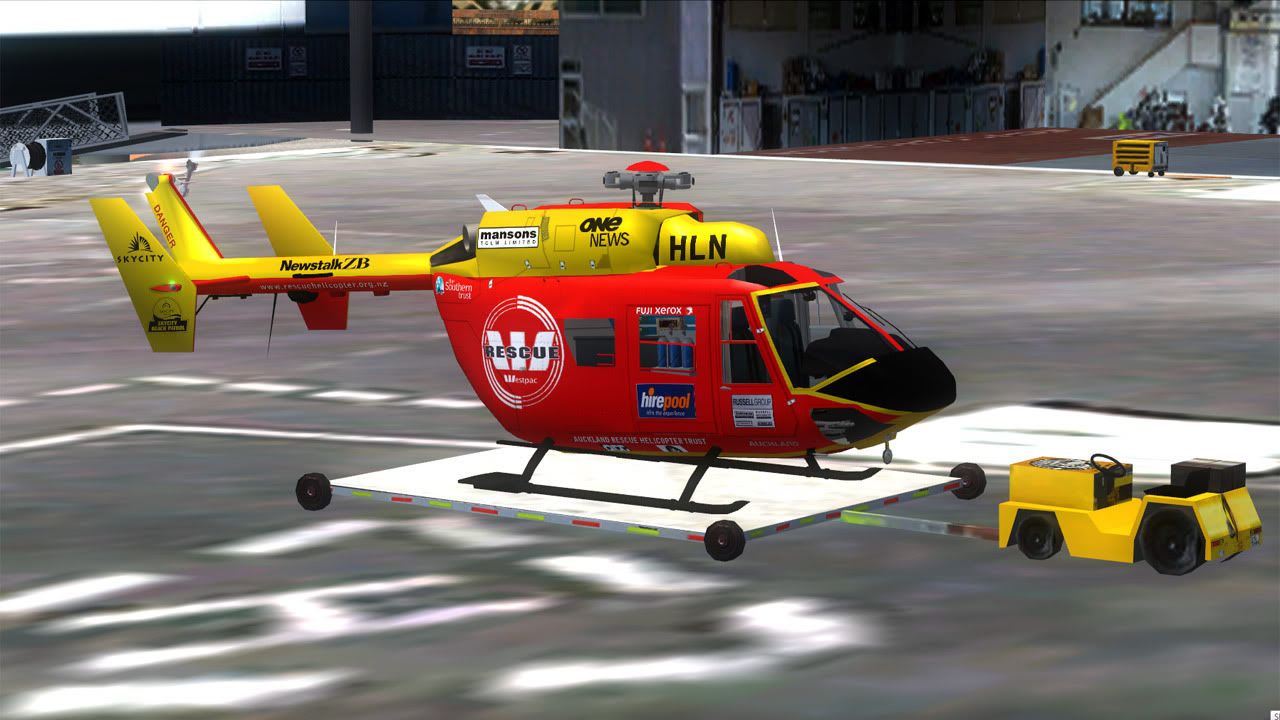
BK-117

Discuss aircraft addons and repaints for Flight Simulator here

Postby Splitpin » Sun Oct 25, 2009 10:12 am

Just wondering if anyone knows of a good BK-117 FOR FSX or FS9. I found 1 on flightsim.com (fs9)..........anymore your aware of smile.gif
I will try and post some pics of the Lama i was going on about last week......i know a post with out pics must be a little dull.......but it is a great chopper..

Thanks for your time....happy long weekend

Splitpin
User avatar
Splitpin
NZFF Pro
 
Topic author
Joined: Mon Aug 03, 2009 12:15 pm
Posts: 21332
Location: Christchurch NZ

Postby BK-117 » Mon Oct 26, 2009 3:53 pm

unfortunately there arnt really any fantastic bk's available. There are some at hovercontrol:

http://64.34.169.161/cgi-bin/ifolio/imageF...p;x=12&y=19

fingers crossed for one in the future!
Image
BK-117
Forum Addict
 
Joined: Wed Sep 06, 2006 8:08 pm
Posts: 247
Location: Africa

Postby Splitpin » Mon Oct 26, 2009 8:26 pm

BK-117 wrote:
QUOTE (BK-117 @ Oct 26 2009, 04:53 PM) <{POST_SNAPBACK}>
unfortunately there arnt really any fantastic bk's available. There are some at hovercontrol:

http://64.34.169.161/cgi-bin/ifolio/imageF...p;x=12&y=19

fingers crossed for one in the future!

Thanks BK.....I'll keep my eyes open, and in the mean time try and tame my Lama.......cheers smile.gif
User avatar
Splitpin
NZFF Pro
 
Topic author
Joined: Mon Aug 03, 2009 12:15 pm
Posts: 21332
Location: Christchurch NZ

Postby creator2003 » Wed Nov 04, 2009 9:19 pm

The FS9 full version Icaro BK117 B2 will be released on Hovercontrol and Icaro in the next couple of days according to members postings on Hovercontrol ,there will be a FSX version in time to come and the fs9 version needs a new air file to work in FSX ,ive done some work on the airfile but the chopper still has some slowing problems on finals ,though a good planned glide scope will work ,and she hovers really well under 40 ,
ill sort out my FSX files once the release of the final version is out for download ..
Last edited by creator2003 on Wed Nov 04, 2009 9:20 pm, edited 1 time in total.
User avatar
creator2003
NZFF Pro
 
Joined: Fri Jun 16, 2006 12:08 am
Posts: 4633
Location: Cant U C im LOCO

Postby Splitpin » Thu Nov 05, 2009 4:21 pm

creator2003 wrote:
QUOTE (creator2003 @ Nov 4 2009, 10:19 PM) <{POST_SNAPBACK}>
The FS9 full version Icaro BK117 B2 will be released on Hovercontrol and Icaro in the next couple of days according to members postings on Hovercontrol ,there will be a FSX version in time to come and the fs9 version needs a new air file to work in FSX ,ive done some work on the airfile but the chopper still has some slowing problems on finals ,though a good planned glide scope will work ,and she hovers really well under 40 ,
ill sort out my FSX files once the release of the final version is out for download ..

Great, thanks very much Creator biggrin.gif .......will keep an eye out for it....thanks again
User avatar
Splitpin
NZFF Pro
 
Topic author
Joined: Mon Aug 03, 2009 12:15 pm
Posts: 21332
Location: Christchurch NZ

Postby NZ255 » Sat Jun 12, 2010 6:14 pm

Hey Mike, have you got the files necessary for this thing to got /handle better in fsx?
Nick
User avatar
NZ255
NZFF Pro
 
Joined: Wed Jun 20, 2007 12:57 pm
Posts: 2475

Postby creator2003 » Sat Jun 12, 2010 6:47 pm

No not really , ,i tryed HTR "heli physics "addon though id need i lot more time to get that working and i couldnt work out its dynamics properly ,there are 3 helicopters in this world that i just cant get working right in fsx ,S76 nemeth /this bk117 /and a as355 addon i love ,
there was news that this would and was being updated to FSX though no news for awhile , it will be kewl when its FSX native ..
User avatar
creator2003
NZFF Pro
 
Joined: Fri Jun 16, 2006 12:08 am
Posts: 4633
Location: Cant U C im LOCO

Postby NZ255 » Sat Jun 12, 2010 6:51 pm

OK, any idea how to get it to slow down? Impossible to make approaches
Nick
User avatar
NZ255
NZFF Pro
 
Joined: Wed Jun 20, 2007 12:57 pm
Posts: 2475

Postby creator2003 » Sun Jun 13, 2010 3:14 am

The rpm doesnt drop enough for it to fall outta the sky ,i managed to get it to drop in htr but in the process effected other things ,ive done all sorts of mods to airfile /cfg and nothing will let it fall ..to hard basket for now
User avatar
creator2003
NZFF Pro
 
Joined: Fri Jun 16, 2006 12:08 am
Posts: 4633
Location: Cant U C im LOCO

Postby NZ255 » Mon Jun 14, 2010 11:15 pm

Oh, I ended up just popping in my favorite heli's air file and that did the trick smile.gif

WIP

Nick
User avatar
NZ255
NZFF Pro
 
Joined: Wed Jun 20, 2007 12:57 pm
Posts: 2475

Postby creator2003 » Tue Jun 15, 2010 12:35 am

True? i tryed things like that but it did nothing ,will have another play at some point ..
User avatar
creator2003
NZFF Pro
 
Joined: Fri Jun 16, 2006 12:08 am
Posts: 4633
Location: Cant U C im LOCO

Postby NZ255 » Tue Jun 15, 2010 4:16 pm

Yeah, just copy and paste...and rename to match the original air file name
In this case: 'bk117.air'
Nick
User avatar
NZ255
NZFF Pro
 
Joined: Wed Jun 20, 2007 12:57 pm
Posts: 2475

Postby cowpatz » Tue Jun 15, 2010 4:31 pm

Why do you need an airfile Nick? That chopper of yours doesn't even have any rotors ! smile.gif
Remember the 50-50-90 rule. Anytime you have a 50-50 chance of getting something right, there's a 90% probability you'll get it wrong!

Image
User avatar
cowpatz
NZFF Pro
 
Joined: Wed Mar 07, 2007 3:28 pm
Posts: 3739

Postby NZ255 » Tue Jun 15, 2010 4:45 pm

Haha, no bad picture smile.gif

Nick
User avatar
NZ255
NZFF Pro
 
Joined: Wed Jun 20, 2007 12:57 pm
Posts: 2475

Postby conundrum » Fri Jun 25, 2010 1:46 pm

Has anyone found a solution to the nothing getting displayed in the copilot side screen?
Last edited by conundrum on Fri Jun 25, 2010 1:47 pm, edited 1 time in total.
conundrum
 

Postby creator2003 » Fri Jun 25, 2010 4:48 pm

Yeah just open the the panel cfg and assign a default fs9 gps or another gauge in the text line ..
this is what it looks like ..
[quote][Vcockpit01]
file=mainpanel_right_T.bmp
Background_color=0,0,0
size_mm=1024,512
position=7
visible=1
ident=
pixel_size=1024,512
texture=$Mpanelright

gauge00=EC135roundi!altimeter, 599,202,95,91
gauge01=EC135roundi!DME_ec135, 352,364,110,48
gauge02=EC135roundi!Attitude Indicator_ec135, 464,145,131,128
gauge03=EC135roundi!hsi_ec135, 465,272,134,113
gauge04=EC135roundi!radio_alt_ec135, 229,243,118,112
gauge05=EC135roundi!VOR_ec135, 352,255,111,110
gauge06=EC135roundi!vsi_ec135, 599,297,95,91
gauge07=BK117_rundi!BK117_OIL_ENG2, 13,286,67,66
gauge08=BK117_rundi!BK117_RPM_ENG2, 12,125,67,66
gauge09=BK117_rundi!BK117_XMSN, 17,371,67,66
gauge10=BK117_rundi!BK117_Tacho, 91,126,106,105
gauge11=BK117_rundi!BK117_Torque, 95,249,98,93
gauge12=ICARO-GPS!GPS, 104,398,210,72---------------------------------------------------- this line maybe just dont edit the numbers..
gauge13=EC135roundi!AOM Licht, 599,181,89,20
gauge14=EC135roundi!GPSNAV, 509,381,50,50
gauge15=bell_206b!Attitude, 230,128,110,106
gauge16=BK117_rundi!BK117_Airspeed, 351,146,108,106
gauge17=BK117_rundi!BK117_ITT_ENG2, 13,207,67,66
gauge18=BK117_rundi!BK117_wiper, 340,474,19,28
gauge19=BK117_rundi!BK117_Master, 378,131,46,14
gauge20=BK117_rundi!BK117_CSAS_r, -1,460,53,32
gauge21=EC135roundi!ATC-ID_vc, 490,120,55,30
gauge22=BK117_rundi!BK117_Firetest_r, 1,48,62,25
gauge23=BK117_rundi!BK117_Fire2, 81,35,34,52


you want to insert some text from other aircraft panel like this one from the eh101
=eh101_map!eh101_map

or the default GPS line
=fs9gps!gps_500

you will find the panel cfg down this path C:\Program Files\Microsoft Games\Microsoft Flight Simulator X\SimObjects\Rotorcraft\Eurocopter BK117 Final Edition\panel
hope this helps you ..
Last edited by creator2003 on Fri Jun 25, 2010 4:51 pm, edited 1 time in total.
User avatar
creator2003
NZFF Pro
 
Joined: Fri Jun 16, 2006 12:08 am
Posts: 4633
Location: Cant U C im LOCO

Postby conundrum » Sat Jun 26, 2010 4:35 am
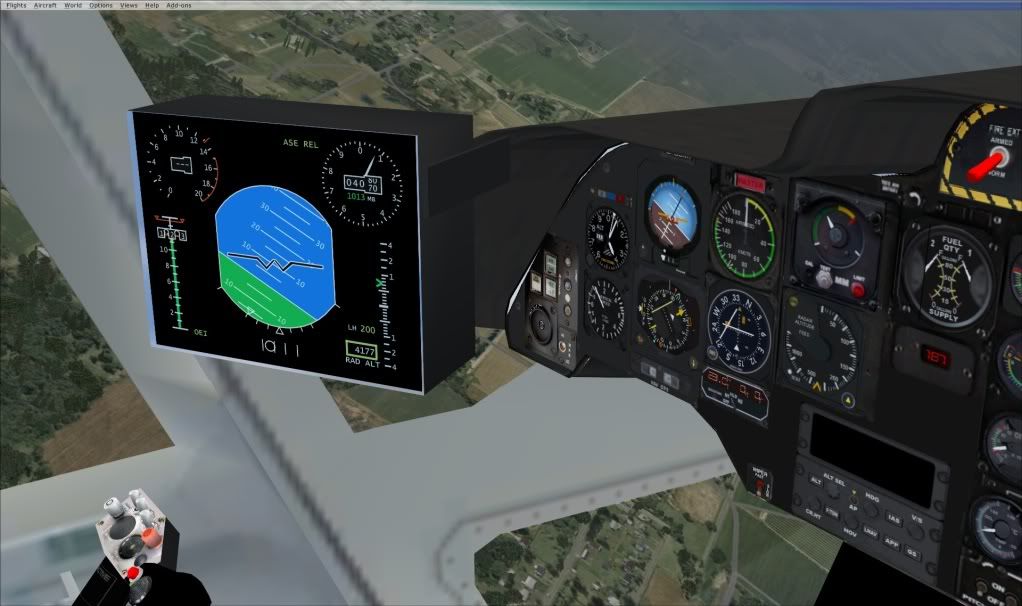
It's actually VC05, and I finally found something that will display:
QUOTE
//--------------------------------------------------------
[Vcockpit05]
Background_color=0,0,0
size_mm=1024,1024
visible=0
pixel_size=1024,1024
texture=$movingmap

gauge00=EH101!EH101_MFD, -20,2,1012,1006[/quote]

conundrum
 

Postby creator2003 » Sat Jun 26, 2010 9:56 am

Ah ok well my directions worked to some value then, cool you worked it all out ....
Last edited by creator2003 on Sat Jun 26, 2010 9:57 am, edited 1 time in total.
User avatar
creator2003
NZFF Pro
 
Joined: Fri Jun 16, 2006 12:08 am
Posts: 4633
Location: Cant U C im LOCO

Postby RNZAF » Sat Jun 26, 2010 12:19 pm

Splitpin wrote:
QUOTE (Splitpin @ Oct 25 2009, 10:12 AM) <{POST_SNAPBACK}>
Just wondering if anyone knows of a good BK-117 FOR FSX or FS9. I found 1 on flightsim.com (fs9)..........anymore your aware of smile.gif
I will try and post some pics of the Lama i was going on about last week......i know a post with out pics must be a little dull.......but it is a great chopper..

Thanks for your time....happy long weekend

Splitpin


hey. google search icaro group, they have a good bk-117 with a VC, hovercontrol has a repaint for westpac rescue plane.gif
User avatar
RNZAF
Member
 
Joined: Mon Jun 21, 2010 4:59 pm
Posts: 35
Location: Christchurch


Return to Aircraft

Who is online

Users browsing this forum: No registered users and 5 guests