Quick question..does VOZ AI work in FSX?
Ive got GNZLAP working sweet in FSX.. if anybody is trying to put this in FSX and having issues let me know.
VOZ and GNZLAP AI
31 posts
• Page 1 of 2 • 1, 2
 by Ian Warren » Fri Aug 21, 2009 10:53 am
Paul , Yes indeed i had VOZ AI installed pre the ORBX AI , the ORBX i believe was still a freeware

-

Ian Warren - NZFF Pro
- Joined: Fri May 05, 2006 5:23 pm
- Posts: 41187
- Location: AREA 51
by GlennAV8R » Fri Aug 21, 2009 11:54 am
Naki wrote:QUOTE (Naki @ Aug 21 2009, 11:28 AM) <{POST_SNAPBACK}>Ok thanks...I might try ORBX AI then but does that include NZ traffic?
I have just insalled ORBX AI (in addidion to GNZLAP Redux and it looks really good, however I havnt seen any of the ORBX aircraft in NZ, even though all the models and textures for the NZ stuff are there. I am not sure why I am not seeing the a/c on NZ flightplans in NZ, they appear at the Aussie airports but not WN, AA or CH that I have looked at. I went to Hong Kong and the AI that originates from Aussie or to Aussie is showing up there, so Im not sure whats going on.
- GlennAV8R
- Forum Addict
- Joined: Tue Mar 04, 2008 3:19 pm
- Posts: 154
- Location: Wellington
by Ian Warren » Fri Aug 21, 2009 12:22 pm
Naki wrote:QUOTE (Naki @ Aug 21 2009, 12:28 PM) <{POST_SNAPBACK}>Ok thanks...I might try ORBX AI then but does that include NZ traffic?
Appeared to update the NZ AI , but i'm not a AI purist , think mix it with a little PAI stuff really gave some depth . This is were we miss Charl on the forum , the AI guru off GURU'S .
-
Ian Warren - NZFF Pro
- Joined: Fri May 05, 2006 5:23 pm
- Posts: 41187
- Location: AREA 51
by Nzeddy » Fri Aug 21, 2009 7:58 pm
Naki wrote:QUOTE (Naki @ Aug 21 2009, 11:28 AM) <{POST_SNAPBACK}>Ok thanks...I might try ORBX AI then but does that include NZ traffic?
ORBX AI does include NZ traffic. I see heaps of them at NZAA!
If you have any other AI traffix installed eg TrafficX, GNZLAP and WOAI etc Orbx AI wont show up!Last edited by Nzeddy on Fri Aug 21, 2009 8:00 pm, edited 1 time in total.- Eddy
-

Nzeddy - Sim-holic
- Joined: Thu Jun 12, 2008 7:52 pm
- Posts: 866
by GlennAV8R » Fri Aug 21, 2009 10:37 pm
Nzeddy wrote:QUOTE (Nzeddy @ Aug 21 2009, 07:58 PM) <{POST_SNAPBACK}>ORBX AI does include NZ traffic. I see heaps of them at NZAA!
If you have any other AI traffix installed eg TrafficX, GNZLAP and WOAI etc Orbx AI wont show up!
Interesting, there must be an easy way round this.
- GlennAV8R
- Forum Addict
- Joined: Tue Mar 04, 2008 3:19 pm
- Posts: 154
- Location: Wellington

-

creator2003 - NZFF Pro
- Joined: Fri Jun 16, 2006 12:08 am
- Posts: 4633
- Location: Cant U C im LOCO
by redkiwi » Tue Sep 01, 2009 5:06 pm
Naki wrote:QUOTE (Naki @ Aug 21 2009, 10:22 AM) <{POST_SNAPBACK}>Quick question..does VOZ AI work in FSX?
Ive got GNZLAP working sweet in FSX.. if anybody is trying to put this in FSX and having issues let me know.
I was just looking at downloading GNZLAP dedux, just had a quick read through the readme and it only outlines it for FS9. What did you do to get it running in FSX?
- redkiwi
- Forum Addict
- Joined: Mon Jan 14, 2008 4:11 pm
- Posts: 193

by Naki » Tue Sep 01, 2009 10:52 pm
I only copied (so far) the HTAI aircraft over..this helped me heaps and got rid of a few issues when I copied them over
Quoting Holger from Orbx:
Quoting Holger from Orbx:
QUOTE
* copy all folders in [FS9]\Aircraft starting with "HTAI" into [FSX]\SimObjects\Airplanes
* copy Traffic_HTAI_CSEP.bgl from [FS9]\Scenery\World\scenery into [FSX]\Scenery\World\scenery
The flightplan bgl file is in FS9-format, which will deactivate all your FSX-format flightplans, including default. Thus, you need to convert Traffic_HTAI_CSEP.bgl into FSX format using AIFPC - http://www.fsdeveloper.com/forum/showthread.php?t=4746 - or alternative tools.
Also, for me at least, the prop discs showed up as all black, so I made my own that I've attached below; you'll need to replace each instance of prop-hs.bmp in the aeroplane texture subfolders. The one I made is for a two-blade prop so you may want to add a different one for the three-blade variants.
Finally, you want to assign the appropriate sound files to each aircaft type. To do that create an empty "soundai" folder in each aircraft folder then copy the soundai.cfg file from the [FSX]\SimObjects\Airplanes\C172_LFH\soundai folder. For the bigger Cessnas replace the "C172" in the cfg file with "C208B" (use Wordpad or Notepad for that
there also are five "fx_ga_*" .fx files in [FS9]\Effects that you should copy into [FSX]\Effects."[/quote]
If you search the Orbx forums (you will need to register ther if you haven't already) Holger has posted a file you can download that fixes the prop issue in FSX
Cheers
* copy Traffic_HTAI_CSEP.bgl from [FS9]\Scenery\World\scenery into [FSX]\Scenery\World\scenery
The flightplan bgl file is in FS9-format, which will deactivate all your FSX-format flightplans, including default. Thus, you need to convert Traffic_HTAI_CSEP.bgl into FSX format using AIFPC - http://www.fsdeveloper.com/forum/showthread.php?t=4746 - or alternative tools.
Also, for me at least, the prop discs showed up as all black, so I made my own that I've attached below; you'll need to replace each instance of prop-hs.bmp in the aeroplane texture subfolders. The one I made is for a two-blade prop so you may want to add a different one for the three-blade variants.
Finally, you want to assign the appropriate sound files to each aircaft type. To do that create an empty "soundai" folder in each aircraft folder then copy the soundai.cfg file from the [FSX]\SimObjects\Airplanes\C172_LFH\soundai folder. For the bigger Cessnas replace the "C172" in the cfg file with "C208B" (use Wordpad or Notepad for that
there also are five "fx_ga_*" .fx files in [FS9]\Effects that you should copy into [FSX]\Effects."[/quote]
If you search the Orbx forums (you will need to register ther if you haven't already) Holger has posted a file you can download that fixes the prop issue in FSX
Cheers
Last edited by Naki on Tue Sep 01, 2009 10:53 pm, edited 1 time in total.
-

Naki - NZFF Pro
- Topic author
- Joined: Sat Aug 05, 2006 10:03 pm
- Posts: 7175
- Location: Tauranga
by redkiwi » Wed Sep 02, 2009 5:16 pm
I've installed the GNZLAP into FSX but now get no traffic what so ever in NZ. I've installed the HTAI models and the voice packs, and put all the files in their respective folders but it doesn't seem to want to work. Do I need to download and install the FS2004 airports by Lawrie as well?
Last edited by redkiwi on Wed Sep 02, 2009 5:21 pm, edited 1 time in total.
- redkiwi
- Forum Addict
- Joined: Mon Jan 14, 2008 4:11 pm
- Posts: 193
by Naki » Thu Sep 03, 2009 11:30 am
No you dont need to put Lawries airports in..although you can if you wish...hope you didnt put the AFCADs in as that will cause a mess with most if not all your airports. Did you put the flight plans in?
-
Naki - NZFF Pro
- Topic author
- Joined: Sat Aug 05, 2006 10:03 pm
- Posts: 7175
- Location: Tauranga
by redkiwi » Thu Sep 03, 2009 1:49 pm
Naki wrote:QUOTE (Naki @ Sep 3 2009, 11:30 AM) <{POST_SNAPBACK}>No you dont need to put Lawries airports in..although you can if you wish...hope you didnt put the AFCADs in as that will cause a mess with most if not all your airports. Did you put the flight plans in?
I did everything as per the instructions except for putting the 'AFCADS for addon airports' across.
I now have empty skies, no flights show up from the freeflight - load flight screen, and there are no additional flights from the missions screen.Last edited by redkiwi on Thu Sep 03, 2009 1:56 pm, edited 1 time in total.
- redkiwi
- Forum Addict
- Joined: Mon Jan 14, 2008 4:11 pm
- Posts: 193
by redkiwi » Thu Sep 03, 2009 3:03 pm
I've not got it work... hadn't put the aircraft into simobjects/airplanes... it's all working now. However the AI aircraft just go black after I'm about 1/2 a mile away.
Also noticed they were having trouble landing at NZPP, although it was blowing 22kts of crosswind! Will do some AI spotting and see if it's a localised problem, or if I'm going to have a whole lot of AI aircraft going down due to no fuel!
Also noticed they were having trouble landing at NZPP, although it was blowing 22kts of crosswind! Will do some AI spotting and see if it's a localised problem, or if I'm going to have a whole lot of AI aircraft going down due to no fuel!
Last edited by redkiwi on Thu Sep 03, 2009 3:05 pm, edited 1 time in total.
- redkiwi
- Forum Addict
- Joined: Mon Jan 14, 2008 4:11 pm
- Posts: 193
by NZ255 » Thu Sep 03, 2009 5:21 pm
WoIA:
Spotting at NZWN
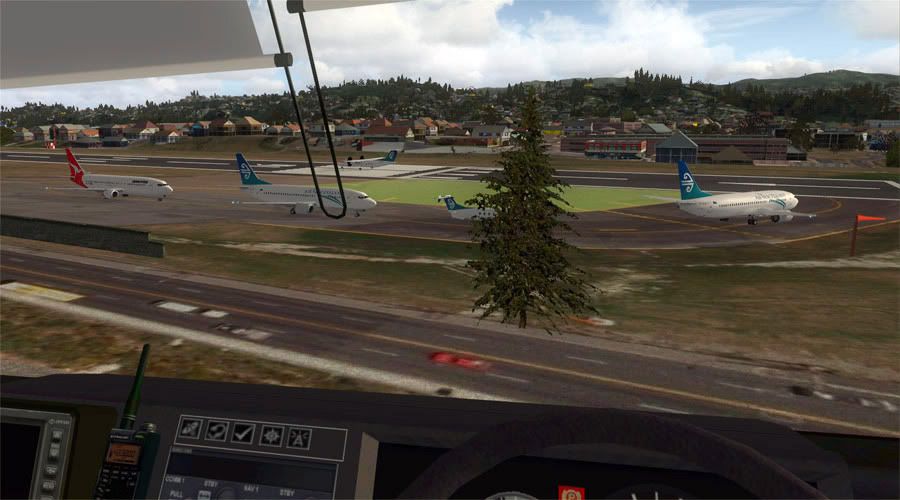
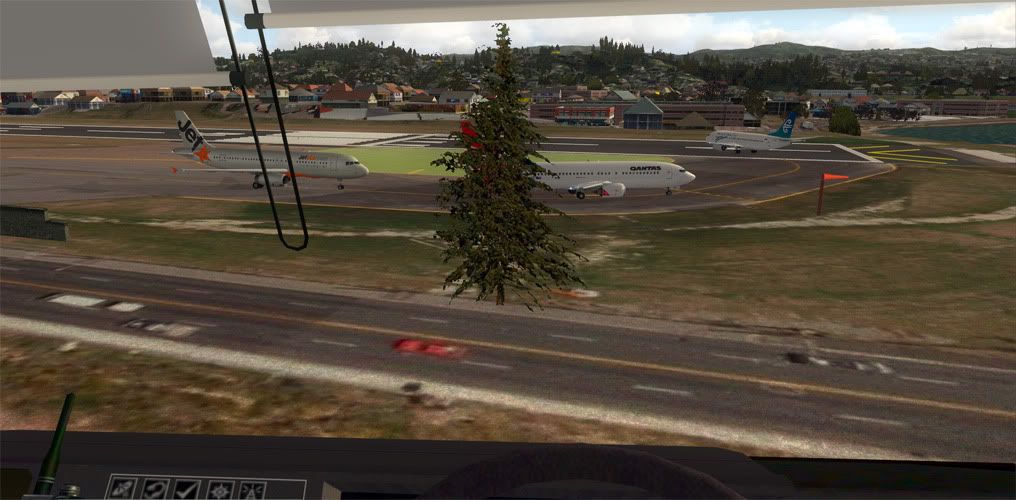
Gotta see about getting that tree removed
Jetstar is from WoAI too, but I added the NZ legs from the old Qantas routes
Spotting at NZWN
Gotta see about getting that tree removed
Jetstar is from WoAI too, but I added the NZ legs from the old Qantas routes
Last edited by NZ255 on Thu Sep 03, 2009 5:26 pm, edited 1 time in total.
Nick
-

NZ255 - NZFF Pro
- Joined: Wed Jun 20, 2007 12:57 pm
- Posts: 2475
by GlennAV8R » Sat Sep 05, 2009 8:46 pm
NZ255 wrote:QUOTE (NZ255 @ Sep 5 2009, 01:35 PM) <{POST_SNAPBACK}>It is RealNZ however the ground is from Google Earth, really high detail about 15cm per pixel.
Awesome, didn't realize google earth had been updated. March 2009, you can see the runway overlay project has got as far as taxiway 3. Okay now the million dollar question, how did you do this??
- GlennAV8R
- Forum Addict
- Joined: Tue Mar 04, 2008 3:19 pm
- Posts: 154
- Location: Wellington
31 posts
• Page 1 of 2 • 1, 2
Return to All Flight Simulators
Who is online
Users browsing this forum: No registered users and 23 guests