Omaka Ground levels?

The official REAL NZ support forum

Postby ctcav8r » Mon Mar 16, 2009 8:22 pm

[attachment=157:2009_03_...21_09_29.bmp]
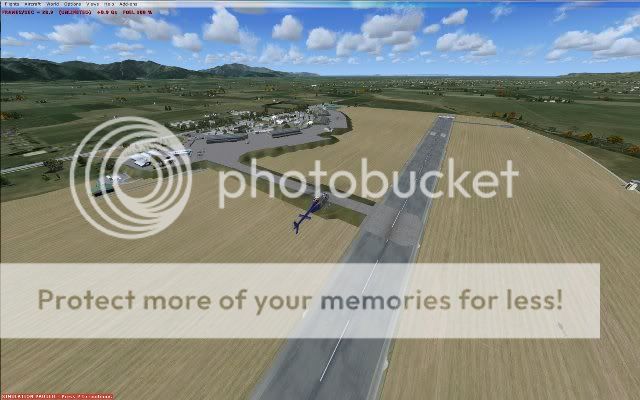
I seem to have random high patches on my Omaka airfield...?

I'm using FSX and have Marlborough FSX...
any ideas?
I have posted a pic above to see...
ctcav8r wrote:
QUOTE (ctcav8r @ Mar 16 2009, 09:21 PM) <{POST_SNAPBACK}>
[attachment=157:2009_03_...21_09_29.bmp]
I seem to have random high patches on my Omaka airfield...?

I'm using FSX and have Marlborough FSX...
any ideas?
I have posted a pic above to see...

User avatar
ctcav8r
Member
 
Topic author
Joined: Wed Feb 04, 2009 6:21 pm
Posts: 62
Location: Auckland, New Zealand

Postby toprob » Mon Mar 16, 2009 8:34 pm

Are your FSX service patches up to date? (It looks a bit like pre-SP1 issues.)
User avatar
toprob
NZFF Pro
 
Joined: Sat Apr 29, 2006 4:56 pm
Posts: 6711
Location: Upper Hutt

Postby ctcav8r » Mon Mar 16, 2009 8:45 pm

toprob wrote:
QUOTE (toprob @ Mar 16 2009, 09:34 PM) <{POST_SNAPBACK}>
Are your FSX service patches up to date? (It looks a bit like pre-SP1 issues.)

I have Acceleration, so should have both sp1 & 2...?
as far as I have read anyway.
Woodbourne is the same
I'll put a pic on soon
any ideas?

toprob wrote:
QUOTE (toprob @ Mar 16 2009, 09:34 PM) <{POST_SNAPBACK}>
Are your FSX service patches up to date? (It looks a bit like pre-SP1 issues.)


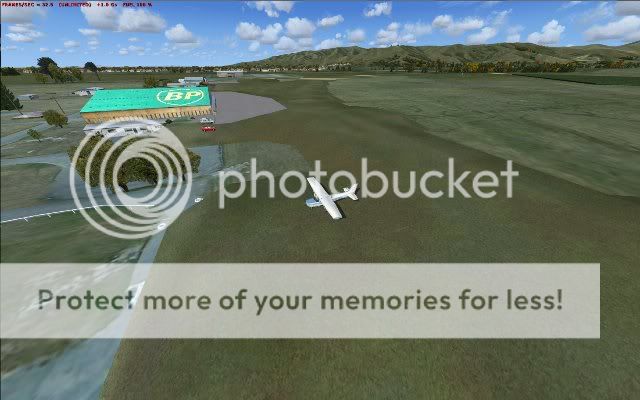
here is Woodbourne,
it appears to floating on an island lol.

Otherwise all other strips in Marlborough region are good - in fact beautiful!!
I'm looking at buying the full FSX package shortly
Any chance this will be on Trademe in the next couple of days?

Back to the problem though - not sure if there are any conflicts etc.
I just did a clean install last week of both Windows and FSX if that helps..?
Last edited by ctcav8r on Mon Mar 16, 2009 8:46 pm, edited 1 time in total.
User avatar
ctcav8r
Member
 
Topic author
Joined: Wed Feb 04, 2009 6:21 pm
Posts: 62
Location: Auckland, New Zealand

Postby toprob » Mon Mar 16, 2009 9:09 pm

Ok, that makes it a bit clearer. Both airports have been re-elevated, but it looks like something is missing. Incorrect elevation is normally caused by either having shifted your FSX installation after installing it, or installing the addon scenery from something other than the original installer (such as a backup copy of the scenery folders.)
Did you install the scenery directly into FSX from the installer?
Did you ever shift your FSX installation?
If neither of these are the cause, we can look a bit further.
This could also, come to think of it, be caused by conflicting AFCAD files, such as those installed by AI addons.
User avatar
toprob
NZFF Pro
 
Joined: Sat Apr 29, 2006 4:56 pm
Posts: 6711
Location: Upper Hutt

Postby dbcunnz » Mon Mar 16, 2009 9:21 pm

While you are on this Rob have you done anything more about the night runway lights for Woodbourne FSX

Doug
Image
User avatar
dbcunnz
NZFF Pro
 
Joined: Thu Feb 21, 2008 12:56 pm
Posts: 4009
Location: Blenheim New Zealand

Postby ctcav8r » Mon Mar 16, 2009 9:27 pm

toprob wrote:
QUOTE (toprob @ Mar 16 2009, 10:09 PM) <{POST_SNAPBACK}>
Ok, that makes it a bit clearer. Both airports have been re-elevated, but it looks like something is missing. Incorrect elevation is normally caused by either having shifted your FSX installation after installing it, or installing the addon scenery from something other than the original installer (such as a backup copy of the scenery folders.)
Did you install the scenery directly into FSX from the installer?
Did you ever shift your FSX installation?
If neither of these are the cause, we can look a bit further.
This could also, come to think of it, be caused by conflicting AFCAD files, such as those installed by AI addons.


No I kept FSX where it was installed.
But moved Marlborough from the FSX folder into the addon scenery folder AFTER it was installed - but before activating it in FSX
I dont have any AI addons at the mo - and these are the first South Island scenery files Iv done so I dont think there are any conflicting ones
User avatar
ctcav8r
Member
 
Topic author
Joined: Wed Feb 04, 2009 6:21 pm
Posts: 62
Location: Auckland, New Zealand

Postby toprob » Tue Mar 17, 2009 9:35 am

Could you check that these two files exist in Scenery\World\Scenery:

AF2_NZOM.bgl
AF2_NZWB.bgl
User avatar
toprob
NZFF Pro
 
Joined: Sat Apr 29, 2006 4:56 pm
Posts: 6711
Location: Upper Hutt

Postby ctcav8r » Tue Mar 17, 2009 10:29 am

toprob wrote:
QUOTE (toprob @ Mar 17 2009, 10:35 AM) <{POST_SNAPBACK}>
Could you check that these two files exist in Scenery\World\Scenery:

AF2_NZOM.bgl
AF2_NZWB.bgl


No they aren't in:
scenery/world/scenery
But they are in:
addon scenery/scenery/world/scenery

Should they be in a diff folder?
Last edited by ctcav8r on Tue Mar 17, 2009 10:46 am, edited 1 time in total.
User avatar
ctcav8r
Member
 
Topic author
Joined: Wed Feb 04, 2009 6:21 pm
Posts: 62
Location: Auckland, New Zealand

Postby toprob » Tue Mar 17, 2009 10:49 am

You will probably need to reinstall the scenery. I can't quite imagine how those files ended up there, the installer finds your FSX folder from the Registry, and puts those files into the Scenery\World\Scenery folder -- it should not add the 'Addon Scenery' path, I wouldn't have thought that was possible.
Let me know how you get on with a reinstall -- remember that the only reliable way to reinstall is to run the Installers from the disc/download. After installing, you can move the RealNZmarl folder to the Addon Scenery folder if you wish. However this shouldn't affect the other scenery files which are placed within your FSX installation folder system.
Last edited by toprob on Tue Mar 17, 2009 10:50 am, edited 1 time in total.
User avatar
toprob
NZFF Pro
 
Joined: Sat Apr 29, 2006 4:56 pm
Posts: 6711
Location: Upper Hutt

Postby ctcav8r » Tue Mar 17, 2009 11:39 am

toprob wrote:
QUOTE (toprob @ Mar 17 2009, 11:49 AM) <{POST_SNAPBACK}>
You will probably need to reinstall the scenery. I can't quite imagine how those files ended up there, the installer finds your FSX folder from the Registry, and puts those files into the Scenery\World\Scenery folder -- it should not add the 'Addon Scenery' path, I wouldn't have thought that was possible.
Let me know how you get on with a reinstall -- remember that the only reliable way to reinstall is to run the Installers from the disc/download. After installing, you can move the RealNZmarl folder to the Addon Scenery folder if you wish. However this shouldn't affect the other scenery files which are placed within your FSX installation folder system.


OK - all is well in Omakaville now!
Originally I had chosen to install the files to addon Scenery folder.
This time I just let it install to default location.
Beautiful scenery!!
Cheers for your help

Can I just delete the previous installation from 'Addon Scenery' folder?

Any chance of the FSX 3 pack going on Trademe for a 'recession sale' haha
I need to justify to my wife lol
User avatar
ctcav8r
Member
 
Topic author
Joined: Wed Feb 04, 2009 6:21 pm
Posts: 62
Location: Auckland, New Zealand

Postby toprob » Tue Mar 17, 2009 12:45 pm

Sure, just delete the stuff in Addon Scenery. However, as I said, you can move the RealNZmarl folder into Addon Scenery if you wish. As long as you only have one activated version...

I admit I confused myself a bit here, I thought that the installer didn't give you the option to change the install path, but it does. However the path must represent your FSX install, and the choice is only there if the Registry path is not correct. This goes back to a few issues with Wellington, where some people had installed a new drive, and just dragged their FSX installation onto it without changing the registry pointer.
User avatar
toprob
NZFF Pro
 
Joined: Sat Apr 29, 2006 4:56 pm
Posts: 6711
Location: Upper Hutt


Return to Godzone 'Real New Zealand' Scenery Support

Who is online

Users browsing this forum: No registered users and 5 guests