FSX comes with many 3D models that are used to make the default scenery- These models are available to be placed in other locations around the world by using the 'Object Placer Tool' avaliable with the SDK (Youll need to have the Deluxe version of FSX)
Using default library objects is a great way of updating the default scenery to something more realistic: It doesnt require too much work and the resultant files are very small which makes sharing them easy.
A catalog of all the FSX library objects can be found here http://lc0277.nerim.net/sceneobjects/
Cheers
Catalogue of FSX Library objects.
21 posts
• Page 1 of 2 • 1, 2

 by creator2003 » Sun Oct 26, 2008 10:45 am
Once you install the sdk packets and updates right through to acceration sdk you will have a SDK manual to checkout and if that doesnt make much sence we can go through it with you on TS sometime ...
-

creator2003 - NZFF Pro
- Joined: Fri Jun 16, 2006 12:08 am
- Posts: 4633
- Location: Cant U C im LOCO
by toprob » Sun Oct 26, 2008 11:15 am
njbb1995 wrote:QUOTE (njbb1995 @ Oct 25 2008, 05:07 PM) <{POST_SNAPBACK}>Just a question, Would anybody like to tell me how to use the object placer tool?
Thanks
Nick
One of the best references for OPT, as far as actually navigating around it and adding objects, is here, the second link in particular. Although these tutorials are designed for mission building, there is a lot of useful stuff to place scenery.
-

toprob - NZFF Pro
- Joined: Sat Apr 29, 2006 4:56 pm
- Posts: 6741
- Location: Upper Hutt
by CoochB » Thu Feb 12, 2009 9:28 am
Can some one help me? I have tried many times to activate the SDK Objects Placement tool but have thus far failed.
I have checked the dll.xml file and it seems correct however in saying that I have found 2 different versions of the launch add on. Tried them both still nothing, I have discounted one version because I lost the add on part of the menu bar when I tried it
I am running Vista if that makes a difference.
Thanks for the link to the objects directory, hope I can soon use it
I have checked the dll.xml file and it seems correct however in saying that I have found 2 different versions of the launch add on. Tried them both still nothing, I have discounted one version because I lost the add on part of the menu bar when I tried it
I am running Vista if that makes a difference.
Thanks for the link to the objects directory, hope I can soon use it
- CoochB
- Forum Addict
- Joined: Mon Jan 26, 2009 7:15 am
- Posts: 150
by Christian » Thu Feb 12, 2009 12:03 pm
CoochB wrote:QUOTE (CoochB @ Feb 16 2009, 09:28 PM) <{POST_SNAPBACK}>Can some one help me? I have tried many times to activate the SDK Objects Placement tool but have thus far failed.
I have checked the dll.xml file and it seems correct however in saying that I have found 2 different versions of the launch add on. Tried them both still nothing, I have discounted one version because I lost the add on part of the menu bar when I tried it
I am running Vista if that makes a difference.
Thanks for the link to the objects directory, hope I can soon use it
There's a tutorial on how to install the SDK here:
http://www.simpilotnet.com/index.php?optio...3&Itemid=32
The most common problem is either a wrong path or the wrong version. If you install the Connect SDK (as shown in the video) you get a debug window which helps you track down what's wrong.
Christian
Great link, thanks Timmo!Breathtakingly gorgeous FS landscapes for New Zealand.
Visit Sim Pilot Experience now:
http://www.simpilotexperience.com
Follow me on twitter:
http://www.twitter.com/ChristianStock
-

Christian - Forum Addict
- Joined: Sun Apr 30, 2006 12:03 pm
- Posts: 426
- Location: melbourne
by creator2003 » Thu Feb 12, 2009 12:21 pm
QUOTE
The most common problem is either a wrong path[/quote]
I do this nearly every time i set it up,, make sure in your ddl the path is set to the sdk or it will never show or work"<Path>C:\Program Files\Microsoft Games\Microsoft Flight Simulator X SDK\SDK\Mission Creation Kit\object_placement.dll</Path>"...
I do this nearly every time i set it up,, make sure in your ddl the path is set to the sdk or it will never show or work"<Path>C:\Program Files\Microsoft Games\Microsoft Flight Simulator X SDK\SDK\Mission Creation Kit\object_placement.dll</Path>"...
-
creator2003 - NZFF Pro
- Joined: Fri Jun 16, 2006 12:08 am
- Posts: 4633
- Location: Cant U C im LOCO
by CoochB » Fri Feb 20, 2009 9:38 am
creator2003 wrote:QUOTE (creator2003 @ Feb 12 2009, 01:21 PM) <{POST_SNAPBACK}>I do this nearly every time i set it up,, make sure in your ddl the path is set to the sdk or it will never show or work"<Path>C:\Program Files\Microsoft Games\Microsoft Flight Simulator X SDK\SDK\Mission Creation Kit\object_placement.dll</Path>"...
I have tried this but no sucess, think I might tried uninstalling the SDK and re installing?Last edited by CoochB on Fri Feb 20, 2009 9:41 am, edited 1 time in total.
- CoochB
- Forum Addict
- Joined: Mon Jan 26, 2009 7:15 am
- Posts: 150
by creator2003 » Fri Feb 20, 2009 9:48 am
Ok well im reinstalling now again myself so ill tell you the process i go through later ,what im doing is a full sdk /sp1/sp2accelerationX install and FSX sp1 sp2 and accelerationX so i should have a full run down and text entrys ...
-
creator2003 - NZFF Pro
- Joined: Fri Jun 16, 2006 12:08 am
- Posts: 4633
- Location: Cant U C im LOCO
by creator2003 » Fri Feb 20, 2009 12:12 pm
So since my last post ive fully install FSX and sdks plus sp1 sp2 and accelerationX plus sdk etc
so the tools didnt work three times for me and it was due to ddl file and what i wrote each time so here is the ddl file that works for me with all installs of X and sdk found in the C:/drive though ive done this in other drives before and it works sweet ..
<?xml version="1.0" encoding="Windows-1252"?>
<SimBase.Document Type="Launch" version="1,0">
<Descr>Launch</Descr>
<Filename>dll.xml</Filename>
<Disabled>False</Disabled>
<Launch.ManualLoad>False</Launch.ManualLoad>
<Launch.Addon>
<Name>Object Placement Tool</Name>
<Disabled>False</Disabled>
<ManualLoad>False</ManualLoad>
<Path>C:\Program Files\Microsoft Games\Microsoft Flight Simulator X SDK\SDK\Mission Creation Kit\object_placement.dll</Path>
</Launch.Addon>
<Launch.Addon>
<Name>Traffic Toolbox</Name>
<Disabled>False</Disabled>
<ManualLoad>False</ManualLoad>
<Path>C:\Program Files\Microsoft Games\Microsoft Flight Simulator X SDK\SDK\Environment Kit\Traffic Toolbox SDK\traffictoolbox.dll</Path>
</Launch.Addon>
<Launch.Addon>
<Name>Visual Effects Tool</Name>
<Disabled>False</Disabled>
<ManualLoad>False</ManualLoad>
<Path>C:\Program Files\Microsoft Games\Microsoft Flight Simulator X SDK\SDK\Environment Kit\Special Effects SDK\visualfxtool.dll</Path>
</Launch.Addon>
</SimBase.Document>
hope this helps some more, just check over the entry's in the ddl i had to three times and still got it wrong until i found what was missing in the text ..
so the tools didnt work three times for me and it was due to ddl file and what i wrote each time so here is the ddl file that works for me with all installs of X and sdk found in the C:/drive though ive done this in other drives before and it works sweet ..
<?xml version="1.0" encoding="Windows-1252"?>
<SimBase.Document Type="Launch" version="1,0">
<Descr>Launch</Descr>
<Filename>dll.xml</Filename>
<Disabled>False</Disabled>
<Launch.ManualLoad>False</Launch.ManualLoad>
<Launch.Addon>
<Name>Object Placement Tool</Name>
<Disabled>False</Disabled>
<ManualLoad>False</ManualLoad>
<Path>C:\Program Files\Microsoft Games\Microsoft Flight Simulator X SDK\SDK\Mission Creation Kit\object_placement.dll</Path>
</Launch.Addon>
<Launch.Addon>
<Name>Traffic Toolbox</Name>
<Disabled>False</Disabled>
<ManualLoad>False</ManualLoad>
<Path>C:\Program Files\Microsoft Games\Microsoft Flight Simulator X SDK\SDK\Environment Kit\Traffic Toolbox SDK\traffictoolbox.dll</Path>
</Launch.Addon>
<Launch.Addon>
<Name>Visual Effects Tool</Name>
<Disabled>False</Disabled>
<ManualLoad>False</ManualLoad>
<Path>C:\Program Files\Microsoft Games\Microsoft Flight Simulator X SDK\SDK\Environment Kit\Special Effects SDK\visualfxtool.dll</Path>
</Launch.Addon>
</SimBase.Document>
hope this helps some more, just check over the entry's in the ddl i had to three times and still got it wrong until i found what was missing in the text ..
-
creator2003 - NZFF Pro
- Joined: Fri Jun 16, 2006 12:08 am
- Posts: 4633
- Location: Cant U C im LOCO
by CoochB » Fri Feb 20, 2009 2:36 pm
creator2003 wrote:QUOTE (creator2003 @ Feb 20 2009, 01:12 PM) <{POST_SNAPBACK}>So since my last post ive fully install FSX and sdks plus sp1 sp2 and accelerationX plus sdk etc
so the tools didnt work three times for me and it was due to ddl file and what i wrote each time so here is the ddl file that works for me with all installs of X and sdk found in the C:/drive though ive done this in other drives before and it works sweet ..
[/color]
hope this helps some more, just check over the entry's in the ddl i had to three times and still got it wrong until i found what was missing in the text ..
I have checked the dll line by line and can find no difference between yours and mine although I have an additional addon for some aircraft downloads however even by taking this additional addon out I still cannot find the tools. Am I looking in the right place? The tutorial I have read indicates it shuld be on the Menu Bar. Could it be anywhere else bearing in mind my computer litaracy is quite low.
Huge thanks to you for taking the time to help, I really appreciate it
- CoochB
- Forum Addict
- Joined: Mon Jan 26, 2009 7:15 am
- Posts: 150
by creator2003 » Fri Feb 20, 2009 2:54 pm
Ah ok yeah it should come up on the menu above the in game screen like this
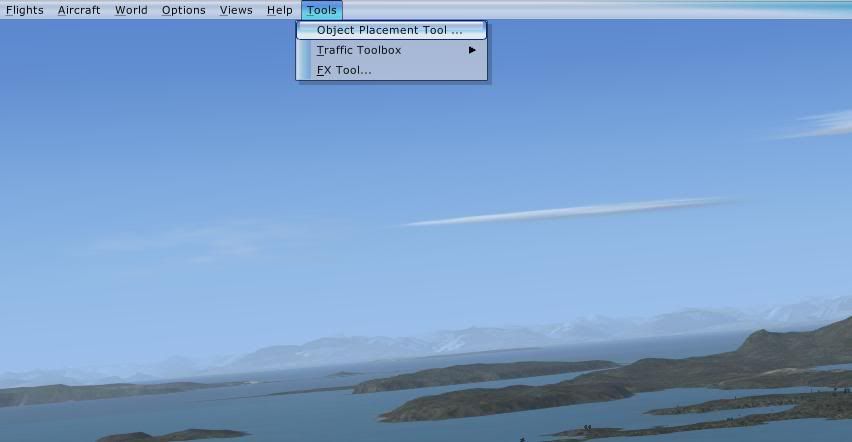
the only time ive had problems with activating the sdk tools is when ive put the wrong text inthe ddl or another things on that ddl like fsrecorder is pointing to the wrong ddl file ..
could be you where looking for the tools in the wrong menu ? or the sdk object ddl path is wrong it could be in a different drive ?
though im sure you know what your doing so ill stop guessing
im stumped at the moment to why this is not working for you ,me i just reinstall it all over and over till ive got it ,but yours still to me is a path or text entry problem and not fsx itself ..
just to go right back to the beginning a little, you have deluxe version ? and have install the sdk pack from DVD disc 1 / do you have accelerationX addon pack ? and did you update the sdk with SDK sp1 and then the acceleration SDK update ?if not did you update it to SDKsp2 ?
the only time ive had problems with activating the sdk tools is when ive put the wrong text inthe ddl or another things on that ddl like fsrecorder is pointing to the wrong ddl file ..
could be you where looking for the tools in the wrong menu ? or the sdk object ddl path is wrong it could be in a different drive ?
though im sure you know what your doing so ill stop guessing
im stumped at the moment to why this is not working for you ,me i just reinstall it all over and over till ive got it ,but yours still to me is a path or text entry problem and not fsx itself ..
just to go right back to the beginning a little, you have deluxe version ? and have install the sdk pack from DVD disc 1 / do you have accelerationX addon pack ? and did you update the sdk with SDK sp1 and then the acceleration SDK update ?if not did you update it to SDKsp2 ?
-
creator2003 - NZFF Pro
- Joined: Fri Jun 16, 2006 12:08 am
- Posts: 4633
- Location: Cant U C im LOCO
by CoochB » Sun Feb 22, 2009 1:19 pm
creator2003 wrote:QUOTE (creator2003 @ Feb 20 2009, 03:54 PM) <{POST_SNAPBACK}>Ah ok yeah it should come up on the menu above the in game screen like this
the only time ive had problems with activating the sdk tools is when ive put the wrong text inthe ddl or another things on that ddl like fsrecorder is pointing to the wrong ddl file ..
could be you where looking for the tools in the wrong menu ? or the sdk object ddl path is wrong it could be in a different drive ?
though im sure you know what your doing so ill stop guessing
im stumped at the moment to why this is not working for you ,me i just reinstall it all over and over till ive got it ,but yours still to me is a path or text entry problem and not fsx itself ..
just to go right back to the beginning a little, you have deluxe version ? and have install the sdk pack from DVD disc 1 / do you have accelerationX addon pack ? and did you update the sdk with SDK sp1 and then the acceleration SDK update ?if not did you update it to SDKsp2 ?
Got it!, I was using the wrong version (I didn't know there was more than one)
Thank you very much for all your help.
- CoochB
- Forum Addict
- Joined: Mon Jan 26, 2009 7:15 am
- Posts: 150
by GDNZ » Sun Dec 13, 2009 6:27 am
Timmo wrote:QUOTE (Timmo @ Nov 9 2007, 12:07 PM) <{POST_SNAPBACK}>A catalog of all the FSX library objects can be found here http://lc0277.nerim.net/sceneobjects/
Cheers
A friend is building a scenery package for NZTE (Te Kowhai), the home of the Bantam microlight. Photos
Does anyone know of a scenery object that looks something like the Bantam?
GaryLast edited by GDNZ on Sun Dec 13, 2009 6:53 am, edited 1 time in total.
-

GDNZ - Member
- Joined: Mon Oct 15, 2007 8:50 am
- Posts: 38
- Location: Palmerston North


by IslandBoy77 » Wed Dec 08, 2010 5:50 pm
Same here - link is dead. Timmo: do you have an updated link for this?
-

IslandBoy77 - Senior Member
- Joined: Tue Feb 03, 2009 2:23 pm
- Posts: 1020
- Location: Napier, New Zealand
by BASys » Thu Dec 09, 2010 2:09 am
Hi Folks
Lamont Clarke has moved ISPs
For his catalogue, please see - FSX default scenery objects
For SDK installation process and troubleshooting
please see FSDeveloper - READ FIRST: FSX SDK installation (all versions)
PS
FSDeveloper is having intermittent connectivity problems today, (08/12/2010).
HTH
ATB
Paul
Lamont Clarke has moved ISPs
For his catalogue, please see - FSX default scenery objects
For SDK installation process and troubleshooting
please see FSDeveloper - READ FIRST: FSX SDK installation (all versions)
PS
FSDeveloper is having intermittent connectivity problems today, (08/12/2010).
HTH
ATB
Paul
Last edited by BASys on Thu Dec 09, 2010 2:12 am, edited 1 time in total.

The ODG Project
I've never felt so frustrated....... died so frequently/spectacularly/or needlessly....... yet had so much fun, in a long time.
Flight's Landing Challenges - Earn your wings !
-

BASys - Member
- Joined: Thu Sep 18, 2008 11:15 am
- Posts: 26
- Location: EGNL, Barrow-in-Furness, Cumbria, UK
 .
.
21 posts
• Page 1 of 2 • 1, 2
Who is online
Users browsing this forum: No registered users and 33 guests