The Skyhawk Pit...

Discuss aircraft addons and repaints for Flight Simulator here

Postby CDTDAN » Mon Dec 08, 2008 8:18 pm

I plan to release this in the next few days, but is not quite finished. I might put a rapidshare link up for those who really want it, but you'll need the SectionF8 F-86, because it has the alpha gauge required for transparency, and I don't want to include it or i might get *told off*!

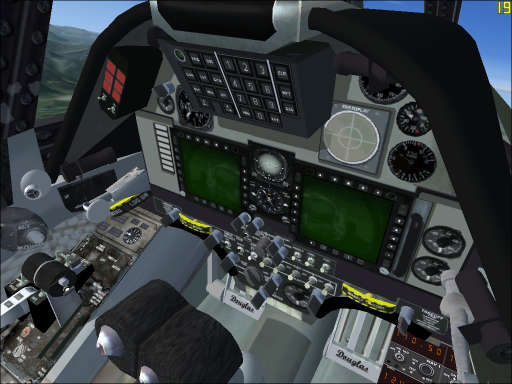
Heres a pic:


I've blurred the window reflections; added refections to all gauges; changed the HUD; changed the RWR display; completely changed the HUD control box/buttons and other touch-ups of the BMP.


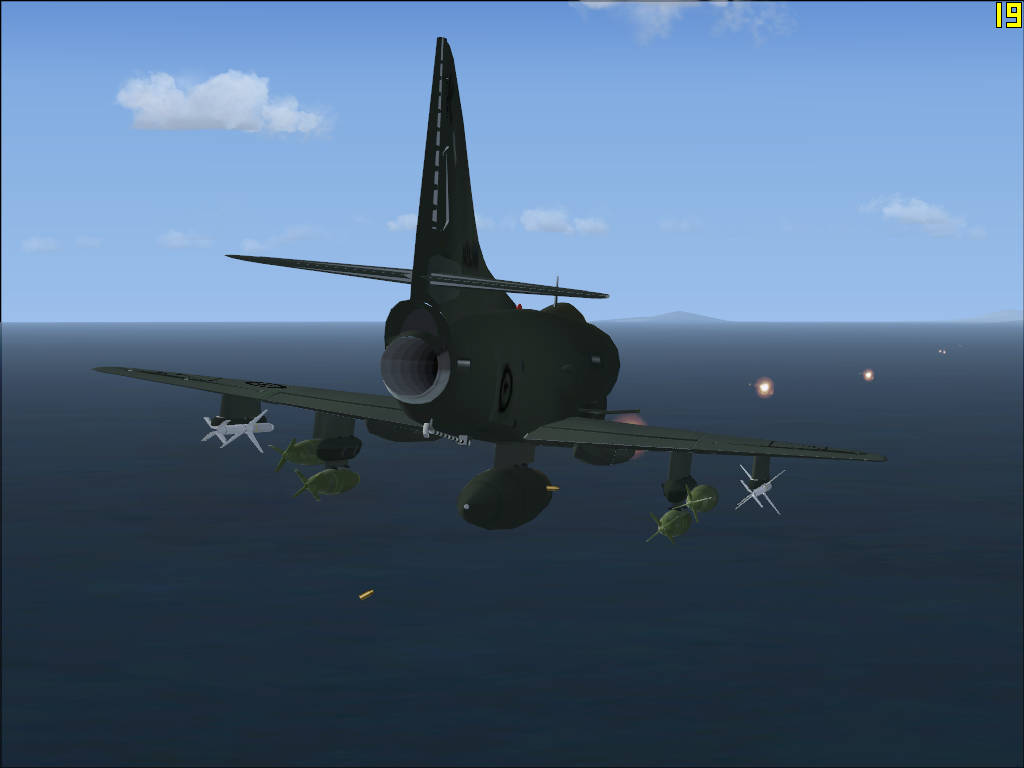
Also I put a gun effect on it...


Comments appreciated winkyy.gif
Click below to go to my website.
Image
CDTDAN
Forum Addict
 
Topic author
Joined: Sat Apr 12, 2008 8:52 pm
Posts: 171
Location: Christchurch!

Postby Ian Warren » Tue Dec 09, 2008 12:47 am

Your ve definitly got mt attention , again , works in FSX and on the RAZBAM A4 ? .. and to put affect in .. many a people be moving for a bitta dog-fighting , extraordinary effort smile.gif
Image
User avatar
Ian Warren
NZFF Pro
 
Joined: Fri May 05, 2006 5:23 pm
Posts: 41187
Location: AREA 51

Postby waka172rg » Tue Dec 09, 2008 2:27 am

This is 2D?? if so is there a 3D in pipline? looks real nice! whathesaid.gif
ImageImage
User avatar
waka172rg
Sim-holic
 
Joined: Wed Jan 23, 2008 2:45 pm
Posts: 796
Location: Motueka

Postby Charl » Tue Dec 09, 2008 7:07 am

We're looking...trigger finger a'twitchin'
User avatar
Charl
NZFF Pro
 
Joined: Mon May 01, 2006 8:28 am
Posts: 9691
Location: Auckland

Postby CDTDAN » Tue Dec 09, 2008 7:53 am

Thanks for the comments guys...

Yes it it a 2D panel, and It's for FSX simply because I don't have FS9, but i'm sure it will work winkyy.gif

Depending om which A-4 you have, (Abacus or RAZBAM) I have 2 panel.cfgs for the to keep the standard gauges in the virtual cockpit, the new 3D cockpit textures and updated gauges will be a seperate release biggrin.gif

AS for the effect, I'm working on ground explosions/damage, but I don't have a clue how! Anyone have any ideas? I did manage to get a 3D 'maverick' missile to launch from my plane with a smoke trail and everything, (Nabbed it from an abacus mission) except an explosion! sad.gif

I've also tried reworking Deane B's old Skyhawk for FS98 on FSDSv3, I'm not so good at this though dry.gif


Dan radar.gif
Click below to go to my website.
Image
CDTDAN
Forum Addict
 
Topic author
Joined: Sat Apr 12, 2008 8:52 pm
Posts: 171
Location: Christchurch!

Postby Ian Warren » Tue Dec 09, 2008 10:00 am

I wonder for this file would be of help

______________________________________________________________Welcome to the weapons pack for FSX!___________________________________________________________
______________________________________________________________Created and modified by Chris Sykes!___________________________________________________________

This weapons pack is divided into two sections, the US weapons pack and the British Pack, overall the packs are designed to be a basic but fun add on to FSX, enabling you to drop bombs and shoot missiles! Yes I did say shoot missiles! The US weapons pack has an extensive collection of weapons created in FSDS, a staggering 68 individual weapons with different variants too! A big thank you and most of the credits goes to Kotaro Akikawa, who uploaded his FSDS model source weapons pack at simviation.com. The British weapons pack is a collection of weapons, generously given from David Brice, made in GMAX and uses an attached effect!


________________________________________________________________COPYRIGHT INFORMATION_____________________________________________________________________
___

This pack and contents should not harm either your flight simulator or computer, but I take no responsibility if either of which are harmed! This pack and contents are copyrighted to myself, with the FSDS source files being copyrighted to Kotaro Akikawa and the GMAX source files copyrighted by David Brice.

Restrictions of use are as follows;

All files included in this pack may not be used for any projects whether freeware, shareware or payware with out prior permission by myself.
Personal use is fully permitted, however if used for flights/missions to be uploaded to any website, the pack or parts of, must not be uploaded with/inside the mission/flight pack, however a link/address should be included with the documentation pointing the user to the website where this weapons pack can be download from.
This weapons pack may not be uploaded to ANY site with out express permission by myself.


Comments, questions and support can be gained through "chrissykes314@hotmail.co.uk"


________________________________________________________________IMPORTANT INFORMATION_____________________________________________________________________
___

Before I go any further I shall explain what the US weapons pack can and cant do! All bombs, whether dumb or guided (With exceptions listed below), explode upon impact with the effect file included. However the missiles and glide bombs do no explode upon impact! Please take note of this, as they are classed under a different object to the bombs, which denies impact effects.

Cluster bombs use a different effect therefore they do not look like the cluster bomb explosions.

The Incendiary bombs use a fire explosion but look too small for a normal incendiary explosion.

Missiles + Glide Bombs, both Air to Ground/Air have forward motion, which may at some points in your flying may give adverse display of both position of the object but also forward motion. You may at times see the objects running along the surface of the ground/sea, also at various bank and pitch angles the objects may drop/release from strange points and also move forward at strange angles, this is something out of my control and is due to the flight simulator. Another point with the missiles is that they do not have rocket effects and smoke trail effects; this is due to them being exported using FSDS.

The British weapons pack is a bit more enhanced, with missiles having attached contrail effect to look like rocket trail but this only lasts for a short time.

Lastly the biggest limitation of Flight Simulator is that you can only have one object to drop at one time.


________________________________________________________________INSTALLATION____
_____________________________________________________________________________

To install the weapons into FSX, you need to follow these instructions carefully!

1, extract the "Effects" folder to your main FSX folder, select over write, there should not be anything overwritten however you can extract to somewhere else and install manually.

2, Open the folder "US Weapons Pack" and extract the folder "SimObjects" to you main FSX folder, again there should not be anything overwritten, repeat actions for the folder "British Weapons Pack".

3, this is the hard part of the weapons installation! You need to create a saved flight with an aircraft that you wish to drop weapons from, when you have done this you will need to add two lines to the saved flight, these are located in the folder "\My Documents\Flight Simulator X Files", open the saved flight using notepad, the name should just be something like "flight", do not try to open any of the other files, such as the flight.wx, flight.fssave. You will need to add these two lines to the saved flight;

[DroppableObjects.0]
ObjectSet.0=**********, ^^^^^^^^^^^^

Now add the weapon of your choice (copy the weapons name and past over the *'s), from the list below and the number of available weapons to drop (any number you wish, write over the ^'s). Once you have done this you save the saved flight and exit notepad, now go load that flight up in FSX and go drop bombs or fire missiles using the key press "shift + D"

Please note! It is critically important that you use the names below exactly as they point to the individual objects!

US Weapons Pack;
Air to Air Missiles;
Aim-4D
Aim-4F
Aim-4G
Aim-7E
Aim-7F
Aim-7M
Aim-7MH
Aim-9B
Aim-9D
Aim-9E
Aim-9H
Aim-9L
Aim-9M
Aim-9X
Aim-54C
Aim-120A
Aim-120B
Aim-120C
Aim-132

Air to Ground Missiles;
Agm-12C
Agm-45
Agm-62I
Agm-62IERDL
Agm-62II
Agm-62IIERDL
Agm-65A
Agm-65B
Agm-65D
Agm-65E
Agm-65F
Agm-65G
Agm-78B
Agm-84D
Agm-84E
Agm-88A
Agm-88C
Agm-114B
Agm-114C
Agm-114F
Agm-114K
Agm-119B
Agm-122A
Agm-123
Agm-142

Guided Bomb Units;
GBU-10
GBU-12
GBU-15
GBU-16
GBU-24A
GBU-24B
GBU-27
GBU-28
GBU-29
GBU-30
GBU-31
GBU-32

Cluster Bombs;
Mk-20
CBU-52
CBU-58
CBU-59
CBU-71
CBU-72
CBU-87
CBU-97

Dumb Bombs;
M117
Mk-81
Mk-82
Mk-83
Mk-84

Incendiary;
Mk-77

British Weapons Pack;
500lb GPB
1000lb GPB
ALARM
Sea Eagle
Paveway
WE177A
Sky Flash
AS-37 Martel
BL755

Image
User avatar
Ian Warren
NZFF Pro
 
Joined: Fri May 05, 2006 5:23 pm
Posts: 41187
Location: AREA 51

Postby CDTDAN » Wed Dec 10, 2008 5:32 pm

Thanks Ian, I do remember downloading that at one stage,I put a sidewinder on and thought it was pretty bad because it just raced foward with no effects, but then I read what you just posted and it says that the british weapons have a smoke effect, Is it good? I could to edit the effect to make it last longer and include some flights using the weapons outside Ohakea or something, that would be pretty cool.

I'm also thinking about the AI Skyhawk included in Abacus vietnam Carrier Ops... its a similar model, (lower poly i suppose) with no VC and lower res textures, do you think would they allow an AI model as a freeware release with permission? my textures work on the model winkyy.gif

Dan radar.gif
Click below to go to my website.
Image
CDTDAN
Forum Addict
 
Topic author
Joined: Sat Apr 12, 2008 8:52 pm
Posts: 171
Location: Christchurch!

Postby waka172rg » Thu Dec 11, 2008 1:03 am

Shot Mate New_Zealand_etc.gif keep up the good work thumbup1.gif
Blake
ImageImage
User avatar
waka172rg
Sim-holic
 
Joined: Wed Jan 23, 2008 2:45 pm
Posts: 796
Location: Motueka

Postby CDTDAN » Thu Dec 11, 2008 7:57 am

I put the 'Sky Flash' on, (it looks alot like a AiM-7 Sparrow) but no smoke comes out at all...

Anyone know why?

Dan radar.gif
Click below to go to my website.
Image
CDTDAN
Forum Addict
 
Topic author
Joined: Sat Apr 12, 2008 8:52 pm
Posts: 171
Location: Christchurch!

Postby Ian Warren » Thu Dec 11, 2008 9:59 am

CDTDAN wrote:
QUOTE (CDTDAN @ Dec 11 2008, 08:57 AM) <{POST_SNAPBACK}>
I put the 'Sky Flash' on, (it looks alot like a AiM-7 Sparrow) but no smoke comes out at all...

Sky Flash were a licence built Sparrow , or simular , they use a solid fuel , dou't if its been made smoke-less , would have thought in the gaming sim world ya want smoke for the effect ?
Image
User avatar
Ian Warren
NZFF Pro
 
Joined: Fri May 05, 2006 5:23 pm
Posts: 41187
Location: AREA 51

Postby CDTDAN » Thu Dec 11, 2008 12:03 pm

It said the British weapons are made in GMAX, so it has an attached contrail to look like smoke, but it dosen't seem to work.

It would be cool to get this working with smoke because the A-4 model has two sparrows.

Dan radar.gif
Click below to go to my website.
Image
CDTDAN
Forum Addict
 
Topic author
Joined: Sat Apr 12, 2008 8:52 pm
Posts: 171
Location: Christchurch!

Postby CDTDAN » Tue Dec 16, 2008 8:36 am

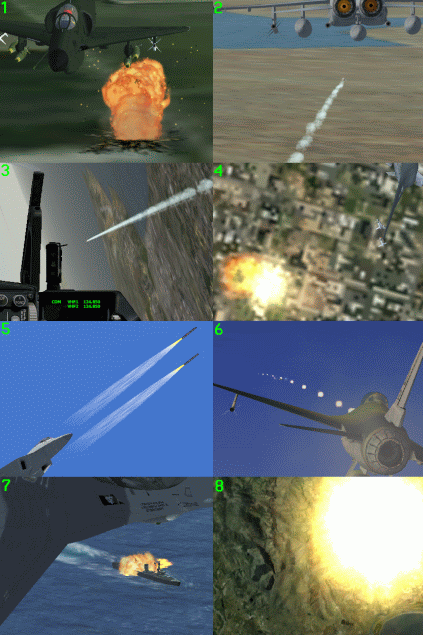
Ok, Here's a whole lot of weapons and effects I've either created or edited/added to FSX:

1. Bomb added from 'Bomber' mission at SimV,
2. AGM-65 from abacus FD5,
3. Same, but with an F-16 panel bitmap from Falcon4.0, with gauges added by me winkyy.gif
4. Rocket/Missile from Nor-cal prop club TU-95,
5. Rockets from the F-136 'Starblade',
6. My gun effect for Kirk's F-16 (with sound [Note the 737!]),
7. Torpedo launched from F-16 Abacus mission 'Battle for Zeebrugge',
8. Finally, a Nuclear bomb created by me on accident, it was supposed to be a flare tongue.gif


...Just thinking what I could put on the A-4 once finished...

Dan radar.gif
Click below to go to my website.
Image
CDTDAN
Forum Addict
 
Topic author
Joined: Sat Apr 12, 2008 8:52 pm
Posts: 171
Location: Christchurch!

Postby leow5263 » Tue Dec 16, 2008 9:20 am

you could add the weppons in and people can add the weppons they like onto the aircraft.
or just put realistic weppons that skyhwks would use on
looking good tongue.gif
User avatar
leow5263
Forum Addict
 
Joined: Sat Mar 08, 2008 9:16 pm
Posts: 444
Location: Christchurch

Postby Ian Warren » Tue Dec 16, 2008 9:25 am

CDTDAN wrote:
QUOTE (CDTDAN @ Dec 16 2008, 09:36 AM) <{POST_SNAPBACK}>
Finally, a Nuclear bomb created by me on accident, it was supposed to be a flare tongue.gif

A bucket of sunshine by accident laugh.gif I have measures of the W34 type , course the old bullpups had a lo-yield themo

Last edited by Ian Warren on Tue Dec 16, 2008 9:27 am, edited 1 time in total.
Image
User avatar
Ian Warren
NZFF Pro
 
Joined: Fri May 05, 2006 5:23 pm
Posts: 41187
Location: AREA 51

Postby Adamski » Tue Dec 16, 2008 5:11 pm

CDTDAN wrote:
QUOTE (CDTDAN @ Dec 8 2008, 09:18 PM) <{POST_SNAPBACK}>
I plan to release this in the next few days, but is not quite finished. I might put a rapidshare link up for those who really want it, but you'll need the SectionF8 F-86, because it has the alpha gauge required for transparency, and I don't want to include it or i might get *told off*!

Let me know when you're done ... and I'll add it to the [dreaded] NZFSIM database.

How long do rapidshare links usually last for? I could try hosting it on NZFSIM if that helps.

Did I say it looked great? thumbup1.gif
Image
User avatar
Adamski
NZFF Pro
 
Joined: Thu Nov 01, 2007 2:22 am
Posts: 5029
Location: Birkenhead, Auckland

Postby CDTDAN » Wed Dec 17, 2008 4:32 pm

Adamski wrote:
QUOTE (Adamski @ Dec 16 2008, 06:11 PM) <{POST_SNAPBACK}>
...How long do rapidshare links usually last for?...


Rapidshare links last for 90 days without download for a non-paying uploader winkyy.gif

Dan radar.gif

EDIT: I just tried and you only get 10 downloads aswell sad.gif
Last edited by CDTDAN on Thu Dec 18, 2008 7:48 am, edited 1 time in total.
Click below to go to my website.
Image
CDTDAN
Forum Addict
 
Topic author
Joined: Sat Apr 12, 2008 8:52 pm
Posts: 171
Location: Christchurch!

Postby CDTDAN » Wed Dec 17, 2008 10:51 pm

The D/L will be available at my *NEW* site, not the best but I thought I'd give it a go... There is also a new RNZAF 757-200 available only at my site, be quick, only 10 D/L available!!!
Click on my *NEW* signature to visit the site...

Dan radar.gif
Click below to go to my website.
Image
CDTDAN
Forum Addict
 
Topic author
Joined: Sat Apr 12, 2008 8:52 pm
Posts: 171
Location: Christchurch!

Postby Ian Warren » Thu Dec 18, 2008 9:35 pm

Dan , I tried all sort to get your A4 pit update , link appears not connected to Simviation , little early maybe or broken ? unsure.gif
Last edited by Ian Warren on Thu Dec 18, 2008 9:36 pm, edited 1 time in total.
Image
User avatar
Ian Warren
NZFF Pro
 
Joined: Fri May 05, 2006 5:23 pm
Posts: 41187
Location: AREA 51

Postby CDTDAN » Sat Dec 20, 2008 2:05 pm

Sorry Ian, thats not the Pit you see in this topic, it's the earlier one I created, nothing compared to this, but the link has been fixed so you can D/L if you like, but it only really compliment the Abacus A-4E. It has a repaint for 'NZ6209' in the Lizard Camo scheme, and a 'boring' Kahu pit.

Anyway, the reason I haven't released this one yet is because I've decided to have the RAZBAM VC update in the same package...

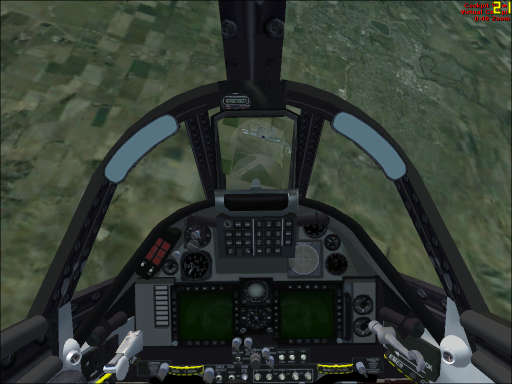
Heres the finished textures...


The panel is also done I just need to which gauges to put in the installer and actually create an installer.

Here's how goes... (taken from the readme.txt)

The model included is not the one intended for this package, its there for to make installation easy. There is a repaint included for the Abacus A-4E.
After all the cockpit is the main feature.

Choose your installer based on which A/C you have..

RAZBAM_KAHU_INSTALL.exe // for RAZBAM Skyhawk (texture upgrade, panel)
ABACUS_KAHU_INSTALL.exe // for ABACUS Skyhawk (panel)
DEFAULT_KAHU_INSTALL.exe // for new A/C../panel. (lower quality)
Click below to go to my website.
Image
CDTDAN
Forum Addict
 
Topic author
Joined: Sat Apr 12, 2008 8:52 pm
Posts: 171
Location: Christchurch!

Postby CDTDAN » Sun Dec 21, 2008 12:24 am

RELEASED!!!

GET IT HERE!


PLEASE LET ME KNOW OF ANY PROBLEMS...
Click below to go to my website.
Image
CDTDAN
Forum Addict
 
Topic author
Joined: Sat Apr 12, 2008 8:52 pm
Posts: 171
Location: Christchurch!

Next

Return to Aircraft

Who is online

Users browsing this forum: No registered users and 2 guests