RealNZ Wgtn Intl'

An area to discuss scenery addons for virtual NZ

Postby Pato » Mon Sep 22, 2008 5:37 pm

I have installed 20m mesh and NZ topo. What do I need to do to improve things please.


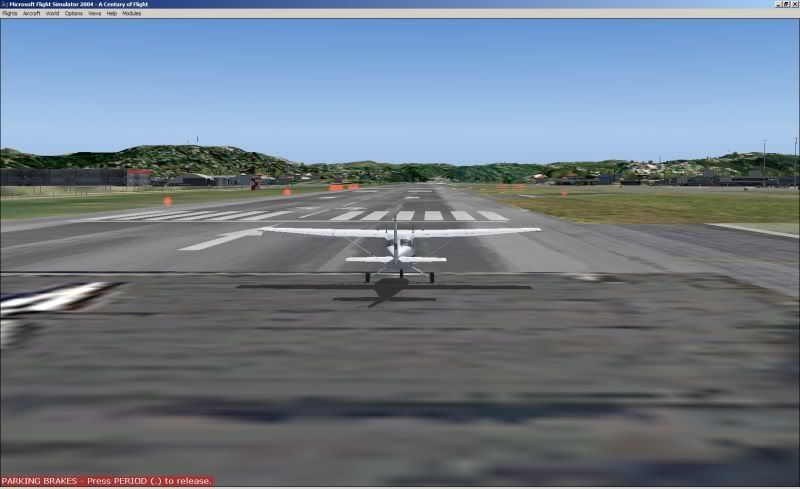
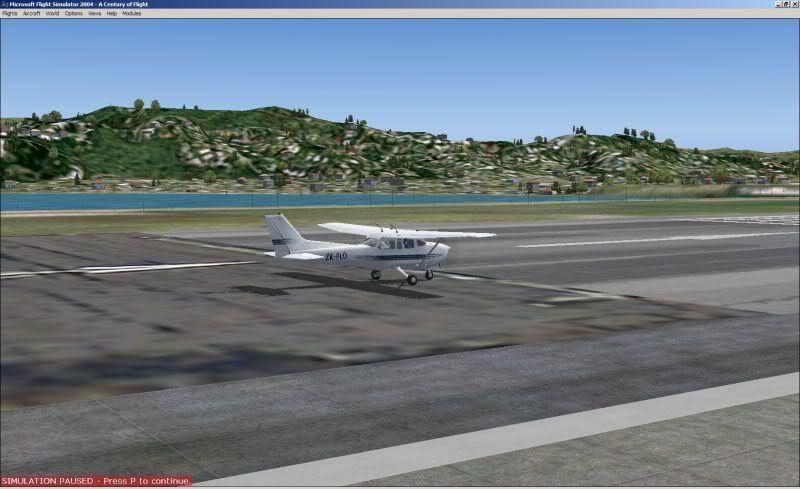
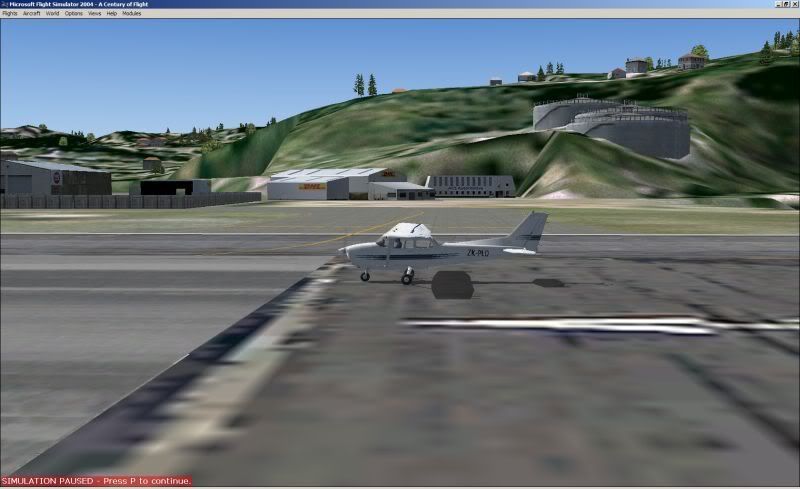
These shots taken from end of runway 34 looking left and right. The tanks and hills don't look too good.
Last edited by Pato on Mon Sep 22, 2008 5:52 pm, edited 1 time in total.
CPU: Intel Core i5 760 @ 2.8GHz. Motherboard: Asus P7P55 LX. RAM: Kingston Hyper X 8GB 1600mhz DDR3 Non ECC. SSD: Samsung 250GB. HDD: WD !TB.
GRAPHICS: Asus GTX460, Direct CU 1GB GDDR5 256bit video graphics card. PSU: Cooler Master eXtreme Power Plus 650W. CASE: Cooler Master Gladiator.
User avatar
Pato
Forum Addict
 
Topic author
Joined: Sat Nov 18, 2006 1:41 pm
Posts: 469
Location: Kapiti Coast

Postby 2fst4u » Mon Sep 22, 2008 5:51 pm

Specifics? is there anything wrong with what it looks like or are you just after more addons? what exactly are you to improve?
2fst4u
Forum Addict
 
Joined: Fri Dec 07, 2007 3:27 pm
Posts: 388
Location: Wellington, New Zealand

Postby toprob » Mon Sep 22, 2008 7:04 pm

I don't think you'd get it any better, at least until we get a sim which allows airports without flattens. There are a couple of things which don't work as well as I'd want in FS2004 (and FSX, really) -- airports on the edge of water, and airports next to hills. That's Wellington, and um, Wellington. This particular hill near the tanks is about as bad as it gets, where the airport flatten meets the hill, so just look the other way:)

This is assuming you've installed everything correctly (and it looks ok to me) including the new mesh settings in FS9.cfg.
User avatar
toprob
NZFF Pro
 
Joined: Sat Apr 29, 2006 4:56 pm
Posts: 6711
Location: Upper Hutt

Postby Pato » Mon Sep 22, 2008 7:05 pm

2fst4u wrote:
QUOTE (2fst4u @ Sep 27 2008, 05:51 AM) <{POST_SNAPBACK}>
Specifics? is there anything wrong with what it looks like or are you just after more addons? what exactly are you to improve?

Is this how it should look?. I hope not. I have had this program on another computer and I am sure it was better than this but
perhaps this is as good as it gets.
CPU: Intel Core i5 760 @ 2.8GHz. Motherboard: Asus P7P55 LX. RAM: Kingston Hyper X 8GB 1600mhz DDR3 Non ECC. SSD: Samsung 250GB. HDD: WD !TB.
GRAPHICS: Asus GTX460, Direct CU 1GB GDDR5 256bit video graphics card. PSU: Cooler Master eXtreme Power Plus 650W. CASE: Cooler Master Gladiator.
User avatar
Pato
Forum Addict
 
Topic author
Joined: Sat Nov 18, 2006 1:41 pm
Posts: 469
Location: Kapiti Coast

Postby toprob » Mon Sep 22, 2008 7:25 pm

Pato wrote:
QUOTE (Pato @ Sep 22 2008, 07:05 PM) <{POST_SNAPBACK}>
Is this how it should look?. I hope not. I have had this program on another computer and I am sure it was better than this but
perhaps this is as good as it gets.


You could try turning some of the graphics options up a bit -- do you have Global Textures all the way up?
It's amazing how different two systems can display the same scenery -- this is dependent on the system specs, and the sim settings.
User avatar
toprob
NZFF Pro
 
Joined: Sat Apr 29, 2006 4:56 pm
Posts: 6711
Location: Upper Hutt

Postby Pato » Mon Sep 22, 2008 7:41 pm

toprob wrote:
QUOTE (toprob @ Sep 27 2008, 07:25 AM) <{POST_SNAPBACK}>
You could try turning some of the graphics options up a bit -- do you have Global Textures all the way up?
It's amazing how different two systems can display the same scenery -- this is dependent on the system specs, and the sim settings.
The specs on this PC are pretty good but I know I have to do a bit of tweaking but just wanted to be sure it is installed ok
before I start playing around with settings. It actually looks better in the screen shots. As a matter of interest will it be about the same in FSX?.
CPU: Intel Core i5 760 @ 2.8GHz. Motherboard: Asus P7P55 LX. RAM: Kingston Hyper X 8GB 1600mhz DDR3 Non ECC. SSD: Samsung 250GB. HDD: WD !TB.
GRAPHICS: Asus GTX460, Direct CU 1GB GDDR5 256bit video graphics card. PSU: Cooler Master eXtreme Power Plus 650W. CASE: Cooler Master Gladiator.
User avatar
Pato
Forum Addict
 
Topic author
Joined: Sat Nov 18, 2006 1:41 pm
Posts: 469
Location: Kapiti Coast

Postby NZ255 » Mon Sep 22, 2008 11:05 pm

It looks like theres some default runway coming out the side of the photoreal runway.
Nick
User avatar
NZ255
NZFF Pro
 
Joined: Wed Jun 20, 2007 12:57 pm
Posts: 2475

Postby Pato » Tue Sep 23, 2008 10:15 am

NZ255 wrote:
QUOTE (NZ255 @ Sep 27 2008, 11:05 AM) <{POST_SNAPBACK}>
It looks like theres some default runway coming out the side of the photoreal runway.
Any suggestions as to how to fix it.?
CPU: Intel Core i5 760 @ 2.8GHz. Motherboard: Asus P7P55 LX. RAM: Kingston Hyper X 8GB 1600mhz DDR3 Non ECC. SSD: Samsung 250GB. HDD: WD !TB.
GRAPHICS: Asus GTX460, Direct CU 1GB GDDR5 256bit video graphics card. PSU: Cooler Master eXtreme Power Plus 650W. CASE: Cooler Master Gladiator.
User avatar
Pato
Forum Addict
 
Topic author
Joined: Sat Nov 18, 2006 1:41 pm
Posts: 469
Location: Kapiti Coast

Postby NZ255 » Tue Sep 23, 2008 10:32 am

Pato wrote:
QUOTE (Pato @ Sep 23 2008, 10:15 AM) <{POST_SNAPBACK}>
Any suggestions as to how to fix it.?

Probably better for Robin to see if that's how it should be first.
Nick
User avatar
NZ255
NZFF Pro
 
Joined: Wed Jun 20, 2007 12:57 pm
Posts: 2475

Postby 2fst4u » Tue Sep 23, 2008 4:41 pm

oh, the runway. i had the same problem but i'm the kind of person that likes to troubleshoot so i fiddle alot.

i had some issues with default conflicting with realnz wellington and taxilines being black and rather pixelated, so i found these files were causing problems.

wgtnrunway
wgtnrunwaymarkings
wgtntarmac2
wgtntarmacwestlines

backup all of realnz's files (should be done anyway) to your documents etc and delete the above files which are found in the realnz folder in fsx. deactivate and reactivate the scenery in-game and see if it helps. if you find too much of a change, or the taxi lines werent giving you issues to start with, then put the tarmac ones back in their place.

the photoreal just looks like that so you could just delete the 'aerial' files (found in the same place) and the ground will be default.

if you still have issues or you dont want to go around deleting files, then please, see robin for help. he might be able to give you 'fixes' rather than solutions
2fst4u
Forum Addict
 
Joined: Fri Dec 07, 2007 3:27 pm
Posts: 388
Location: Wellington, New Zealand


Return to Scenery

Who is online

Users browsing this forum: No registered users and 10 guests


