toprob wrote:QUOTE (toprob @ Apr 25 2008, 01:20 AM) <{POST_SNAPBACK}>Those look like default ground textures -- this is normally caused by installing a landclass file with a priority higher than Wellington.
It could also be a faulty installation, so if you haven't 'nuked' it with landclass, you might try to reinstall it.
Thank you Rob and Nick, I changed the order and it seems to be okay now.
Wellington support issues
53 posts
• Page 3 of 3 • 1, 2, 3
 by andrewp » Sun Apr 20, 2008 2:14 pm
- andrewp
by lmcisaac » Fri Aug 29, 2008 2:25 pm
toprob wrote:QUOTE (toprob @ Oct 3 2006, 11:33 AM) <{POST_SNAPBACK}>The wish-list of objects which I start with is normally pruned because of time constraints. That's the main reality of trying to make a living from this.
As an example of this, one of the things on the Wellington for FSX list is an AI Crusaders stomping all over some little AI Hurricanes in the caketin... It'll be interesting to see if it makes it into the final scenery.
Ho Ho, I just sent a note to cousin down in "Fog City" that I was going to attempt putting some Crusaders lined up on their goal line with a Hurricane taking a conversion, also a shot at painting the cranes with the Cane's colours and the name "Hurrycrane" written on them, (as in real life for those who don't know)
The only problem I have with Real Wellington is that the seawall at the South West corner end - between the road and Lyall Bay appears to be floating a couple of Meters higher than it should be. This is not really a problem but does appear if you have are in Spot Mode and look West when at ground level. Still fiddling with all parameters/addons/meshes etc.
Very happy with the Real series of scenery. Thanks Robin.
- lmcisaac
- Newbie
- Joined: Thu Nov 29, 2007 9:59 pm
- Posts: 3

by toprob » Fri Aug 29, 2008 7:43 pm
lmcisaac wrote:QUOTE (lmcisaac @ Aug 29 2008, 02:25 PM) <{POST_SNAPBACK}>The only problem I have with Real Wellington is that the seawall at the South West corner end - between the road and Lyall Bay appears to be floating a couple of Meters higher than it should be. This is not really a problem but does appear if you have are in Spot Mode and look West when at ground level. Still fiddling with all parameters/addons/meshes etc.
Very happy with the Real series of scenery. Thanks Robin.
Which mesh do you use?
-

toprob - NZFF Pro
- Topic author
- Joined: Sat Apr 29, 2006 4:56 pm
- Posts: 6741
- Location: Upper Hutt
by GlennAV8R » Sat Aug 30, 2008 4:43 pm
toprob wrote:QUOTE (toprob @ Aug 29 2008, 07:43 PM) <{POST_SNAPBACK}>Which mesh do you use?
I have this problem also. fsx updated version, and am using 20m mesh.
- GlennAV8R
- Forum Addict
- Joined: Tue Mar 04, 2008 3:19 pm
- Posts: 154
- Location: Wellington
by lmcisaac » Wed Sep 10, 2008 3:57 pm
toprob wrote:QUOTE (toprob @ Aug 29 2008, 07:43 PM) <{POST_SNAPBACK}>Which mesh do you use?
Thanks for the prompt response - sorry about the delay in replying but I've been working on it.
Using RedBaron 20M and Topo, I had previously reinstalled RealWgtn and Wgtn101 and the 20M and Topo without success, this time I disabled all other
addon sceneries and the seawall problem dissappeared, reenabled the other addons 1 at a time (same priorities) and now can't recreate it. I'll continue and update this thread if I ever get it back- and with how I fixed it.
Thanks again.
- lmcisaac
- Newbie
- Joined: Thu Nov 29, 2007 9:59 pm
- Posts: 3
by GlennAV8R » Thu Sep 11, 2008 10:46 am
lmcisaac wrote:QUOTE (lmcisaac @ Sep 10 2008, 03:57 PM) <{POST_SNAPBACK}>Thanks for the prompt response - sorry about the delay in replying but I've been working on it.
Using RedBaron 20M and Topo, I had previously reinstalled RealWgtn and Wgtn101 and the 20M and Topo without success, this time I disabled all other
addon sceneries and the seawall problem dissappeared, reenabled the other addons 1 at a time (same priorities) and now can't recreate it. I'll continue and update this thread if I ever get it back- and with how I fixed it.
Thanks again.
Hi there
I have just played around with this and tracked it down to the RBE Topo. If it is disabled the problem goes away. I think this has to do with the ability to use FSX coastlines or not, as explained in the readme with the RBE Topo.
Glenn.
- GlennAV8R
- Forum Addict
- Joined: Tue Mar 04, 2008 3:19 pm
- Posts: 154
- Location: Wellington
by markll » Tue Jun 15, 2010 9:50 pm
Ok, so I know that the last post in this thread was literally YEARS ago, but I only just bought NZWN and I have the sea wall problem. Sticks out like a dogs proverbials:
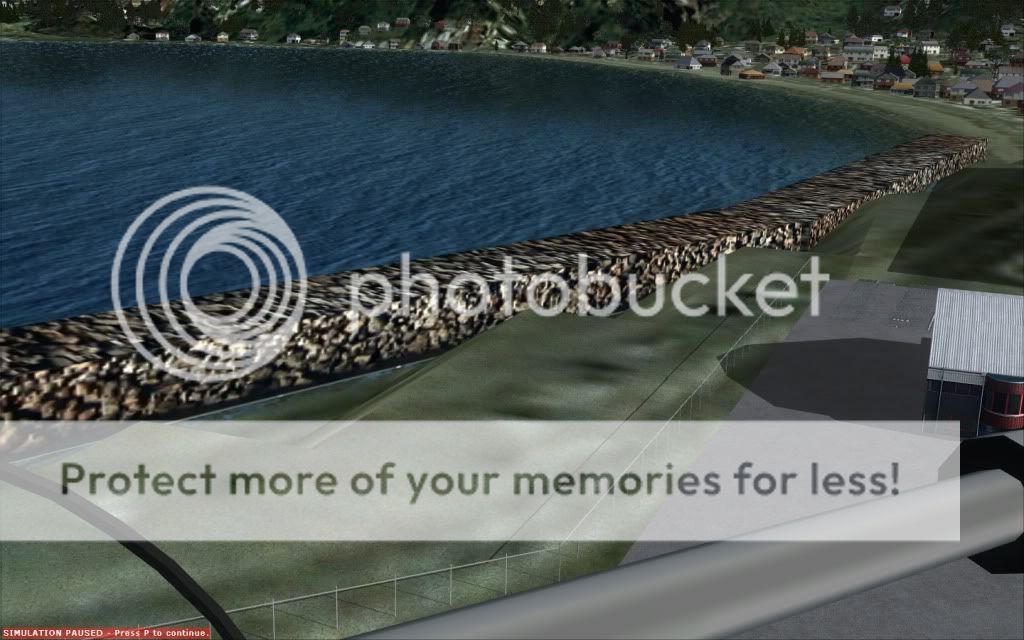
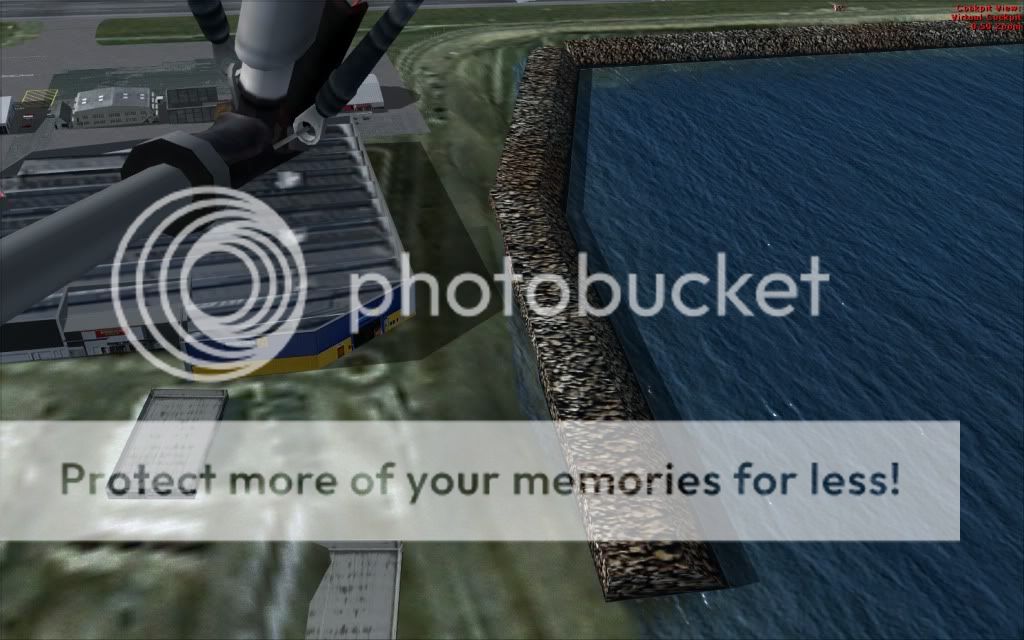
I'm running FSX, the 75m mesh and thats it. Any tips on settings to tweak, etc?
Cheers
Mark
I'm running FSX, the 75m mesh and thats it. Any tips on settings to tweak, etc?
Cheers
Mark


-

markll - Forum Addict
- Joined: Wed Jun 04, 2008 6:19 am
- Posts: 345
- Location: Whitby
by markll » Tue Jun 15, 2010 10:58 pm
NZ255 wrote:QUOTE (NZ255 @ Jun 15 2010, 10:48 PM) <{POST_SNAPBACK}>Are you talking about the rock 'thing'? That is part of the scenery
Yeah thats it. I know its part of the scenery, but surely it shouldn't be sticking out like that? It certainly doesn't look anything like that in RL....
-
markll - Forum Addict
- Joined: Wed Jun 04, 2008 6:19 am
- Posts: 345
- Location: Whitby
by creator2003 » Tue Jun 15, 2010 11:09 pm
from robs first post in this topic
QUOTE
The scenery should come with a disclaimer: 'Works best with the Red Baron/Geographx 20 metre mesh and topo scenery' but I've tried to make it work without having to spend any more money on these addons. There will be some display issues without these, though.
Dimples:
These are holes around the runway, and are an interesting issue. These are normally caused by having the TERRAIN_MAX_VERTEX_LEVEL entry in the FS9.cfg set too low. If you have installed the Red Baron Entertainment 20 metre mesh then you would have been advised to increase this value for proper mesh display. It shouldn't be necessary to increase the value for a 75 metre mesh, but it seems that it is necessary here. This may be a by-product of the way the scenery is flattened.
If you see dimples:
Open the FS9.cfg file. The manual will show how to find this file in the 'Wreckless Tweaks' section.
Find the line which starts:TERRAIN_MAX_VERTEX_LEVEL=
and change the value to 21.[/quote]
,in X from memory this is a mesh choice setting for the wall have you tryed using the default sliders set at 20meter -10meter
Dimples:
These are holes around the runway, and are an interesting issue. These are normally caused by having the TERRAIN_MAX_VERTEX_LEVEL entry in the FS9.cfg set too low. If you have installed the Red Baron Entertainment 20 metre mesh then you would have been advised to increase this value for proper mesh display. It shouldn't be necessary to increase the value for a 75 metre mesh, but it seems that it is necessary here. This may be a by-product of the way the scenery is flattened.
If you see dimples:
Open the FS9.cfg file. The manual will show how to find this file in the 'Wreckless Tweaks' section.
Find the line which starts:TERRAIN_MAX_VERTEX_LEVEL=
and change the value to 21.[/quote]
,in X from memory this is a mesh choice setting for the wall
have you tryed using the default sliders set at 20meter -10meterLast edited by creator2003 on Tue Jun 15, 2010 11:31 pm, edited 1 time in total.
-

creator2003 - NZFF Pro
- Joined: Fri Jun 16, 2006 12:08 am
- Posts: 4633
- Location: Cant U C im LOCO
by toprob » Wed Jun 16, 2010 11:53 am
MS actually made the mesh level a slider in FSX, rather than having to edit the cfg file. So the recommended mesh resolution setting is 20 metres. Although the main problem with FS2004 was having the setting too low, it is actually more of a problem in FSX having the setting too high, and I suspect that this is what is happening here. The higher the setting, the more abrupt the transition, and you end up with a cliff rather than a nice soft blend.
So first this is to try the mesh resolution at 20 metres and see if that helps.
I think that this is also service-pack specific, so it would make sense to confirm that you have FSX updated with all the SPs.
So first this is to try the mesh resolution at 20 metres and see if that helps.
I think that this is also service-pack specific, so it would make sense to confirm that you have FSX updated with all the SPs.
-
toprob - NZFF Pro
- Topic author
- Joined: Sat Apr 29, 2006 4:56 pm
- Posts: 6741
- Location: Upper Hutt
by markll » Wed Jun 16, 2010 8:18 pm
toprob wrote:QUOTE (toprob @ Jun 16 2010, 11:53 AM) <{POST_SNAPBACK}>MS actually made the mesh level a slider in FSX, rather than having to edit the cfg file. So the recommended mesh resolution setting is 20 metres. Although the main problem with FS2004 was having the setting too low, it is actually more of a problem in FSX having the setting too high, and I suspect that this is what is happening here. The higher the setting, the more abrupt the transition, and you end up with a cliff rather than a nice soft blend.
So first this is to try the mesh resolution at 20 metres and see if that helps.
I think that this is also service-pack specific, so it would make sense to confirm that you have FSX updated with all the SPs.
Thanks Rob, you too Creator. Yep, so I've got my slider set to 19 (closest I can get it to 20) and thats what it was like when I took those screenies. I just tried dropping it to 10, no difference...

-
markll - Forum Addict
- Joined: Wed Jun 04, 2008 6:19 am
- Posts: 345
- Location: Whitby
53 posts
• Page 3 of 3 • 1, 2, 3
Return to Godzone 'Real New Zealand' Scenery Support
Who is online
Users browsing this forum: No registered users and 31 guests