Photoshop

A forum for everything else that does not fit into the other categories

Postby victor_alpha_charlie » Sat May 10, 2008 9:21 pm

Hey guys, I'm having a wee bit of trouble. I'm trying to do a repaint of the new VA 737-200, from a template from Jetabout, and I'm having trouble with doing the stripes. The logo worked fine, I just pasted it and lowered the opacity a bit so the cracks etc on the plane could be seen.

When making the stripes, I planned to Polygonal Lasso the area where one stripe would be, then copy and paste to make a new layer. By doing this I would be able to use a large paintbrush and color in the stripes, and only the area in the new layer I had made would be coloured. Once done, I then planned to lower the opacity as done with the logo to add realism, and do the other stripe.

Unfortunately I'm having trouble. Even with a new layer made, and with that new layer selected, the paintbrush will color whatever it touches, even though it should only colour in the new layer I made. I'll post a pic, please note I have the new layer selected, but the paintbrush will work anywhere on the picture:
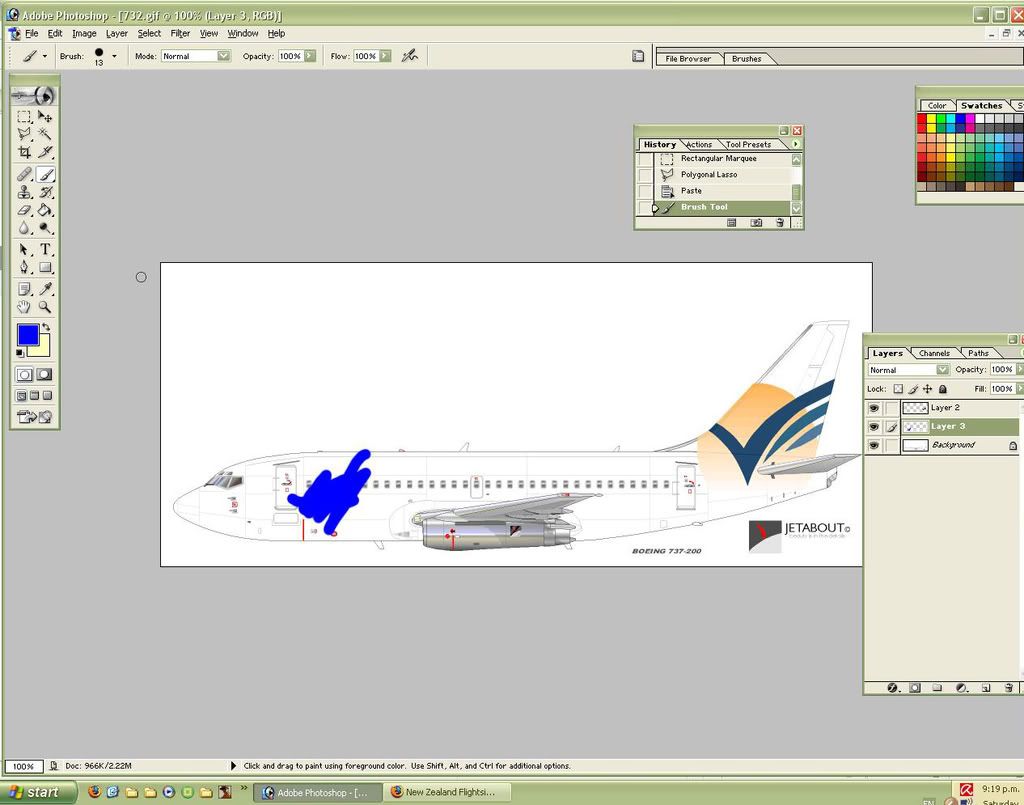


What should I do? <_<
Any help appreciated!
Last edited by victor_alpha_charlie on Sat May 10, 2008 9:39 pm, edited 1 time in total.
User avatar
victor_alpha_charlie
NZFF Pro
 
Topic author
Joined: Wed Jan 10, 2007 11:09 am
Posts: 2372

Postby NZ255 » Sat May 10, 2008 9:58 pm

With the new layer selected, draw the stripe with the Polygonal Lasso, then try colouring it in again. Should only colour inside the Polygonal. Try
Nick
User avatar
NZ255
NZFF Pro
 
Joined: Wed Jun 20, 2007 12:57 pm
Posts: 2475

Postby victor_alpha_charlie » Sat May 10, 2008 10:03 pm

NZ255 wrote:
QUOTE (NZ255 @ May 10 2008, 09:58 PM) <{POST_SNAPBACK}>
With the new layer selected, draw the stripe with the Polygonal Lasso, then try colouring it in again. Should only colour inside the Polygonal. Try


Champion! Thanks man!
User avatar
victor_alpha_charlie
NZFF Pro
 
Topic author
Joined: Wed Jan 10, 2007 11:09 am
Posts: 2372

Postby Kelburn » Sun May 11, 2008 4:36 pm

doing some repainting?

I have been searching after you posted this and I will try and come up with liveries (for random stuff)
Image

Isn't it evident?? Boeing are my favourite aircraft.

P.S. that's is my real birthday but I wish to keep my real age secret to keep you all pondering.
Kelburn
NZFF Pro
 
Joined: Sat Oct 14, 2006 10:59 am
Posts: 2193
Location: On a reverse 'hole'

Postby ronindanbo » Mon May 12, 2008 2:16 pm

Why does that logo look familiar? :o
BSMP ltd Chairman of the board

Image
Visit www.bsmp.co.nz
User avatar
ronindanbo
Sim-holic
 
Joined: Fri Jul 14, 2006 5:59 am
Posts: 700
Location: Wellington


Return to Off Topic

Who is online

Users browsing this forum: No registered users and 8 guests



