Editing Real Photos

A separate section for photographers to upload and comment on everything from amateur plane spotting images to professional air to air shots.

Postby benwynn » Sun Mar 30, 2008 9:55 pm

Hi All,

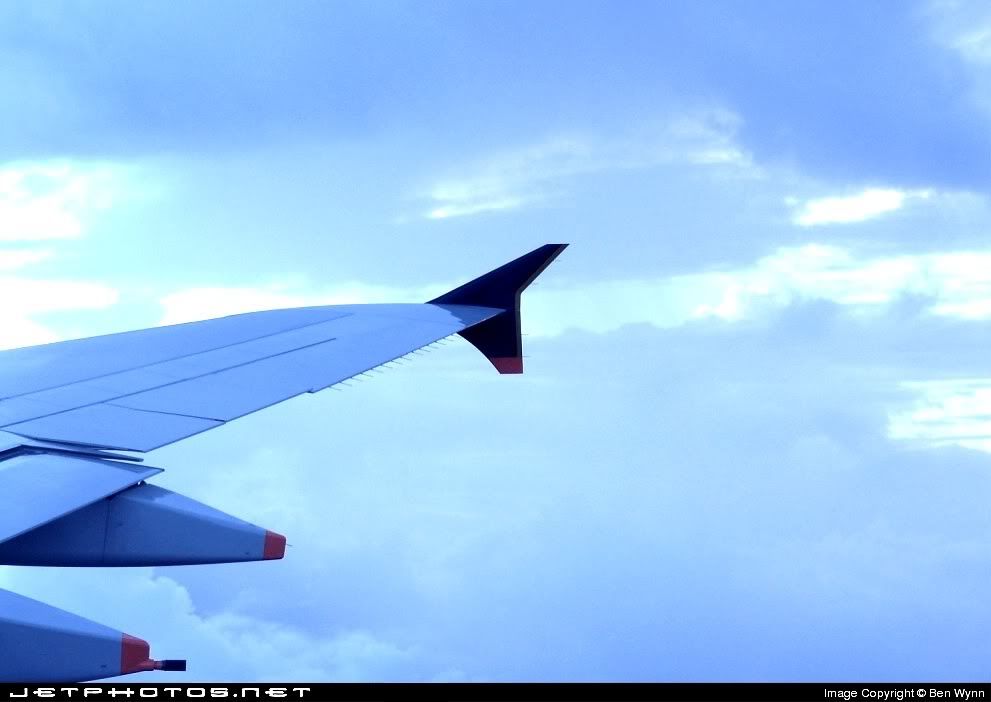
I have a picture that I have uploaded to www.jetphotos.net , just to see there responce, as im 99% it wont get accepted. I do have photoshop for the odd flight sim edit, but Have no Idea how to use it on a real photo other than sharpening.

I shall post the Image below for you all to look at. Its not a bad picture, or atleast I dont think so, but the Quality isnt 100%. I was woundering if any of the top notch Aviation Photographers, eg Gavin or anybody else here at NZFF, could help me out with editing this image to try and get it accpeted.


Cheers Ben
User avatar
benwynn
Senior Member
 
Topic author
Joined: Wed Apr 11, 2007 9:11 pm
Posts: 1433
Location: YBBN

Postby Gavin Conroy » Mon Mar 31, 2008 7:47 am

I have had a quick go at it but my photoshop skills are not that great either as I try and set the camera up properly before taking photos as due to the number of photos I take it would take to long to edit or correct so apart from resizing and sharpening and basic contrast changes thats all I know.

The photo does have a very blue colour cast which does cause a few problems and I see that the wing has a bit of noise (spots) as well so I have had a play but not sure much has changed apart from dulling down some of the blue so you can see the layers of cloud.
I did sharpen it a bit but am not sure what the requirements are for jet photos.
Gavin Conroy
Sim-holic
 
Joined: Sat Jul 07, 2007 8:22 am
Posts: 832
Location: Blenheim

Postby toprob » Mon Mar 31, 2008 9:57 am

Yes, when you look at the blue channel, it is very blown out -- so no matter how you adjust the colour, you won't be able to recover the correct blue balance. Is the original any different? I notice that your sig is very blue as well -- maybe this is a problem with your camera, or your monitor, or you just like blue:)
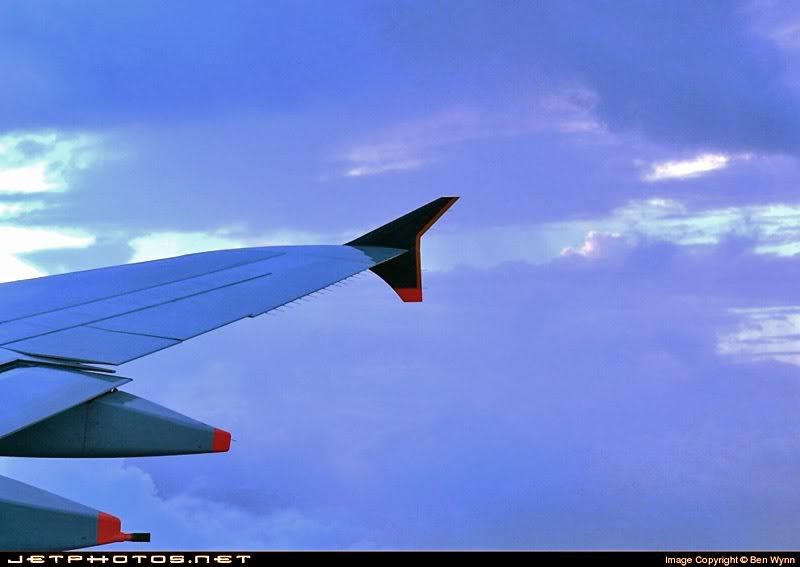
I've done two things here, first I've just worked on the blue channel, putting some contrast back. Then I've darkened the overall image a little (only by shifting the tone balance, which is Levels in PhotoShop), as I suspect that the aircraft colours are a little washed out. I would consider lowering the saturation a little as well, as the alterations have boosted it a little, and it was quite saturated to start with.
You'd get a better result starting with the original image, though. The main goal is the least number of adjustments, which will give the least amount of damage to the final image.
However I do think that the main problem with the image is that I can't figure out the subject. If it meant to be the wing, then too much of it is cropped off. The tip should be right over the right side of the image. If it is meant to be the sky, then it just doesn't have enough oomph. I suspect that the sky looked a lot better when you took the pic, but has lost a little magic to your camera's limitations.


User avatar
toprob
NZFF Pro
 
Joined: Sat Apr 29, 2006 4:56 pm
Posts: 6711
Location: Upper Hutt

Postby victor_alpha_charlie » Mon Mar 31, 2008 3:02 pm

I think they're blue because both shots were taken through windows ;)
User avatar
victor_alpha_charlie
NZFF Pro
 
Joined: Wed Jan 10, 2007 11:09 am
Posts: 2372

Postby K5054NZ » Mon Mar 31, 2008 3:49 pm

And guessing by the shape and colouration of the A380's winglets in the sig shot that this is an A380 wing? :D haha nice work bro!

Kudos to Gav and Rob for lending a helping hand too! I just post pics as cr*p as they come out of my camera!
Last edited by K5054NZ on Mon Mar 31, 2008 3:49 pm, edited 1 time in total.
User avatar
K5054NZ
Senior Member
 
Joined: Sun Jul 30, 2006 4:53 pm
Posts: 1036
Location: NZOM

Postby Charl » Mon Mar 31, 2008 3:57 pm

It's normally enough to do a little brightness/contrast, and maybe sharpen the image after it's resized down for upload.
But since you (presumably have it in an editor, you could pull the hue/saturation values around a bit.
This one is desaturated and a bit greener than the original, which gives back a little sky.
User avatar
Charl
NZFF Pro
 
Joined: Mon May 01, 2006 8:28 am
Posts: 9691
Location: Auckland

Postby Jenks » Mon Mar 31, 2008 6:15 pm

This sort of colour adjustment relies a lot on knowing what you are trying to achieve - ie, what colour was the sky at the time. For example, if you take a pic at sunset then a grey aircraft wing would not be grey at all, it would be affected by the ambient light. So for your picture it is really simple to make the wing the correct grey, but will that make the sky the correct colour... probably not.

Accurate colour adjustment is only really possible if you have an idea what you are shooting for, and then it can be really easy. Take for example your sig pic. I simply told the image that the white of the fuselage should be white and that the grey engine nacelles should be a neutral grey colour. Presto! In 2 seconds you have a pic that is probably very close to true colours with very little effort. it needs a little more tweaking as this is quite a crude method, but you get the general idea.


For your wing/sky pic, I agree that the blue is too dominant, but the improved versions that others have posted here look quite nice. Go with whichever one feels right to you, and good luck!

Steve
User avatar
Jenks
Forum Addict
 
Joined: Wed Jun 07, 2006 8:58 pm
Posts: 215
Location: Whitby, Wellington

Postby greaneyr » Mon Mar 31, 2008 6:56 pm

Hi Ben

On first glance, I thought you might have had the white balance on your camera set for tungsten light. This would have the effect of making cloudy sky light appear blue, but then I saw the colour of the cloud tops in the distance and they are definitely white. The wing is blue because it would have appeared blue, in other words, this photo is representative of how the eye would have seen it. This is something I like, but isn't always to everyone's taste.

Definitely take Gavin's advice re sharpening. There seems to be a large contingent of people out there who like any resized photo to be oversharpened. Jetphotos and airliners.net both fall into this category. Personally, I can't stand that look but I have to sharpen my photos before uploading to either of those sites or face certain rejection.

I do agree with Robin in that the photo doesn't really have a clear 'subject'.
User avatar
greaneyr
Forum Addict
 
Joined: Fri Nov 16, 2007 9:53 pm
Posts: 459
Location: Palmerston North

Postby Alex » Mon Mar 31, 2008 7:06 pm

Hey Ben,

I had a wee go with Photoshop as well here. I got most of the blue away, but that also meant your clouds got recoloured a purply colour, still looks ok I reckon. :rolleyes:


Alex
Alex
NZFF Pro
 
Joined: Fri Jul 14, 2006 3:39 pm
Posts: 3620

Postby NZ255 » Mon Mar 31, 2008 7:17 pm

Jenks wrote:
QUOTE (Jenks @ Mar 31 2008, 07:15 PM) <{POST_SNAPBACK}>

Dang that looks good! :clap:
Nick
User avatar
NZ255
NZFF Pro
 
Joined: Wed Jun 20, 2007 12:57 pm
Posts: 2475

Postby Gavin Conroy » Mon Mar 31, 2008 7:47 pm

greaneyr wrote:
QUOTE (greaneyr @ Apr 5 2008, 07:56 AM) <{POST_SNAPBACK}>
Hi Ben

On first glance, I thought you might have had the white balance on your camera set for tungsten light. This would have the effect of making cloudy sky light appear blue, but then I saw the colour of the cloud tops in the distance and they are definitely white. The wing is blue because it would have appeared blue, in other words, this photo is representative of how the eye would have seen it. This is something I like, but isn't always to everyone's taste.

Definitely take Gavin's advice re sharpening. There seems to be a large contingent of people out there who like any resized photo to be oversharpened. Jetphotos and airliners.net both fall into this category. Personally, I can't stand that look but I have to sharpen my photos before uploading to either of those sites or face certain rejection.

I do agree with Robin in that the photo doesn't really have a clear 'subject'.


Can only agree with all of that.
I have taken 1000s of photos and only have 130 odd shots on airliners.net and only upload there when I can be bothered and when I know the photos suit there standards.
Over time that site has taught me a lot but I still only use basic photoshop skills, dont work with layers and dont know how to digitally alter photos and I like it that way as I like taking photos but dont enjoy editing photos because I got lazy and didnt set the camera up myself for the occasion.

As suggested, check your camera settings or do what I have done many times, set all camera setting back to default and start again.

I have had my fair share of photo rejections on airliners and I look at it like it being there loss, the solution ,create my own website so people can enjoy the photos, its easy and kind of fun once you get into it.

Here is the link to airliners with my small contribution but have 1000s of shots on my site and I still think the photos on my site are generally better than some that have been accepted on that site.

http://www.airliners.net/search/photo.sear...amp;thumbnails=
Last edited by Gavin Conroy on Mon Mar 31, 2008 7:48 pm, edited 1 time in total.
Gavin Conroy
Sim-holic
 
Joined: Sat Jul 07, 2007 8:22 am
Posts: 832
Location: Blenheim

Postby greaneyr » Mon Mar 31, 2008 7:49 pm

I thought I'd have a go as well. Pretty subtle changes here, just calibrating the white point then bringing back the blue and green channels somewhat, finally sharpening it all up.

I think it just gives the clouds a bit more of a realistic tint to them,
User avatar
greaneyr
Forum Addict
 
Joined: Fri Nov 16, 2007 9:53 pm
Posts: 459
Location: Palmerston North

Postby Gavin Conroy » Mon Mar 31, 2008 7:53 pm

In fact, have gone off topic here but here are to rejections for you to look at.
They said the Bou wasnt centered properly and the Q300 is blurry and personally I dont see a problem with either but hey, there loss. B-)


Gavin Conroy
Sim-holic
 
Joined: Sat Jul 07, 2007 8:22 am
Posts: 832
Location: Blenheim

Postby greaneyr » Mon Mar 31, 2008 8:02 pm

Gavin Conroy wrote:
QUOTE (Gavin Conroy @ Mar 31 2008, 08:47 PM) <{POST_SNAPBACK}>
Can only agree with all of that.
I have taken 1000s of photos and only have 130 odd shots on airliners.net and only upload there when I can be bothered and when I know the photos suit there standards.
Over time that site has taught me a lot but I still only use basic photoshop skills, dont work with layers and dont know how to digitally alter photos and I like it that way as I like taking photos but dont enjoy editing photos because I got lazy and didnt set the camera up myself for the occasion.

As suggested, check your camera settings or do what I have done many times, set all camera setting back to default and start again.

I have had my fair share of photo rejections on airliners and I look at it like it being there loss, the solution ,create my own website so people can enjoy the photos, its easy and kind of fun once you get into it.

Here is the link to airliners with my small contribution but have 1000s of shots on my site and I still think the photos on my site are generally better than some that have been accepted on that site.

http://www.airliners.net/search/photo.sear...amp;thumbnails=

The more I think about it, the more I think airliners.net have the power to damage a photographer's skills. I saw them as 'the place to be' when I first started getting into aviation photography, and so I kind of based my 'standards' on theirs for a long time. It took me even longer to unlearn the narrow habits they taught me, and to some extent I think I'm still unlearning them.

For ages, I was getting rejections and thought I might have been trying to punch above my weight to actually make a decent job of aviation photography. It wasn't until I started emailling Rob Neil that I truly realised it was their standards that were the problem and not my abilities. Sure, I've had photos printed in publications and even sold them from a.net, but I know what you mean when you say you have much better images on your site that airliners.net ever accept.

I also have a website, but without the opportunities it hasn't really grown. I kind of got tired of taking photos of the same old same old. The content on yours is always so much more appealing than looking at ATRs, Q300s and 1900Ds flying in and out of Palmy too!

My Photos on Airliners.net

In the Caribou shot, they would have been expecting to see the prop spinners both an equal distance from the edges of the image.

The Q300... doesn't really have a lot of detail to base an assumption of 'blurry' on. I think they are 'glass is half empty', 'guilty until proven innocent' types. They'd probably argue that in the absence of detail to prove that it IS sharp, it's not possible to believe it.

The thing that bugs me about airliners.net's screeners is all they ever do is look for bad in submissions. That's not really a healthy way to be imho.
User avatar
greaneyr
Forum Addict
 
Joined: Fri Nov 16, 2007 9:53 pm
Posts: 459
Location: Palmerston North

Postby Ian Warren » Mon Mar 31, 2008 8:08 pm

Great pics Richard , My first and only camera i ever brought will never take flying shots ... I JUST AIM AT A 'WALL' AND FIRE !
Image
User avatar
Ian Warren
NZFF Pro
 
Joined: Fri May 05, 2006 5:23 pm
Posts: 41187
Location: AREA 51

Postby greaneyr » Mon Mar 31, 2008 8:14 pm

Ian Warren wrote:
QUOTE (Ian Warren @ Mar 31 2008, 09:08 PM) <{POST_SNAPBACK}>
Great pics Richard , My first and only camera i ever brought will never take flying shots ... I JUST AIM AT A 'WALL' AND FIRE !

Thanks Ian. I try to make the best I can of life within the 'cheap seats' (as I like to refer to the area accessible by the general public). Would love a chance to shine with some air-to-airs some day. Gavins work makes me drool.
User avatar
greaneyr
Forum Addict
 
Joined: Fri Nov 16, 2007 9:53 pm
Posts: 459
Location: Palmerston North

Postby FlyingKiwi » Tue Apr 01, 2008 2:44 pm

Don't have much to add that everyone else hasn't already said. I've found Airliners' screening standards to occasionally be a little "strange" to put it politely. I've had photos rejected there that I honestly couldn't see any problem with. I guess ultimately it comes down to the fact that the screeners are human and have slightly different standards to each other. I uploaded a photo of the Ardmore MiG-21 some months ago that was initially rejected for incorrect categories (I think they wanted me to categorise it as a "preserved" aircraft even though it was basically derelict) and then on re-uploading it I had it rejected on the basis of it being undersharpened or something like that.

On the other hand, I've also had photos accepted that in hindsight really probably shouldn't have. This one, for example from my early days when I hadn't yet developed a consistent technique for adjusting contrast: http://www.airliners.net/photo/Advanced-Fl...0B-4/0990636/L/ It looked alright at the time but looking back on it now I'm sorta embarrassed! <_<

These are my photos for reference.

I dislike the amount that they require you to sharpen by, I find a slightly soft appearance (as opposed to actual blurriness) is nicer to look at than a razor sharp image where camera limitations become a lot more apparent. Let me tell you right now, cheatlines are the Airliners.net photographer's worst nightmare! :(
Last edited by FlyingKiwi on Tue Apr 01, 2008 2:45 pm, edited 1 time in total.
User avatar
FlyingKiwi
Senior Member
 
Joined: Mon May 29, 2006 4:17 pm
Posts: 1688
Location: Auckland

Postby Charl » Tue Apr 01, 2008 4:18 pm

Leo, you wouldn't have a side-on pic of that Hurricane would you?
User avatar
Charl
NZFF Pro
 
Joined: Mon May 01, 2006 8:28 am
Posts: 9691
Location: Auckland

Postby Gavin Conroy » Tue Apr 01, 2008 7:45 pm

greaneyr wrote:
QUOTE (greaneyr @ Apr 5 2008, 08:14 AM) <{POST_SNAPBACK}>
Thanks Ian. I try to make the best I can of life within the 'cheap seats' (as I like to refer to the area accessible by the general public). Would love a chance to shine with some air-to-airs some day. Gavins work makes me drool.


If you are ever down this way and we are using a four seater for something you are welcome to come along.
On Tuesday this week I few my 100th air 2 air photo flight with the WW1 Pfalz and it was great. We got some good photos that will appear in a mag sometime this year.
We were working woth 30 degree angle of bank and changing formation lines often which is not easy but its a matter of knowing what the subject aircaraft is capable of but more importantly what the pilot of cameraship and subject pilot can achieve and Im lucky to have some pretty experienced guys down here and only fly with formation trained people for obvious reasons.
I dont take passengers often but have invited photographers along to give them a look at how the air 2 air game looks and most come away surprised at the workload as you have to direct the aircraft around the sky and put everyone in the right place to suit the aircrafts colur scheme and keep it all safe so its full on but the results are there is you get it right.

Have had some neat experiences and its taken 5 years and a lot of $ to get his far but it has been worth it.
I was asked to write a story on air 2 air and how it works and may do that some time and having 200 PIC hours under my belt bofore I discovered a camera really helped as a total understanding of what wll work and what wont helps you to gain peoples trust and as I say if there is a seat avaiable you are welcome to come along, there would be perspex in the way but a good start all the same.
When you fly with people with a lot of experience and can talk in their lingo things go so much better.
The most important word though is Trust.

Have photographed 30 aircraft in 2008 and look forward to posting some photos when I am able.
Have gone on a bit long but if you have any questions that I may be able to answer just ask as I am happy to help where I can.
Gavin Conroy
Sim-holic
 
Joined: Sat Jul 07, 2007 8:22 am
Posts: 832
Location: Blenheim

Postby greaneyr » Tue Apr 01, 2008 8:11 pm

Thanks for the offer Gavin. I'll definitely take you up on it if I am ever down your way. It'd be great to have an opportunity to do something like that.

I figured the workload would be pretty intense during an air to air. I find it a real rush even just working an airshow, so much to do, so little time, having to make those judgement calls about what you're going to follow and what you're going to leave alone. It's always more intense knowing that this may be the last chance you get to shoot this particular aircraft if it's nearing the end of it's display. To do this kind of thing with the added challenges of being airborne would be very demanding I'm sure.

My biggest problem is opportunities really. I'm really at the point where I've probably achieved most of what I'm ever going to be able to achieve from standing outside an airport boundary. Get up close to an aircraft without the clutter of airshow foot traffic and you should in theory have the ultimate platform to take some impressive shots, but I'm usually lost since it's all so unfamiliar! It happens so seldom that I don't get a chance to practice or build on any skills so I find myself firing blindly at the poor aircraft and, unsurprisingly, coming away with very few decent shots. Like everything, practice makes perfect and without practice it is difficult to improve.

The only way to get more opportunities as far as I can tell is to know people who can get you there. To know people, you need to know them! And even though it might be possible to arrange a one-off visit by sending out emails and offering free photos in return, it's the continual exposure that's needed rather than just a one off. Even then, NZ isn't really a big enough country to have a market for too many photographers so it's not likely to result in much paying work.

At times, I do feel somewhat like a caged Lion over this hobby! Plenty of enthusiasm and experience, but few opportunities to convert it into something tangible.

I too am going on now haha
User avatar
greaneyr
Forum Addict
 
Joined: Fri Nov 16, 2007 9:53 pm
Posts: 459
Location: Palmerston North

Next

Return to New Zealand Aviation Photography

Who is online

Users browsing this forum: No registered users and 6 guests