 Yeah
Yeah Thanks
Nick
100% ad-free
 by NZ255 » Mon Mar 10, 2008 11:42 am
Yeah 
by toprob » Mon Mar 10, 2008 11:54 am

by NZ255 » Mon Mar 10, 2008 12:03 pm
toprob wrote:QUOTE (toprob @ Mar 10 2008, 12:54 PM) <{POST_SNAPBACK}>I assume you are working with FS2004 here.
You can place it just by editing the XML file and compiling it. You remove the comment markers (and the comments) and change the lat,lon, heading to the actual location and heading of your building.
Then you compile using bglcomp, which should give you a BGL file.
Yes 2004, so I compile the XML then the mdl to BGL?Nick
by ashton » Mon Mar 10, 2008 12:35 pm

by toprob » Mon Mar 10, 2008 1:13 pm
NZ255 wrote:QUOTE (NZ255 @ Mar 10 2008, 01:03 PM) <{POST_SNAPBACK}>Yes 2004, so I compile the XML then the mdl to BGL?
You just compile the XML -- it references the MDL, and will combine the placement code from the XML with the MDL data into one BGL.ashton wrote:QUOTE (ashton @ Mar 10 2008, 01:35 PM) <{POST_SNAPBACK}>try this Gmax xml to bgl tutorial
http://www.scenery.org/_downloads/xml_to_bgl.zip
happy modeling
ashton b
That's pretty useful, although he does add some steps which are not really necessary. You should be able to compile without copying bglcomp anywhere else. He also keeps his source files within the scenery folder itself, which works fine but seems risky.
toprob- NZFF Pro
- Joined: Sat Apr 29, 2006 4:56 pm
- Posts: 6741
- Location: Upper Hutt
by NZ255 » Mon Mar 10, 2008 1:14 pm
ashton wrote:QUOTE (ashton @ Mar 10 2008, 01:35 PM) <{POST_SNAPBACK}>try this Gmax xml to bgl tutorial
http://www.scenery.org/_downloads/xml_to_bgl.zip
happy modeling
ashton b
Ah ha, thanks Rob and Ashton!:)Nick
by greaneyr » Mon Mar 10, 2008 1:51 pm

by toprob » Mon Mar 10, 2008 2:17 pm
greaneyr wrote:QUOTE (greaneyr @ Mar 10 2008, 02:51 PM) <{POST_SNAPBACK}>Something I've just learnt re doing this that I should probably add. If you adjust the MDL file at all, you have to go back and recompile the XML to BGL. Even though the XML and subsequent BGL reference the MDL file, when you change the MDL file you still need to recompile for some reason. Really annoying and not like HTML where an embedded object will change on a page when the original changes.
Whereas the XML references the MDL, they are both just an intermediate step towards a BGL. FS can't read or do anything with a MDL file, and it shouldn't be included in the scenery. So if you change the MDL, FS won't know until you recompile.
That was one of the reasons why I said this:QUOTEHe also keeps his source files within the scenery folder itself, which works fine but seems risky.[/quote]
It confuses the issue putting anything but BGLs in the Scenery folder, as nothing else is necessary, or readable, for FS.
toprob- NZFF Pro
- Joined: Sat Apr 29, 2006 4:56 pm
- Posts: 6741
- Location: Upper Hutt
by greaneyr » Mon Mar 10, 2008 4:11 pm
by HardCorePawn » Tue Mar 11, 2008 10:07 am
greaneyr wrote:QUOTE (greaneyr @ Mar 10 2008, 05:11 PM) <{POST_SNAPBACK}>Thanks Robin, I didn't reaise that. It makes sense when you think about it. Change the BGL and FS has to rebuild the scenery database. Change the MDL file and it doesn't. I think you'd actually be surprised at how many people don't realise this. I know i've seen a lot of MDL files included in scenery updates.
errr that is not quite right either... changing the MDL wont make FS rebuild the library, but if you want your changes to show up, then it will have to be rebuilt (by way of the BGL being updated)
Think of the MDL as an object (ie. a House)... the XML is like the address (where the house is)... you then combine these two things together (ie. compile using bglcomp) to give you a BGL file which tells FS to put Object A in Position X.
If you change the MDL or the XML, you need to recompile the BGL (and refresh the scenery library), otherwise your change(s) will not show up, as FS only reads BGL's...Last edited by HardCorePawn on Tue Mar 11, 2008 10:10 am, edited 1 time in total."Son, we are about the break the surly bonds of gravity, and punch the face of God." -- Homer Simpson

by greaneyr » Wed Mar 12, 2008 7:59 am
HardCorePawn wrote:QUOTE (HardCorePawn @ Mar 11 2008, 11:07 AM) <{POST_SNAPBACK}>errr that is not quite right either... changing the MDL wont make FS rebuild the library, but if you want your changes to show up, then it will have to be rebuilt (by way of the BGL being updated)
Think of the MDL as an object (ie. a House)... the XML is like the address (where the house is)... you then combine these two things together (ie. compile using bglcomp) to give you a BGL file which tells FS to put Object A in Position X.
If you change the MDL or the XML, you need to recompile the BGL (and refresh the scenery library), otherwise your change(s) will not show up, as FS only reads BGL's...
I think you misread me. That's exactly how I meant it works. By 'change the bgl and fs has to rebuild the scenery database' I meant change it... as in rebuild it. How else would you change the BGL? I'm not sure what you thought I meant there.
Incidentally I've since found there are people who make scenery using static object libraries which don't have the MDL compiled into the BGL which is likely where this confusion has come from.
by HardCorePawn » Wed Mar 12, 2008 8:17 am

by greaneyr » Sat Mar 15, 2008 12:39 pm
HardCorePawn wrote:QUOTE (HardCorePawn @ Mar 12 2008, 09:17 AM) <{POST_SNAPBACK}>Well I read that as, change the MDL and FS does not have to do anything to show the changes... which is not true... as you will have to recompile it into the BGL, which will force FS to update the scenery database.
I'm guessing what you meant was:
"If you change the BGL FS will rebuild the scenery database, and your changes will show up. but if you only change the MDL, nothing will change in FS"
Yeah pretty much.
I should have said "Change the BGL file and FS rebuilds the scenery database. Change the MDL and it doesn't". What i meant was that from this particular behaviour you can tell what FS cares about and what it doesn't. FS only changes it's scenery database when something meaningful has been modified, so if it doesn't rebuild the DB (eg after a change of the MDL) this acts as a sure sign that it doesn't care about the MDL.
by toprob » Tue Apr 15, 2008 2:30 pm
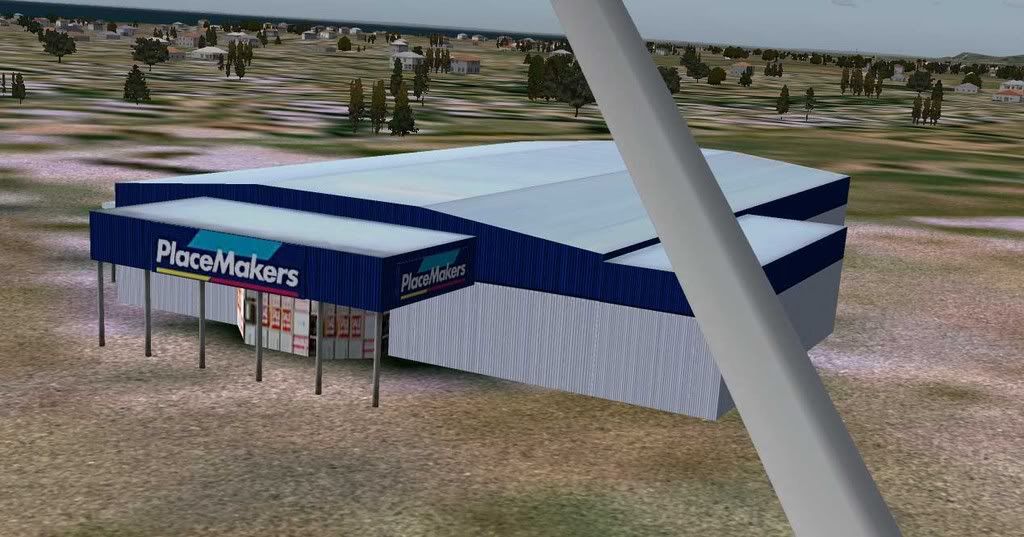
NZ255 wrote:QUOTE (NZ255 @ Mar 10 2008, 11:42 AM) <{POST_SNAPBACK}>Hi, I have been interested in getting into the scenery design thing for a while and we were at Place makers the other day, across the road from Pram airport (NZPP) so I took some dimensions, and when I got home built it up in gmax, via Robin great tutorials. It's not the most accurate building, but because your only going to see it out the side window when you're on approach, you're not going to notice it doesn't have the sticky out, rounded bits the real one does. Anyway, I've made it, and now I have a mdl file and an XML file, what do I do from there? I don't really want to have to pay for something (EZ Scenery) because it might only be a once of thing, although I would also like to model and photreal my house.
Thanks
Nick
How did you get on with this, Nick? I've dropped a very generic 'autogen' placemakers into the FS2004 NZPP, but if you have a textured model, that'd be a lot better:)
by Timmo » Tue Apr 15, 2008 3:13 pm

by NZ255 » Tue Apr 15, 2008 4:05 pm
by Timmo » Tue Apr 15, 2008 4:21 pm
NZ255 wrote:QUOTE (NZ255 @ Apr 15 2008, 04:05 PM) <{POST_SNAPBACK}>PS How many of these files need to be in the scenery folder?
-placemakers.BGL
-placemakers.mdl
-placemakers.XML
Just the BGL- That is the finished product that FS reads.
Edit: Of course you will also need the texture sheet/s in the texture folder
Id also suggest keeping the mdl and XML in a 'Source' folder separate from your FS installation: Move the comiled bgl to your scenery folder after compilation.Last edited by Timmo on Wed Apr 16, 2008 9:26 am, edited 1 time in total.
by NZ255 » Tue Apr 15, 2008 4:27 pm
Timmo wrote:QUOTE (Timmo @ Apr 15 2008, 04:21 PM) <{POST_SNAPBACK}>Just the BGL- That is the finished product that FS reads.
Id also suggest keeping the mdl and XML in a 'Source' folder separate from your FS installation: Move the comiled bgl to your scenery folder after compilation.
ok thanksNick
by toprob » Tue Apr 15, 2008 5:10 pm
NZ255 wrote:QUOTE (NZ255 @ Apr 15 2008, 04:05 PM) <{POST_SNAPBACK}>Yeah, I've finished it, it hasn't got photoreal textures, and it not all that "real world-istic"
1) because I was limited in my knowlege with G-max
2) because it was surrounded by fences and other buildings, so I just made my own textures, and used some others from the web
Certainly nothing wrong with that, looks ready for release:)
Users browsing this forum: No registered users and 46 guests