Hello Fellow Simmers,
FS9
I have decided to try and run Snowman's excellent airport sceneries for NZ.
I have downloaded and installed all the libraries and associated files as suggested by Snowman for NZPM.
Opening FS9 at NZPM all the scenery looks find, everything in its right place.
When I change the view to outside the aircraft and zoom back or make any sudden movements the scene does a blip.......... and the textures go blurry which also includes the textures of any AI aircraft that might be nearby.
Taxi around the airport inside your aircraft and after a while the same problem occurs. By refocusing on a small part of the scenery sometimes brings the textures back into focus and then zoom out and blip......
I have installed other NZ sceneries eg Robin's NZ Sceneries and have no texture problems.
In a previous post another member appeared to have the same problem when approaching NZPM. I could not find out how that member resolved their problem.
I have not yet tried any of Snowman's other sceneries to see if this error occurs.
Ok is it my setup?
Not the best!!!!! An old Athlon 1.8, 2g of ram, Albatron AGP GeForce 6600.
It would be nice to know if this is a simple software issue before one spends money on upgrading hardware only to have the same problem.
Any help from you Lawrie or anybody else would be appreciated.
Thankyou,
Daryl
Out of Focus Textures
22 posts
• Page 1 of 2 • 1, 2
 by cowpatz » Wed Jan 09, 2008 11:15 am
I have noticed this as well with Laurie's sceneries. Seems to happen a lot on the Whitianga scenery for some reason.
Remember the 50-50-90 rule. Anytime you have a 50-50 chance of getting something right, there's a 90% probability you'll get it wrong!

-

cowpatz - NZFF Pro
- Joined: Wed Mar 07, 2007 3:28 pm
- Posts: 3774
by Dan » Wed Jan 09, 2008 3:39 pm
Lawrie, please help. I'm sure we're missing something pretty basic.
I'm getting texture blurries as well. I get it straight away when I load up NZKK or NZNR and I get it at YSNF only when I look in certain directions.
Here is YSNF as it first appears with fine textures and this is good.

If I look toward the control tower all the textures go to their dullest MIP (including aircraft schemes and virtual cockpits). Note the EZ scenery objects still look pretty sharp.
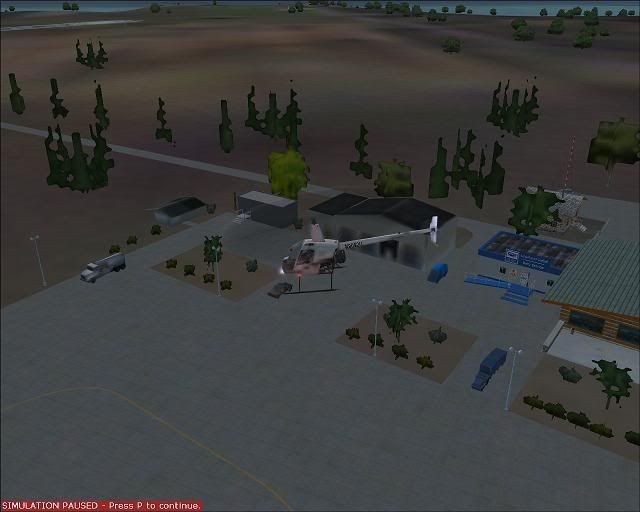
With YSNF, if I fly around looking away from the control tower it comes right again. If I fly over the Island, the whole area is extra blurry. At first I thought it was becuase I was missing some EZ-scenery objects but I had Lawrie's Waihi Beach with missing objects and there are no blurries at all. Actually Lawrie, Waihi is pretty fantastic - well done!
There is a building next to the control tower like an open shed without textures that may be the problem, but I don't think so. This object appears textureless on Lawrie's NZWU with no adverse affect.
Has anyone had this problem in the past and found the solution?
I'm getting texture blurries as well. I get it straight away when I load up NZKK or NZNR and I get it at YSNF only when I look in certain directions.
Here is YSNF as it first appears with fine textures and this is good.
If I look toward the control tower all the textures go to their dullest MIP (including aircraft schemes and virtual cockpits). Note the EZ scenery objects still look pretty sharp.
With YSNF, if I fly around looking away from the control tower it comes right again. If I fly over the Island, the whole area is extra blurry. At first I thought it was becuase I was missing some EZ-scenery objects but I had Lawrie's Waihi Beach with missing objects and there are no blurries at all. Actually Lawrie, Waihi is pretty fantastic - well done!
There is a building next to the control tower like an open shed without textures that may be the problem, but I don't think so. This object appears textureless on Lawrie's NZWU with no adverse affect.
Has anyone had this problem in the past and found the solution?
-

Dan - Member
- Joined: Tue Jul 25, 2006 7:07 pm
- Posts: 78
- Location: Waitakere
by toprob » Wed Jan 09, 2008 4:38 pm
I'd had a quick look, but with no luck, but I do remember reading that some libraries need to latest version to overcome this problem. It may be useful to check to see if there are updates for the libraries used here.
-

toprob - NZFF Pro
- Joined: Sat Apr 29, 2006 4:56 pm
- Posts: 6741
- Location: Upper Hutt
by ranm » Wed Jan 09, 2008 7:34 pm
Here is a hint: http://www.fsdeveloper.com/forum/archive/i...php/t-5629.html
Now does anyone knows how to mipmap the textures?
Ran
Now does anyone knows how to mipmap the textures?
Ran

-

ranm - Forum Addict
- Joined: Sat Dec 09, 2006 10:54 pm
- Posts: 161
by Kahu » Wed Jan 09, 2008 8:03 pm
Thanks for that ranm. "Once in a while you have to move something to FS9 main\texture for a bmp to work. " Does this mean that if we move the conflicting textures to here will it solve the problem?

-
Kahu - Sim-holic
- Joined: Sat May 05, 2007 3:59 pm
- Posts: 578
- Location: Tauranga
by sundayflyer » Wed Jan 09, 2008 9:48 pm
OK Thanks for the interest in this problem.
I am not the only one which has this error. Dan your pics show exactly what I am experiencing.
After reading the article on ez fuel tanks it would appear that there is problem with the original bmps. (Not mip mapped)?
The ez fuel tanks zip file that I downloaded were all dated around the 5.4.2006.
Who has got updated corrected copies? I have no idea nor have the software to alter these bmps if indeed this could be the answer.
Has anybody removed completely the 11 bmps from their texture folder as suggested and run FS9 without them. If you remove the bmps from the texture folder do you need to remove the bgl files etc from the scenery folder as well.
Thanks
I am not the only one which has this error. Dan your pics show exactly what I am experiencing.
After reading the article on ez fuel tanks it would appear that there is problem with the original bmps. (Not mip mapped)?
The ez fuel tanks zip file that I downloaded were all dated around the 5.4.2006.
Who has got updated corrected copies? I have no idea nor have the software to alter these bmps if indeed this could be the answer.
Has anybody removed completely the 11 bmps from their texture folder as suggested and run FS9 without them. If you remove the bmps from the texture folder do you need to remove the bgl files etc from the scenery folder as well.
Thanks
Daryl
-
sundayflyer - Member
- Topic author
- Joined: Sun Jun 04, 2006 4:04 pm
- Posts: 43
- Location: Havelock North
by Redda03 » Thu Jan 10, 2008 12:45 pm
Glad to hear that others have been experiencing "blurrie textures".....they have been appearing randomly when using Snowman's NZ addons and I have tried different display settings recently to try and get rid of them....to no avail!!.....I thought it may have been my FS9 FScene install that may have been the culprit.
With a recent system upgrade for better FSX performance FS9 is now running as smooth as...with no texture problems with other addon scenery.
It appears that the FS "Specialists" out there are nutting out the problem area and I eagerly await the "fix"!!
Bob R
With a recent system upgrade for better FSX performance FS9 is now running as smooth as...with no texture problems with other addon scenery.
It appears that the FS "Specialists" out there are nutting out the problem area and I eagerly await the "fix"!!
Bob R
url="http://www.VectorLandclass.co.nz/"]
[/url]
[/url]- Redda03
- Forum Addict
- Joined: Tue Aug 08, 2006 12:31 pm
- Posts: 205
- Location: Waikanae Beach
by Snowman » Thu Jan 10, 2008 2:53 pm
Im working on it guys, but im having no problems in my sim, finding it hard to re-create the problem.
I have seen it a couple of times whe i was building, but it was only for a split second before it cleared, and was probably due to the fact that i was in slew mode, and moved too quickly, not giving the sim enough time to load the textures properly.
Doesnt seem to happen under normal flying conditions.............
Could be a bad mip in one of the texture sets, could also be caused by duplication of the textures,...ie: the same textures in an active texture folder in an addon scenery somewhere else in the FS world,...............
Im working on it.................
Lawrie.
I have seen it a couple of times whe i was building, but it was only for a split second before it cleared, and was probably due to the fact that i was in slew mode, and moved too quickly, not giving the sim enough time to load the textures properly.
Doesnt seem to happen under normal flying conditions.............
Could be a bad mip in one of the texture sets, could also be caused by duplication of the textures,...ie: the same textures in an active texture folder in an addon scenery somewhere else in the FS world,...............
Im working on it.................
Lawrie.


-

Snowman - NZFF Pro
- Joined: Wed Jul 26, 2006 3:52 pm
- Posts: 2427
- Location: Tauranga, NZ.
by sundayflyer » Fri Jan 11, 2008 9:46 am
I think I have found the answers to our blurry texture problems.
This is what I have done .
1. I removed all the ez-fuel_tanks bmp's from the texture folder (Got this info from a previous post that all or some of these textures maybe faulty).
2. Found on Avsim a S.Schwartz texture fix in a file called pss_ut_updates_1 which relates to some Ultimate Terrain updates which we don't need however in the file there are two updated bmp's Zinc.bmp & Zinc_LM.bmp.
The old Zinc.bmp & Zinc_LM.bmp in my texture folder were dated 11.10.2006/27.2.2007.
3. I replaced the old bmp's with the new bmp's dated the 22.7.2007 & 13.12.2007. The Zinc.bmp is used in the ez-large_hangers.ss & ez-terminals_ss files that Lawrie uses. Fired up FS9 and NO BLURRIES!!!!!!!
I then put the textures back in from the ez-fuel_tanks file unaltered to test if these textures were faultly & the blurries came back. I then remove these textures again and no blurries.
I have not yet found the updated textures or texture that is faulty in the ez-fuel_tanks file as I don't have any software to do this. Lawrie could you please check the textures in your sim for this file and give us the updated textures. The ones in my folder are all dated May & June 2006.
I hope this helps to point others in the right direction that are experiencing this problem.
Cheers,
Daryl
This is what I have done .
1. I removed all the ez-fuel_tanks bmp's from the texture folder (Got this info from a previous post that all or some of these textures maybe faulty).
2. Found on Avsim a S.Schwartz texture fix in a file called pss_ut_updates_1 which relates to some Ultimate Terrain updates which we don't need however in the file there are two updated bmp's Zinc.bmp & Zinc_LM.bmp.
The old Zinc.bmp & Zinc_LM.bmp in my texture folder were dated 11.10.2006/27.2.2007.
3. I replaced the old bmp's with the new bmp's dated the 22.7.2007 & 13.12.2007. The Zinc.bmp is used in the ez-large_hangers.ss & ez-terminals_ss files that Lawrie uses. Fired up FS9 and NO BLURRIES!!!!!!!
I then put the textures back in from the ez-fuel_tanks file unaltered to test if these textures were faultly & the blurries came back. I then remove these textures again and no blurries.
I have not yet found the updated textures or texture that is faulty in the ez-fuel_tanks file as I don't have any software to do this. Lawrie could you please check the textures in your sim for this file and give us the updated textures. The ones in my folder are all dated May & June 2006.
I hope this helps to point others in the right direction that are experiencing this problem.
Cheers,
Daryl
Daryl
-
sundayflyer - Member
- Topic author
- Joined: Sun Jun 04, 2006 4:04 pm
- Posts: 43
- Location: Havelock North
by Snowman » Fri Jan 11, 2008 2:58 pm
sundayflyer wrote:QUOTE (sundayflyer @ Jan 11 2008, 10:46 AM) <{POST_SNAPBACK}>I think I have found the answers to our blurry texture problems.
This is what I have done .
1. I removed all the ez-fuel_tanks bmp's from the texture folder (Got this info from a previous post that all or some of these textures maybe faulty).
2. Found on Avsim a S.Schwartz texture fix in a file called pss_ut_updates_1 which relates to some Ultimate Terrain updates which we don't need however in the file there are two updated bmp's Zinc.bmp & Zinc_LM.bmp.
The old Zinc.bmp & Zinc_LM.bmp in my texture folder were dated 11.10.2006/27.2.2007.
3. I replaced the old bmp's with the new bmp's dated the 22.7.2007 & 13.12.2007. The Zinc.bmp is used in the ez-large_hangers.ss & ez-terminals_ss files that Lawrie uses. Fired up FS9 and NO BLURRIES!!!!!!!
I then put the textures back in from the ez-fuel_tanks file unaltered to test if these textures were faultly & the blurries came back. I then remove these textures again and no blurries.
I have not yet found the updated textures or texture that is faulty in the ez-fuel_tanks file as I don't have any software to do this. Lawrie could you please check the textures in your sim for this file and give us the updated textures. The ones in my folder are all dated May & June 2006.
I hope this helps to point others in the right direction that are experiencing this problem.
Cheers,
Daryl
I built a new sim in one of my son's machines. Copied over all my sceneries (including all other freeware and payware scneries i have), all aircraft etc, made the sim identical to mine except for one thing............ the Static Objects Library. I installed all of that from the original download zips from Avsim. In his sim, i get blurries occasionally at some of my sceneries, and also at other sceneires around the world using EZ Scnenery textures. At your suggestion, i downloaded the UT update with the 2 zinc files, and replaced them in my sons machine with the 2 from the UT download, and, no more blurries !
As for the EZ fule tanks objects, i cant be sure there, as im not having any problems, and since i changed the 2 zinc textures in his sim, hes not having any blurry problems. There are 2 versions of ez fule tanks on Avsim, and to answer your question about file dates on the fuel tank files, mine are the same as yours.
Same as you, i have been looking for updated textures for this, but , so far, have not come across any. Have also been looking for any updates for any of the other libraries,......... just in case.
Unfortunately, i dont have any tools either to check out the integrity of the textures...............
Just in case the EZ Fuel Tanks set is causing problems with other people, i will refrain from using it in any future sceneries i build.
Unfortunately, limits me to the various ugly default tanks for FS9.
Lawrie.Last edited by Snowman on Fri Jan 11, 2008 2:58 pm, edited 1 time in total.
-
Snowman - NZFF Pro
- Joined: Wed Jul 26, 2006 3:52 pm
- Posts: 2427
- Location: Tauranga, NZ.
by sundayflyer » Fri Jan 11, 2008 4:40 pm
Thanks Lawrie for the input on these textures.
I have done some further checking on the textures of ez-fuel_tanks. There are 11 bmp's in this file of which I have found 3 to be causing the blurries.
They are:
zinc03.bmp 7/06/2006 10.00pm
gauges.bmp 13/06/2006 10.22pm
planter rims.bmp 31/05/2006 6.37pm
I have come to this conclusion by inputting the textures one at a time into FS9, then running FS9 until the blurries showed up. The other 8 bmp's on my system from this file do not cause me any blurries.
Hope this helps you further if you want to continue using ez-fuel_tanks in your sceneries. If anybody has an update for these 3 bmp's please let the forum know.
Thankyou,
Daryl
I have done some further checking on the textures of ez-fuel_tanks. There are 11 bmp's in this file of which I have found 3 to be causing the blurries.
They are:
zinc03.bmp 7/06/2006 10.00pm
gauges.bmp 13/06/2006 10.22pm
planter rims.bmp 31/05/2006 6.37pm
I have come to this conclusion by inputting the textures one at a time into FS9, then running FS9 until the blurries showed up. The other 8 bmp's on my system from this file do not cause me any blurries.
Hope this helps you further if you want to continue using ez-fuel_tanks in your sceneries. If anybody has an update for these 3 bmp's please let the forum know.
Thankyou,
Daryl
Daryl
-
sundayflyer - Member
- Topic author
- Joined: Sun Jun 04, 2006 4:04 pm
- Posts: 43
- Location: Havelock North
by ranm » Fri Jan 11, 2008 7:17 pm
zinc03.bmp looks like a copy of zinc.bmp, so you can copy the new one into a new version of zinc03.bmp. Planter rims.bmp looks quite similar to zinc.bmp so I guess you can do the same. I try not to get that close to the planters in my Cessna to notice the rims 
not sure about the guages though. May have to do without
Ran
not sure about the guages though. May have to do without
Ran
-
ranm - Forum Addict
- Joined: Sat Dec 09, 2006 10:54 pm
- Posts: 161
by Snowman » Fri Jan 11, 2008 11:00 pm
sundayflyer wrote:QUOTE (sundayflyer @ Jan 11 2008, 05:40 PM) <{POST_SNAPBACK}>Thanks Lawrie for the input on these textures.
I have done some further checking on the textures of ez-fuel_tanks. There are 11 bmp's in this file of which I have found 3 to be causing the blurries.
They are:
zinc03.bmp 7/06/2006 10.00pm
gauges.bmp 13/06/2006 10.22pm
planter rims.bmp 31/05/2006 6.37pm
I have come to this conclusion by inputting the textures one at a time into FS9, then running FS9 until the blurries showed up. The other 8 bmp's on my system from this file do not cause me any blurries.
Hope this helps you further if you want to continue using ez-fuel_tanks in your sceneries. If anybody has an update for these 3 bmp's please let the forum know.
Thankyou,
Daryl
I removed those 3 textures from my sim a long time ago,.............. you have only just reminded me about it, i had completely forgotten. The guages one is only for some tiny guages on the ends of some of the smaller fuel tanks, and is not even noticable that they are not there when viewed in the sim.
Another i also removed some time ago was zinc02.bmp, cant remember where that one came from though.
Further to the "blurries", i have also just discovered that i have uploaded all my sceneries without a "Texture" folder in them.
All sceneries require both a "Scenery" and a "Texture" folder in them, even if the texture folder is empty.
Perhaps thats why i havnt experienced the problems that others have, as i do have empty "Texture" folders in them in my sim.
It appears the only sceneries of mine that i have uploaded that DO have a "Texture" folder in them, are the ones that have custom textures,......... NZNR, NZHN , and NZWN retro-1970s.
Many apologies to all for this oversight,............ i dont know how i managed that,.............. must be getting too old for this sort of thing....................................
Lawrie.
-
Snowman - NZFF Pro
- Joined: Wed Jul 26, 2006 3:52 pm
- Posts: 2427
- Location: Tauranga, NZ.
by hugh » Sat Jan 12, 2008 3:19 pm
Thanks for the input Daryl and Lawrie, I was seeing the same things at times and just put it down to my creaky old computer, but I deleted those three files and Dargaville is crisp and clear again. btw I cant recall any probs having no texture folder in the airport scenery. Anyway no worries Lawrie, that info is going to help me with my own EZ scenery projects
- hugh
by creator2003 » Sat Jan 12, 2008 8:05 pm
You should be able to create mipmaps with the imagetool found in the fs2004 sdk pack ,remember backup all the textures you are going to change just incase this does not work ,
you should also be able to format them to dx1 or dx3 ,
ive had some troubles with this with my own scenery not showing up ,but i just place it again with the new textures maps on ,kind of hard to explain ,ive also had good times with doing this to other textures sets from scenery i though needed it ,just remember rule No1 "backup first "
you should also be able to format them to dx1 or dx3 ,
ive had some troubles with this with my own scenery not showing up ,but i just place it again with the new textures maps on ,kind of hard to explain ,ive also had good times with doing this to other textures sets from scenery i though needed it ,just remember rule No1 "backup first "
-

creator2003 - NZFF Pro
- Joined: Fri Jun 16, 2006 12:08 am
- Posts: 4633
- Location: Cant U C im LOCO
by Dan » Sun Jan 13, 2008 8:56 am
Thanks for the advice on this issue everyone, my NZKK and YSNF have come right - I never thought a lack of a mip-map could be such a problem. I wonder if non-mipped ai aircraft textures put a similar drain on a system.
-
Dan - Member
- Joined: Tue Jul 25, 2006 7:07 pm
- Posts: 78
- Location: Waitakere
by LouP » Wed Aug 20, 2008 4:48 am
Hi,
My first post here. Lawrie, I received your e-mail but have been so busy, I haven't had the time to respond. I went through all the fixes and most items have been corrected except I still seem to bhe missing some building textures at NZPM for some reason. Anyway to narrow down the names of the textures I should have here? I searched for duplicates in all the major texture folders (main texture folder, texture folder in add-on scenery section, etc.) but nothing seems to popping as a problem.
Also, I tried to start a seperate post about this but don't seem to have the rights to be able to do that.
Thanks,
LouP
My first post here. Lawrie, I received your e-mail but have been so busy, I haven't had the time to respond. I went through all the fixes and most items have been corrected except I still seem to bhe missing some building textures at NZPM for some reason. Anyway to narrow down the names of the textures I should have here? I searched for duplicates in all the major texture folders (main texture folder, texture folder in add-on scenery section, etc.) but nothing seems to popping as a problem.
Also, I tried to start a seperate post about this but don't seem to have the rights to be able to do that.
Thanks,
LouP
- LouP
22 posts
• Page 1 of 2 • 1, 2
Return to South Pacific FlightSim Scenery
Who is online
Users browsing this forum: No registered users and 18 guests