It installed alright but when I click to start it up on Vista the following happens:
The application failed to initialize properly (0xc000007b). Click OK to terminate the application.
Can anyone help?
FS9 Probelms
19 posts
• Page 1 of 1
 by Mattnz » Fri Oct 19, 2007 4:26 pm
Just done a Google search on it:
here
By the looks of all the topics on it, there are a number of reasons that may be causing it; ranging from viruses, .net FrameWork not being installed, and Windows not being updated fully.
Also check that there are not any other updates available for hardware on your computer, that have not yet been installed.
If that doesn't help, it may be good to try reinstalling FS.
here
By the looks of all the topics on it, there are a number of reasons that may be causing it; ranging from viruses, .net FrameWork not being installed, and Windows not being updated fully.
Also check that there are not any other updates available for hardware on your computer, that have not yet been installed.
If that doesn't help, it may be good to try reinstalling FS.

- Mattnz
- Sim-holic
- Joined: Sun Feb 25, 2007 6:13 pm
- Posts: 810
- Location: Dunedin
by Kelburn » Fri Oct 19, 2007 4:35 pm
QUOTE
.net FrameWork[/quote]
How do I know if I have this?
Also the aptop is just over 24 hours old with Window Vista Premium
Also I have only Lock-on installed along with Mozilla Firefox and Mozilla Thunderbird the rest is default. I tried installing the 9.1 update but that did nothing.
How do I know if I have this?
Also the aptop is just over 24 hours old with Window Vista Premium
Also I have only Lock-on installed along with Mozilla Firefox and Mozilla Thunderbird the rest is default. I tried installing the 9.1 update but that did nothing.

Isn't it evident?? Boeing are my favourite aircraft.
P.S. that's is my real birthday but I wish to keep my real age secret to keep you all pondering.
- Kelburn
- NZFF Pro
- Topic author
- Joined: Sat Oct 14, 2006 10:59 am
- Posts: 2193
- Location: On a reverse 'hole'

by Kelburn » Fri Oct 19, 2007 5:34 pm
as far as I know, it's probably to do with .net framework
how do I know what version i have, if I have it?
how do I know what version i have, if I have it?
Isn't it evident?? Boeing are my favourite aircraft.
P.S. that's is my real birthday but I wish to keep my real age secret to keep you all pondering.
- Kelburn
- NZFF Pro
- Topic author
- Joined: Sat Oct 14, 2006 10:59 am
- Posts: 2193
- Location: On a reverse 'hole'
by Mattnz » Fri Oct 19, 2007 5:37 pm
If you look in the add/remove programs there should be an entry for "Microsoft .net Framework' or something like that.
If that's there, then it's installed. I can't remember what version FS needs, but the latest version is 3.0.
If that's there, then it's installed. I can't remember what version FS needs, but the latest version is 3.0.
- Mattnz
- Sim-holic
- Joined: Sun Feb 25, 2007 6:13 pm
- Posts: 810
- Location: Dunedin
by Kelburn » Fri Oct 19, 2007 8:47 pm
all I can see around the MS area is:
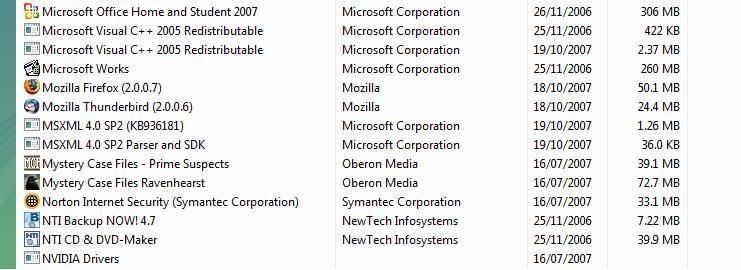
So does this mean I don't have it?
I can use Lock-On if that helps.
So does this mean I don't have it?
I can use Lock-On if that helps.
Isn't it evident?? Boeing are my favourite aircraft.
P.S. that's is my real birthday but I wish to keep my real age secret to keep you all pondering.
- Kelburn
- NZFF Pro
- Topic author
- Joined: Sat Oct 14, 2006 10:59 am
- Posts: 2193
- Location: On a reverse 'hole'
by Mattnz » Fri Oct 19, 2007 9:52 pm
I'm not sure exactly what Lock-On is/does, but it looks as though you will need to install the .net FrameWork.
I don't know if that will solve your problem, but I have had similar problems before without having .net FrameWork installed.
You will be able to download them from either the Microsoft site, or filehippo.com. I'm not sure exactly what version you will need. I think FS runs with 1.1 - at least that's the one I've got installed, looking at it.
I don't know if that will solve your problem, but I have had similar problems before without having .net FrameWork installed.
You will be able to download them from either the Microsoft site, or filehippo.com. I'm not sure exactly what version you will need. I think FS runs with 1.1 - at least that's the one I've got installed, looking at it.
- Mattnz
- Sim-holic
- Joined: Sun Feb 25, 2007 6:13 pm
- Posts: 810
- Location: Dunedin
by creator2003 » Sat Oct 20, 2007 1:07 am
did you update fs9 to 9.1 by any chance ? ,ive installed to vista a couple of times now and all worked sweet ...
-

creator2003 - NZFF Pro
- Joined: Fri Jun 16, 2006 12:08 am
- Posts: 4633
- Location: Cant U C im LOCO
by Kelburn » Sat Oct 20, 2007 7:58 am
I did update to 9.1 and scaned for a virus. I also tried installing .net framework but it said it was already installed. And as far as I know, windows udates itself constantly with me.
Isn't it evident?? Boeing are my favourite aircraft.
P.S. that's is my real birthday but I wish to keep my real age secret to keep you all pondering.
- Kelburn
- NZFF Pro
- Topic author
- Joined: Sat Oct 14, 2006 10:59 am
- Posts: 2193
- Location: On a reverse 'hole'
by Kelburn » Sun Oct 21, 2007 12:34 pm
I went out and brought a brand new FS9.
The one I previously had was from malaysia
Anyway this game installed properly etc but when I start up it gets to the splash screen but comes up with "a problem has caused Microsoft Flight Simulator to close..." how can I fix this. I've tried everything on this page including the 9.1 update:
http://support.microsoft.com/kb/837195
All except Method Five as I have a nVida Graphics card but the driver help doesn't show up in services.msc for some reason.
Can someone help??
The one I previously had was from malaysia
Anyway this game installed properly etc but when I start up it gets to the splash screen but comes up with "a problem has caused Microsoft Flight Simulator to close..." how can I fix this. I've tried everything on this page including the 9.1 update:
http://support.microsoft.com/kb/837195
All except Method Five as I have a nVida Graphics card but the driver help doesn't show up in services.msc for some reason.
Can someone help??
Isn't it evident?? Boeing are my favourite aircraft.
P.S. that's is my real birthday but I wish to keep my real age secret to keep you all pondering.
- Kelburn
- NZFF Pro
- Topic author
- Joined: Sat Oct 14, 2006 10:59 am
- Posts: 2193
- Location: On a reverse 'hole'
by Kelburn » Sun Oct 21, 2007 8:36 pm
Just bringing this to everyones attention as I really want to fix this problem
Isn't it evident?? Boeing are my favourite aircraft.
P.S. that's is my real birthday but I wish to keep my real age secret to keep you all pondering.
- Kelburn
- NZFF Pro
- Topic author
- Joined: Sat Oct 14, 2006 10:59 am
- Posts: 2193
- Location: On a reverse 'hole'
by Kelburn » Sun Oct 21, 2007 10:16 pm
I think I may have but will try.
Anyone else on vista know how to fix this
Anyone else on vista know how to fix this
Isn't it evident?? Boeing are my favourite aircraft.
P.S. that's is my real birthday but I wish to keep my real age secret to keep you all pondering.
- Kelburn
- NZFF Pro
- Topic author
- Joined: Sat Oct 14, 2006 10:59 am
- Posts: 2193
- Location: On a reverse 'hole'
by Kelburn » Tue Oct 23, 2007 4:00 pm
Nope not working. Am going to ring Microsoft.
Isn't it evident?? Boeing are my favourite aircraft.
P.S. that's is my real birthday but I wish to keep my real age secret to keep you all pondering.
- Kelburn
- NZFF Pro
- Topic author
- Joined: Sat Oct 14, 2006 10:59 am
- Posts: 2193
- Location: On a reverse 'hole'
by Mattnz » Tue Oct 23, 2007 4:19 pm
Hmm...I'm pretty much stumped here, so it might be good to give MS a call, if you can ever get through to them
Have you tried using this troubleshooter as well?
http://support.microsoft.com/kb/303032/
Have you tried using this troubleshooter as well?
http://support.microsoft.com/kb/303032/
- Mattnz
- Sim-holic
- Joined: Sun Feb 25, 2007 6:13 pm
- Posts: 810
- Location: Dunedin
by Kelburn » Tue Oct 23, 2007 4:32 pm
I tried re-installing it but @$#% now it won't install coming up with the "vista has encountered a problem" etc.
Got it installing now but will wait to see if it works.
Got it installing now but will wait to see if it works.
Isn't it evident?? Boeing are my favourite aircraft.
P.S. that's is my real birthday but I wish to keep my real age secret to keep you all pondering.
- Kelburn
- NZFF Pro
- Topic author
- Joined: Sat Oct 14, 2006 10:59 am
- Posts: 2193
- Location: On a reverse 'hole'
by Kelburn » Tue Oct 23, 2007 4:59 pm
Would you guess what??
The installation didn't work!
"Specified Module could not be found"


The installation didn't work!
"Specified Module could not be found"
Isn't it evident?? Boeing are my favourite aircraft.
P.S. that's is my real birthday but I wish to keep my real age secret to keep you all pondering.
- Kelburn
- NZFF Pro
- Topic author
- Joined: Sat Oct 14, 2006 10:59 am
- Posts: 2193
- Location: On a reverse 'hole'
by HardCorePawn » Wed Oct 24, 2007 7:51 am
which module? what is the full error message?
"Son, we are about the break the surly bonds of gravity, and punch the face of God." -- Homer Simpson

-

HardCorePawn - Senior Member
- Joined: Fri Sep 01, 2006 4:18 pm
- Posts: 1277
- Location: 2500' above Godzone
19 posts
• Page 1 of 1
Who is online
Users browsing this forum: No registered users and 20 guests