EZ Scenery Help

An area to discuss scenery addons for virtual NZ

Postby ardypilot » Mon Oct 15, 2007 9:49 pm

I'm making my own little airport with EZ Scenery, marking out the runway with white tires.

First of all, I tried using the tires from the REAL NZ Omaka scenery but couldn't line them up, so Mike sent me some custom ones that I loaded with ease.

Then, I went to delete the original REAL NZ tires by clicking the 'select object' tickbox then waited for the EZ Scenery red crosses to lock onto the tires once I placed my aircraft next to it, but for some reason it won't do that. (It works with all the other scenery on my airport though)
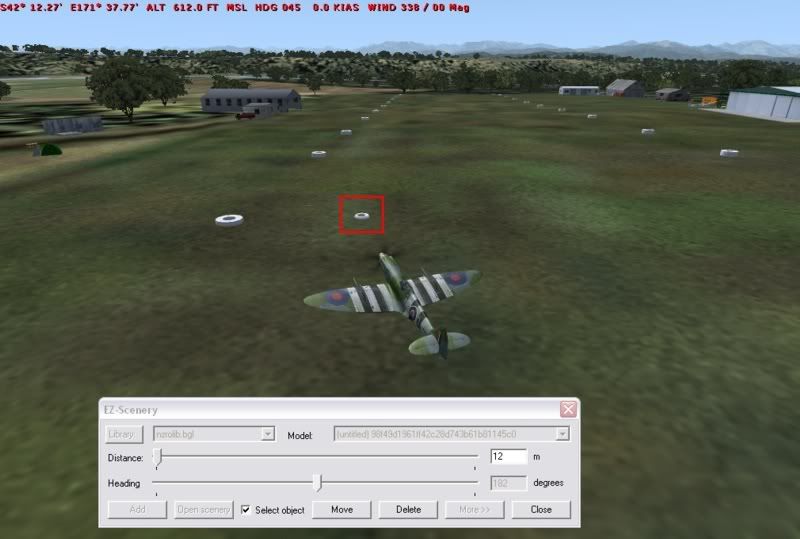


Anyway, how can I remove these? Is there a BGL decompiler that will remove it in a .cfg like file somewhere? Also, is it possible to remove the autogen trees at the end of the runway?
User avatar
ardypilot
NZFF Pro
 
Topic author
Joined: Wed Apr 26, 2006 10:01 am
Posts: 6802
Location: Auckland

Postby toprob » Mon Oct 15, 2007 10:21 pm

Are you sure the sticky objects are in the same BGL? I've never known EZScenery not to reselect any object, but of course you need to have the right BGL open.
If you're sure its in there, though, you can use NewBGLAnalyzeto decompile and track down the sticky bits.
User avatar
toprob
NZFF Pro
 
Joined: Sat Apr 29, 2006 4:56 pm
Posts: 6711
Location: Upper Hutt

Postby Bandit » Tue Oct 16, 2007 7:14 am

I had a similar thing happen with some trees I placed in one of my sceneries.

I found the following -
1. Check the height of your crosshairs when trying to select the object (they may be under ground or up high out of sight).
2. I sometimes found that if the "select object" didn't work but I had the crosshairs in the correct place when I deleted it anyway and restarted the sim. It did disappear as desired.
Testers are born to fiddle. What does this button do? Oh! Never mind.....
User avatar
Bandit
Forum Addict
 
Joined: Fri Jul 21, 2006 10:08 pm
Posts: 423
Location: Palmerston North

Postby toprob » Tue Oct 16, 2007 9:36 am

Bandit wrote:
QUOTE (Bandit @ Oct 16 2007, 08:14 AM) <{POST_SNAPBACK}>
I had a similar thing happen with some trees I placed in one of my sceneries.

I found the following -
1. Check the height of your crosshairs when trying to select the object (they may be under ground or up high out of sight).
2. I sometimes found that if the "select object" didn't work but I had the crosshairs in the correct place when I deleted it anyway and restarted the sim. It did disappear as desired.


That's interesting. In my experience EZ will always select the nearest object to the crosshair when you click 'Select object'. It seems that you both are getting different behaviour. What version do you have? It may pay to check that you have the latest (1.03?)
User avatar
toprob
NZFF Pro
 
Joined: Sat Apr 29, 2006 4:56 pm
Posts: 6711
Location: Upper Hutt

Postby Bandit » Tue Oct 16, 2007 10:33 am

I have v1.02 which I'm sure is the latest for FS9.

I've also had it happen when trying to remove smoke effects but I figured it had something to do with them not being viewable until you restart when you initially place them. I just did as described in No2 above and all was well so I haven't worried about it.

I agree when it comes to objects like buildings though - I've never had it unable to select an object.

Checked mine when I got home and you are correct Rob. Yep I have v1.03 as well.
Last edited by Bandit on Tue Oct 16, 2007 8:25 pm, edited 1 time in total.
Testers are born to fiddle. What does this button do? Oh! Never mind.....
User avatar
Bandit
Forum Addict
 
Joined: Fri Jul 21, 2006 10:08 pm
Posts: 423
Location: Palmerston North

Postby toprob » Tue Oct 16, 2007 10:57 am

I've just checked and mine is 1.03.
User avatar
toprob
NZFF Pro
 
Joined: Sat Apr 29, 2006 4:56 pm
Posts: 6711
Location: Upper Hutt

Postby ardypilot » Wed Oct 17, 2007 4:54 pm

QUOTE
2. I sometimes found that if the "select object" didn't work but I had the crosshairs in the correct place when I deleted it anyway and restarted the sim. It did disappear as desired.[/quote]
Sweet- that worked for me.

Thanks for the replies guys.
User avatar
ardypilot
NZFF Pro
 
Topic author
Joined: Wed Apr 26, 2006 10:01 am
Posts: 6802
Location: Auckland

Postby G-HEVN » Wed Oct 17, 2007 11:21 pm

Don't forget, if you use objects out of someone else's scenery (and especially if it's payware), you need to get the author's express permission before you can upload it anywhere.

But I'm sure you knew that. wink.gif
G-HEVN
 

Postby toprob » Thu Oct 18, 2007 11:11 am

G-HEVN wrote:
QUOTE (G-HEVN @ Oct 18 2007, 12:21 AM) <{POST_SNAPBACK}>
Don't forget, if you use objects out of someone else's scenery (and especially if it's payware), you need to get the author's express permission before you can upload it anywhere.

But I'm sure you knew that. wink.gif


Yes, I'd actually keep away from using payware objects -- there are real problems with distribution if you ever decide to go public with your airport. Since you are not able to include the payware library, only those who own the scenery will get the benefit. Those who don't will complain bitterly angry.gif The real issue for me is that eventually someone will assume that they can forward the library to their mates, which would be the wrong assumption.
User avatar
toprob
NZFF Pro
 
Joined: Sat Apr 29, 2006 4:56 pm
Posts: 6711
Location: Upper Hutt

Postby ardypilot » Thu Oct 18, 2007 10:49 pm

QUOTE
if you use objects out of someone else's scenery (and especially if it's payware), you need to get the author's express permission before you can upload it anywhere.[/quote]
Yeah I'd figured that straight away. I'm not going to upload this anywhere, I just wanted to make myself something small and customised. winkyy.gif
User avatar
ardypilot
NZFF Pro
 
Topic author
Joined: Wed Apr 26, 2006 10:01 am
Posts: 6802
Location: Auckland


Return to Scenery

Who is online

Users browsing this forum: No registered users and 4 guests

