162.18 forceware drivers

The place to ask for help or solve each others technical issues and discuss hardware

Postby ardypilot » Mon Oct 01, 2007 1:34 pm

Yesterday I downloaded the latest nVidia driver (162.18_forceware_winxp_international_whql.exe) for my old GeForce FX5600- uninstalled my old drivers, booted in safe made and ran Driver Cleaner Pro, then restarted and installed.

Now when I run FS9 I get loads of jaggie edges everywhere like anti-aliasing has been turned off. I have it unticked in the sim's graphic options and checked to 4x (which is what I had it set to before) on the nVidia toolbar setting menu:
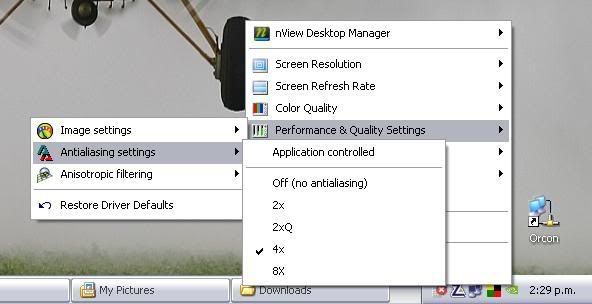
However, this doesn't seem to effect it. And when I try to go into the advanced settings, aka the Nvidia Control Panel, nothing happens when I click it.
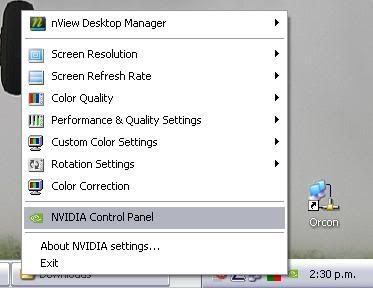
I've tried turning off ZoneAlarm and AVG but it makes no difference. I googled the problem to find a few other people who did not have the .Net framework installed, had the same problem. However, I already have the .Net framework installed (you need it for VOZ) so I am unsure on what to do next- can anyone here help?
User avatar
ardypilot
NZFF Pro
 
Topic author
Joined: Wed Apr 26, 2006 10:01 am
Posts: 6802
Location: Auckland

Postby brownbox » Mon Oct 01, 2007 2:32 pm

dont worry trolly, your not alone. I realised this a little while back and thought it was just me. I currently dont know how to fix it. I tried 162.18, 163.14 but havnt tried the new beta yet.

Best way I can think is to uninstall and change to an older version or try the new beta.
Desktop:Core 2 Duo E4300 1.8@ 3.0Ghz@ 1.36v. 4Gb Supertalent DDR2-800 2.1v@ 5-5-5-15. Asus P5N-E SLI Pencil Modded. Corsair TX 650. 512MB Palit Geforce 8800GT. 2x200GB IDE+640GB SATAII. Windows Vista Ultimate X86. Samsung SH-S222A
Phone:Nokia N900 Vodafone
Car: 1993 Mitsubishi Mirage Asti Z. Steel Blue Pearl

1996 Toyota Curren 2.0L 5 Spd Manual Silver. 205/50/R16 on Enkei K-95. Lowered on Jamex Superlows. Remote locking. Remote boot release. Cruise control
1996 Mitsubishi GTO MR

Image
User avatar
brownbox
Senior Member
 
Joined: Thu Apr 27, 2006 10:55 pm
Posts: 1318

Postby ardypilot » Mon Oct 01, 2007 3:59 pm

Best way I can think is to uninstall and change to an older version or try the new beta.

Oh ok- what version would you reccomend? Could you post a download link?
User avatar
ardypilot
NZFF Pro
 
Topic author
Joined: Wed Apr 26, 2006 10:01 am
Posts: 6802
Location: Auckland

Postby brownbox » Mon Oct 01, 2007 5:44 pm

before I got my 8600, I found the 94.20 driver the best. Although it was old, it was very good, and I kept it for the whole 6 months of owning my 7600. Dunno where you will find it, but it is around. winkyy.gif
Desktop:Core 2 Duo E4300 1.8@ 3.0Ghz@ 1.36v. 4Gb Supertalent DDR2-800 2.1v@ 5-5-5-15. Asus P5N-E SLI Pencil Modded. Corsair TX 650. 512MB Palit Geforce 8800GT. 2x200GB IDE+640GB SATAII. Windows Vista Ultimate X86. Samsung SH-S222A
Phone:Nokia N900 Vodafone
Car: 1993 Mitsubishi Mirage Asti Z. Steel Blue Pearl

1996 Toyota Curren 2.0L 5 Spd Manual Silver. 205/50/R16 on Enkei K-95. Lowered on Jamex Superlows. Remote locking. Remote boot release. Cruise control
1996 Mitsubishi GTO MR

Image
User avatar
brownbox
Senior Member
 
Joined: Thu Apr 27, 2006 10:55 pm
Posts: 1318

Postby utopian » Wed Oct 03, 2007 9:44 am

I have had the same problem and found this fixed it,

Nvidia Fourms

Doing it does have a side effect, I loose preview on aircraft when selecting an aircraft in full screen mode, Also in full screen mode if I have a undockted windows of fsinn for example it only displays the picture above the undocked window.

As I have duel monitors I don't find this a problem, also nhancer lets you have setting higher than the nvidia drivers

Hope this helps
utopian
 

Postby brownbox » Wed Oct 03, 2007 7:55 pm

Thanks for that helpful tip Utopian
Desktop:Core 2 Duo E4300 1.8@ 3.0Ghz@ 1.36v. 4Gb Supertalent DDR2-800 2.1v@ 5-5-5-15. Asus P5N-E SLI Pencil Modded. Corsair TX 650. 512MB Palit Geforce 8800GT. 2x200GB IDE+640GB SATAII. Windows Vista Ultimate X86. Samsung SH-S222A
Phone:Nokia N900 Vodafone
Car: 1993 Mitsubishi Mirage Asti Z. Steel Blue Pearl

1996 Toyota Curren 2.0L 5 Spd Manual Silver. 205/50/R16 on Enkei K-95. Lowered on Jamex Superlows. Remote locking. Remote boot release. Cruise control
1996 Mitsubishi GTO MR

Image
User avatar
brownbox
Senior Member
 
Joined: Thu Apr 27, 2006 10:55 pm
Posts: 1318

Postby ZK-MAT » Wed Oct 03, 2007 8:06 pm

As a general comment, stick to the driver that gives you good results, or at least results you can live with. It's human nature to see if you can get that extra ounce of quality out of an older card, but, in my experience new driver sets are developed to deal with issues on the latest release video cards, and in the process can break what wasn't wrong with older cards. Your best bet is sticking to a driver released not long after the FX5600 was brought out.

Your mileage may vary.

Matt
User avatar
ZK-MAT
Senior Member
 
Joined: Sun Apr 30, 2006 11:41 pm
Posts: 1690
Location: Papamoa

Postby utopian » Wed Oct 03, 2007 9:26 pm

As a personal rule I try to keep my video card drives as up to date as possible, but that being said I have seen some issues with older cards and new drives. And for that reason I have a stock pile of old nvidia drivers dating back to the 53.03 Drivers.
utopian
 

Postby brownbox » Thu Oct 04, 2007 6:24 am

i just use whatever everyone else with 8600s say were fastest. I also use Tweaked drivers
Desktop:Core 2 Duo E4300 1.8@ 3.0Ghz@ 1.36v. 4Gb Supertalent DDR2-800 2.1v@ 5-5-5-15. Asus P5N-E SLI Pencil Modded. Corsair TX 650. 512MB Palit Geforce 8800GT. 2x200GB IDE+640GB SATAII. Windows Vista Ultimate X86. Samsung SH-S222A
Phone:Nokia N900 Vodafone
Car: 1993 Mitsubishi Mirage Asti Z. Steel Blue Pearl

1996 Toyota Curren 2.0L 5 Spd Manual Silver. 205/50/R16 on Enkei K-95. Lowered on Jamex Superlows. Remote locking. Remote boot release. Cruise control
1996 Mitsubishi GTO MR

Image
User avatar
brownbox
Senior Member
 
Joined: Thu Apr 27, 2006 10:55 pm
Posts: 1318


Return to Technical Issues

Who is online

Users browsing this forum: No registered users and 10 guests
