your coments on computer specs please

The place to ask for help or solve each others technical issues and discuss hardware

Postby FunkymonkeyNZ » Wed Sep 26, 2007 12:02 am

Hey guys this is a first time post for me and i would love ya guys feedback on some pc spec's im looking into buying....

ok so right now ive been running FS9 on my average 1.5GHz laptop and i've been putting up with it for a long long time now and the more addon's i ..."addon"
unsure.gif.. it getting to the point where its unberable, getting down to 8-10 frame's with fair weather.
Sooooo any way long story short please have a looksey at these spec's and tell me what ya think,

Intel Core 2 Quad Q6600 CPU 2.4GHzx4 8MB L2 Cache(New Intel Quad Core CPU)
- Gigabyte GA-P35-S3 Intel P35 Chipset Motherboard (good OC motherboard with latest intel chipset)
- Features SATA 3Gb/s function
- 2GB DDRII 800 RAM
- 320GB Highspeed s-ATAII 7200Rpm HDD
- Gigabyte GeForce 8600GT Graphics Card
- 18X DVD+/-ReWrter Support Dual-Layer
- 2 front / 4 rear USB 2.0 ports
- HD 6-channel Audio CODEC
- 10/100/1000 LAN Controller
- Raidmax Ninja Tower Case BLACK
- Raidmax 520Watt PSU

Now remember i do intend to keep on simming with FS9 and i hope this will give me smooth Graphics when using trackIR and the virtual cockpit's of the Wilco 737, PMDG 747,
Oh and before i go i just have one more quick question...When simming around NZ i look ou to my left and right and the ocean or mountain ranges become blurey in the distance or if i look down on the ground there is a delay with the texture of the land coming into focus, will this be fixed once the new pc is loaded up? Sorry for all the Questions guys....just want to be 100% sure!

Thanks all and Fly High!!! New_Zealand_etc.gif

Chris.
Chris Maher
Image
NZ CPL(A)+MEIR, NZNV,
User avatar
FunkymonkeyNZ
Forum Addict
 
Topic author
Joined: Sat Sep 22, 2007 10:18 pm
Posts: 220
Location: Invercargill

Postby SUBS17 » Wed Sep 26, 2007 7:59 am

That system will rock but don't get more than 2GB of ram and only get 1 2GB chip not 2x1GB so if in future the extra RAM is needed you can double it.
User avatar
SUBS17
Senior Member
 
Joined: Mon Jun 05, 2006 11:16 am
Posts: 1745

Postby benwynn » Wed Sep 26, 2007 8:26 am

Try and get somthing better than an INTEL Mobo- ASUS would be alot better smile.gif
User avatar
benwynn
Senior Member
 
Joined: Wed Apr 11, 2007 9:11 pm
Posts: 1433
Location: YBBN

Postby ooOO00OOoo » Wed Sep 26, 2007 8:42 am

You'll probably will need a bigger power supply(psu)

from nvidia forums. http://forums.nvidia.com/index.php?showtopic=41931 <---place where quote came from
As long as the PSU can output at least 24 Amperes of current constantly on the +12V rail, any 400W PSU can run the card

So if the psu has at least 24 amperes of current constantly on the +12V rail they you will be fine

but i still recommend you get a better psu
Last edited by ooOO00OOoo on Thu Sep 27, 2007 9:19 am, edited 1 time in total.
ooOO00OOoo
 

Postby Charl » Wed Sep 26, 2007 8:55 am

FunkymonkeyNZ wrote:
QUOTE(FunkymonkeyNZ @ Sep 26 2007, 12:02 AM) <{POST_SNAPBACK}>
Hey guys this is a first time post for me and i would love ya guys feedback on some pc spec's im looking into buying....
Now remember i do intend to keep on simming with FS9 and i hope this will give me smooth Graphics when using trackIR and the virtual cockpit's of the Wilco 737, PMDG 747,
Oh and before i go i just have one more quick question...When simming around NZ i look ou to my left and right and the ocean or mountain ranges become blurey in the distance or if i look down on the ground there is a delay with the texture of the land coming into focus, will this be fixed once the new pc is loaded up? Sorry for all the Questions guys....just want to be 100% sure!
Thanks all and Fly High!!! New_Zealand_etc.gif
Chris.

Chris you will have a superb FS9 experience with that rig.
But don't expect everything all at once - depending on your sight distance settings etc in the sim, there will always be a slight delay when you load up complex textures.
This is especially noticable in spot view when you pan around quickly.
But if you're used to a 1.5GHz machine, prepare to smile.
User avatar
Charl
NZFF Pro
 
Joined: Mon May 01, 2006 8:28 am
Posts: 9691
Location: Auckland

Postby HardCorePawn » Wed Sep 26, 2007 9:10 am

SUBS17 wrote:
QUOTE(SUBS17 @ Sep 26 2007, 07:59 AM) <{POST_SNAPBACK}>
That system will rock but don't get more than 2GB of ram and only get 1 2GB chip not 2x1GB so if in future the extra RAM is needed you can double it.


I am going to go ahead and disagree with you on this...

If you get a pair of (ie. 2x) 1GB sticks of "matched memory"... like the Corsair Twin2x stuff, you will be able to run the RAM in Dual Channel mode... this gives you an increase in performance as it effectively doubles the bandwidth between memory controller and CPU. I would not expect twice the performance tho... theory and reality are not necessarily the same thing! winkyy.gif

Also as most motherboards these days (including the Gigabyte GA-P35-S3) have several RAM slots, there is no reason why you cannot just buy another pair of sticks later on to double the memory...

I am running 4Gigs in a 2x 1G + 2x 1G, Dual Channel configuration... granted WinXP 32bit is only currently using about 3.5Gigs, but I have no complaints and the comp seems to handle everything I throw at it...
Last edited by HardCorePawn on Wed Sep 26, 2007 9:11 am, edited 1 time in total.
"Son, we are about the break the surly bonds of gravity, and punch the face of God." -- Homer Simpson

Image
User avatar
HardCorePawn
Senior Member
 
Joined: Fri Sep 01, 2006 4:18 pm
Posts: 1277
Location: 2500' above Godzone

Postby Chris Donaldson » Wed Sep 26, 2007 10:18 am

That system looks good, but a few suggestions:

If you can afford it go with the 8800GTS, bearing in the mind that it's got a slower core clock speed than the 7950GT 512MB, and less memory. DX10 hasn't been released yet, and there's no indication yet of when it will be released. Tom's hardware also did a great review comparing the 8500/8600GT to the 8800GTS, and there was no contest the 8800GTS came out on top and price wise the 8800GTS was the better option. I can't seem to find the article on Tom's hardware tho sorry.
http://www.nvidia.com/page/8800_reviews.html

The CPU is good, but no software to date is programmed to run on "4 cores" so you might want to increase the speed of the CPU and maybe get a E6850 3GHZ?

As someone else mentioned your PSU will need to be at least 600W to run the card, even going up to 800W would be good.
Last edited by Chris Donaldson on Wed Sep 26, 2007 10:19 am, edited 1 time in total.
Chris Donaldson
 

Postby brownbox » Wed Sep 26, 2007 2:47 pm

2x 1GB dual channel RAM sticks FTW. If you really want to upgrade, get two more later.

"- Raidmax 520Watt PSU"

Big no no. Get somethign proper. I know, it sounds expensive, but trust me, it does help alot, especially if you are looking at overclocking. Ive been through my fair share of cheap PSU's and sometimes theyr just so pathetic. Look at the Enermax Liberty Series, or some of the Silverstones. Aim for around 700W for that system, especially if your overclocking


"- Gigabyte GeForce 8600GT Graphics Card"

Although I must say the 8600GT is a nice card (I have one tongue.gif ), it will definately be the bottleneck of your. Get a 8800GTS 320, or if you really have some spare $$$, get a 640 or a GTX.

Desktop:Core 2 Duo E4300 1.8@ 3.0Ghz@ 1.36v. 4Gb Supertalent DDR2-800 2.1v@ 5-5-5-15. Asus P5N-E SLI Pencil Modded. Corsair TX 650. 512MB Palit Geforce 8800GT. 2x200GB IDE+640GB SATAII. Windows Vista Ultimate X86. Samsung SH-S222A
Phone:Nokia N900 Vodafone
Car: 1993 Mitsubishi Mirage Asti Z. Steel Blue Pearl

1996 Toyota Curren 2.0L 5 Spd Manual Silver. 205/50/R16 on Enkei K-95. Lowered on Jamex Superlows. Remote locking. Remote boot release. Cruise control
1996 Mitsubishi GTO MR

Image
User avatar
brownbox
Senior Member
 
Joined: Thu Apr 27, 2006 10:55 pm
Posts: 1318

Postby FunkymonkeyNZ » Wed Sep 26, 2007 7:24 pm

Ok then so i've taken in all of your feed back so far, and to be truthfull its kinda got me scratching my head! blink.gif
do i go with this or do i go with that??? all these diff opinions have got me bewillded, i must admit i am on a budget
and im not really looking for a machiene to over-clock, i mean hey guys im not buying it to make FlightSim videos to
post on YouTube tongue.gif, But im just looking for a system that will produce nice smooth lines and fast performance for FS9.

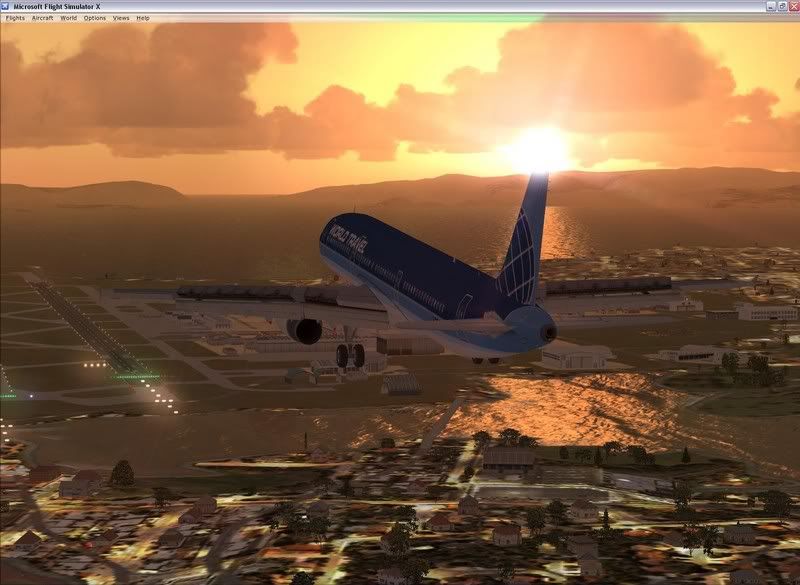
Oh and by the way could someone maybe please post me a screen shot of there flight using a 8600GT Graphics card?
just want to know if i should go for the next version up if its really going to make a huge difference....

Cheers Guys

Chris New_Zealand_etc.gif
Chris Maher
Image
NZ CPL(A)+MEIR, NZNV,
User avatar
FunkymonkeyNZ
Forum Addict
 
Topic author
Joined: Sat Sep 22, 2007 10:18 pm
Posts: 220
Location: Invercargill

Postby brownbox » Wed Sep 26, 2007 9:37 pm

OK, if your not looking to overclock, I would still look at a decent PSU. The last thing you want is a shotty no name PSU blowing your thousand dollar PC to pieces.
Take a look at this list
http://www.flightsimulationforums.com/viewtopic.php?t=1145

If you are on a budget, the 8600GT will be fine. If you want some more performance, you can always overclock it to 8600GTS speed.
8600GT will do you nicely for FS9, however you have to bump down to medium-high in FSX. 8600GT also does 16x AA, which is good for nice image quality.
Last edited by brownbox on Wed Sep 26, 2007 9:57 pm, edited 1 time in total.
Desktop:Core 2 Duo E4300 1.8@ 3.0Ghz@ 1.36v. 4Gb Supertalent DDR2-800 2.1v@ 5-5-5-15. Asus P5N-E SLI Pencil Modded. Corsair TX 650. 512MB Palit Geforce 8800GT. 2x200GB IDE+640GB SATAII. Windows Vista Ultimate X86. Samsung SH-S222A
Phone:Nokia N900 Vodafone
Car: 1993 Mitsubishi Mirage Asti Z. Steel Blue Pearl

1996 Toyota Curren 2.0L 5 Spd Manual Silver. 205/50/R16 on Enkei K-95. Lowered on Jamex Superlows. Remote locking. Remote boot release. Cruise control
1996 Mitsubishi GTO MR

Image
User avatar
brownbox
Senior Member
 
Joined: Thu Apr 27, 2006 10:55 pm
Posts: 1318

Postby brownbox » Wed Sep 26, 2007 9:54 pm

FunkymonkeyNZ wrote:
QUOTE(FunkymonkeyNZ @ Oct 1 2007, 07:24 AM) <{POST_SNAPBACK}>
Oh and by the way could someone maybe please post me a screen shot of there flight using a 8600GT Graphics card?
just want to know if i should go for the next version up if its really going to make a huge difference....


Heres a picture perfect landing at NZAA. This is the first time I opened up FSX in months, and found my AI has dissapeared. Nice picture anyway.
As you can see, the 8600GT is a nice card, and is able to run medium-high settings with nice image quality. This was running at 25FPS at 1600x1200. I beleive FSX is highly CPU intensive, so this should run even better for you.


An 8600Gt is fine if you are on a budget (which you are). You can always upgrade later, and until then, this card would be suitable
Desktop:Core 2 Duo E4300 1.8@ 3.0Ghz@ 1.36v. 4Gb Supertalent DDR2-800 2.1v@ 5-5-5-15. Asus P5N-E SLI Pencil Modded. Corsair TX 650. 512MB Palit Geforce 8800GT. 2x200GB IDE+640GB SATAII. Windows Vista Ultimate X86. Samsung SH-S222A
Phone:Nokia N900 Vodafone
Car: 1993 Mitsubishi Mirage Asti Z. Steel Blue Pearl

1996 Toyota Curren 2.0L 5 Spd Manual Silver. 205/50/R16 on Enkei K-95. Lowered on Jamex Superlows. Remote locking. Remote boot release. Cruise control
1996 Mitsubishi GTO MR

Image
User avatar
brownbox
Senior Member
 
Joined: Thu Apr 27, 2006 10:55 pm
Posts: 1318

Postby FunkymonkeyNZ » Wed Sep 26, 2007 11:14 pm

brownbox wrote:
QUOTE(brownbox @ Sep 26 2007, 09:54 PM) <{POST_SNAPBACK}>
Heres a picture perfect landing at NZAA. This is the first time I opened up FSX in months, and found my AI has dissapeared. Nice picture anyway.
As you can see, the 8600GT is a nice card, and is able to run medium-high settings with nice image quality. This was running at 25FPS at 1600x1200. I beleive FSX is highly CPU intensive, so this should run even better for you.


An 8600Gt is fine if you are on a budget (which you are). You can always upgrade later, and until then, this card would be suitable


Thanks dude much appreshiated!!! good to know what to expect!

Oh and by the way mate thats a bloody nice pic! thumbup1.gif

Cheers.....
Chris Maher
Image
NZ CPL(A)+MEIR, NZNV,
User avatar
FunkymonkeyNZ
Forum Addict
 
Topic author
Joined: Sat Sep 22, 2007 10:18 pm
Posts: 220
Location: Invercargill

Postby creator2003 » Wed Sep 26, 2007 11:44 pm

cheak out any of my videos in the last months found in the vid section of this forum ,made with my spec below nothing flash but kick butt when it comes down to it ,i use trackIR4 with all the planes choppers you mite have and all will work just fine across any of the realnz scenery addons no problem ,and there is nothing wrong with the 8600gts apart from drivers at the moment and some other issues that should be worked out soon ..
testdrive also works sweet fully cranked
just get a bigger power pack ,2gb ram should be sweet and have fun doing it all winkyy.gif
be sure to check out the details of the videos ,you will notice everything is maxed and im still able to capture at 25 solid locked ,when unlimited i get anything from 60 flps to 120 flps flying over all the addons that you can throw at it
User avatar
creator2003
NZFF Pro
 
Joined: Fri Jun 16, 2006 12:08 am
Posts: 4633
Location: Cant U C im LOCO

Postby brownbox » Thu Sep 27, 2007 7:10 am

creator2003 wrote:
QUOTE(creator2003 @ Oct 1 2007, 11:44 AM) <{POST_SNAPBACK}>
testdrive also works sweet fully cranked


I can second that. I am about to get another 8600GT and run them in SLI. Should be fun
Desktop:Core 2 Duo E4300 1.8@ 3.0Ghz@ 1.36v. 4Gb Supertalent DDR2-800 2.1v@ 5-5-5-15. Asus P5N-E SLI Pencil Modded. Corsair TX 650. 512MB Palit Geforce 8800GT. 2x200GB IDE+640GB SATAII. Windows Vista Ultimate X86. Samsung SH-S222A
Phone:Nokia N900 Vodafone
Car: 1993 Mitsubishi Mirage Asti Z. Steel Blue Pearl

1996 Toyota Curren 2.0L 5 Spd Manual Silver. 205/50/R16 on Enkei K-95. Lowered on Jamex Superlows. Remote locking. Remote boot release. Cruise control
1996 Mitsubishi GTO MR

Image
User avatar
brownbox
Senior Member
 
Joined: Thu Apr 27, 2006 10:55 pm
Posts: 1318

Postby SUBS17 » Thu Sep 27, 2007 9:12 am

HardCorePawn wrote:
QUOTE(HardCorePawn @ Sep 30 2007, 09:10 PM) <{POST_SNAPBACK}>
I am going to go ahead and disagree with you on this...

If you get a pair of (ie. 2x) 1GB sticks of "matched memory"... like the Corsair Twin2x stuff, you will be able to run the RAM in Dual Channel mode... this gives you an increase in performance as it effectively doubles the bandwidth between memory controller and CPU. I would not expect twice the performance tho... theory and reality are not necessarily the same thing! winkyy.gif

Also as most motherboards these days (including the Gigabyte GA-P35-S3) have several RAM slots, there is no reason why you cannot just buy another pair of sticks later on to double the memory...

I am running 4Gigs in a 2x 1G + 2x 1G, Dual Channel configuration... granted WinXP 32bit is only currently using about 3.5Gigs, but I have no complaints and the comp seems to handle everything I throw at it...


I never bother with dual channel as the benefits aren't that much an increase in performance and also I'd stick to 2GB as I've heard a few people have problems with more than 2GB on some systems using 32bit OS. Interesting though if the M/Board has 4 slots for RAM hes got plenty of room to expand even if you do get dual channel.
User avatar
SUBS17
Senior Member
 
Joined: Mon Jun 05, 2006 11:16 am
Posts: 1745

Postby Bazza » Thu Sep 27, 2007 9:37 am

Thought I'd just drop in my comments on the 8600GT. I have just installed one in a new set-up and am very pleased with it.
Like most of us I was budget driven and this seemed to be a good option. I am regularly seeing frame rates in the high 50's
dropping on occasions down to 35 so I'm pretty happy. Having said that I'd better clarify - I'm still on FS9, too lazy to change.
Image
User avatar
Bazza
Sim-holic
 
Joined: Sat Jul 15, 2006 1:44 pm
Posts: 983
Location: Tauranga

Postby brownbox » Thu Sep 27, 2007 9:53 am

I think its as long as you have less than 4gig of ram that you wil be fine with 32bit. I ran 3gig for a while with no troubles, although you will most probably never use that much RAM, which is why I sold a stick.
Desktop:Core 2 Duo E4300 1.8@ 3.0Ghz@ 1.36v. 4Gb Supertalent DDR2-800 2.1v@ 5-5-5-15. Asus P5N-E SLI Pencil Modded. Corsair TX 650. 512MB Palit Geforce 8800GT. 2x200GB IDE+640GB SATAII. Windows Vista Ultimate X86. Samsung SH-S222A
Phone:Nokia N900 Vodafone
Car: 1993 Mitsubishi Mirage Asti Z. Steel Blue Pearl

1996 Toyota Curren 2.0L 5 Spd Manual Silver. 205/50/R16 on Enkei K-95. Lowered on Jamex Superlows. Remote locking. Remote boot release. Cruise control
1996 Mitsubishi GTO MR

Image
User avatar
brownbox
Senior Member
 
Joined: Thu Apr 27, 2006 10:55 pm
Posts: 1318

Postby HardCorePawn » Fri Sep 28, 2007 8:42 am

brownbox wrote:
QUOTE(brownbox @ Sep 27 2007, 09:53 AM) <{POST_SNAPBACK}>
I think its as long as you have less than 4gig of ram that you wil be fine with 32bit. I ran 3gig for a while with no troubles, although you will most probably never use that much RAM, which is why I sold a stick.


It really does not matter how much you put in... a 32bit OS can only address 4 gigs of memory space... take some away for memory mapped devices like video cards, HDD's and optical drives etc and you're down somewhere between 3gigs and 4gigs of available memory addresses available for RAM...

I have 4, and have not had any issues... Windows XP just chooses to only use around 3.5... hopefully they will sort Vista out and I can shift to 64bit... and finally get the use of ALL the ram...

As for 'you will most probably never user that much RAM'... well, I seem to recall someone once saying that the worldwide market for computers was around 5 or 6 dry.gif

And lest we forget the often mis-attributed quote '640k RAM should be enough for anyone'
"Son, we are about the break the surly bonds of gravity, and punch the face of God." -- Homer Simpson

Image
User avatar
HardCorePawn
Senior Member
 
Joined: Fri Sep 01, 2006 4:18 pm
Posts: 1277
Location: 2500' above Godzone

Postby G-HEVN » Sun Sep 30, 2007 9:26 pm

FS9 is a single core app, so you will gain no benefit from more cores. Even FSX only gains marginal benefit with more than 2 cores. You'd be far better off with a CPU that runs fewer cores, faster. Of course, you don't mention what else you might want to run...
G-HEVN


Return to Technical Issues

Who is online

Users browsing this forum: No registered users and 15 guests