Installation of GNZLAP
8 posts
• Page 1 of 1
 by captainherc » Sun Sep 16, 2007 7:10 pm
Have just down loaded GNZLAP and HTAI so ready to install. As some of you may be aware from my earlier posts elsewhere, I am not to computer savy. What I need to know is how to install ( I think I have unzipping solved). Once un zipped where to next, and how. Where do I look to find the folder and what are there names. How do I load the files. This goes for both of the downloads. Also do I need to install the voice pack now or can I add this later. How do I do a back up before I start, so WHEN I stuff it up I can fix it without having to uninstall and reinstall again. Thanks.
-

captainherc - Forum Addict
- Topic author
- Joined: Sat Aug 18, 2007 9:50 pm
- Posts: 352
- Location: Whakatane
by Charl » Mon Sep 17, 2007 6:09 pm
Not really the kind of problem we're going to solve here.
I suggest you get a computer-savvy friend to show you around Windows Explorer, then read the GNZLAP Readme, it has a fairly graphic description in the included Word document.
I suggest you get a computer-savvy friend to show you around Windows Explorer, then read the GNZLAP Readme, it has a fairly graphic description in the included Word document.
-

Charl - NZFF Pro
- Joined: Mon May 01, 2006 8:28 am
- Posts: 9801
- Location: Auckland
by captainherc » Tue Sep 18, 2007 9:30 pm
I think I loaded it correctlt. Saw a post here from pato and did what it said also. on copying the file the Scenery world said was eisting with same name so did not overwrite. All other seemed to go in ok. In the odd instance where it needed to over write an existing I took your heed and did not. went to do my saved flight fron TG and saw no xtra A/C. looked in the print out and then went to select a fliht and then NZ. Selecteted a flight from TG. On loading it came up no flight plan and it will need to be VFR.Also the A/C it gave me was a US rego C182. I think it needs a bit of tweaking.
-
captainherc - Forum Addict
- Topic author
- Joined: Sat Aug 18, 2007 9:50 pm
- Posts: 352
- Location: Whakatane
by Charl » Tue Sep 18, 2007 9:57 pm
captainherc wrote:QUOTE(captainherc @ Sep 18 2007, 09:30 PM) <{POST_SNAPBACK}>I think I loaded it correctlt. Saw a post here from pato and did what it said also. on copying the file the Scenery world said was eisting with same name so did not overwrite. All other seemed to go in ok. In the odd instance where it needed to over write an existing I took your heed and did not. went to do my saved flight fron TG and saw no xtra A/C. looked in the print out and then went to select a fliht and then NZ. Selecteted a flight from TG. On loading it came up no flight plan and it will need to be VFR.Also the A/C it gave me was a US rego C182. I think it needs a bit of tweaking.
This is the readme, do what it says:
In your case, do not copy/paste the "Addon Scenery" folder.
But overwrite the others which are shown arrowed.
You don't need to install the callsigns.

-
Charl - NZFF Pro
- Joined: Mon May 01, 2006 8:28 am
- Posts: 9801
- Location: Auckland
by captainherc » Tue Sep 18, 2007 11:06 pm
Thats fine. Did all that. Did copy over addon scenery though. What now.
-
captainherc - Forum Addict
- Topic author
- Joined: Sat Aug 18, 2007 9:50 pm
- Posts: 352
- Location: Whakatane
by Charl » Wed Sep 19, 2007 5:17 pm
captainherc wrote:QUOTE(captainherc @ Sep 18 2007, 11:06 PM) <{POST_SNAPBACK}>Thats fine. Did all that. Did copy over addon scenery though. What now.
Start the sim.
Make sure traffic settings are set to show all traffic.
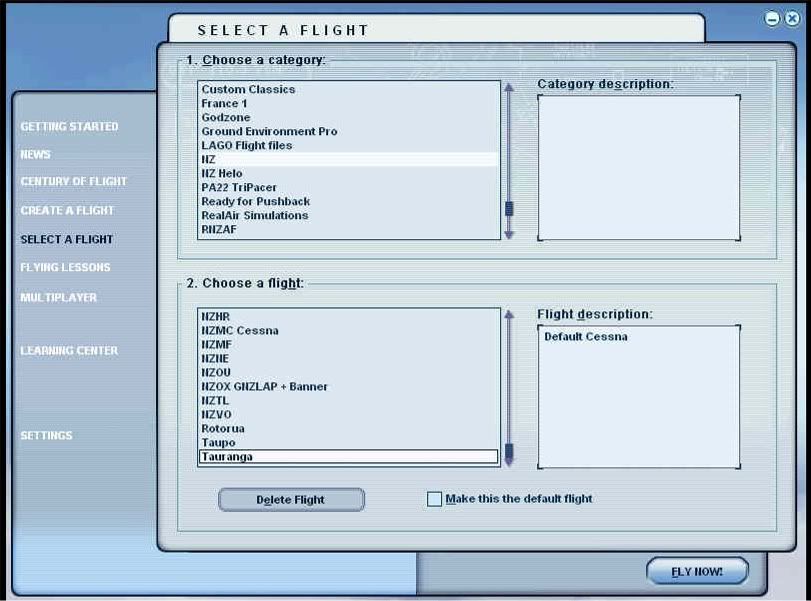
Select a NZ flight:
You will be in a default MS aircraft.
Fly around a bit, there will be AI.
If you'd like to learn a bit more about AI, look here.
-
Charl - NZFF Pro
- Joined: Mon May 01, 2006 8:28 am
- Posts: 9801
- Location: Auckland
by captainherc » Thu Sep 20, 2007 11:44 pm
I selected that flight. While loading the scnery etc prior to flight starting a message box came up, no flight plan available. Only other traffic was the (I think) default learjet off to Auss. Looking through the A/C list and the AI section only had about 5 nz rego's. Can I un install the GNZLAP and reload as per instructions except the addon scenery. While I was loading the files the scenery world cam up wether to overwrite so as was unsure did not. this also came up earlier on another file so did not overwrite that as well, as noted in para6 of installation instructions. If unable to uninstall should I remove FS completely and reinstall. Only have Red Barons CD's loaded as well as the 20mesh cd. So no big deal to reinstall at this stage. Went to another flight, the one where you fly with the banner a/c. Got a US rego cessna. The a/c was flying with no prop turning and moving the joystick the plane appaered to fly but only in the horizontal plane. pulling back on the js the image would zoom out and back in to the ground when checked fwd, I had no other control and finally crashed.
-
captainherc - Forum Addict
- Topic author
- Joined: Sat Aug 18, 2007 9:50 pm
- Posts: 352
- Location: Whakatane
by Charl » Fri Sep 21, 2007 9:59 am
captainherc wrote:QUOTE(captainherc @ Sep 20 2007, 11:44 PM) <{POST_SNAPBACK}>I selected that flight. While loading the scnery etc prior to flight starting a message box came up, no flight plan available.
Ignore this.Only other traffic was the (I think) default learjet off to Auss. Looking through the A/C list and the AI section only had about 5 nz rego's. Can I un install the GNZLAP and reload as per instructions except the addon scenery. While I was loading the files the scenery world cam up wether to overwrite so as was unsure did not. this also came up earlier on another file so did not overwrite that as well, as noted in para6 of installation instructions. If unable to uninstall should I remove FS completely and reinstall. Only have Red Barons CD's loaded as well as the 20mesh cd. So no big deal to reinstall at this stage.
The "Unsure" bit only applies to AFCAD files which reside in the...addon scenery\scenery folder. You should overwrite Aircraft, Flights, Scenery, and Sound folders.Went to another flight, the one where you fly with the banner a/c. Got a US rego cessna.
GNZLAP does not replace flyable aircraft. It is a moving scenery project which supplies Artificial Intelligence planes which accompany you in the sim. The flights are saved with default Micrososft aircraft which everybody has in their sim. You can change your own aircraft to whatever you have available.The a/c was flying with no prop turning and moving the joystick the plane appaered to fly but only in the horizontal plane. pulling back on the js the image would zoom out and back in to the ground when checked fwd, I had no other control and finally crashed.
Y'know, I would go one step at a time. Re-install the sim with no addons, and then spend a bit of time getting to know it.
The addon market often requires a thourough knowledge of the sim and its folder structure.
GNZLAP is no exception.
I think you will agree that you have just about used up the quota of support you could expect from a freeware offering...
-
Charl - NZFF Pro
- Joined: Mon May 01, 2006 8:28 am
- Posts: 9801
- Location: Auckland
8 posts
• Page 1 of 1
Return to New Zealand AI Projects
Who is online
Users browsing this forum: No registered users and 19 guests