Flickering Ground Textures

The official REAL NZ support forum

Postby ardypilot » Sat Aug 25, 2007 3:15 pm

After months of having photoreal scenery installed, it has started flickering today- only the high res ground textures at airports it seems.

This is not an iscolated problem, it is happening both at my REAL NZ airports (Wellington and Woodbourne), plus on the ground at FlyTampa's St Maarten, although I thought I would post here as you may be able to help. Here is a screenshot of what happens:
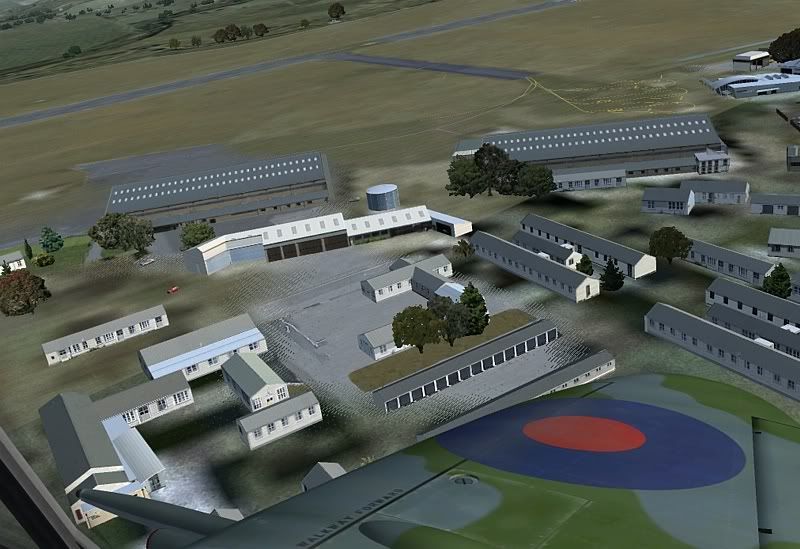
It is visable from both internal and external aircraft views, and happens with every aircraft I am flying. Any ideas?
User avatar
ardypilot
NZFF Pro
 
Topic author
Joined: Wed Apr 26, 2006 10:01 am
Posts: 6802
Location: Auckland

Postby Alex » Sat Aug 25, 2007 4:24 pm

What have you installed/modded recently? Think of the time when you can remember this not happening, and now - what did you do between those times?

Alex
Alex
NZFF Pro
 
Joined: Fri Jul 14, 2006 3:39 pm
Posts: 3620

Postby ardypilot » Sun Aug 26, 2007 11:47 am

What have you installed/modded recently?

Only the ICARO BK117, which I installed into a temp folder first before shifting into my FS9 directory.

I removed it incase it was causing the problem, but it still exists. I havn't installed any other new aircraft or scenery in a while, apart from the RealAir Spitfire (although that has been working sweet for about a week).
User avatar
ardypilot
NZFF Pro
 
Topic author
Joined: Wed Apr 26, 2006 10:01 am
Posts: 6802
Location: Auckland

Postby creator2003 » Mon Aug 27, 2007 11:24 am

Well i know the aircraft wouldnt do anything to scenery textures ,just looks like some scenery planes are bleeding through ,but if this is happening at other a/p ,this makes the problem less likly to be the scenery itself and something to do with settings ,or display of graphic card but hey im just pulling ideas out of no where here ,and im surprized with all these top scenery guys around that you havent had more answers ..to me it looks like lapping of planes ,or graphic card fuzzys
Last edited by creator2003 on Mon Aug 27, 2007 11:25 am, edited 1 time in total.
User avatar
creator2003
NZFF Pro
 
Joined: Fri Jun 16, 2006 12:08 am
Posts: 4633
Location: Cant U C im LOCO

Postby toprob » Mon Aug 27, 2007 12:26 pm

I admit I've never seen anything like that. Do you have anything new with a higher priority in your scenery library?
The only thing I can think of is that there was a 5.1 earthquake near Levin last week, but I'd be surprised if it was felt at Woodbourne...
Last edited by toprob on Mon Aug 27, 2007 12:26 pm, edited 1 time in total.
User avatar
toprob
NZFF Pro
 
Joined: Sat Apr 29, 2006 4:56 pm
Posts: 6711
Location: Upper Hutt

Postby ardypilot » Mon Aug 27, 2007 6:33 pm

Well whatever it was, it is working fine now. Both St Maarten and Woodbourne remain flickerless during both day/night and summer/winter tests. thumbup1.gif

Must have just been my graphics card playing up after a rather long simming session..
User avatar
ardypilot
NZFF Pro
 
Topic author
Joined: Wed Apr 26, 2006 10:01 am
Posts: 6802
Location: Auckland

Postby creator2003 » Mon Aug 27, 2007 7:09 pm

Ah ok yeah that would be it id say graphic cards when the are really hot or have been running for a long time will start to play up sometimes just giving up with the whole screen as graphic fuzzys or just parts of the screen like if you had media player in the background or other windows displaying behind the fs screen ..
glad its ok now yeah just keep that in mind ... groupwave.gif another problem solve thumbup1.gif
User avatar
creator2003
NZFF Pro
 
Joined: Fri Jun 16, 2006 12:08 am
Posts: 4633
Location: Cant U C im LOCO


Return to Godzone 'Real New Zealand' Scenery Support

Who is online

Users browsing this forum: No registered users and 7 guests
