Coastline design

An area to discuss scenery addons for virtual NZ

Postby Dan » Mon Aug 20, 2007 7:08 pm

Hi everybody,

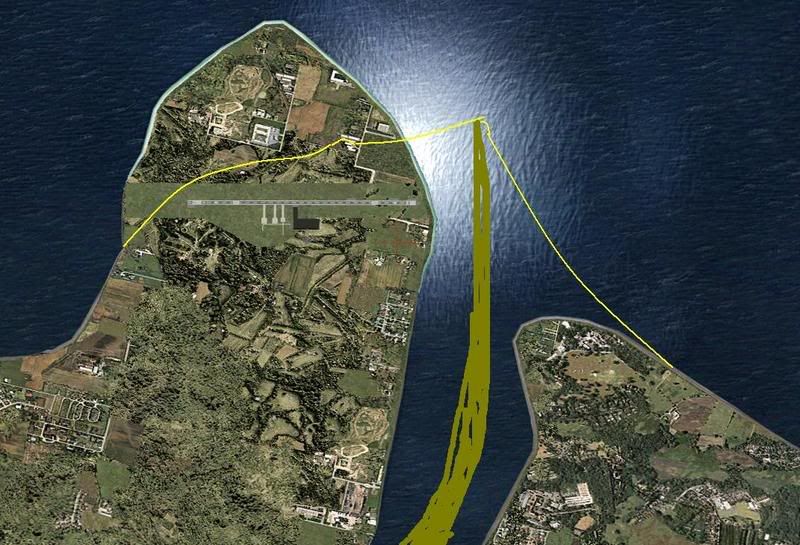
Here's one for the scenery experts. I'm working on a basic airport scenery and I'm unhappy with the default MS coastline around the airport. I've created an AFCAD file and some basic objects using Google Earth as reference for positioning the airport features. Is there an easy way of getting rid of the river and moving the coastline to the yellow line shown in the screen shot below? The brown smudgy bit to the right of the picture is the dry riverbed that exists for 95% of the year.

Dan
User avatar
Dan
Member
 
Topic author
Joined: Tue Jul 25, 2006 7:07 pm
Posts: 78
Location: Waitakere

Postby Timmo » Mon Aug 20, 2007 8:55 pm

Timmo
NZFF Pro
 
Joined: Wed Oct 25, 2006 6:28 pm
Posts: 2056
Location: Tauranga

Postby Dan » Mon Aug 20, 2007 9:52 pm

Thanks, that looks like a pretty powerful programme. I should have added I'm using FS9. Is there an FS9 equivalent?
User avatar
Dan
Member
 
Topic author
Joined: Tue Jul 25, 2006 7:07 pm
Posts: 78
Location: Waitakere

Postby Kelburn » Tue Aug 21, 2007 4:08 pm

what airport are you doing?
Image

Isn't it evident?? Boeing are my favourite aircraft.

P.S. that's is my real birthday but I wish to keep my real age secret to keep you all pondering.
Kelburn
NZFF Pro
 
Joined: Sat Oct 14, 2006 10:59 am
Posts: 2193
Location: On a reverse 'hole'

Postby Dan » Tue Aug 21, 2007 7:11 pm

Kelburn wrote:
QUOTE(Kelburn @ Aug 26 2007, 04:08 AM) <{POST_SNAPBACK}>
what airport are you doing?


It's Presedente Nicolau Lobato airport at Dili, Timor Leste (WPDL). I should have added non-NZ. Other developers have released an AFCAD file for it (I think on flightsim.com) and there is SRTM mesh scenery available which makes a big difference.
User avatar
Dan
Member
 
Topic author
Joined: Tue Jul 25, 2006 7:07 pm
Posts: 78
Location: Waitakere


Return to Scenery

Who is online

Users browsing this forum: No registered users and 9 guests