Changing default colours for FSX NZ?
34 posts
• Page 1 of 2 • 1, 2
 by scon » Wed Jun 13, 2007 4:53 pm
Grumble wrote: Title says it all. Is there any way to change the dry, desert-like NZ from a default FSX install to make it the green and pleasant land it is in reality?
You can get things called Landclasses which change that but currently there are no FSX ones ( for NZ ) there was one for FS9 but it does not work in FSX very well. Christian is working on one howiever
Regards, Scott
- scon
- Sim-holic
- Joined: Mon Oct 16, 2006 7:16 pm
- Posts: 963
- Location: NZ
by HardCorePawn » Wed Jun 13, 2007 10:20 pm
However, it seems to have disappeared off the face of the internet
There appears to be a very good reason for this... I've being doing some hunting and I managed to find a thread over at AVSIM that explains the mystery...
effectively, this Thomas Trewin guy ripped off Ground Environment Pro (GE PRO)
 and tried to pass the textures off as his own freeware...
read the post by Peter Wilding... It also explains why its all patchy... coz the textures etc are the wrong size for FSX

"Son, we are about the break the surly bonds of gravity, and punch the face of God." -- Homer Simpson

-

HardCorePawn - Senior Member
- Joined: Fri Sep 01, 2006 4:18 pm
- Posts: 1277
- Location: 2500' above Godzone
by Timmo » Mon Jul 02, 2007 4:48 pm
I also had a go at this and it was mostly successful in making 90% of the north Island look good. The only problem is, i dont have any data to differentiate the areas of urban development (i.e. The LCDBII land cover i used only really has one category for built environments so i could have all towns looking like small ones or all towns looking like cities).....This could be worked around using that excel based package which works on BIL files but....like many things, i dont have time to do it.
I may release just the Bay of Plenty if time permits (as i know where the various areas of dense buildings are)...
I may release just the Bay of Plenty if time permits (as i know where the various areas of dense buildings are)...
- Timmo
- NZFF Pro
- Joined: Wed Oct 25, 2006 6:28 pm
- Posts: 2056
- Location: Tauranga
by cirrusnature » Mon Jul 02, 2007 8:08 pm
Any help to make this country greener is always appreciated 
-
cirrusnature - Forum Addict
- Joined: Thu Apr 27, 2006 7:54 pm
- Posts: 232
by Timmo » Tue Jul 03, 2007 4:57 pm
Well...these images mightnt mean much since the colours are mostly the same....
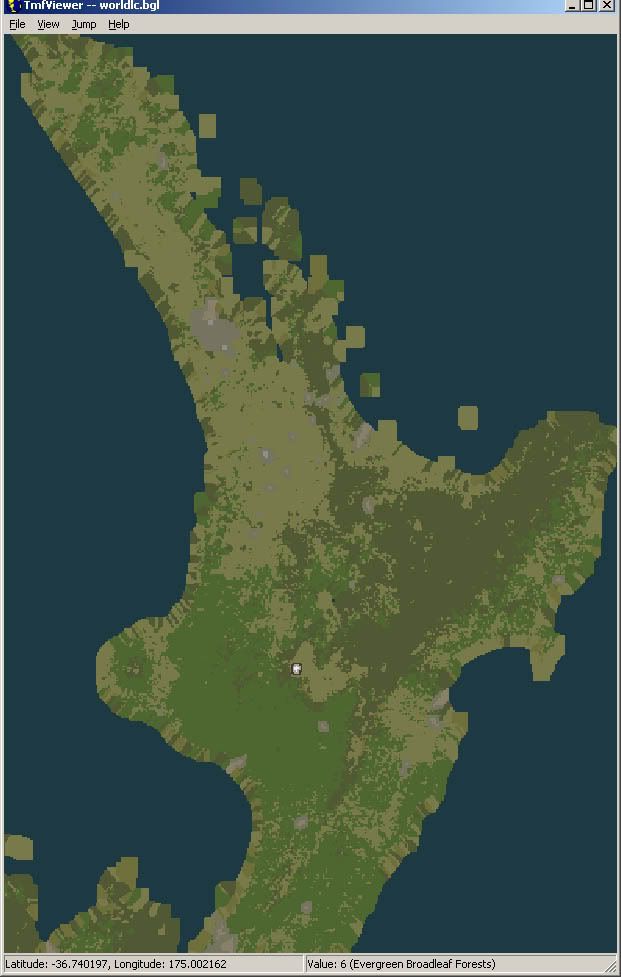
Here is what i came up with
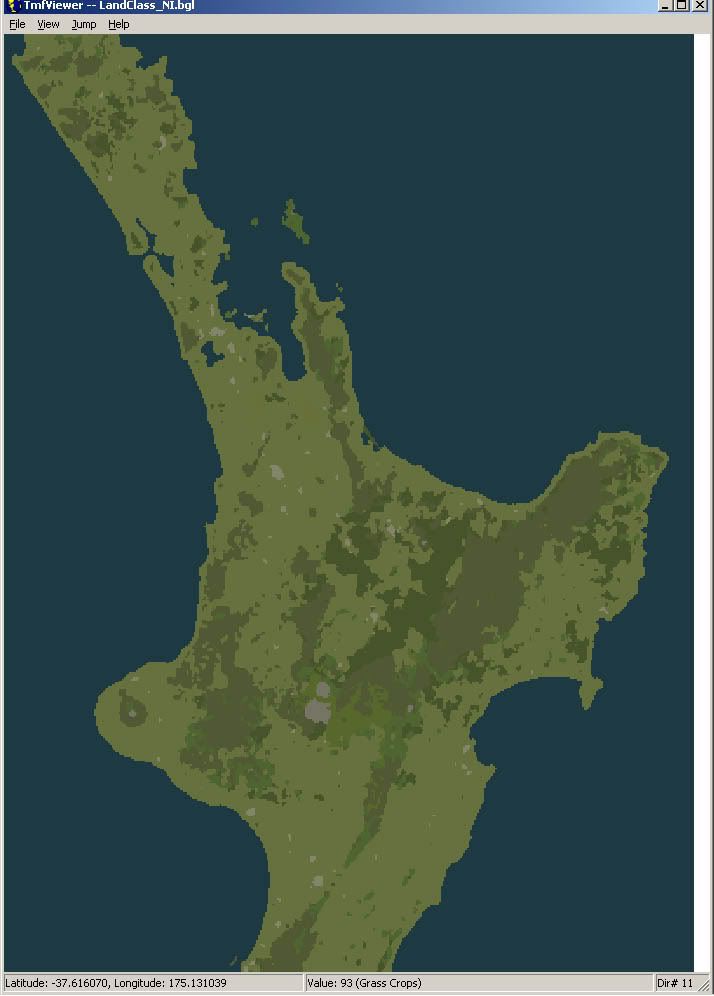
I need to test it/tweak it more....in the mean time the LC for FS2004 does an OK job...its certainly an improvement
Here is what i came up with
I need to test it/tweak it more....in the mean time the LC for FS2004 does an OK job...its certainly an improvement
- Timmo
- NZFF Pro
- Joined: Wed Oct 25, 2006 6:28 pm
- Posts: 2056
- Location: Tauranga
by Christian » Wed Jul 04, 2007 12:04 pm
I'm really busy with the mag these days so I don't know when I'll be able to come up with the replacement textures.
In the meantime I recommend you install my FS9 landclass and fly summer only!
Christian
In the meantime I recommend you install my FS9 landclass and fly summer only!
Christian
Breathtakingly gorgeous FS landscapes for New Zealand.
Visit Sim Pilot Experience now:
http://www.simpilotexperience.com
Follow me on twitter:
http://www.twitter.com/ChristianStock
Visit Sim Pilot Experience now:
http://www.simpilotexperience.com
Follow me on twitter:
http://www.twitter.com/ChristianStock
-

Christian - Forum Addict
- Joined: Sun Apr 30, 2006 12:03 pm
- Posts: 426
- Location: melbourne
by Timmo » Wed Jul 04, 2007 12:10 pm
Christian- Did you document your procedure at all? If so, could you send it through....im also short of time and if i can get around the trial and error stuff, i may be able to release something sooner...
Ive only got data for the north Island though...
Ive only got data for the north Island though...
- Timmo
- NZFF Pro
- Joined: Wed Oct 25, 2006 6:28 pm
- Posts: 2056
- Location: Tauranga
by Christian » Wed Jul 04, 2007 4:13 pm
Hi Timmo
All I've done is send the default textures through photoshop. It's simply just fiddling to make the colours better.
Christian
All I've done is send the default textures through photoshop. It's simply just fiddling to make the colours better.
Christian
Breathtakingly gorgeous FS landscapes for New Zealand.
Visit Sim Pilot Experience now:
http://www.simpilotexperience.com
Follow me on twitter:
http://www.twitter.com/ChristianStock
Visit Sim Pilot Experience now:
http://www.simpilotexperience.com
Follow me on twitter:
http://www.twitter.com/ChristianStock
-
Christian - Forum Addict
- Joined: Sun Apr 30, 2006 12:03 pm
- Posts: 426
- Location: melbourne
by Timmo » Wed Jul 04, 2007 5:09 pm
The textures called by the landclass file? or the actual land class definitions?
for FSX, most of the problems seem to be the Landclass definitons- Most of the areas of farmland in NZ are classified as 'cool shrubs and grasses' (i.e. that brownish texture with a few autogen shrubs) in the default landclass.....this needs to be changed.
for FSX, most of the problems seem to be the Landclass definitons- Most of the areas of farmland in NZ are classified as 'cool shrubs and grasses' (i.e. that brownish texture with a few autogen shrubs) in the default landclass.....this needs to be changed.
- Timmo
- NZFF Pro
- Joined: Wed Oct 25, 2006 6:28 pm
- Posts: 2056
- Location: Tauranga
by Christian » Wed Jul 04, 2007 6:20 pm
The textures. The landclass system in FSX hasn't changed, so my old FS9 landclass file works just fine in FSX. I did a closer investigation and indeed there is little point changing the landclass file, it's as accurate as it can be. In FSX, it's the textures themselves that cause the problems.
Breathtakingly gorgeous FS landscapes for New Zealand.
Visit Sim Pilot Experience now:
http://www.simpilotexperience.com
Follow me on twitter:
http://www.twitter.com/ChristianStock
Visit Sim Pilot Experience now:
http://www.simpilotexperience.com
Follow me on twitter:
http://www.twitter.com/ChristianStock
-
Christian - Forum Addict
- Joined: Sun Apr 30, 2006 12:03 pm
- Posts: 426
- Location: melbourne
by Timmo » Wed Jul 04, 2007 7:03 pm
Indeed. Ok well ill cancel that project then.
I think i was reading a post of yours on fsdeveloper that said the textures are now almost hardcoded or something?
Its certainly beyond my knowledge at this stage
I think i was reading a post of yours on fsdeveloper that said the textures are now almost hardcoded or something?
Its certainly beyond my knowledge at this stage
- Timmo
- NZFF Pro
- Joined: Wed Oct 25, 2006 6:28 pm
- Posts: 2056
- Location: Tauranga
by Christian » Thu Jul 05, 2007 11:52 am
No, changing textures is easy, but a lot of work. You can access the textures via imagetool (or the Photoshop DX plugin). Open and save is not a problem, getting the colours of 16 textures per class right is a different matter!
Christian
Christian
Breathtakingly gorgeous FS landscapes for New Zealand.
Visit Sim Pilot Experience now:
http://www.simpilotexperience.com
Follow me on twitter:
http://www.twitter.com/ChristianStock
Visit Sim Pilot Experience now:
http://www.simpilotexperience.com
Follow me on twitter:
http://www.twitter.com/ChristianStock
-
Christian - Forum Addict
- Joined: Sun Apr 30, 2006 12:03 pm
- Posts: 426
- Location: melbourne
by Timmo » Thu Jul 05, 2007 12:44 pm
hmmm Interesting.....I might give this a go as the landclass texture for pine forest is based on 'native' pine forest (i.e. random distribution) such as in North America....In NZ pretty much all pine forest is plantation forest in tidy rows with tracks and skid sites......Its an easy one to do as well since it doesnt change with season.
Are the textures referenced by filenames alone? (i.e. If i replace a texture for summer pines with another ive made with the same filename, FSX will pick it up no worries?
Are the textures referenced by filenames alone? (i.e. If i replace a texture for summer pines with another ive made with the same filename, FSX will pick it up no worries?
- Timmo
- NZFF Pro
- Joined: Wed Oct 25, 2006 6:28 pm
- Posts: 2056
- Location: Tauranga
by Christian » Thu Jul 05, 2007 5:52 pm
The texture name is linked via landclass table. If you know which texture to change, yes, save it with the same filename. There are some tables around that tell you which values go with which textures. Don't know an address off my head, but google will certainly bring results.
Christian
Christian
Breathtakingly gorgeous FS landscapes for New Zealand.
Visit Sim Pilot Experience now:
http://www.simpilotexperience.com
Follow me on twitter:
http://www.twitter.com/ChristianStock
Visit Sim Pilot Experience now:
http://www.simpilotexperience.com
Follow me on twitter:
http://www.twitter.com/ChristianStock
-
Christian - Forum Addict
- Joined: Sun Apr 30, 2006 12:03 pm
- Posts: 426
- Location: melbourne
by Jimmah » Sat Aug 18, 2007 6:00 pm
Alright. I realise this thread has been dead for a while, but the problem still exists!
I've been digging around the FSX SDK, trying to figure out how this all works.
Is it just me or is the documentation not quite up to date/correct? It lists all the regions, but does not mention region Z (New Zealand) which IS built in. The problem, however, seems to be that there are NO textures for this region, so everything reverts back to region B textures. The SDK also mentions a naming nomenclature for the textures that doesn't quite add up to the textures I'm looking at (the spreadsheet mentioned below seems to help with finding the right files).
There's a pretty good spreadsheet with screenshots over here, I'm thinking that if I at least change some of the nz landclass type (i.e find a type that has better looking textures in region B), things should improve.
Ideally we need to find out if we can get FSX to look up region Z textures, then create a whole set of these (possibly renamed textures from other regions). I've only just started delving into this, thus I am unsure as to whether this is possible. As I said, what the SDK talks about and what I see in the files/textures etc doesn't quite seem to match up.
Anyhow, just curious to see if anyone else is still working on this and what, if anything, they have found out.
I've been digging around the FSX SDK, trying to figure out how this all works.
Is it just me or is the documentation not quite up to date/correct? It lists all the regions, but does not mention region Z (New Zealand) which IS built in. The problem, however, seems to be that there are NO textures for this region, so everything reverts back to region B textures. The SDK also mentions a naming nomenclature for the textures that doesn't quite add up to the textures I'm looking at (the spreadsheet mentioned below seems to help with finding the right files).
There's a pretty good spreadsheet with screenshots over here, I'm thinking that if I at least change some of the nz landclass type (i.e find a type that has better looking textures in region B), things should improve.
Ideally we need to find out if we can get FSX to look up region Z textures, then create a whole set of these (possibly renamed textures from other regions). I've only just started delving into this, thus I am unsure as to whether this is possible. As I said, what the SDK talks about and what I see in the files/textures etc doesn't quite seem to match up.
Anyhow, just curious to see if anyone else is still working on this and what, if anything, they have found out.
- Jimmah


34 posts
• Page 1 of 2 • 1, 2
Return to All Flight Simulators
Who is online
Users browsing this forum: No registered users and 35 guests