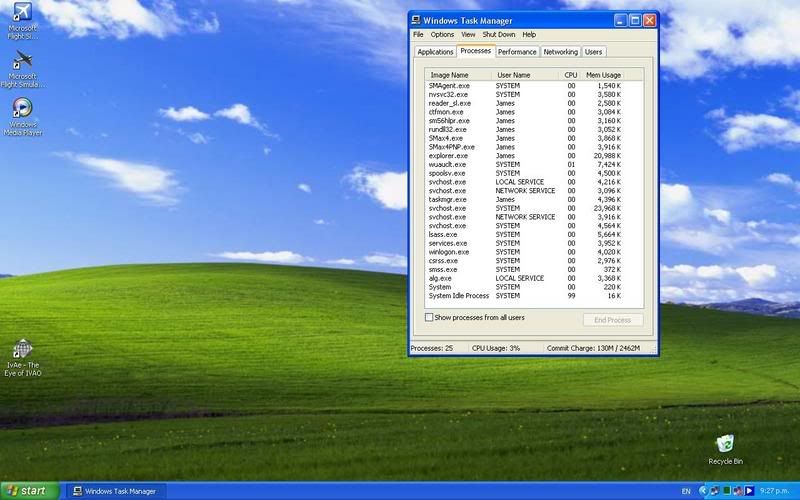
running Proceses

The place to ask for help or solve each others technical issues and discuss hardware

Postby Jimmy » Sun Jun 17, 2007 9:47 pm

I am a little concerned about all the processes I see running in taskmanger (nows the paranoid time, one week after a major upgrade and everything is wanting to kill my butiful new system :ph43r: :lol: ).

user posted image

Anything there I should be wroied about? "svchost" looks odd, looking at taskmanger now I see 5 "svchost"s some are LOCAL SEVICE and some NETWORK and some SYSTEM..

So anything on that list that I should be concerned about or is wasteing my computer power?

Also, when you open taskmanger when there are no other programs running does the cpu useage jump to 100% (or 50 in the case of dual core)? That seems an awful lot of power being used just to open one window, I noticed it with my old set up too..

Thanks
James
Jimmy
 

Postby Charl » Sun Jun 17, 2007 10:05 pm

You can Google any of these process names and spend a happy evening deciding whether your computer is under attack.
Generally not, if you have clean surfing habits and have paid for most of your installed software.
User avatar
Charl
NZFF Pro
 
Joined: Mon May 01, 2006 8:28 am
Posts: 9691
Location: Auckland

Postby HardCorePawn » Mon Jun 18, 2007 9:27 am

svchost is part of the OS... basically used to run various windows services.

and yeah... the task manager will usually cause the CPU usage to spike... its doing a little more than just opening a window! <_<

As Charl mentioned, you can lookup the various processes online... try this site...

Just don't go and randomly kill processes tho... some of them are running important windows services and will make the system unstable :rolleyes:

Its actually quite a learning experience to see exactly what is running, sometimes you find some real cr@p... like useless adobe acrobat 'quick start' utilities etc... stuff that just sits there sucking up resources but not really doing a lot...

leads you to other things, like the startup folder, Run at startup registry entries etc.

regards,
Jared
"Son, we are about the break the surly bonds of gravity, and punch the face of God." -- Homer Simpson

Image
User avatar
HardCorePawn
Senior Member
 
Joined: Fri Sep 01, 2006 4:18 pm
Posts: 1277
Location: 2500' above Godzone

Postby Jimmy » Mon Jun 18, 2007 10:18 am

Thanks guys, I will do some research on some of them then.

I miht try and clean up the start up list but proably wont start the habit of ending all the unessacery process like I did with my first system, would spend quite sometime going threw the list everytime I started up. I don't think the perforamce impact is so much to be going threw and ending them all the time, just good to know theres nothing there useing up to much power to be concerned about :D

mm whatll it be next :P

Thanks again
James
Jimmy
 

Postby HardCorePawn » Mon Jun 18, 2007 10:34 am

I miht try and clean up the start up list but proably wont start the habit of ending all the unessacery process like I did with my first system, would spend quite sometime going threw the list everytime I started up.


I believe there is a program called something like 'End it all', which does this for you... you run it and it will automatically go through and end everything that you have not marked as protected etc.

I have never actually tried it, but from reading various FS forums, it appears to be fairly useful.
"Son, we are about the break the surly bonds of gravity, and punch the face of God." -- Homer Simpson

Image
User avatar
HardCorePawn
Senior Member
 
Joined: Fri Sep 01, 2006 4:18 pm
Posts: 1277
Location: 2500' above Godzone

Postby Zöltuger » Mon Jun 18, 2007 11:58 am

HardCorePawn wrote: something like 'End it all'

oh, that's a bit sad :(

just sticking the process name into google will tell you what it is, useful when trying to identify spyware that slips into your system. It is frustrating when you install something like an HP printer and it adds 6 new processes to the list and programs which you only end up using once a month in the task bar.
Zöltuger
 

Postby Kahu » Mon Jun 18, 2007 4:05 pm

I use a program called FSAuto Start which is really useful to stop all the unwanted programs before you run any sim.
Image
User avatar
Kahu
Sim-holic
 
Joined: Sat May 05, 2007 3:59 pm
Posts: 578
Location: Tauranga

Postby Stanel » Tue Jun 19, 2007 5:23 am

My recommendations:
1. First check your system with Spybot Search&Destroy - freeware . You may download HERE
2. Check your system with nentenst.exe - freeware. You may download HERE
3. Clean your register - the best is Uniblue Register Booster (payware). For free I suggest trial (40 days) version of Ashampoo WinOptimizer HERE
4. If you have firewall installed (I am sure you have) check if Windows firewall is disabled. Sometimes two firewalls make problems.
5. But start from cleaning Cache if you have never performed that action before !
Last edited by Stanel on Tue Jun 19, 2007 8:31 am, edited 1 time in total.
Stanel
------------------------------------------------
AMD Phenom II X6 1090T
Gigabyte GA-890FXA-UD7
16GB 2 x KINGSTON DDR3 8GB (KVR1333D3N9K2/8G)
Nvidia GeForce GTX 470
Windows 7 Ultimate 64-bit
22" iiyama 1680x1050x32
CH Products Eclipse Yoke
CH Products Pro Pedals
GoFlight GF-T8, GF-MCP, GF-LGT, GF166A
TrackIR 4
FSX Acceleration
User avatar
Stanel
Member
 
Joined: Sun Jun 17, 2007 4:24 am
Posts: 29
Location: Poland

Postby ooOO00OOoo » Tue Jun 19, 2007 2:49 pm

Stanel wrote: My recommendations:
1. First check your system with Spybot Search&Destroy - freeware . You may download HERE
2. Check your system with nentenst.exe - freeware. You may download HERE
3. Clean your register - the best is Uniblue Register Booster (payware). For free I suggest trial (40 days) version of Ashampoo WinOptimizer HERE
4. If you have firewall installed (I am sure you have) check if Windows firewall is disabled. Sometimes two firewalls make problems.
5. But start from cleaning Cache if you have never performed that action before !

Don't forget ad awarehere is also freeware
ooOO00OOoo
 

Postby HardCorePawn » Tue Jun 19, 2007 3:09 pm

Another good one is WinXP + SP2 install disk <_<

I usually do it every 3 or 4 months, just to keep the system running nice and fresh... one of these days I'll actually go and create a Ghost image of a fresh install... so I can get it back up in about 15 minutes :)
"Son, we are about the break the surly bonds of gravity, and punch the face of God." -- Homer Simpson

Image
User avatar
HardCorePawn
Senior Member
 
Joined: Fri Sep 01, 2006 4:18 pm
Posts: 1277
Location: 2500' above Godzone


Return to Technical Issues

Who is online

Users browsing this forum: No registered users and 8 guests