Ready for my upgrade!

The place to ask for help or solve each others technical issues and discuss hardware

Postby Zöltuger » Thu Jun 07, 2007 6:51 pm

Jimmy wrote: Theres a little sticker on the motherboard box (a lovely box :P ) "Supports intel Core 2 Duo" But only says P4 Pentium D and celeron CPUs.. interesting..

that is interesting. might be another upgrade on the cards B-)
Zöltuger
 

Postby Jimmy » Tue Jun 12, 2007 12:49 pm

Got it all installed last night, had some help from our family friend across the road, he prety much just directed me and watched :D Was surprisingly easier than I thought, we had to do a reinstall of win xp, he had to leave while it was reformating the C drive so I managed to do all the rest myself! Have installed all the drivers and stuff and now can't wait to get home this afternoon and install fs!

Incredibly im only having one major problem, the sound. I have installed, and reinstalled the sound driver, yet pluging both my headset and speakers into the rear port (we couldn't conect the front one to the mobo) and no sound, the sound program that was installed with the driver has a little graphic equiliser and that shows audio going up and down yet no sound!

I have fiddled with all the settings (yes I don't need anyone telling me to click on the sound volume in the icon tray :lol: ) and I chekecked in the BIOS that the onboard audio is enabled.

Any ideas what could be wrong with the audio output? (yes im pluging it in to the right jack :P )

The only other problem is a hissing sound, from the new CPU fan id imagine, one of those really iritating ones that rythmicly goes up and down in pitch :blink: Need that sound going!

Thanks
James
Jimmy
 

Postby HardCorePawn » Tue Jun 12, 2007 4:31 pm

sounds like the mobo may be fubar... it would appear that the output sockets are broken...

Personally I would test this by running the mobo out of the case (ie. sitting on the desk on the anti-static bag) so that I could connect up the jacks on the front of the case (I assume you couldnt hook them up because the cables would not not reach) and check if they work.

DISCLAIMER: I accept no responsibility if you attempt to do this.

You are probably better off just contacting whoever you got the mobo from and getting a replacement.
"Son, we are about the break the surly bonds of gravity, and punch the face of God." -- Homer Simpson

Image
User avatar
HardCorePawn
Senior Member
 
Joined: Fri Sep 01, 2006 4:18 pm
Posts: 1277
Location: 2500' above Godzone

Postby brownbox » Tue Jun 12, 2007 4:39 pm

great stuff jimmy :thumbup:

The only other problem is a hissing sound

This may be the northbridge fan. These have a tendancy of being really stupid and loud, although they are so small in size! You could always try unplugging the northbridge fan and running the computer (nothing will happen to it), then if the noise is still there, try stopping the cpu fan momentarily with your finger. If neither of these fixes the problem i wouldnt have a clue :lol:


As for the sound, have you checked the mobos website to check there are any BIOS updates adressing this problem. It is also possible that your mobo is a dud, although I doubt it, and think it is a software problem.

Best of luck
Desktop:Core 2 Duo E4300 1.8@ 3.0Ghz@ 1.36v. 4Gb Supertalent DDR2-800 2.1v@ 5-5-5-15. Asus P5N-E SLI Pencil Modded. Corsair TX 650. 512MB Palit Geforce 8800GT. 2x200GB IDE+640GB SATAII. Windows Vista Ultimate X86. Samsung SH-S222A
Phone:Nokia N900 Vodafone
Car: 1993 Mitsubishi Mirage Asti Z. Steel Blue Pearl

1996 Toyota Curren 2.0L 5 Spd Manual Silver. 205/50/R16 on Enkei K-95. Lowered on Jamex Superlows. Remote locking. Remote boot release. Cruise control
1996 Mitsubishi GTO MR

Image
User avatar
brownbox
Senior Member
 
Joined: Thu Apr 27, 2006 10:55 pm
Posts: 1318

Postby Zöltuger » Tue Jun 12, 2007 5:34 pm

brownbox wrote: You could always try unplugging the northbridge fan and running the computer (nothing will happen to it), then if the noise is still there, try stopping the cpu fan momentarily with your finger.

bad ideas!

It could be because there's something plugged into the front port, I'd unplug the front ports just to be sure. There might also be a motherboard jumper that need to be reset, check your manuals for details.
Zöltuger
 

Postby brownbox » Tue Jun 12, 2007 6:19 pm

I meant to say unplug the northbridge fan FOR A LITTLE WHILE ONLY :thumbup:

Unless you have means of stopping the fan somehow without breaking anything, then release it as soon as you can see its not the problem ;)
Desktop:Core 2 Duo E4300 1.8@ 3.0Ghz@ 1.36v. 4Gb Supertalent DDR2-800 2.1v@ 5-5-5-15. Asus P5N-E SLI Pencil Modded. Corsair TX 650. 512MB Palit Geforce 8800GT. 2x200GB IDE+640GB SATAII. Windows Vista Ultimate X86. Samsung SH-S222A
Phone:Nokia N900 Vodafone
Car: 1993 Mitsubishi Mirage Asti Z. Steel Blue Pearl

1996 Toyota Curren 2.0L 5 Spd Manual Silver. 205/50/R16 on Enkei K-95. Lowered on Jamex Superlows. Remote locking. Remote boot release. Cruise control
1996 Mitsubishi GTO MR

Image
User avatar
brownbox
Senior Member
 
Joined: Thu Apr 27, 2006 10:55 pm
Posts: 1318

Postby Jimmy » Tue Jun 12, 2007 9:48 pm

Fixed it!!

We weren't able to plug the front panel speaker out put in cos the pin layout was rather odd, so we didn't know witch to plug in where, thats not a problem thow as ill be useing a USB headset soon.

The problem was that we removed the jumper over two sets of pins but never replaced it, I found two jumpers and its all working now :D

I have installed fs10 and 9 and getting incredible performance, with autogen off in fsx I get around 50fps and in fs9 with everything on minmal I topped 300fps! With fs9 settings how I had them getting 16 frames I can now get up to 70 when unlimited. But I have one major major problem. Long regular stutters.

I will get about 3 seconds of high perforamce (being eathier around 70fps or a steady maxium such as 25 when locked) then it will sudenly drop to lower than 10 for about 4 seconds then with a jult go back up to 70 or so.

This is happening in FS9 and FS10, completly defualt, photoreal terrian, defualt aircraft or the LD 763, even when puased I can see the frame counter drop and this is all when having the view point in one direction with out moving it about.

These aren't minor stuters, I just need a way to keep the high perforamce constant, any ideas very apreciated!

Thanks
James
Jimmy
 

Postby brownbox » Tue Jun 12, 2007 10:31 pm

Hmmmmm....
A jump to conclusions, but make sure your CPU cooler is clipped in properly. May sound stupid, but trust me, the LGA775 cooler is a bugger of a thing to get on and make sure it is clipped on right.

Just wondering, if you have flight sim running in a window, then click on the dekstop while leaving the fs window open (ensure pause on task switch is turned off), do you still get these stutters?

make sure all your drivers (video, sound, chipset) are up to date

Ill say more when I think of them :thumbup:


Also, do you have SP2 for Windows XP installed?
Last edited by brownbox on Tue Jun 12, 2007 10:32 pm, edited 1 time in total.
Desktop:Core 2 Duo E4300 1.8@ 3.0Ghz@ 1.36v. 4Gb Supertalent DDR2-800 2.1v@ 5-5-5-15. Asus P5N-E SLI Pencil Modded. Corsair TX 650. 512MB Palit Geforce 8800GT. 2x200GB IDE+640GB SATAII. Windows Vista Ultimate X86. Samsung SH-S222A
Phone:Nokia N900 Vodafone
Car: 1993 Mitsubishi Mirage Asti Z. Steel Blue Pearl

1996 Toyota Curren 2.0L 5 Spd Manual Silver. 205/50/R16 on Enkei K-95. Lowered on Jamex Superlows. Remote locking. Remote boot release. Cruise control
1996 Mitsubishi GTO MR

Image
User avatar
brownbox
Senior Member
 
Joined: Thu Apr 27, 2006 10:55 pm
Posts: 1318

Postby Jimmy » Tue Jun 12, 2007 10:43 pm

Thanks for the sugestinos Brownbox :D

so how does the CPU fan have an effect on these fs stuters? We did have some trouble getting it on, but when I suggested to clip the opistate clips instead of two beside each other first they all cliped down perfectly.

I have the same display driver that I had before (the one that came with the card) and all the drivers are installed from the disc that came with the motherboard.

I'll try that thing with clicking on the start menu and still seeing fs, could be interesting.

James
Jimmy
 

Postby HardCorePawn » Wed Jun 13, 2007 9:58 am

so how does the CPU fan have an effect on these fs stuters?


If the fan is not on properly, hence not providing adequate cooling, the CPU may be 'stepping down', ie. running slower, to try to stop itself overheating...

I would think that running FS unconstrained is probably what is causing your stutters... I vaguely remember reading on Phil Taylors blog about the way FS handles things when you are running things maxed and without limiting the frames...

something to do with it getting caught up trying to do all the processing for one thing (I think it may have been texture processing or something) and running out of time for other things which was resulting in stutters...

I would suggest limiting the FPS to around 25 to 30... to be honest, anymore than this is not really worth it... unless you're in an e-penis measuring contest... <_<

Also, what sort of HDD have you got? IDE, SATA? 5400RPM or 7200RPM? ATA66, 100? Its possible that your old HDD may not be able to cope with your blazing fast new system and is bottle-necking the whole rig...

Also, seeing as you re-installed XP, you may want to try tweaking it a little... things like auto file indexing, anti-virus and the like may be slowing it down...

If you're in window'd mode, you may want to get the Task Manager up (ctrl-alt-del and press T), and see what processes are taking up CPU time... you may see some random task that is popping up and sucking CPU cycles which may explain why the frame counter is bouncing around...

Also, can you please post your complete specs:

Mobo: eg. Gigabyte P965-DS3
CPU: eg. Intel Core2Duo E6400
RAM: Amount + Type eg. 2gigs DDR2-800
HDD: Size, Make, Model, Type eg. 250gig Seagate Barracuda II 7200 SATA
GPU: Make Model, Mem eg. Gigabyte E7600GT 256meg

I just want to make sure there is nothing really obviously hardware wise :)

cheers,
Jared
"Son, we are about the break the surly bonds of gravity, and punch the face of God." -- Homer Simpson

Image
User avatar
HardCorePawn
Senior Member
 
Joined: Fri Sep 01, 2006 4:18 pm
Posts: 1277
Location: 2500' above Godzone

Postby Jimmy » Wed Jun 13, 2007 10:33 am

Hi Jared,

I'v been tweaking fs for a few years now and this really has me confused, its just so consistant no matter what the settings, as I said I have been getting the problem with the fps locked too..

(being eathier around 70fps or a steady maxium such as 25 when locked)


In both fs9 and 10, So itll hover up around the locked limit then suddenly drop to ten, the only time I have not had this problem was with many settings down and in the defualt lockheed vega
:lol: I suppose the fps wern't droping below the 25 I had it locked at, but every other time it has stuterd, even my first flight in fsx, the defualt one, I had the excatly the same stuters.

I looked at my CPU tempature (useing Asus PC Probe) when installing fs and it sat around 57degress celcius, with no programs running it was at about the same tempature (everytime iv checked its between 55 and 62). I'm yet to see what tempature it is in fs, I will check.

I have had taskmanger running while in fs and the CPU usage indicator sits at halfway, I suppose this is it useing one core? it does vary slightly but not significantly.

Heres my specs:


Mobo: Asus P5PE-VM Intel 865G LGA775 All In One Motherboard

CPU: Intel Pentium D Processor 3.2Ghz LGA775 2x2M Cache 800FSB #935

RAM: Silicon Power 1GB DDR-400 PC3200 Memory

HDD(primary): 38GB, Matrox, I don't know alot about this harddrive.
HDD (secondary, fs drive): 120GB, don't know alot about this one eathier.. I got this Harddrive brand new last Novemeber.

Both my harddrives are pluged into IDE cables and all sit very close together.

GPU: Palit Geforce 7600GS 256MB DDR3 AGP 8x

PSU: Golden 450W.

Case: a very basic case, no fancy cooling designs, I have my side case open (I think when I opened it the CPU temp droped a couple of degress too.)

I hope theres enough information here, thanks a heap Jared :D

James
Last edited by Jimmy on Wed Jun 13, 2007 10:34 am, edited 1 time in total.
Jimmy
 

Postby HardCorePawn » Wed Jun 13, 2007 2:47 pm

I get the feeling that with 1gig of DDR400 and a couple of old IDE drives, you may just be running into some bottlenecks...

the 8x AGP GPU probably does not help either...

Possibly issues with the system paging stuff in and out of memory... and I would assume that as you have Windows installed on, what must be, an old 38gig drive... that the pagefile will be sitting here too... no doubt this thing only supports maybe ATA66? What does it come up with when you get the POST screen at startup? ie. the screen that lists all the IRQ settings... You should see 2 listings for your HDDs...

It really looks like the system just cant keep up and chokes the FPS accordingly...

On a side note, I was reading some reviews on newegg.com and they said something about DDR400 only running at 354Mhz if the FSB was 1066... however that should not really be an issue given that your CPU is only 800FSB...

do you have 1 stick of DDR mem? or 2? I cant remember if that old stuff needed to be in pairs to run dual channel like the new stuff does...

Also, another possibility is that maybe your PSU is not able to supply reliable voltages under load... its a fairly common fault with cheaper PSU's... but that would usually result in random resets and errors... rather than a bit of a frame rate drop...

unless the voltage drop is affecting the CPU and its having to step down or something...

you could try disabling the onboard sound as well... its quite possible that that is stealing CPU cycles that is causing the framerate drop...

Finally... just make sure you have installed all the lastest drivers for the mobo... maybe consider updating the BIOS if its not at the latest...

good luck
"Son, we are about the break the surly bonds of gravity, and punch the face of God." -- Homer Simpson

Image
User avatar
HardCorePawn
Senior Member
 
Joined: Fri Sep 01, 2006 4:18 pm
Posts: 1277
Location: 2500' above Godzone

Postby brownbox » Wed Jun 13, 2007 4:43 pm

make sure your onboard video is disabled. This has been known to severely decrease performance :thumbup:
Desktop:Core 2 Duo E4300 1.8@ 3.0Ghz@ 1.36v. 4Gb Supertalent DDR2-800 2.1v@ 5-5-5-15. Asus P5N-E SLI Pencil Modded. Corsair TX 650. 512MB Palit Geforce 8800GT. 2x200GB IDE+640GB SATAII. Windows Vista Ultimate X86. Samsung SH-S222A
Phone:Nokia N900 Vodafone
Car: 1993 Mitsubishi Mirage Asti Z. Steel Blue Pearl

1996 Toyota Curren 2.0L 5 Spd Manual Silver. 205/50/R16 on Enkei K-95. Lowered on Jamex Superlows. Remote locking. Remote boot release. Cruise control
1996 Mitsubishi GTO MR

Image
User avatar
brownbox
Senior Member
 
Joined: Thu Apr 27, 2006 10:55 pm
Posts: 1318

Postby Jimmy » Wed Jun 13, 2007 5:00 pm

hmm so theres quite alot there to think about..

The RAM is one module. And my fs hardrive is only 8 mounths old. The primary drive witch is reasonably old is very empty and about 80gbs remain on my new drive so space is plentiful.

My CPUs tempature is fine and I don't see the useage jumping around in taskmanger, so perhaps this could be more of a graphics problem, I think ill try some more up to date drivers, or older ones, Im currently just useing the ones that came on disc with my card.

And I am planing to get anothor RAM module in the next mounth. (excatly the same as my current one).

Thanks again
James
Jimmy
 

Postby Jimmy » Wed Jun 13, 2007 5:11 pm

I Found the problem!

It is the tempature :o

Just had fsx running in the defualt flight, was getting awsome stuterless perforamce with autogen on getting 30frames, then after not long it stuterd stutering, I opened ASUS PC Prob and CPU temp was up at 80degress and rising :o :o

After suddenly closing fs the tempature droped rapidly from 80 to below 50.

What do I do!?!??!?!?! Could my CPU be stuffed from this happening?

James (concerned James)
Jimmy
 

Postby HardCorePawn » Wed Jun 13, 2007 6:11 pm

i shouldnt think so... if you run it 24x7 for a couple of days it might... but a few minutes shouldnt do any damage... at worst it will have shortened the life of your CPU by around a day or so ;)

Temps huh? sounds like your CPU heatsink is not seated properly... you may need to reseat it... possibly need to clean heatink and cpu and then apply some thermal paste before reseating...

no biggie... just go and read up on it... google is your friend... there are plenty of guides around... which pretty pictures and videos etc... must better tutorials than i could write! <_<

however, I will say that the most important thing to note is that with thermal compound... less is more... you only need a very thin coat, so a small dollop on the CPU that you spread with your finger covered in gladwrap (or clean plastic bag etc.) until the top of the contact area has a nice thin, even coat is all you need...

if it starts oozing out everywhere like the playdoh fun factory... you have too much! :rolleyes:
Last edited by HardCorePawn on Wed Jun 13, 2007 6:13 pm, edited 1 time in total.
"Son, we are about the break the surly bonds of gravity, and punch the face of God." -- Homer Simpson

Image
User avatar
HardCorePawn
Senior Member
 
Joined: Fri Sep 01, 2006 4:18 pm
Posts: 1277
Location: 2500' above Godzone

Postby brownbox » Wed Jun 13, 2007 8:13 pm

Dont worry Jimmy, it is 100% fine :thumbup:
You may remember i had a similar problem with my cpu heatsink a while back after i cleaned it. I had my cpu temps up to 89'c and I got all freaked out, and everyone said my CPU is fried etc etc.

THe problem is that the stupid Pentium D heatsink is not clipped in properly. There is a simple fix:

This is a no risk procedure, providing you know the general computer rules (dont touch anything fancy looking, always keep a hand on the steel part of the case or wear a anti static strap, and dont force anything on.


-Unplug your pc, pull it out from under the table, and tip it over sideways so the cpu fan is facing upward
-You will see on the cooler there are 4 clips with arrows on the top poiting anti clockwise.
-Turn the tops of these clips anticlockwise, then pull the clips up until they pop out (you will know what I mean by "pop out"
-If you have popped the clips out correctly, the cooler should come right off.
-Using a rag, clean the surface of the CPU and heatsink base
-Apply a small drop of thermal compound onto the COOLER BASE ONLY (not the CPU surface! or it ends up too much), then spread it using a square piece of plastic or cardboard (gets a more even surface than using the tip of the bottle or a finger)
-Once this is done, turn the top of the clips clockwise, the oposite way of the arrows.
-While holding the cooler in your hand, practise clipping the clips back into place by pushing the tops down. Make sure you study how these clips work carefully as it will come in handy now and for the future
-Place your cooler back onto the mobo, lining the clips up with the holes
-Once the clips are lined up with the holes, push the tops down, until the clip in.
-PLug you fan back in

Thats about it.
I managed to do this procedure in my first month of tinkering with a desktop pc, so I imagine you would be able to figure out how to do it :thumbup:

Just remember, evenly apply the thermal compound, but dont put on too much. Just enough so the surface is covered.

Best of luck :thumbup:
Last edited by brownbox on Wed Jun 13, 2007 8:15 pm, edited 1 time in total.
Desktop:Core 2 Duo E4300 1.8@ 3.0Ghz@ 1.36v. 4Gb Supertalent DDR2-800 2.1v@ 5-5-5-15. Asus P5N-E SLI Pencil Modded. Corsair TX 650. 512MB Palit Geforce 8800GT. 2x200GB IDE+640GB SATAII. Windows Vista Ultimate X86. Samsung SH-S222A
Phone:Nokia N900 Vodafone
Car: 1993 Mitsubishi Mirage Asti Z. Steel Blue Pearl

1996 Toyota Curren 2.0L 5 Spd Manual Silver. 205/50/R16 on Enkei K-95. Lowered on Jamex Superlows. Remote locking. Remote boot release. Cruise control
1996 Mitsubishi GTO MR

Image
User avatar
brownbox
Senior Member
 
Joined: Thu Apr 27, 2006 10:55 pm
Posts: 1318

Postby Jimmy » Wed Jun 13, 2007 9:22 pm

the LGA775 cooler is a bugger of a thing to get on and make sure it is clipped on right.
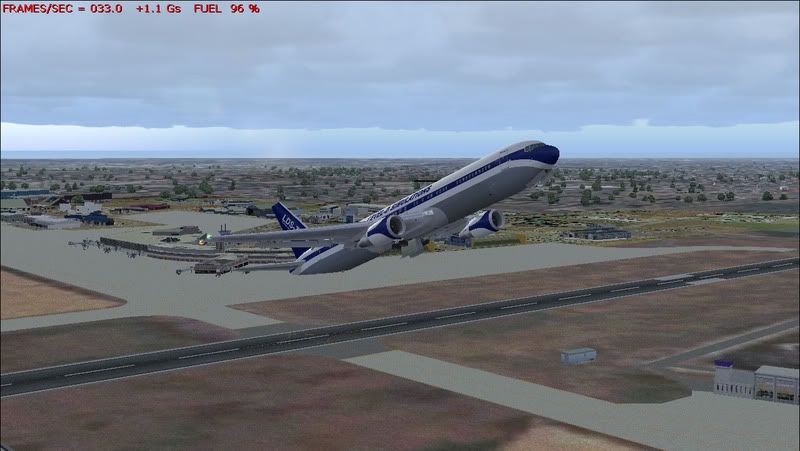

Well, that is excatly what I just did, Brownbox, you have solved the final problem that had me one step away from perfect performace! :D

I pushed very hard on all the clips and got it on really well, I can now fly in fs9 and 10 with the CPU not going above 40Degress! I had some minor stuters but turned of NTFS file paging thingy with the command prompt and now its completly smooth.

user posted image

Two years iv been aiming for this, what can I say, thanks for all the help guys, you all deserve medal of the mounth :thumbup:

James :plane:
Jimmy
 

Postby HardCorePawn » Wed Jun 13, 2007 10:02 pm

Great news!

Happy that you've had a positive outcome Jimmy... now if I could just find that frigging FSX landclass that Brock has I'd be stoked!
"Son, we are about the break the surly bonds of gravity, and punch the face of God." -- Homer Simpson

Image
User avatar
HardCorePawn
Senior Member
 
Joined: Fri Sep 01, 2006 4:18 pm
Posts: 1277
Location: 2500' above Godzone

Postby brownbox » Thu Jun 14, 2007 4:45 pm

great to hear Jimmy :thumbup:
Desktop:Core 2 Duo E4300 1.8@ 3.0Ghz@ 1.36v. 4Gb Supertalent DDR2-800 2.1v@ 5-5-5-15. Asus P5N-E SLI Pencil Modded. Corsair TX 650. 512MB Palit Geforce 8800GT. 2x200GB IDE+640GB SATAII. Windows Vista Ultimate X86. Samsung SH-S222A
Phone:Nokia N900 Vodafone
Car: 1993 Mitsubishi Mirage Asti Z. Steel Blue Pearl

1996 Toyota Curren 2.0L 5 Spd Manual Silver. 205/50/R16 on Enkei K-95. Lowered on Jamex Superlows. Remote locking. Remote boot release. Cruise control
1996 Mitsubishi GTO MR

Image
User avatar
brownbox
Senior Member
 
Joined: Thu Apr 27, 2006 10:55 pm
Posts: 1318

Previous

Return to Technical Issues

Who is online

Users browsing this forum: No registered users and 11 guests