Firefox

The place to ask for help or solve each others technical issues and discuss hardware

Postby victor_alpha_charlie » Fri Apr 27, 2007 11:32 pm

Evenin,

Whenever Firefox updates itself, it sets everything back to default.
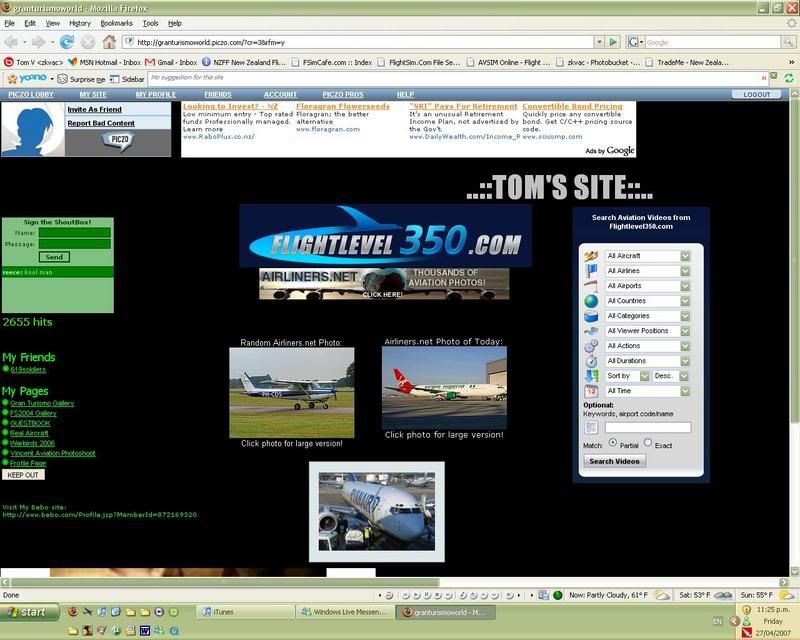
user posted image

It resets my homepage, my addons and all my saved websites, that can be seen just below the address bar. the pic above shows it setup how i like, which has just taken me 10 minutes after Firefox did another bloody update. i have around 50 saved sites so its not fun reorganizing after the orders been screwed up. is there any way i can stop this? Before i get on a plane and go and kill the people that made ff. (yes ok that won't happen :lol: )

And if anyon was wondering, that site is my personal one.. oo00oo..
Visit it here . Sign the guestbook!
Churr
Last edited by victor_alpha_charlie on Fri Apr 27, 2007 11:34 pm, edited 1 time in total.
User avatar
victor_alpha_charlie
NZFF Pro
 
Topic author
Joined: Wed Jan 10, 2007 11:09 am
Posts: 2372

Postby brownbox » Sat Apr 28, 2007 9:01 am

Ive had all sorts of crappy problems like this with firefox. FOr example, the one you name here, history not being recorded, auto complete not working, and auto scrolling swtiching itself off :angry:

Heres what I did

Go into c:/documents and settings/application data

Then copy the whole folder named mozilla into your desktop. Then uninstall firefox, delete your mozilla firefox directory, restart your computer, install it again, then copy your application data folder back into its original place

I think that made sence :unsure:

CHeers
BB
Desktop:Core 2 Duo E4300 1.8@ 3.0Ghz@ 1.36v. 4Gb Supertalent DDR2-800 2.1v@ 5-5-5-15. Asus P5N-E SLI Pencil Modded. Corsair TX 650. 512MB Palit Geforce 8800GT. 2x200GB IDE+640GB SATAII. Windows Vista Ultimate X86. Samsung SH-S222A
Phone:Nokia N900 Vodafone
Car: 1993 Mitsubishi Mirage Asti Z. Steel Blue Pearl

1996 Toyota Curren 2.0L 5 Spd Manual Silver. 205/50/R16 on Enkei K-95. Lowered on Jamex Superlows. Remote locking. Remote boot release. Cruise control
1996 Mitsubishi GTO MR

Image
User avatar
brownbox
Senior Member
 
Joined: Thu Apr 27, 2006 10:55 pm
Posts: 1318

Postby lowellyerex » Sat Apr 28, 2007 11:41 am

I thought they'd finally fixed that Firefox issue - it used to pee me off too. Dare i say it, but I think IE 7 has caught up to Firefox, and is actually preferable in some respects (I still come across website functionality problems with Firefox - including the Airways IFIS site). I still use Firefox, mainly because it has all my usernames and non-critical passwords remembered, and because I like the "no script" plugin, especially with my kids using the computer. I also run my browsers from within "drop my rights", as I run XP with admin privileges. For info on this, see this article

I installed the latest version of Opera, and it looks pretty darn good, but I'm yet to give it a thorough workout.
lowellyerex
 

Postby brownbox » Sat Apr 28, 2007 4:11 pm

The absolute reason i use firefox is because of the amazing adblocker. ;)
Desktop:Core 2 Duo E4300 1.8@ 3.0Ghz@ 1.36v. 4Gb Supertalent DDR2-800 2.1v@ 5-5-5-15. Asus P5N-E SLI Pencil Modded. Corsair TX 650. 512MB Palit Geforce 8800GT. 2x200GB IDE+640GB SATAII. Windows Vista Ultimate X86. Samsung SH-S222A
Phone:Nokia N900 Vodafone
Car: 1993 Mitsubishi Mirage Asti Z. Steel Blue Pearl

1996 Toyota Curren 2.0L 5 Spd Manual Silver. 205/50/R16 on Enkei K-95. Lowered on Jamex Superlows. Remote locking. Remote boot release. Cruise control
1996 Mitsubishi GTO MR

Image
User avatar
brownbox
Senior Member
 
Joined: Thu Apr 27, 2006 10:55 pm
Posts: 1318

Postby jastheace » Sun Apr 29, 2007 2:30 pm

funny that, i don't have any problems what so ever when it updates itself i get a new tab saying it has been updated, and everything else is exactly where i left it
In the ongoing battle between objects made of aluminum going hundreds of miles per hour and the ground going zero miles per hour, the ground has yet to lose.

Image
User avatar
jastheace
Senior Member
 
Joined: Sun Aug 13, 2006 1:33 pm
Posts: 1032
Location: Hastings

Postby Mattnz » Sun Apr 29, 2007 4:27 pm

It normally updates fine for me, but last time it screwed up. I'll try deleting the Application Data folder, and see if that will work.

Thanks,
Matt :)
Image
Mattnz
Sim-holic
 
Joined: Sun Feb 25, 2007 6:13 pm
Posts: 810
Location: Dunedin

Postby johanfrc » Wed May 02, 2007 5:37 am

I'm using FF without any problems. When I update I can still use all the remembered websites and passwords. So no problem here. I also use the Adblock Plus plugin and it great. haven't seen an ad for more then 2-3 months.
Image
If God had really intended men to fly, he'd make it easier to get to the airport. - George Winters
johanfrc
Member
 
Joined: Sun Feb 04, 2007 12:34 am
Posts: 149
Location: Denmark

Postby Bingobob » Wed May 02, 2007 9:20 am

User Error springs to mind with this problem
Bingobob
 

Postby Timmo » Wed May 02, 2007 1:46 pm

I wasnt impressed to be honest, it was really slow to start up and didnt really do anything better than I.E. (at least for my use)
Timmo
NZFF Pro
 
Joined: Wed Oct 25, 2006 6:28 pm
Posts: 2056
Location: Tauranga

Postby creator2003 » Wed May 02, 2007 3:56 pm

Try netscape browser it users firefox and explorer and is the one stop boss of browser options , ive never had things go back to default {firefox) unless i complete remove and reinstall
creator2003


Return to Technical Issues

Who is online

Users browsing this forum: No registered users and 9 guests
