
Wellington support issues
53 posts
• Page 2 of 3 • 1, 2, 3


 Lawrie.


 by Charl » Fri Apr 06, 2007 12:49 pm
Re-installed NZWN and noticed these on approach to Rwy16:
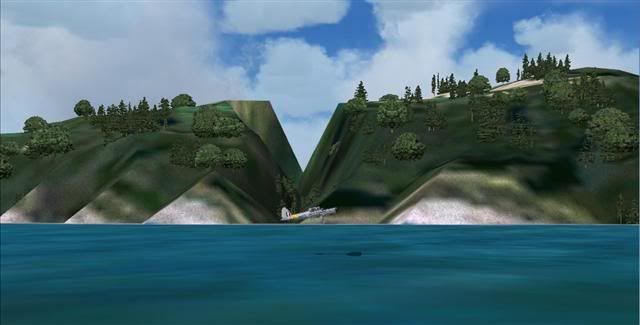
and a little closer to the airport:
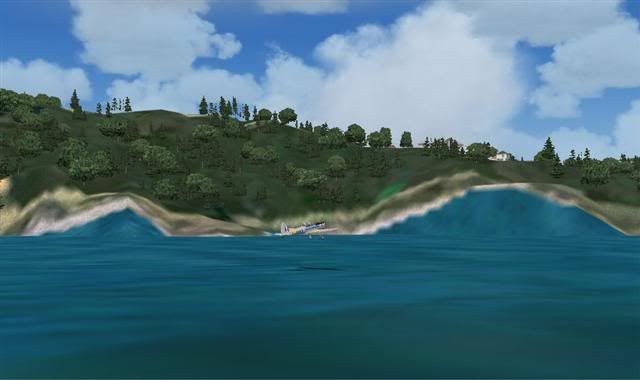
I think my installation has always had these, but since I'm doing a fresh look, thought I'd ask if it's a known issue.
I've been through the FAQ's
and a little closer to the airport:
I think my installation has always had these, but since I'm doing a fresh look, thought I'd ask if it's a known issue.
I've been through the FAQ's
-

Charl - NZFF Pro
- Joined: Mon May 01, 2006 8:28 am
- Posts: 9801
- Location: Auckland
by ZK-LGD » Fri Apr 06, 2007 1:12 pm
Howdy Charl,
Screenshot 1: that looks like a problem with one of the Cook Strait AFCADs cutting a path through Point Halswell (either that, or virtual prisoners from Wellington Prison have tunnelled their way out ).
Screenshot 2: is your TL set at 21?
Screenshot 1: that looks like a problem with one of the Cook Strait AFCADs cutting a path through Point Halswell (either that, or virtual prisoners from Wellington Prison have tunnelled their way out
).Screenshot 2: is your TL set at 21?
Regards,
Dorian
Dorian
-

ZK-LGD - Sim-holic
- Joined: Fri Apr 28, 2006 3:34 pm
- Posts: 742
- Location: Springfield, Canterbury
by Charl » Fri Apr 06, 2007 2:07 pm
Well Dorian I'm glad someone's awake - I think I asked this before, you provided the AFCAD answer, I fixed it, and on re-install lost it. 
Thanks.
Here's terrain stuff in fs.cfg:
TEXTURE_BANDWIDTH_MULT=400
[TERRAIN]
TERRAIN_ERROR_FACTOR=100.000000
TERRAIN_MIN_DEM_AREA=10.000000
TERRAIN_MAX_DEM_AREA=100.000000
TERRAIN_MAX_VERTEX_LEVEL=21
TERRAIN_TEXTURE_SIZE_EXP=8
TERRAIN_AUTOGEN_DENSITY=5
TERRAIN_USE_GRADIENT_MAP=1
TERRAIN_EXTENDED_TEXTURES=1
TERRAIN_DEFAULT_RADIUS=9.5000000
TERRAIN_EXTENDED_RADIUS=4.500000
TERRAIN_EXTENDED_LEVELS=4
Thanks.
Here's terrain stuff in fs.cfg:
TEXTURE_BANDWIDTH_MULT=400
[TERRAIN]
TERRAIN_ERROR_FACTOR=100.000000
TERRAIN_MIN_DEM_AREA=10.000000
TERRAIN_MAX_DEM_AREA=100.000000
TERRAIN_MAX_VERTEX_LEVEL=21
TERRAIN_TEXTURE_SIZE_EXP=8
TERRAIN_AUTOGEN_DENSITY=5
TERRAIN_USE_GRADIENT_MAP=1
TERRAIN_EXTENDED_TEXTURES=1
TERRAIN_DEFAULT_RADIUS=9.5000000
TERRAIN_EXTENDED_RADIUS=4.500000
TERRAIN_EXTENDED_LEVELS=4
-
Charl - NZFF Pro
- Joined: Mon May 01, 2006 8:28 am
- Posts: 9801
- Location: Auckland
by ZK-LGD » Fri Apr 06, 2007 2:26 pm
Have you also installed the Wellington 101 fix Robin released? I know this addressed the problem with the Lyall Bay sea wall. Haven't approched NZWN on 16 for some time now, but, from memory, I think I may also have the same "problem". Might just be a misalignment between mesh and scenery tile.
Robin?
Robin?
Regards,
Dorian
Dorian
-
ZK-LGD - Sim-holic
- Joined: Fri Apr 28, 2006 3:34 pm
- Posts: 742
- Location: Springfield, Canterbury
by Charl » Sun Apr 22, 2007 7:17 pm
Scholar and a gentleman. sir, I thank you.
Interesting part is the sea used to make a hump where the AFCAD sat, despite my best efforts.
After my total re-install this has now vanished, the RealNZ QW looks great once more.
Must be the order in which the scenery loads itself?
Interesting part is the sea used to make a hump where the AFCAD sat, despite my best efforts.
After my total re-install this has now vanished, the RealNZ QW looks great once more.
Must be the order in which the scenery loads itself?
Last edited by Charl on Sun Apr 22, 2007 7:19 pm, edited 1 time in total.
-
Charl - NZFF Pro
- Joined: Mon May 01, 2006 8:28 am
- Posts: 9801
- Location: Auckland
by toprob » Mon Aug 27, 2007 6:09 pm
anthonynz wrote:QUOTE(anthonynz @ Aug 27 2007, 05:31 PM) <{POST_SNAPBACK}>i just installed it on fsx and all the airport and a few other buildings are all black any way to fix this as it is hard to land at wellington airport being like this
You may need to reinstall. Are you sure you installed the FSX version?
-

toprob - NZFF Pro
- Topic author
- Joined: Sat Apr 29, 2006 4:56 pm
- Posts: 6741
- Location: Upper Hutt
by anthonynz » Tue Aug 28, 2007 5:19 pm
toprob wrote:QUOTE(toprob @ Sep 1 2007, 06:09 AM) <{POST_SNAPBACK}>You may need to reinstall. Are you sure you installed the FSX version?
yes i did use the fsx install and i have reinstall twice but same thing
- anthonynz
by anthonynz » Wed Aug 29, 2007 5:23 pm
toprob wrote:QUOTE(toprob @ Sep 2 2007, 08:09 AM) <{POST_SNAPBACK}>Did you install the FSX version from the CD, or run the patch on the FS2004 version?
What are your specs? In particular your video.
i installed it from the cd and cant remember what vid specs are but the marlborough one works real good just not welly
- anthonynz
by toprob » Thu Aug 30, 2007 1:47 pm
anthonynz wrote:QUOTE(anthonynz @ Aug 29 2007, 05:23 PM) <{POST_SNAPBACK}>i installed it from the cd and cant remember what vid specs are but the marlborough one works real good just not welly
Apart from a faulty installation, I don't have many ideas on this. That's why I wanted to know your specs, because maybe your graphics system is being overloaded.
In FSX, I think that black textures can mean a few different things:
1. FS9-style untextured materials -- the type of thing which the updated Wellington for FSX was designed to fix. But this would only apply to a few objects.
2. Missing textures -- which is why I was asking about how you installed this. I have had people just download the patch, without installing the basic scenery first -- this would definitely account for missing textures, but since you installed from the CD this won't be the case;
3. Textures just not being rendered -- which comes down to system specs again.
Regarding no. 2, how many files are inthe RealNZwgtn/texture folder? Just navigate to there in Windows Explorer, and the status bar will tell you how many files.
-
toprob - NZFF Pro
- Topic author
- Joined: Sat Apr 29, 2006 4:56 pm
- Posts: 6741
- Location: Upper Hutt
by ronindanbo » Sun Dec 09, 2007 6:11 am
Hi Robin
I have just installed Welly in FSX and applied the patch, I have an issue where I think the AFCAC may be the default and there seems to be an incorrect landclass (waves under the taxiways ?) is there anything I can do to fix this??
I have just installed Welly in FSX and applied the patch, I have an issue where I think the AFCAC may be the default and there seems to be an incorrect landclass (waves under the taxiways ?) is there anything I can do to fix this??

-

ronindanbo - Sim-holic
- Joined: Fri Jul 14, 2006 5:59 am
- Posts: 700
- Location: Wellington
 (in a good way
  )
) 


by toprob » Sun Apr 20, 2008 12:20 pm
andrewp wrote:QUOTE (andrewp @ Apr 20 2008, 11:50 AM) <{POST_SNAPBACK}>My Wellington is looking a little bare ... how do I fix this? I have all the sliders on max.
Those look like default ground textures -- this is normally caused by installing a landclass file with a priority higher than Wellington.
It could also be a faulty installation, so if you haven't 'nuked' it with landclass, you might try to reinstall it.
-
toprob - NZFF Pro
- Topic author
- Joined: Sat Apr 29, 2006 4:56 pm
- Posts: 6741
- Location: Upper Hutt
53 posts
• Page 2 of 3 • 1, 2, 3
Return to Godzone 'Real New Zealand' Scenery Support
Who is online
Users browsing this forum: No registered users and 24 guests