Best Graphics Card for me

The place to ask for help or solve each others technical issues and discuss hardware

Postby Christian » Wed Mar 21, 2007 10:57 pm

Hi Trolly

If your pc is running stable you don't need a new PSU. If your graphics card doesn't get enough power your pc will crash whenever you run graphics heavy programs (eg FS). A better PSU won't give you better performance - unless you haven't connected your 6600GT to the PSU. If you haven't, your card will run in a slower mode.

Switching PSU is pretty painless. Old one out, new one in - that's it. Probaby one day Windows licenses will refuse to run because you switched PSU and besides demand a hard drive format, but luckily we aren't there yet ;)

Cheers,
Christian
Breathtakingly gorgeous FS landscapes for New Zealand.
Visit Sim Pilot Experience now:
http://www.simpilotexperience.com
Follow me on twitter:
http://www.twitter.com/ChristianStock
User avatar
Christian
Forum Addict
 
Joined: Sun Apr 30, 2006 12:03 pm
Posts: 426
Location: melbourne

Postby brownbox » Thu Mar 22, 2007 7:12 am

good to see you got it sorted Trolly :thumbup:

Im guessing on your setup, youll probably wont about a 400w psu. Let this place help
http://www.extreme.outervision.com/psucalculator.jsp
Desktop:Core 2 Duo E4300 1.8@ 3.0Ghz@ 1.36v. 4Gb Supertalent DDR2-800 2.1v@ 5-5-5-15. Asus P5N-E SLI Pencil Modded. Corsair TX 650. 512MB Palit Geforce 8800GT. 2x200GB IDE+640GB SATAII. Windows Vista Ultimate X86. Samsung SH-S222A
Phone:Nokia N900 Vodafone
Car: 1993 Mitsubishi Mirage Asti Z. Steel Blue Pearl

1996 Toyota Curren 2.0L 5 Spd Manual Silver. 205/50/R16 on Enkei K-95. Lowered on Jamex Superlows. Remote locking. Remote boot release. Cruise control
1996 Mitsubishi GTO MR

Image
User avatar
brownbox
Senior Member
 
Joined: Thu Apr 27, 2006 10:55 pm
Posts: 1318

Postby ardypilot » Sun Mar 25, 2007 12:48 am

Anyway, feel free to test the card some and you can make a decision next week after you've had a chance to put it through its paces

Well, so far, this is what I have noticed:

Bad stuff:
Scenery in distance is blurred, really noticably. The textures I am talking about are about 25nm from my aircraft's position. This never used to happen with my 5600 setup. <- (main concern)

FSNAV takes agggges to start up. Every view change I make (left, right, up, down, zoom in/out), the whole world airport, vor and mountain data reloads. Again, never happened with the 5600 with same drivers.

When changing to spot view, the aircraft's textures take a couple of seconds to load before the appear on the blank white/grey external model.

When panning around in spot view, the terrain flickers with white/blue empty squares.

Black screen flickering when changing postion/ time and date/ weather/ aircraft in select a flight menu, and on the loading screen.

Good stuff:
Increased, smoother FPS. :D

So, anyone know how to solve my problemos? I guess I really need to buy a whole new system, but $$$ don't allow at the moment. Also, was it nessecery for me to rebuild my entire FS9.cfg when installing the new GFX card? I still have my old one backed up...
Last edited by ardypilot on Sun Mar 25, 2007 12:49 am, edited 1 time in total.
User avatar
ardypilot
NZFF Pro
 
Topic author
Joined: Wed Apr 26, 2006 10:01 am
Posts: 6802
Location: Auckland

Postby ardypilot » Sun Mar 25, 2007 7:17 pm

BUMP!

I emailed FSNAV, and they told me to try the '78.01' drivers from nvidia. I cleaned my new drivers out with drivercleaner, installed the 78.01 ones but it made no difference...

Help me please someone!
User avatar
ardypilot
NZFF Pro
 
Topic author
Joined: Wed Apr 26, 2006 10:01 am
Posts: 6802
Location: Auckland

Postby Bingobob » Sun Mar 25, 2007 9:11 pm

You still running a 300W PSU? Thats you first problem you really should have minimum of 400W or better. More power easier it runs it helps to get a good name power supply as well. Your local friendly PC shop should be able to help.

Try the Nvidia Detonator 71.84, last I heard that was the most stable driver for the 6600GT cards. Should know I got it in this system and it works.

But your power supply is not strong enough.
Bingobob
 

Postby ardypilot » Sun Mar 25, 2007 9:16 pm

But your power supply is not strong enough.

Oh ok, so you are sure that getting a 400w PSU would soulve the problems I listed?

Thanks for the 71.84 info- I'll go get that now :)
Last edited by ardypilot on Sun Mar 25, 2007 9:38 pm, edited 1 time in total.
User avatar
ardypilot
NZFF Pro
 
Topic author
Joined: Wed Apr 26, 2006 10:01 am
Posts: 6802
Location: Auckland

Postby Bingobob » Sun Mar 25, 2007 9:20 pm

Yes!

Assuming you get a good brand and not a el cheapo from Dickie Smiths. Even then you may occasional encounter a warning on startup that Nvidia has detected low power supply to graphics card and features have been switched off. Nothing to worry about for some reason it only happens on cold days :P

Seriously aim for bigger than 400W if possible, like I said more Power :drool:
Bingobob
 

Postby Bingobob » Sun Mar 25, 2007 9:24 pm

After thought :rolleyes:

How old is your PSU? The more use it gets the more it will have degraded.
Bingobob
 

Postby ardypilot » Sun Mar 25, 2007 9:57 pm

Is this the driver you were referring to Bingo?
http://www.nvidia.com/object/winxp_2k_71.84.html

Also, my PSU is pretty old. Came with my PC when I bought it almost two and a bit years ago. Is this PSU decent, or would you call this one an el cheapo: http://www.pbtech.co.nz/index.php?item=PSUATR0500
User avatar
ardypilot
NZFF Pro
 
Topic author
Joined: Wed Apr 26, 2006 10:01 am
Posts: 6802
Location: Auckland

Postby HardCorePawn » Sun Mar 25, 2007 11:21 pm

Trolly,

I doubt that getting a better PSU will cure your blurries and texture loadings issues. A new PSU should fix the Internal Power Errors, you mentioned in your other thread.

The blurries and Texture issues are going to be driver and, more likely IMHO, due to bus speed related (ie. the fact that you are running an 8x AGP card in a 4x AGP slot.)

Obviously the only way to fix that is to get a new mobo... but if you're going to do that, I would recommend MOBO+CPU+RAM+Vid.

Looks like my 6600GT is going to be a no-go... I'm sorry that it didnt work out :(
"Son, we are about the break the surly bonds of gravity, and punch the face of God." -- Homer Simpson

Image
User avatar
HardCorePawn
Senior Member
 
Joined: Fri Sep 01, 2006 4:18 pm
Posts: 1277
Location: 2500' above Godzone

Postby ardypilot » Mon Mar 26, 2007 12:03 am

Thanks for the advice HCP- Even if getting a new PSU did solve the blurries, I can't really be bothered splashing out $170+ just for the sake of 4 or 5 extra FPS. I guess I will just sake my money for a new PC sometime in the future.

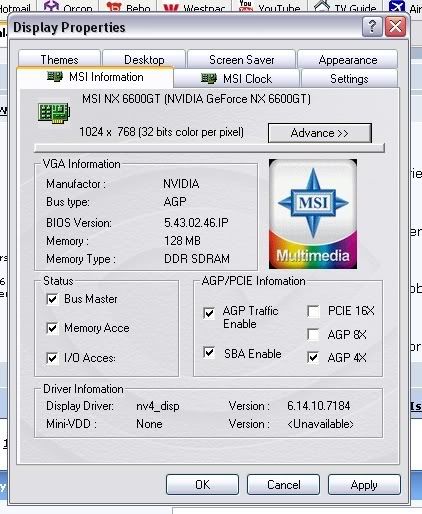
due to bus speed related (ie. the fact that you are running an 8x AGP card in a 4x AGP slot.

On the other hand, unlike the NX6600, this card lets me choose for it to be 4x compatable:
user posted image
If it is ok with you, I will continue to test it for a few more days with some more research and different drivers. PM me if you need to ;)

Cheers mate.
User avatar
ardypilot
NZFF Pro
 
Topic author
Joined: Wed Apr 26, 2006 10:01 am
Posts: 6802
Location: Auckland

Postby Christian » Mon Mar 26, 2007 12:56 pm

Hi Trolly

Firstly check if your video card is connected to the PSU. The 6600 needs external power.

Secondly, if you rebuilt your FS9.cfg make sure you change the terrain texture settings. Not sure on top of my head what good settings are, but Justin Tyme from fsgenesis has published some good values - google it. The default FS9.cfg has really blurry textures - looks awful.

Another thing you can try is adjusting the AGP settings in the bios. That may help with the texture loading issue.

Cheers,
Christian
Breathtakingly gorgeous FS landscapes for New Zealand.
Visit Sim Pilot Experience now:
http://www.simpilotexperience.com
Follow me on twitter:
http://www.twitter.com/ChristianStock
User avatar
Christian
Forum Addict
 
Joined: Sun Apr 30, 2006 12:03 pm
Posts: 426
Location: melbourne

Postby Jimmy » Mon Mar 26, 2007 2:07 pm

On the other hand, unlike the NX6600, this card lets me choose for it to be 4x compatable:


Its most likely thats just an option with the software your useing there, it may not actuly be supported by your card itself ;) See its got the PCI-e option there too, so somethign made for a wide range of cards.

kepp trying, youl get there in the end :thumbup:
James
Last edited by Jimmy on Mon Mar 26, 2007 2:07 pm, edited 1 time in total.
Jimmy
 

Postby ardypilot » Mon Mar 26, 2007 4:20 pm

Firstly check if your video card is connected to the PSU. The 6600 needs external power.

Yep, it definitly is.

but Justin Tyme from fsgenesis has published some good values - google it.

Thanks. I had a good search but found nothing- got a link?

Try is adjusting the AGP settings in the bios.

Instructions please?

Also, if anyone is using ZoneAlarm Pro 7.0, do you know how to stop the pop ups that come up when it checks for the latest updates? When I'm running a full screen program such as FS, it minimizes to the desktop when it happens.

Cheers.
User avatar
ardypilot
NZFF Pro
 
Topic author
Joined: Wed Apr 26, 2006 10:01 am
Posts: 6802
Location: Auckland

Postby Christian » Mon Mar 26, 2007 4:48 pm

these are my settings:

[DISPLAY]
UPPER_FRAMERATE_LIMIT=25
TEXTURE_BANDWIDTH_MULT=100
TextureMaxLoad=10
[TERRAIN]
TERRAIN_ERROR_FACTOR=100.000000
TERRAIN_MIN_DEM_AREA=10.000000
TERRAIN_MAX_DEM_AREA=100.000000
TERRAIN_MAX_VERTEX_LEVEL=21
TERRAIN_TEXTURE_SIZE_EXP=8
TERRAIN_AUTOGEN_DENSITY=5
TERRAIN_USE_GRADIENT_MAP=1
TERRAIN_EXTENDED_TEXTURES=1
TERRAIN_DEFAULT_RADIUS=9.500000
TERRAIN_EXTENDED_RADIUS=4.500000
TERRAIN_EXTENDED_LEVELS=3

Not sure if they are the best, but definitely better than default.

The AGP settings are a bit fidgety and may not change anything. There is only one setting, name depends on BIOS but should be obvious, something like 'AGP bandwidth' and then you can set different MB values. Try values between 64MB and 256MB and see if that makes a difference.

Christian
Breathtakingly gorgeous FS landscapes for New Zealand.
Visit Sim Pilot Experience now:
http://www.simpilotexperience.com
Follow me on twitter:
http://www.twitter.com/ChristianStock
User avatar
Christian
Forum Addict
 
Joined: Sun Apr 30, 2006 12:03 pm
Posts: 426
Location: melbourne

Postby ardypilot » Mon Mar 26, 2007 9:21 pm

Hi again Christian,
I coped that terrain and display section into my cfg file, but didn't notice a difference.

I then went into my BIOS and found a setting called "Graphics Apature Size" and changed it from 128mb to 256mb, but again, did not notice a difference in FS. I'm wondering if it should still be 128mb as both this card, and the last one I had, had 128mb onboard memory.

Its most likely thats just an option with the software your useing there, it may not actuly be supported by your card itself

I also found an option to use AGP 1X, 2X or 4X, and it was on 4x, so I guess my mobo supports it?
User avatar
ardypilot
NZFF Pro
 
Topic author
Joined: Wed Apr 26, 2006 10:01 am
Posts: 6802
Location: Auckland

Postby Christian » Mon Mar 26, 2007 9:27 pm

Looks like you can run AGP 4x

Try reducing Graphics Apature Size. Maybe try setting it to 0 first and see if that makes a difference. If that doesn't do anything it's beyond my wisdom.
Breathtakingly gorgeous FS landscapes for New Zealand.
Visit Sim Pilot Experience now:
http://www.simpilotexperience.com
Follow me on twitter:
http://www.twitter.com/ChristianStock
User avatar
Christian
Forum Addict
 
Joined: Sun Apr 30, 2006 12:03 pm
Posts: 426
Location: melbourne

Postby Bingobob » Thu Mar 29, 2007 11:19 am

I am cautious on advising you further due to my own business commitments ;)

Ideally a AGP 8x capable motherboard would get the best effect out of the A6600 GPX and almost certainly as I stated elesewhere the PSU should be more meaty than the 300w hairdryer motor you have installed.

What your trying to do is put 91 octane fuel in a car designed for 98 and expecting it to perform well on hills :P

My ultimate advice to you is build a new system otherwise you will be just throwing money away. If it aint broke dont fix it.
Bingobob
 

Postby ardypilot » Thu Mar 29, 2007 11:24 pm

Thanks for all the help guys, but I couldn't get Jared's 6600 to work any better in my system any better, so I gave it back to him today.

I now have my old 5600 back in place, and the distant clarity really does make a big difference for me when simming. I guess "I didnt know what I got 'till it gone". Next time I think about upgrading, it will be a whole new system!
User avatar
ardypilot
NZFF Pro
 
Topic author
Joined: Wed Apr 26, 2006 10:01 am
Posts: 6802
Location: Auckland

Postby Zöltuger » Fri Mar 30, 2007 4:21 pm

Trolly wrote: Next time I think about upgrading, it will be a whole new system!

:thumbup:
*cough* FSX *cough*
Last edited by Zöltuger on Fri Mar 30, 2007 4:22 pm, edited 1 time in total.
Zöltuger
 

PreviousNext

Return to Technical Issues

Who is online

Users browsing this forum: No registered users and 12 guests