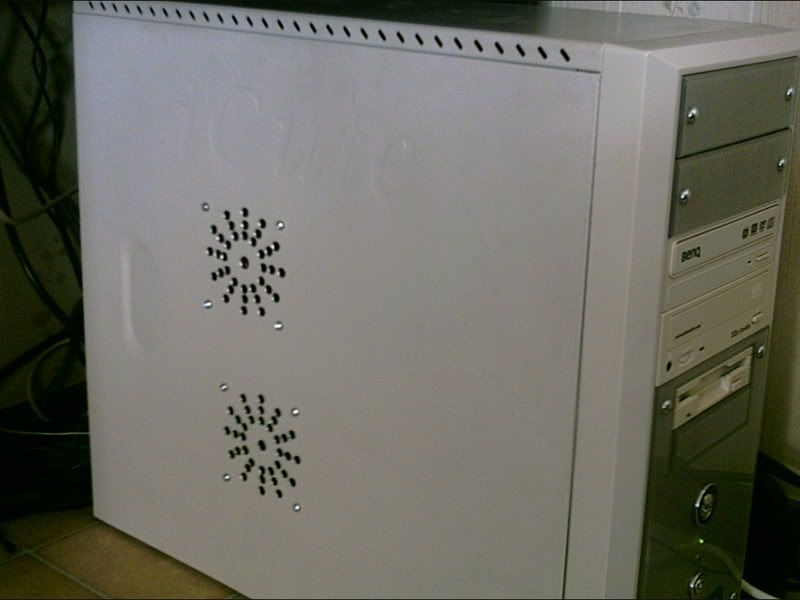
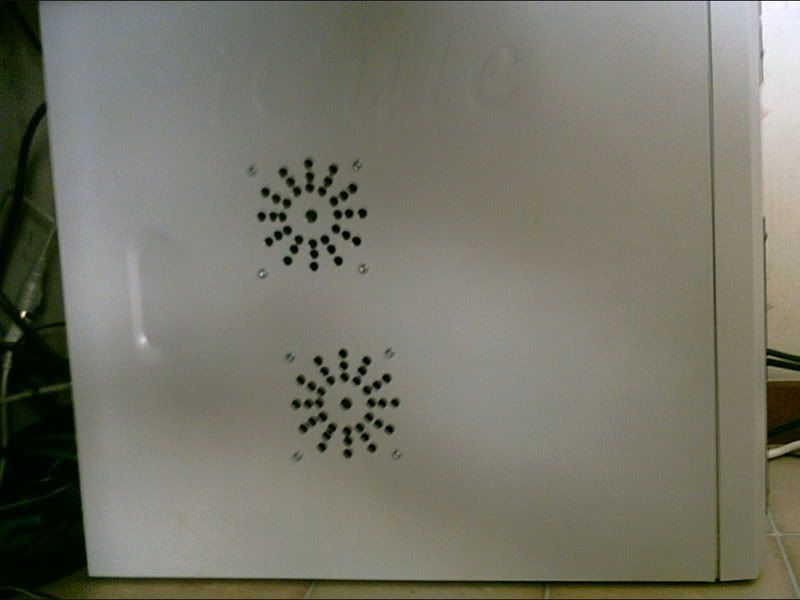
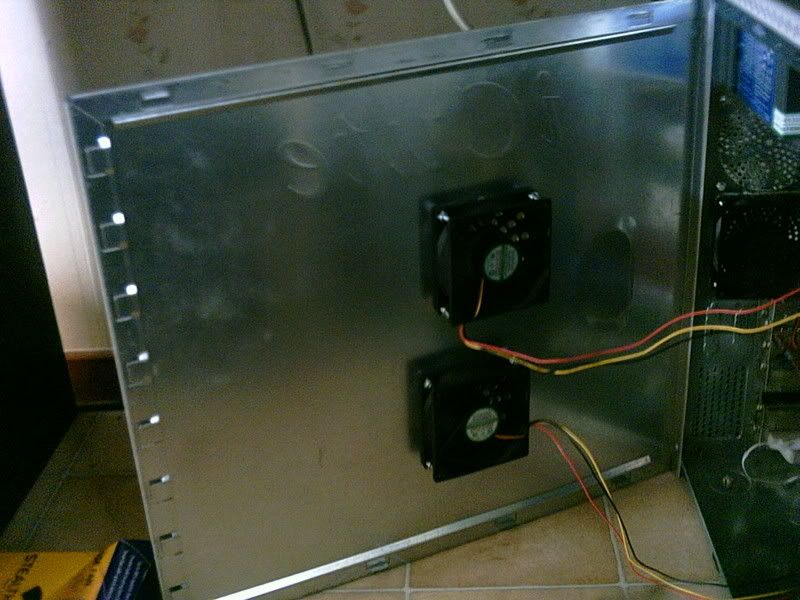
I cut up my case

The place to ask for help or solve each others technical issues and discuss hardware

Postby brownbox » Tue Mar 06, 2007 5:34 pm

I did it. I put two holes in the side of my computer, and stuck fans in them. It doesnt look half bad! (considering I did it)

Just check it out
user posted image
user posted image
user posted image

Well, what do you tihink? Although, it seems to be noisier now, my graphics card temp has dropped 6 degrees Celcius to 37'C idling :P
Desktop:Core 2 Duo E4300 1.8@ 3.0Ghz@ 1.36v. 4Gb Supertalent DDR2-800 2.1v@ 5-5-5-15. Asus P5N-E SLI Pencil Modded. Corsair TX 650. 512MB Palit Geforce 8800GT. 2x200GB IDE+640GB SATAII. Windows Vista Ultimate X86. Samsung SH-S222A
Phone:Nokia N900 Vodafone
Car: 1993 Mitsubishi Mirage Asti Z. Steel Blue Pearl

1996 Toyota Curren 2.0L 5 Spd Manual Silver. 205/50/R16 on Enkei K-95. Lowered on Jamex Superlows. Remote locking. Remote boot release. Cruise control
1996 Mitsubishi GTO MR

Image
User avatar
brownbox
Senior Member
 
Topic author
Joined: Thu Apr 27, 2006 10:55 pm
Posts: 1318

Postby Jimmy » Tue Mar 06, 2007 5:42 pm

theres some skill there! Those holes look perfect :thumbup:

Hey if your concernd about heating then try getting a PCI exhust fan, I don't know how effective my one was but its a good sounding concept, it actuly sucks the hot air out of the case, nice and warm behind the compter too lol have a search on tradme or go to smiths dick or something...
Jimmy
 

Postby brownbox » Tue Mar 06, 2007 5:59 pm

Ive technically already got one. The way my video card fan works (after market), it sucks air in from the case, over the heatsink, and out of the case. Very handy. Hence the reason I stuck a fan beside the video card, so it would have plenty of air to suck in. Also, I have 1 80 mm exhausting, aswell and the power supply. 1 fan in the front to cool the hd too ;)


  theres some skill there

Not at all! All it needed was a drill, a centre punch, a compass, and a hammer. Not to mention plenty of cursing! :lol:
Desktop:Core 2 Duo E4300 1.8@ 3.0Ghz@ 1.36v. 4Gb Supertalent DDR2-800 2.1v@ 5-5-5-15. Asus P5N-E SLI Pencil Modded. Corsair TX 650. 512MB Palit Geforce 8800GT. 2x200GB IDE+640GB SATAII. Windows Vista Ultimate X86. Samsung SH-S222A
Phone:Nokia N900 Vodafone
Car: 1993 Mitsubishi Mirage Asti Z. Steel Blue Pearl

1996 Toyota Curren 2.0L 5 Spd Manual Silver. 205/50/R16 on Enkei K-95. Lowered on Jamex Superlows. Remote locking. Remote boot release. Cruise control
1996 Mitsubishi GTO MR

Image
User avatar
brownbox
Senior Member
 
Topic author
Joined: Thu Apr 27, 2006 10:55 pm
Posts: 1318

Postby HardCorePawn » Wed Mar 07, 2007 9:58 am

Are your 2 new fans sucking air in, blowing it out, or one of each?
"Son, we are about the break the surly bonds of gravity, and punch the face of God." -- Homer Simpson

Image
User avatar
HardCorePawn
Senior Member
 
Joined: Fri Sep 01, 2006 4:18 pm
Posts: 1277
Location: 2500' above Godzone

Postby Charl » Wed Mar 07, 2007 11:05 am

Inspired by the BB philosophy some time ago (think it may have been the high-voltage test to destruction) I did just this some time ago.
Mine is a single 100mm fan blowing out through a rosette not half as nice as the one BB did.
My fan is a $10 el cheapo however, and it has expired.
Ths makes the situation much worse, as the normal airflow path is now short-circuited.
This results in overheating of HDD and video card.

I have solved the problem as follows:
On starting the computer I check the wall-mounted thermometer.
If it reads above 24 degrees, I remove the side of the case and place my desk fan on the floor next to it, blowing directly into the case.
If the room temp goes above 26, I turn the desk fan onto its High speed setting.
When flying small prop planes, I turn the sound off as there is sufficient noise from the fan to (more than) compensate :wub:

Edit: do not try this at home unless you are about to upgrade your entire system :P
Last edited by Charl on Wed Mar 07, 2007 11:09 am, edited 1 time in total.
User avatar
Charl
NZFF Pro
 
Joined: Mon May 01, 2006 8:28 am
Posts: 9691
Location: Auckland

Postby brownbox » Wed Mar 07, 2007 3:32 pm

i have them both (cheapo $6 fans) blowing in. Heres my setup

ONe at front to cool hd
2 in side to cool cpu, video card, and motherboard+other components
Video card aftermarket fan exhausting
1x80mm cheapo exhausting
dual fan PSU also exhausting

I rekon its nicely balanced
Desktop:Core 2 Duo E4300 1.8@ 3.0Ghz@ 1.36v. 4Gb Supertalent DDR2-800 2.1v@ 5-5-5-15. Asus P5N-E SLI Pencil Modded. Corsair TX 650. 512MB Palit Geforce 8800GT. 2x200GB IDE+640GB SATAII. Windows Vista Ultimate X86. Samsung SH-S222A
Phone:Nokia N900 Vodafone
Car: 1993 Mitsubishi Mirage Asti Z. Steel Blue Pearl

1996 Toyota Curren 2.0L 5 Spd Manual Silver. 205/50/R16 on Enkei K-95. Lowered on Jamex Superlows. Remote locking. Remote boot release. Cruise control
1996 Mitsubishi GTO MR

Image
User avatar
brownbox
Senior Member
 
Topic author
Joined: Thu Apr 27, 2006 10:55 pm
Posts: 1318

Postby Zöltuger » Wed Mar 07, 2007 8:43 pm

dunno if i'd have them blowing in, exhaust fans seem like a better idea
Zöltuger
 

Postby HardCorePawn » Thu Mar 08, 2007 10:06 am

For the side fans, you probably do want them sucking cooler air in. That should help keep the ambient temps around the CPU and vid card as low as possible.

Due to the idea of keeping the CPU near the top (warmest) part of the interior, having a direct vent to the outside (theoretically cooler) air is a good idea, hence cases that actually have ducted vents sitting over the CPU.

In addition, I would raise the cheapo 80mm fan that you have exhausting at the back (3rd pic), up to the higher position on the case (or is that a 120mm slot?). That way it will remove the warmer (higher) air from the case interior.
"Son, we are about the break the surly bonds of gravity, and punch the face of God." -- Homer Simpson

Image
User avatar
HardCorePawn
Senior Member
 
Joined: Fri Sep 01, 2006 4:18 pm
Posts: 1277
Location: 2500' above Godzone

Postby brownbox » Fri Mar 09, 2007 6:23 am

Ok, Ill do that. It is a 80mm slot. All of them are in my computer :lol:
Desktop:Core 2 Duo E4300 1.8@ 3.0Ghz@ 1.36v. 4Gb Supertalent DDR2-800 2.1v@ 5-5-5-15. Asus P5N-E SLI Pencil Modded. Corsair TX 650. 512MB Palit Geforce 8800GT. 2x200GB IDE+640GB SATAII. Windows Vista Ultimate X86. Samsung SH-S222A
Phone:Nokia N900 Vodafone
Car: 1993 Mitsubishi Mirage Asti Z. Steel Blue Pearl

1996 Toyota Curren 2.0L 5 Spd Manual Silver. 205/50/R16 on Enkei K-95. Lowered on Jamex Superlows. Remote locking. Remote boot release. Cruise control
1996 Mitsubishi GTO MR

Image
User avatar
brownbox
Senior Member
 
Topic author
Joined: Thu Apr 27, 2006 10:55 pm
Posts: 1318


Return to Technical Issues

Who is online

Users browsing this forum: No registered users and 7 guests
