Two thumbs up for Vista

A forum for everything else that does not fit into the other categories

Postby brownbox » Wed Feb 07, 2007 8:29 am

Before now, I had Vista on my computer dual booting with XP. I never really did much with Vista cause its so slow, and doesnt play many games etc...

Well, I started playing around with it last night, and I found its not actually that bad. Its much like a big mean dog. At the start you are scared of it, and think its stupid and you avoid it, but once you get to know it, you see its not that bad (kind of :lol: ). So, I started playing around with it, shutting down unnecesary programes running, disabling un needed services, and installing Nvidias latest 100.54 Forceware drivers. Mannnnnn does it fly. I tested it on the following games:
Need For Speed Most Wanted
Corel Paintshop Pro
GTR2
Flatout 2
Sim City 4
FS9 (not tested yet, but will do in a few minutes)

In all the games, I noticed slightly better and slightly worse performance than XP. I think that is not bad at all considering a few things...

1. Windows XP is over 4 years old. I was running it fully up to date with service packs, updates, and modded video card drivers.
2. Windows Vista is still in its very early stages. There have been hardly any updates, and even video drivers are now only starting to leave the beta stage.
3. I still had all the eye candy tunred on. Aero glass, sidebar, etc.


Heres two shots taken from Seattle, from FS9. Same weather, time of day, graphics settings, addons, etc.

XP screenshot. Ive always had bad FPS in this area. Not sure why :
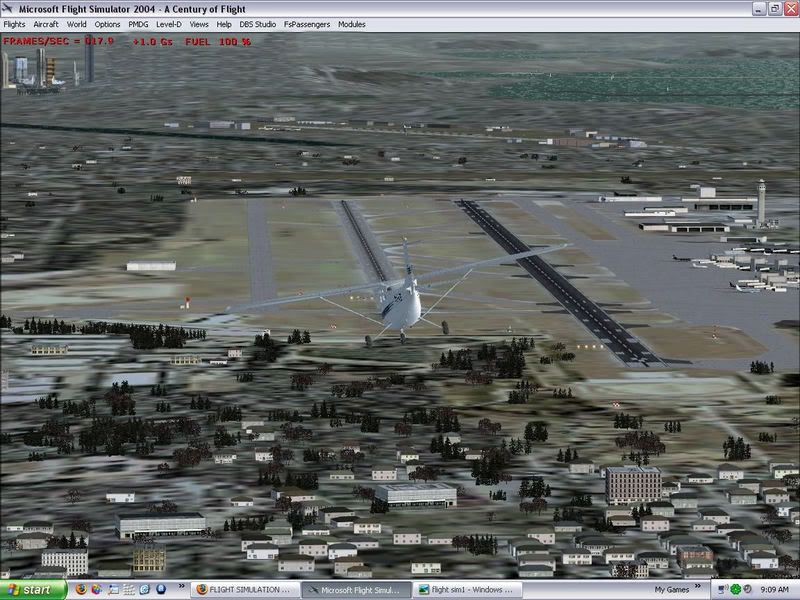
user posted image

Here is the screenshot from Vista. As you can see there is a dramatic improvement :
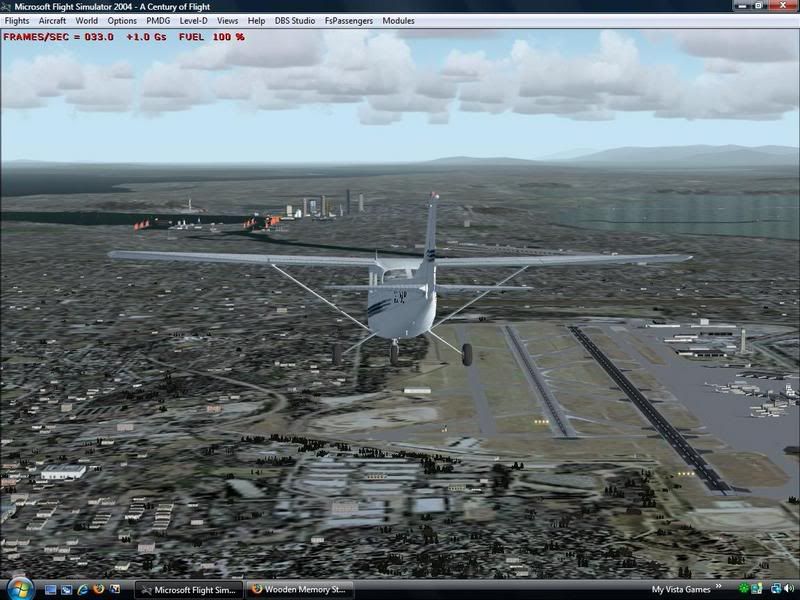
user posted image

I noticed a general increase in performance throughout the sim world, and a massive improvement at busy airports where the computer usually slows right down.

Desktop:Core 2 Duo E4300 1.8@ 3.0Ghz@ 1.36v. 4Gb Supertalent DDR2-800 2.1v@ 5-5-5-15. Asus P5N-E SLI Pencil Modded. Corsair TX 650. 512MB Palit Geforce 8800GT. 2x200GB IDE+640GB SATAII. Windows Vista Ultimate X86. Samsung SH-S222A
Phone:Nokia N900 Vodafone
Car: 1993 Mitsubishi Mirage Asti Z. Steel Blue Pearl

1996 Toyota Curren 2.0L 5 Spd Manual Silver. 205/50/R16 on Enkei K-95. Lowered on Jamex Superlows. Remote locking. Remote boot release. Cruise control
1996 Mitsubishi GTO MR

Image
User avatar
brownbox
Senior Member
 
Topic author
Joined: Thu Apr 27, 2006 10:55 pm
Posts: 1318

Postby creator2003 » Wed Feb 07, 2007 8:41 am

are the new nivida drivers just for vista or can you use them with xp as well ???
also you look like you are getting low frames rates for the spec of your pc ?
are those set to unlimited flp?
i manage 60 solid in that same area in fs9 with addons and i dont even have dual core and also half of your ram spec ,really weird ??
apart from the above im looking into upgrading to vista when the testing by you and many others is all over :thumbup:
cheers 4 the info
Last edited by creator2003 on Wed Feb 07, 2007 9:19 am, edited 1 time in total.
creator2003
 

Postby brownbox » Wed Feb 07, 2007 8:50 am

no, the drivers arent made for XP, only Vista. They are however, the first Vista drivers to support SLI on 8 series cards. Shows how behind Nvidia are with their stuff ;)
Desktop:Core 2 Duo E4300 1.8@ 3.0Ghz@ 1.36v. 4Gb Supertalent DDR2-800 2.1v@ 5-5-5-15. Asus P5N-E SLI Pencil Modded. Corsair TX 650. 512MB Palit Geforce 8800GT. 2x200GB IDE+640GB SATAII. Windows Vista Ultimate X86. Samsung SH-S222A
Phone:Nokia N900 Vodafone
Car: 1993 Mitsubishi Mirage Asti Z. Steel Blue Pearl

1996 Toyota Curren 2.0L 5 Spd Manual Silver. 205/50/R16 on Enkei K-95. Lowered on Jamex Superlows. Remote locking. Remote boot release. Cruise control
1996 Mitsubishi GTO MR

Image
User avatar
brownbox
Senior Member
 
Topic author
Joined: Thu Apr 27, 2006 10:55 pm
Posts: 1318

Postby ZK-Brock » Wed Feb 07, 2007 9:04 am

Hey brownbox, your sim actually looks better in vista, did you change the settings at all or would this be an effect of the drivers?
ZK-Brock
NZFF Pro
 
Joined: Sun Jul 23, 2006 3:35 pm
Posts: 2035

Postby Jimmy » Wed Feb 07, 2007 9:15 am

Ive always had bad FPS in this area. Not sure why :


17.9, thats about the best I ever get!! :lol: I think the perforamce around ksea would be to do with all the 3d objects over in the harbour area, its very dense, also the airport is got alot of detail.


So its almost doubled the fps... That could just be cos its a fresh fs9 install? Is it completly defualt , your fs9 screenshot looks like you have installed extra water textures and what about the ai? How about you copy ov er your fs9 cfg, and also things like texture folder and all your addons then save a flight somewere in fs9 that you get bad fps then load that same flight on vista. But anyway, 17.9 compared to 33 :o

Does vista make more use of your dual core and other hardware or something like that
Jimmy
 

Postby brownbox » Wed Feb 07, 2007 6:25 pm

also, the buildings in the background would cause a slowdown too i think... maybe :unsure:

Hey brownbox, your sim actually looks better in vista, did you change the settings at all or would this be an effect of the drivers?

Nope, all the same settings Im sure. I just used the general setting in the new control panel to Quality in both XP and Vista. This made 4x AA and 16x AF ;)
Desktop:Core 2 Duo E4300 1.8@ 3.0Ghz@ 1.36v. 4Gb Supertalent DDR2-800 2.1v@ 5-5-5-15. Asus P5N-E SLI Pencil Modded. Corsair TX 650. 512MB Palit Geforce 8800GT. 2x200GB IDE+640GB SATAII. Windows Vista Ultimate X86. Samsung SH-S222A
Phone:Nokia N900 Vodafone
Car: 1993 Mitsubishi Mirage Asti Z. Steel Blue Pearl

1996 Toyota Curren 2.0L 5 Spd Manual Silver. 205/50/R16 on Enkei K-95. Lowered on Jamex Superlows. Remote locking. Remote boot release. Cruise control
1996 Mitsubishi GTO MR

Image
User avatar
brownbox
Senior Member
 
Topic author
Joined: Thu Apr 27, 2006 10:55 pm
Posts: 1318

Postby JonARNZ » Wed Feb 07, 2007 7:06 pm

Very interesting and encouraging results. I'm holding off the upgrade for awhile, wait and see how things go. I saw Vista for the first time in action today, looks nice is about all I can say really.
ARNZX flightsim.co.nz
Asus Sabretooth X79 MB | i73930K CPU | 8GB DDR3 1600 C7 Ram | GTX 560Ti DCII OC | Corsair H80 Water Cooling
User avatar
JonARNZ
Senior Member
 
Joined: Sat Oct 21, 2006 12:49 pm
Posts: 1523
Location: Auckland

Postby Zöltuger » Wed Feb 07, 2007 7:17 pm

brownbox wrote: also, the buildings in the background would cause a slowdown too i think... maybe  :unsure:

yeah there's more autogen visable in the XP shot than the Vista shot
I'm sceptical, but I'll definitely be upgrading to Vista on my next PC. Out of interest, is it the Vista you're using the release version or a pre-release version?
Last edited by Zöltuger on Wed Feb 07, 2007 7:18 pm, edited 1 time in total.
Zöltuger
 

Postby brownbox » Wed Feb 07, 2007 7:54 pm

it is the full Ultimate version from the shop. Fancy packaging and all ;)
Desktop:Core 2 Duo E4300 1.8@ 3.0Ghz@ 1.36v. 4Gb Supertalent DDR2-800 2.1v@ 5-5-5-15. Asus P5N-E SLI Pencil Modded. Corsair TX 650. 512MB Palit Geforce 8800GT. 2x200GB IDE+640GB SATAII. Windows Vista Ultimate X86. Samsung SH-S222A
Phone:Nokia N900 Vodafone
Car: 1993 Mitsubishi Mirage Asti Z. Steel Blue Pearl

1996 Toyota Curren 2.0L 5 Spd Manual Silver. 205/50/R16 on Enkei K-95. Lowered on Jamex Superlows. Remote locking. Remote boot release. Cruise control
1996 Mitsubishi GTO MR

Image
User avatar
brownbox
Senior Member
 
Topic author
Joined: Thu Apr 27, 2006 10:55 pm
Posts: 1318

Postby JonARNZ » Wed Feb 07, 2007 8:20 pm

Zöltuger wrote: yeah there's more autogen visable in the XP shot than the Vista shot

I think thats more about aircraft position in both screenshots. In the XP shot hes further forward, lower and more to the right, so most of the autogen we see simply isn't visible in vista because its out of frame.
Last edited by JonARNZ on Wed Feb 07, 2007 8:21 pm, edited 1 time in total.
ARNZX flightsim.co.nz
Asus Sabretooth X79 MB | i73930K CPU | 8GB DDR3 1600 C7 Ram | GTX 560Ti DCII OC | Corsair H80 Water Cooling
User avatar
JonARNZ
Senior Member
 
Joined: Sat Oct 21, 2006 12:49 pm
Posts: 1523
Location: Auckland

Postby Zöltuger » Wed Feb 07, 2007 9:39 pm

JonARNZ wrote:
Zöltuger wrote: yeah there's more autogen visable in the XP shot than the Vista shot

I think thats more about aircraft position in both screenshots. In the XP shot hes further forward, lower and more to the right, so most of the autogen we see simply isn't visible in vista because its out of frame.

that's what i meant to say...
Zöltuger
 

Postby ardypilot » Thu Feb 08, 2007 12:10 am

Brownbox, if you played around with your FS9.cfg file you might yield some better results for your sim in XP.

You may wish to read these theads to help you out:
http://z11.invisionfree.com/nzff/index.php?showtopic=15
http://z11.invisionfree.com/nzff/index.php?showtopic=73
User avatar
ardypilot
NZFF Pro
 
Joined: Wed Apr 26, 2006 10:01 am
Posts: 6802
Location: Auckland

Postby Zöltuger » Thu Feb 08, 2007 9:19 am

by the way, if you haven't seen them, apple has some cool ads criticising Vista at http://www.apple.com/getamac
check out 'security'- hilarious!
Last edited by Zöltuger on Thu Feb 08, 2007 9:19 am, edited 1 time in total.
Zöltuger
 

Postby kiwiflyboy » Thu Feb 08, 2007 4:32 pm

I really wanted a mac for my next comp, but I got given a compaq laptop for xmas, so i guess i must wait till I get a new computer.
kiwiflyboy
 

Postby Zöltuger » Sun Feb 11, 2007 8:53 pm

Attention XP users with multiple core processors:
download this patch from Microsoft, it helps performance (even on my P4 HT)
Zöltuger
 

Postby brownbox » Sun Feb 11, 2007 9:34 pm

Nice find Zoltuger, although I beat you to it a few weeks ago :P
http://z11.invisionfree.com/nzff/index. ... topic=2127

"Microsoft Dual Core Hotfix"
Last edited by brownbox on Sun Feb 11, 2007 9:35 pm, edited 1 time in total.
Desktop:Core 2 Duo E4300 1.8@ 3.0Ghz@ 1.36v. 4Gb Supertalent DDR2-800 2.1v@ 5-5-5-15. Asus P5N-E SLI Pencil Modded. Corsair TX 650. 512MB Palit Geforce 8800GT. 2x200GB IDE+640GB SATAII. Windows Vista Ultimate X86. Samsung SH-S222A
Phone:Nokia N900 Vodafone
Car: 1993 Mitsubishi Mirage Asti Z. Steel Blue Pearl

1996 Toyota Curren 2.0L 5 Spd Manual Silver. 205/50/R16 on Enkei K-95. Lowered on Jamex Superlows. Remote locking. Remote boot release. Cruise control
1996 Mitsubishi GTO MR

Image
User avatar
brownbox
Senior Member
 
Topic author
Joined: Thu Apr 27, 2006 10:55 pm
Posts: 1318

Postby Zöltuger » Sun Feb 11, 2007 10:36 pm

hmm, then that doesn't explain your vista/XP performance difference. i was watching the performance meter while playing FSX, and it definitely used the second core more than usual- so it's really worth the download.
Last edited by Zöltuger on Sun Feb 11, 2007 10:37 pm, edited 1 time in total.
Zöltuger


Return to Off Topic

Who is online

Users browsing this forum: No registered users and 14 guests
